
1. Introduction
The EGQINR H38 Smart Watch is a versatile fitness tracker designed to monitor your health and activity levels. It features Bluetooth call capabilities, comprehensive health monitoring (heart rate, SpO2, blood pressure, sleep), and support for over 114 sports modes. This manual provides essential information for setting up, operating, and maintaining your device.
2. What's in the Box
- 1*EGQINR H38 Smart Watch
- 1*Instruction Manual
- 1*Magnetic Charging Cable
- 1*Regular Silicone Strap
- 1*Extended Silicone Strap
3. Setup
To begin using your EGQINR H38 Smart Watch, follow these steps for initial setup and pairing with your smartphone.

Figure 3.1: EGQINR H38 Smart Watch
3.1 Initial Pairing with the FitCloudPro App
- Download and install the 'FitCloudPro' app from your smartphone's app store (compatible with iOS 9.0 / Android 4.4 or above).
- Ensure your phone's Bluetooth is enabled.
- Open the 'FitCloudPro' app and navigate to the 'Device' section.
- Tap 'Add Peripheral' or 'Search for Device' and select 'H38' to connect.
- Confirm the pairing request on both your phone and the smartwatch.

Figure 3.2: Visual guide for initial app pairing.
3.2 Bluetooth Connection for Calls
After successful app binding, enable the Bluetooth call function:
- On your smartwatch, swipe down from the top to access quick settings.
- Tap the 'Audio Bluetooth' icon to turn it on.
- On your smartphone, go to Bluetooth settings and find 'H38' in the list of available devices. Tap to bind.
- Once connected, you can use the smartwatch for Bluetooth calls.
Video 3.1: A comprehensive overview of the EGQINR H38 Smart Watch, including setup and key features.
4. Operating Instructions
4.1 Bluetooth Calls & Message Notifications
Once connected via Bluetooth, you can manage calls and notifications directly from your smartwatch. Make or answer calls, store contacts, and view call history. Receive vibration alerts for incoming calls, SMS, email, and app messages (e.g., Facebook, Twitter, WhatsApp). The 1.57" HD display allows for easy reading of full message content.

Figure 4.1: Bluetooth call and message notification features.
4.2 24/7 Accurate Health Monitoring
The smartwatch utilizes advanced sensors for continuous health monitoring. It accurately tracks your heart rate, blood oxygen (SpO2), and blood pressure 24/7. Additionally, it provides professional interpretation of sleep patterns, including deep sleep, light sleep, and awake times, to help analyze and improve sleep quality. Real-time data can be viewed on the watch, with continuous data and analysis reports available in the FitCloudPro app.

Figure 4.2: Health monitoring features including heart rate, blood pressure, SpO2, and sleep tracking.
4.3 114+ Sports Modes & All-Day Activity Tracking
Monitor your daily steps, distance, and calories burned to effectively achieve your fitness goals. The watch supports over 114 sports modes, such as running, cycling, walking, and yoga. It accurately records real-time heart rate, steps, calorie consumption, distance, and duration during exercise. All data is accessible on the watch and through the FitCloudPro app for better fitness guidance.

Figure 4.3: Extensive sports modes and activity tracking capabilities.
4.4 Multiple Practical Functions
The smartwatch offers a range of smart features to assist in daily life, including a menstrual cycle reminder, breathing training, drinking water reminder, sedentary reminder, voice assistant, weather updates, music control, stopwatch, timer, alarm, calculator, find phone function, and camera control. It also supports do-not-disturb mode and offers 12-hour/24-hour time display and Fahrenheit/Celsius options.
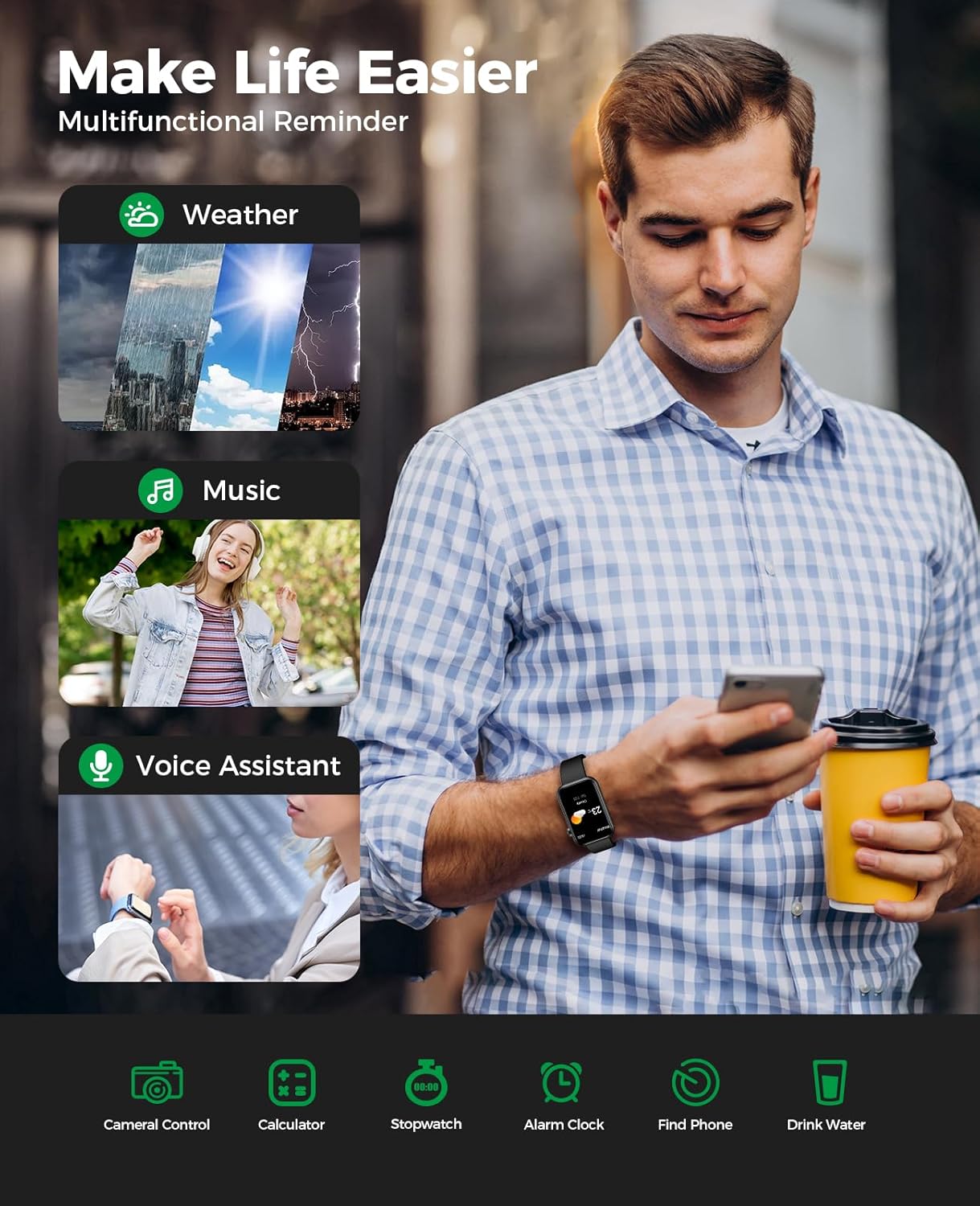
Figure 4.4: Overview of the smartwatch's multifunctional reminders and tools.
4.5 Superb Visual & Operational Experience
The 1.57" HD full-touch color screen provides exceptional picture quality and highly responsive touch sensitivity. Customize your watch with over 150 free watch faces available in the app, or use your favorite photo. The watch supports iOS 9.0 / Android 4.4 or above smartphones.

Figure 4.5: High-definition display and customizable watch faces.
5. Charging & Battery Life
The smartwatch is equipped with a 230mAh battery and a low-power consumption design, offering extended endurance. A full charge takes approximately 2 hours using the magnetic USB cable. It supports 3-7 days of heavy use and up to 30 days of standby time.

Figure 5.1: Charging process and battery life details.
6. Waterproofing
The EGQINR H38 Smart Watch has an IP67 waterproof rating. This means it is resistant to water splashes, sweat, and light rain. You can confidently wear it during everyday activities such as washing hands or engaging in light water-related tasks. However, it is not suitable for swimming, showering with hot water, or diving.

Figure 6.1: IP67 Waterproof rating details.
7. Maintenance
To ensure the longevity and optimal performance of your smartwatch, follow these maintenance guidelines:
- Regularly clean the watch screen and strap with a soft, dry cloth.
- Avoid exposing the watch to extreme temperatures or direct sunlight for prolonged periods.
- Do not attempt to disassemble or repair the watch yourself, as this may void the warranty.
- Keep the charging contacts clean and dry to ensure efficient charging.
8. Troubleshooting
If you encounter any issues with your smartwatch, try the following basic troubleshooting steps:
- Watch not turning on: Ensure the watch is fully charged. Connect it to the magnetic charging cable and a power source for at least 30 minutes.
- Unable to pair with phone: Make sure Bluetooth is enabled on your phone and the watch. Ensure the FitCloudPro app is installed and updated. Try restarting both your phone and the smartwatch.
- Inaccurate health data: Ensure the watch is worn snugly on your wrist, not too tight or too loose. Clean the sensors on the back of the watch. Avoid excessive movement during measurements.
- Notifications not received: Check app permissions on your phone to ensure FitCloudPro has access to notifications. Verify that notifications are enabled within the FitCloudPro app settings for specific applications.
- Short battery life: Reduce screen brightness, disable unnecessary features like continuous heart rate monitoring if not needed, and ensure background app usage is minimized.
If problems persist, refer to the FitCloudPro app's FAQ section or contact customer support.
9. Specifications
| Feature | Detail |
|---|---|
| Brand | EGQINR |
| Model Number | aa754db2-b86f-4905-a9c8-4ed415595b96 |
| Screen Size | 1.57 Inches |
| Operating System | Android & iOS (Android 4.4+, iOS 9.0+) |
| Special Features | Bluetooth Call, Text Notification, Heart Rate Monitor, Blood Pressure Watch, Sleep Tracker, Activity Tracker, Calorie Tracker, Pedometer, Weather Information, Music, Camera, Alarm Clock, Calculator, Double Straps |
| Battery Capacity | 230 Milliamp Hours |
| Connectivity Technology | Bluetooth |
| Waterproof Rating | IP67 |
| Item Weight | 6.4 ounces |
| Package Dimensions | 4.33 x 4.33 x 2.32 inches |
10. Warranty and Support
EGQINR is committed to product quality and customer satisfaction. While specific warranty details are not provided in this manual, please refer to the manufacturer's official website or contact their customer support for warranty information and assistance. Keep your purchase receipt for any warranty claims.


