
1. Introduction
The AeroBand MIDI Guitar is a guitar-shaped MIDI controller designed for music creation, offering a unique and intuitive experience for guitarists, producers, and electronic music enthusiasts. It eliminates the need for traditional keyboard skills, providing endless possibilities with MIDI sounds.
Key features include:
- Guitar-Shape MIDI Controller: Play synthesizers and other instruments using a familiar guitar interface.
- Fast and Accurate: Experience low latency and responsive performance with accurate MIDI output tracking.
- Plug and Play: Seamless connectivity with Digital Audio Workstations (DAWs) and software via USB-C or Bluetooth.
- Customization in Each String: Each string has its own MIDI channel, allowing independent processing and the use of different instruments or effects per string.
- Cool and Portable Design: Features a stylish design with a detachable fretboard, making it portable for travel. Silicone strings ensure comfortable play without finger soreness.

Figure 1: AeroBand MIDI Guitar highlighting its design and core capabilities.
2. Setup
2.1. Unboxing and Assembly
The AeroBand MIDI Guitar comes in two main pieces: the body and the detachable fretboard (neck). To assemble, align the plug on the neck with the slot on the body and insert it until you hear a 'click' sound, ensuring a secure connection.

Figure 2: Detachable neck for portability and easy assembly.
2.2. Charging
Connect the guitar to a power source using the provided USB Type-C cable. The neck will display battery life indicators when powered on. The guitar can also be connected to a computer via USB-C for both charging and data transfer.
2.3. Connectivity
The AeroBand MIDI Guitar supports both USB-C and Bluetooth connectivity for seamless integration with DAWs, apps, or software on laptops, PCs, and tablets.

Figure 3: Plug & Play setup with USB-C connectivity to a computer.
3. Operating Instructions
3.1. Basic Controls
- Power On/Off: Press and hold the main knob for 2 seconds.
- Volume Control: Rotate the main knob to adjust the guitar volume output.
- Headphone Jack: Plug in headphones for private practice.
- Microphone Input: Connect an external microphone to sing along or record vocals.
- Drum Loop: Press the main knob to activate/deactivate drum loops. Use the buttons on the headstock to adjust speed and select from 6 different drum tones.
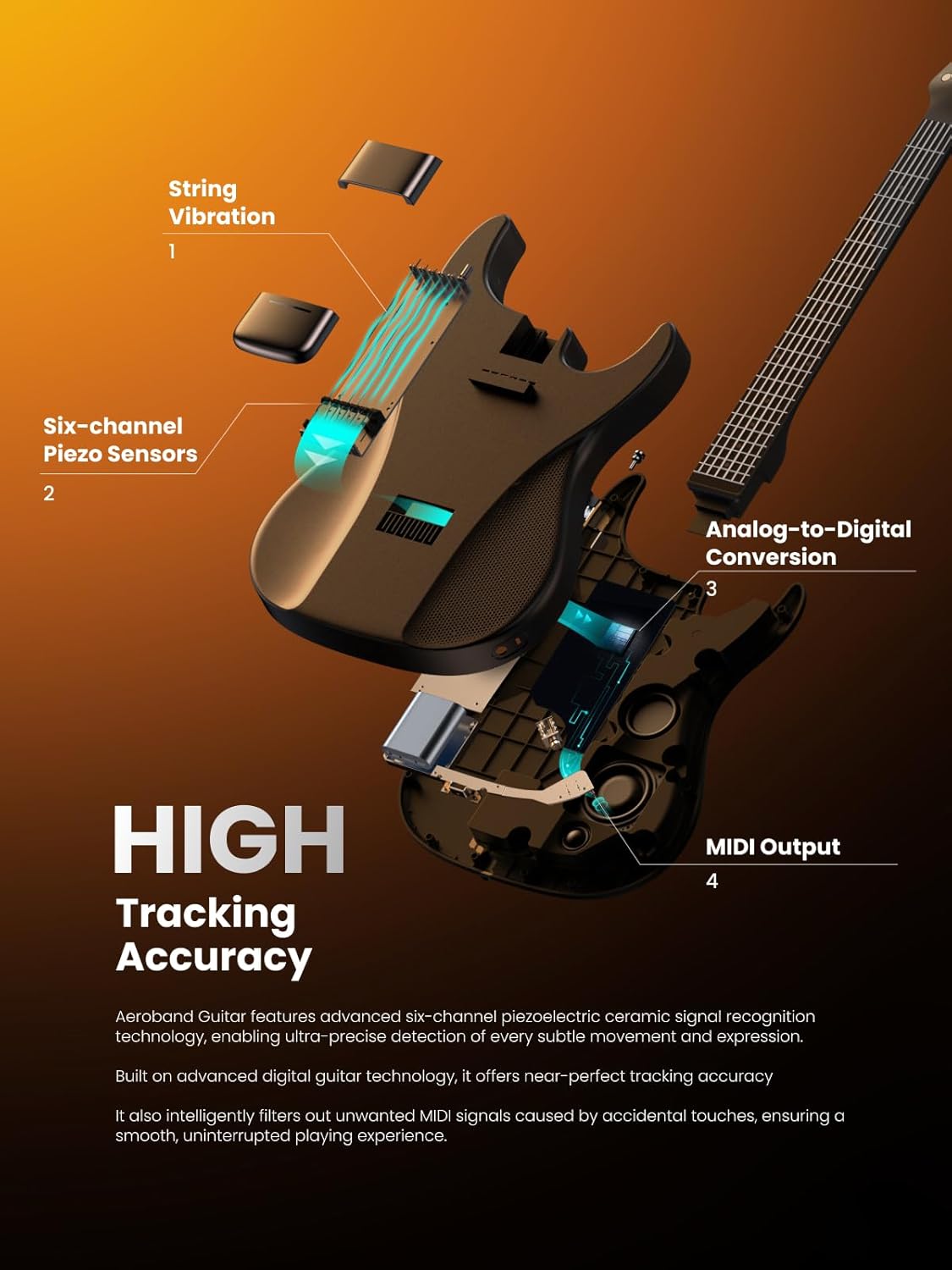
Figure 4: Control panel with power/volume knob, headphone jack, and USB-C port.
3.2. App Features
The AeroBand companion app (available for Android, iOS, and Mac) unlocks the full potential of your MIDI guitar. Connect via Bluetooth to access various settings and learning tools.
- Guitar Tone: Select from a variety of guitar tones (e.g., Martin, Fender, Classical) and other instrument sounds (e.g., Piano, Banjo, Clavinet).
- Trick Tone: Enable or disable advanced playing techniques like hammer-on/pull-off/slide and open string hammer-on for expressive play.
- Special Tuning: Choose from official configurations (Standard, Open G, Open F, Open E, Open D, Open C, Open A, Half step up/down, Full step down, Drop D, Drop C#, Drop C, DADGAD) or create custom tunings.
- Mute Bar: Adjust the mute bar settings for different palm mute effects.
- Strings Sensitivity: Customize the velocity, loudness, and responsiveness for each individual string to match your playing style.
- EasyChord & SimplifyChord: Simplify chord playing for beginners by allowing a single touch to apply entire chords. Basic and Advanced modes are available.
- BPM & Loop: Adjust beats per minute (BPM) and loop volume for practice.
- Songs & Tutorials: Access a library of songs and beginner-friendly tutorials to learn and practice.

Figure 5: Special tuning options available in the AeroBand app.

Figure 6: One-Touch Transpose feature for quick key changes.
3.3. Official Product Videos
Know About the AeroBand Painless Guitar
Description: This video provides an overview of the AeroBand Painless Guitar, highlighting its features and benefits for users.
New way to use MIDI
Description: Explore innovative ways to utilize the MIDI capabilities of the AeroBand MIDI Guitar for music production and performance.
4. Maintenance
4.1. String Replacement
The AeroBand MIDI Guitar uses silicone strings that are designed for durability and comfort. In case of breakage, replacement strings can be installed by removing the magnetic covers over the string connection points on the body.
5. Troubleshooting
- Connectivity Issues: Ensure Bluetooth is enabled on your device and the guitar is in pairing mode. For USB-C, verify the cable connection and try a different port or cable.
- No Sound: Check the volume levels on both the guitar and your connected device/app. Ensure headphones or external speakers are properly connected.
- App Malfunction: Restart the app and the guitar. Ensure the app is updated to the latest version.
6. Specifications
| Feature | Detail |
|---|---|
| Item Weight | 8.58 pounds |
| Product Dimensions | 39.2 x 12.8 x 2.68 inches |
| Item Model Number | AG01MIDI |
| Back Material | Plastic |
| Body Material | Plastic |
| Color Name | Black |
| Compatible Devices | Laptop, PC, Tablet |
| Connector Type | USB Type C |
| Fretboard Material | Steel |
| Hardware Interface | 3.5mm Audio, USB Type C |
| String Material | Silicone |
| Top Material | Acrylonitrile Butadiene Styrene |
| Neck Material Type | Rosewood |
| Number of Strings | 6 |
| Guitar Bridge System | Fixed |
| Material Type | Acrylonitrile Butadiene Styrene (ABS), Alloy Steel, Polyvinyl Chloride (PVC), Silicone |
| Size | Full-size |
| Hardware Platform | Laptop, PC, Tablet |
7. What's in the Box
- User Manual
- USB Type C Cable
- Adapter For USB Type C To USB Type A
- Picks
- Pick Box
8. Warranty and Support
The AeroBand MIDI Guitar comes with a standard manufacturer's warranty. For detailed warranty information, technical support, or service inquiries, please refer to the official AeroBand website or contact their customer service directly. Contact information can typically be found in the Quick Start Guide or on the product packaging.


