
Omethey KMT-75
Omethey 6.5 Cub Extra Large Home Safe Box User Manual
Model: KMT-75 | Brand: Omethey
Introduction
Thank you for choosing the Omethey 6.5 Cub Extra Large Home Safe Box. This safe is designed to provide robust security for your valuables, featuring fireproof and waterproof capabilities, a digital keypad, a convenient drop slot, and a dual alarm system. This manual provides detailed instructions for setup, operation, and maintenance to ensure optimal performance and security.
What's Included
Please verify that all components listed below are present in your package:
- 1 x Omethey 6.5 Cub Drop Safe Unit
- 4 x Emergency Keys
- 1 x USB Type-C Cable (for emergency power)
- 4 x Non-slip Pads
- 6 x Expansion Screws (for mounting)
- 1 x User Manual (this document)

Image: All components included with your Omethey safe.
Specifications
| Feature | Detail |
|---|---|
| External Dimensions (D x W x H) | 13.78" x 13.78" x 29.53" |
| Internal Capacity | 6.5 Cubic Feet |
| Material | Reinforced Low Carbon Alloy Steel |
| Lock Type | Electronic Combination Lock |
| Special Features | Adjustable & Removable Shelf, Alarm System, Anti-Theft, Combination Lock, Sensor Light, Drop Slot, Double Door, Key Hook, Backlit Keypad, Mute Function |
| Mounting Type | Wall & Floor Mount (pre-drilled holes) |
| Item Weight | 48.8 Pounds |
| Alarm | Audible & Vibration (70 decibels) |
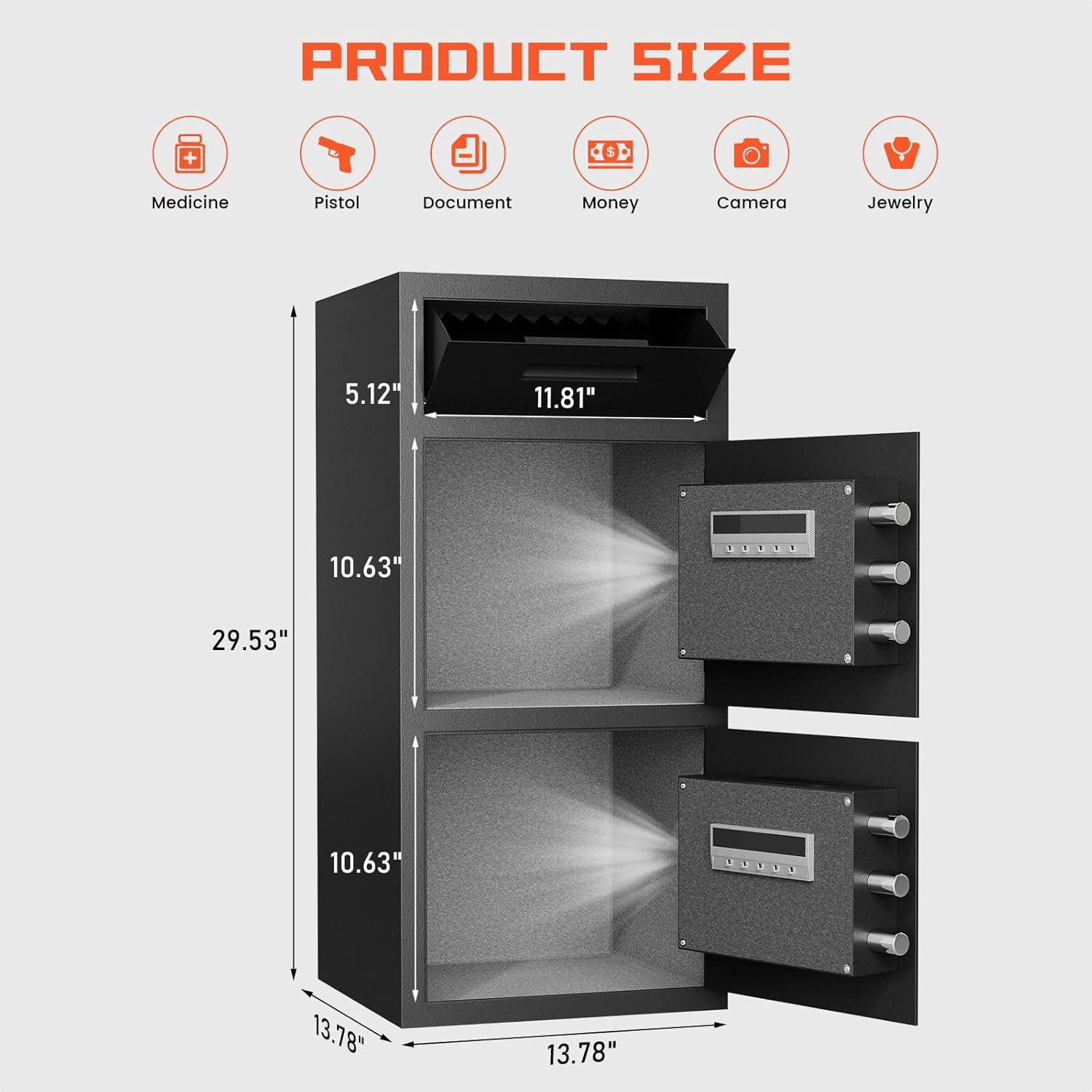
Image: Product dimensions and capacity details.
Setup and Installation
Initial Setup
- Unpacking: Carefully remove the safe from its packaging. Inspect for any damage.
- Battery Installation: Locate the battery compartment on the inside of the safe door. Insert the required batteries (typically 4 AA batteries, not included) ensuring correct polarity.
- Emergency Key Access: Familiarize yourself with the emergency key override. The emergency keyhole is usually hidden behind a cover on the keypad. Keep emergency keys in a secure location outside the safe.
- First Opening: Use the emergency key to open the safe for the first time. This allows you to access the interior and install batteries if not already done.
Mounting the Safe
For enhanced security, it is highly recommended to mount the safe to a floor or wall. The safe comes with pre-drilled mounting holes and expansion screws.
- Choose Location: Select a suitable location, preferably a solid surface like a concrete floor or a wall stud.
- Mark Holes: Position the safe and mark the drilling points through the pre-drilled holes (four at the back, two at the bottom).
- Drill Holes: Drill pilot holes at the marked locations using an appropriate drill bit for your surface.
- Secure Safe: Align the safe with the drilled holes and insert the expansion screws. Tighten them securely to anchor the safe in place.

Image: Steps for securely mounting the safe.
Operating Instructions
Opening the Safe
Your Omethey safe offers three methods for opening:
- Emergency Key: Insert the emergency key into the hidden keyhole, turn it, and then turn the knob to open.
- Digital Passcode: Enter your programmed passcode on the backlit keypad, then turn the knob to open.
- USB Type-C Emergency Power + Passcode: If batteries are depleted, connect the USB Type-C cable to an external power source and the safe's emergency port. Then, enter your passcode and turn the knob.

Image: Three ways to open your Omethey safe.
Setting/Changing Passcode
Refer to the quick start guide included with your safe for detailed instructions on setting and changing your personal passcode. It is recommended to change the default passcode immediately after initial setup.
Drop Slot Usage
The integrated drop slot allows for quick and easy deposit of items like cash, coins, or small documents without needing to open the main safe door. The anti-fishing design prevents unauthorized retrieval of deposited items.

Image: Features of the quick access drop slot.
Dual Alarm System
The safe is equipped with a dual alarm system that activates under two conditions:
- Incorrect Passcode: After 3 consecutive incorrect passcode entries.
- Violent Vibration: If the safe detects violent vibrations or tampering.
The alarm emits a loud sound (70 decibels) for 60 seconds, designed to deter intruders. The alarm can be stopped by entering the correct passcode.

Image: Dual alarm system and mute function details.
Mute Function
To operate the safe silently, activate the mute function. Press the '*' key, then the '1' key on the keypad to toggle the mute function on or off. This is useful for discreet access without disturbing others.
Internal LED Light
The safe features a built-in LED light that automatically illuminates the interior when the safe is opened with a valid passcode. This provides visibility to easily locate items inside, even in low-light conditions.

Image: Internal features including LED lighting and soft lining.
Maintenance
- Battery Replacement: Replace batteries promptly when the low battery indicator appears or if the keypad becomes unresponsive. Always use new, high-quality batteries.
- Cleaning: Clean the exterior of the safe with a soft, damp cloth. Avoid abrasive cleaners or solvents that could damage the finish or electronic components.
- Keypad Care: Keep the keypad dry and free from dust or debris.
- Emergency Keys: Store emergency keys in a secure, easily accessible location away from the safe. Do not store them inside the safe.
Troubleshooting
| Problem | Possible Cause | Solution |
|---|---|---|
| Safe does not open with passcode. | Incorrect passcode entered; Low batteries; Keypad malfunction. | Re-enter passcode carefully. Replace batteries. Use emergency key. Contact customer support if issue persists. |
| Alarm activates unexpectedly. | Multiple incorrect passcode entries; Physical impact/vibration. | Enter correct passcode to silence. Avoid hitting or shaking the safe. |
| Keypad is unresponsive. | Dead batteries; Loose battery connection. | Replace batteries. Ensure batteries are inserted correctly. Use USB Type-C for emergency power. |
| Emergency key does not work. | Key not fully inserted; Obstruction in keyhole. | Ensure key is fully inserted and turned correctly. Check for debris in keyhole. |
Warranty and Support
Omethey is committed to providing quality products and customer satisfaction. Your safe comes with a lifetime customer service guarantee. If you encounter any issues or have questions regarding your Omethey safe, please do not hesitate to contact our customer service team. We are available 24/7 to assist you.
For support, please refer to the contact information provided in your quick start guide or visit the official Omethey website.
Ask a question about this manual
Ask about setup, troubleshooting, compatibility, parts, safety, or missing instructions. Manuals+ will review the question and use this page’s manual context to help answer it.