
1. Introduction
This manual provides detailed instructions for the installation, operation, maintenance, and troubleshooting of the EC Buying ZK-502MT 50W x 2 Bluetooth-Compatible Amplifier Board. Please read this manual thoroughly before using the product to ensure proper function and safety.
2. Safety Information
- Power Supply: Use a DC9-24V/3A or above power supply. Do not connect to a 24V battery pack directly. Ensure the power supply voltage is stable and within the specified range.
- Speaker Compatibility: Connect speakers with an impedance of 4-8Ω and a power rating of 15-100W. Using incompatible speakers may damage the amplifier board.
- Protection Mechanisms: The board includes built-in overheating, overcurrent, short circuit, and voltage protection. However, avoid operating the device under extreme conditions to prevent triggering these protections unnecessarily.
- Environment: Operate the amplifier in a dry, well-ventilated area. Avoid exposure to moisture, dust, or extreme temperatures.
- Handling: Handle the board with care to avoid damaging electronic components. Avoid touching the circuit board while powered on.
3. Package Contents
Verify that all items listed below are included in your package:
- ZK-502MT Bluetooth-Compatible Amplifier Board
- Knobs (Volume, Treble, Bass)
- Mounting hardware (screws, standoffs)
- DC power adapter connector
- Small screwdriver
- Heat sink

Image 3.1: ZK-502MT amplifier board, three control knobs, mounting hardware, DC power connector, screwdriver, and heat sink.
4. Product Overview
The ZK-502MT is a compact 50W x 2 Bluetooth-Compatible audio amplifier module designed for home passive speakers. It features Bluetooth 5.0 connectivity and an AUX input, along with independent treble and bass controls for sound customization.
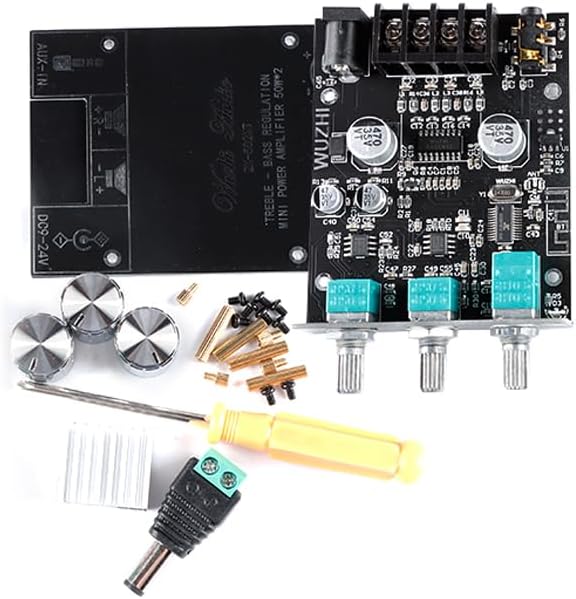
Image 4.1: Top view of the ZK-502MT amplifier board showing the main components, input/output terminals, and control knob shafts.

Image 4.2: Bottom view of the ZK-502MT amplifier board, displaying the model number and circuit board traces.
5. Specifications
| Parameter | Value |
|---|---|
| Product Model | ZK-502MT |
| Bluetooth Version | 5.0 (unobstructed range up to 15 meters / 49 feet) |
| Signal to Noise Ratio (SNR) | > 90dB |
| Input Method | AUX + Bluetooth-Compatible |
| Number of Channels | Left and right dual channels (Stereo) |
| Adaptive Power Supply | DC9~24V / 3A or above (cannot be connected to 24V battery pack) |
| Compatible Speaker Impedance | 4~8Ω |
| Compatible Speaker Power | 15~100 W |
| Output Power (at 8Ω) | 12V: 12W+12W, 15V: 18W+18W, 19V: 30W+30W, 24V: 40W+40W |
| Output Power (at 4Ω) | 12V: 20W+20W, 15V: 30W+30W, 19V: 40W+40W, 24V: 50W+50W |
| Protection Mechanisms | Overheating, Overcurrent, Short Circuit, Voltage Protection |
| Product Dimensions (L*W*H) | 89mm * 60mm * 21mm (overall, including connectors/knobs) |
| Board Dimensions (L*W) | 74mm * 60mm (board only) |
| Product Weight | Approximately 111g (including packaging) |

Image 5.1: ZK-502MT amplifier board with board dimensions of 74mm x 60mm indicated.
6. Setup Instructions
- Install Heat Sink: Attach the provided heat sink to the amplifier chip on the board. Ensure good contact for efficient heat dissipation.
- Connect Speakers: Connect your passive speakers to the speaker output terminals (L+, L-, R+, R-) on the amplifier board. Ensure correct polarity. Use the small screwdriver for secure connections.
- Connect Power Supply: Connect a DC9-24V power supply (3A or higher) to the DC power input jack. If using the included DC power adapter connector, wire it to your power supply.
- Install Knobs: Place the three control knobs onto their respective shafts (Volume, Treble, Bass).
- Power On: Once all connections are secure, turn on the power supply. The amplifier board will power on.
7. Operating Instructions
7.1. Bluetooth Connection
- Ensure the amplifier board is powered on.
- On your audio source device (e.g., smartphone, tablet), enable Bluetooth and search for available devices.
- Select "ZK-502MT" from the list of devices to pair. A confirmation sound may indicate successful pairing.
- Once paired, audio from your device will play through the connected speakers.
7.2. AUX Input Connection
- Connect your audio source device to the AUX-IN port on the amplifier board using a 3.5mm audio cable.
- The amplifier will automatically switch to AUX input when a cable is detected.
7.3. Adjusting Audio
- Volume Control: Rotate the Volume knob to adjust the overall output level.
- Treble Control: Rotate the Treble knob to increase or decrease high-frequency sounds.
- Bass Control: Rotate the Bass knob to increase or decrease low-frequency sounds.
8. Maintenance
- Cleaning: Use a soft, dry cloth to clean the amplifier board. Do not use liquid cleaners or solvents.
- Storage: When not in use for extended periods, store the amplifier in a cool, dry place away from direct sunlight and moisture.
- Inspection: Periodically check all connections for tightness and ensure no wires are frayed or damaged.
9. Troubleshooting
| Problem | Possible Cause | Solution |
|---|---|---|
| No sound output |
|
|
| Bluetooth not pairing |
|
|
| Distorted sound |
|
|
| Amplifier overheating |
|
|
10. Warranty Information
Warranty information for the EC Buying ZK-502MT amplifier board is not available in the provided product data. Please refer to your purchase documentation or contact the seller for details regarding warranty coverage.
11. Customer Support
Customer support contact information for the EC Buying ZK-502MT amplifier board is not available in the provided product data. For assistance, please contact the retailer or seller from whom you purchased the product.