
1. Introduction
This manual provides essential information for the safe and efficient operation, installation, and maintenance of your DIHOOL Electric Scissor Lift Table, Model US-DHLCT2-120A. This electric lifting platform is designed for various applications, offering a load capacity of up to 265 Lbs and an adjustable height range of 10.43 to 43.31 inches. It features multiple control options and safety mechanisms for reliable performance.
Please read this manual thoroughly before using the product and retain it for future reference.
2. Safety Information
Always prioritize safety during installation and operation. Failure to follow safety guidelines can result in injury or damage to the equipment.
- Load Capacity: Do not exceed the maximum load capacity of 265 Lbs (120 kg). For optimal performance and safety, operate at 80% of the maximum load capacity.
- Obstruction Detection: The system includes obstruction/resistance detection. If an unusual current spike is detected, the lift will stop or rebound to prevent pinching or collisions. Do not intentionally obstruct the lift during operation.
- Continuous Operation: Avoid continuous long-term operation. The maximum continuous runtime is 20 minutes. Allow the motor to cool down after extended use.
- Stable Placement: Ensure the lift table is placed on a stable, level surface. If using a tabletop, ensure the load's center of gravity is positioned at the center of the tabletop.
- Ceiling/Lateral Installation: If installing from the ceiling, do not apply lateral force. For lateral installations, the load should not exceed 50% of the maximum load capacity.
- Power Supply: Use the provided AC adapter (AC100-240V) or a compatible DC24V-30V power source. If using a 12V power source, a 12V to 24V DC step-up converter (120W+ required) is necessary.
- Children and Pets: Keep children and pets away from the lift table during operation.
The control system monitors current changes. If an unusual current spike is detected, the system will stop or rebound to prevent accidents and protect the motor.
3. Product Overview and Components
The DIHOOL Electric Scissor Lift Table consists of a robust steel scissor mechanism, an electric motor, and a control system. Key components include:
- X-Shaped Frame: Ensures uniform force distribution and stable lifting.
- Steel Bracket: Made from robust steel with electrophoretic black surface treatment for durability and corrosion resistance.
- Quiet & Strong Motor: Provides smooth, stable, and quiet operation (under 50dB).
- Pedestal: Enhances stability. Can be replaced with optional universal wheels for mobility (wheels sold separately).
- IPS-S2 Controller: The central control unit for managing lift operations.
4. Specifications
| Feature | Specification |
|---|---|
| Model | US-DHLCT2-120A |
| Load Capacity | 265 Lbs (120 kg) |
| Min Height | 10.43 inches (265 mm) |
| Max Height | 43.31 inches (1100 mm) |
| Stroke | 32.87 inches (835 mm) |
| No-load Speed | 0.47 in/s (12 mm/s) |
| Operating Voltage | DC20-32V (AC100-240V with adapter) |
| Operating Temperature | -10°C to +65°C |
| IP Grade | IP43 |
| Limit Switches | Built-in |
| Weight | 49 Lbs (22 kg) |
| Surface Treatment | Electrophoretic Black |
| Operating Frequency | 10% Work System, Maximum 1 Hour Continuous Working |
| Product Dimensions (L x W x H) | 29.53" x 16.54" x 10.43" (750mm x 420mm x 265mm) |

5. Setup
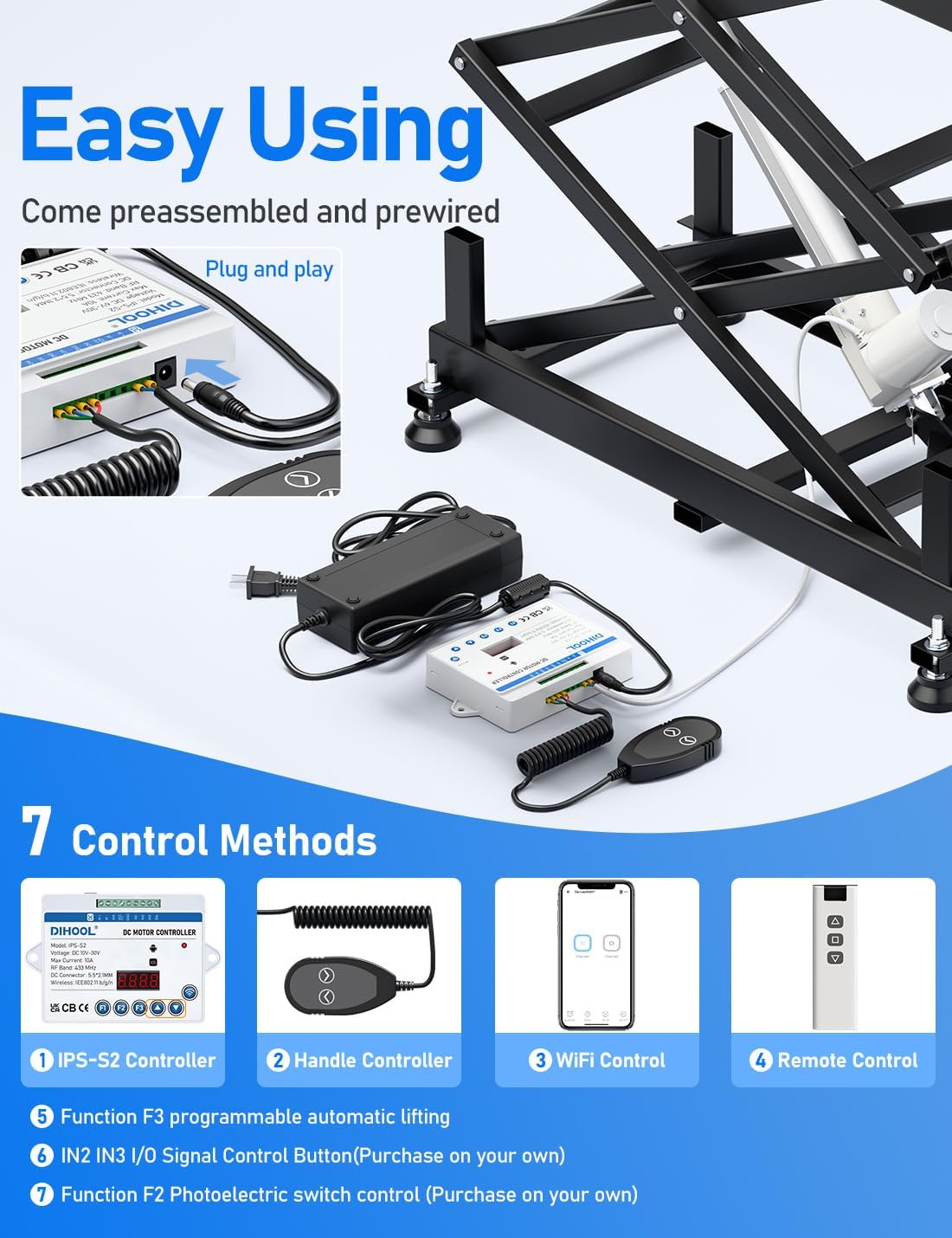
The DIHOOL Electric Scissor Lift Table comes pre-assembled and pre-wired for ease of use. Follow these steps for initial setup:
- Unpacking: Carefully remove the lift table and all components from the packaging.
- Placement: Place the lift table on a flat, stable, and level surface. Ensure adequate clearance around the table for safe operation.
- Power Connection: Connect the provided AC adapter to the IPS-S2 controller, then plug the adapter into a standard AC outlet (100-240V). Alternatively, connect a compatible DC24V-30V power source directly to the controller.
- Controller Connection: Ensure all control cables (wired handle, remote receiver) are securely connected to the IPS-S2 controller.
- Optional Accessories: If using optional swivel casters, install them according to their instructions. Ensure they are locked when the table is in use to prevent unintended movement.

Installation Environments
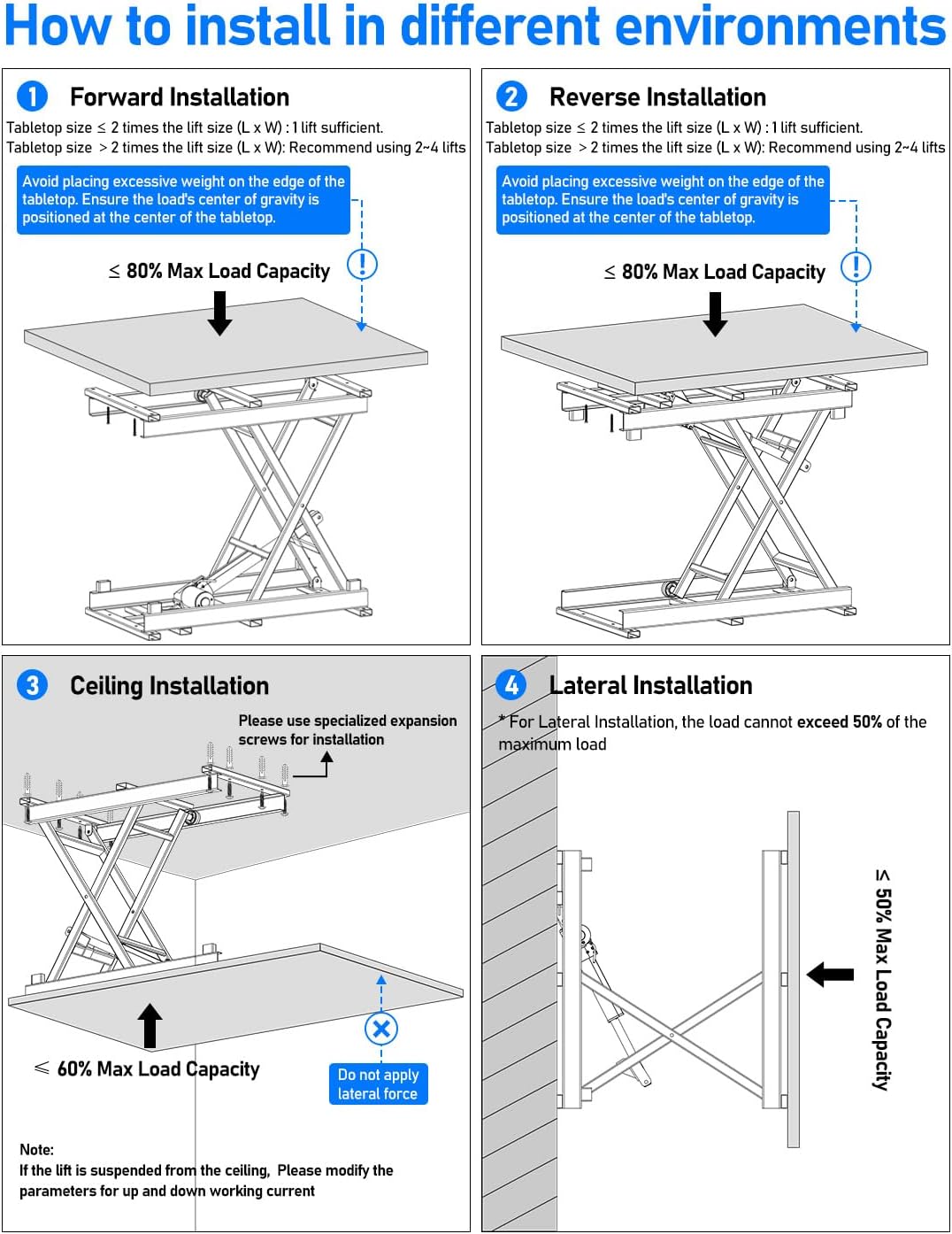
The lift table can be installed in various configurations. Always adhere to load capacity guidelines for each type of installation:
- Forward Installation: Tabletop size should be less than or equal to 2 times the lift size (L x W). If tabletop size is greater than 2 times the lift size, use 2-4 lifts. Avoid excessive weight on the edge of the tabletop.
- Reverse Installation: Similar to forward installation, ensure tabletop size and weight distribution are appropriate.
- Ceiling Installation: Requires specialized expansion screws. Do not apply lateral force. Load capacity should not exceed 60% of the maximum.
- Lateral Installation: Load capacity should not exceed 50% of the maximum.
6. Operating Instructions
Your DIHOOL Electric Scissor Lift Table offers multiple control methods for versatile operation:
- Wireless Remote Control: Operate the lift wirelessly within a 30-meter range. Press the UP or DOWN buttons to adjust height.
- IPS-S2 Controller Buttons: Use the B1 (UP) and B2 (DOWN) buttons directly on the controller for manual height adjustment.
- eWelink APP (WiFi Control): Download the eWelink app from your device's app store. Follow the app's instructions to connect to the lift table via WiFi for remote control.
- Wired Handle Button: Connect the wired handle to the controller. Use the UP/DOWN buttons on the handle for precise control. The cable length is up to 2.5m.
- External Switch/Button: The controller supports connection to external switches or buttons such as Photoelectric Switches, Inductive Switches, Push Buttons, or Pedals. These can be purchased separately.
- Automatic Lifting (Control Signals): The system can be configured to achieve automatic lifting based on external control signals. Refer to the controller's detailed settings for this function.
- Automatic Run (Exhibition Mode): The lift can be set to run automatically, ideal for display purposes in exhibition halls.
Controller Settings
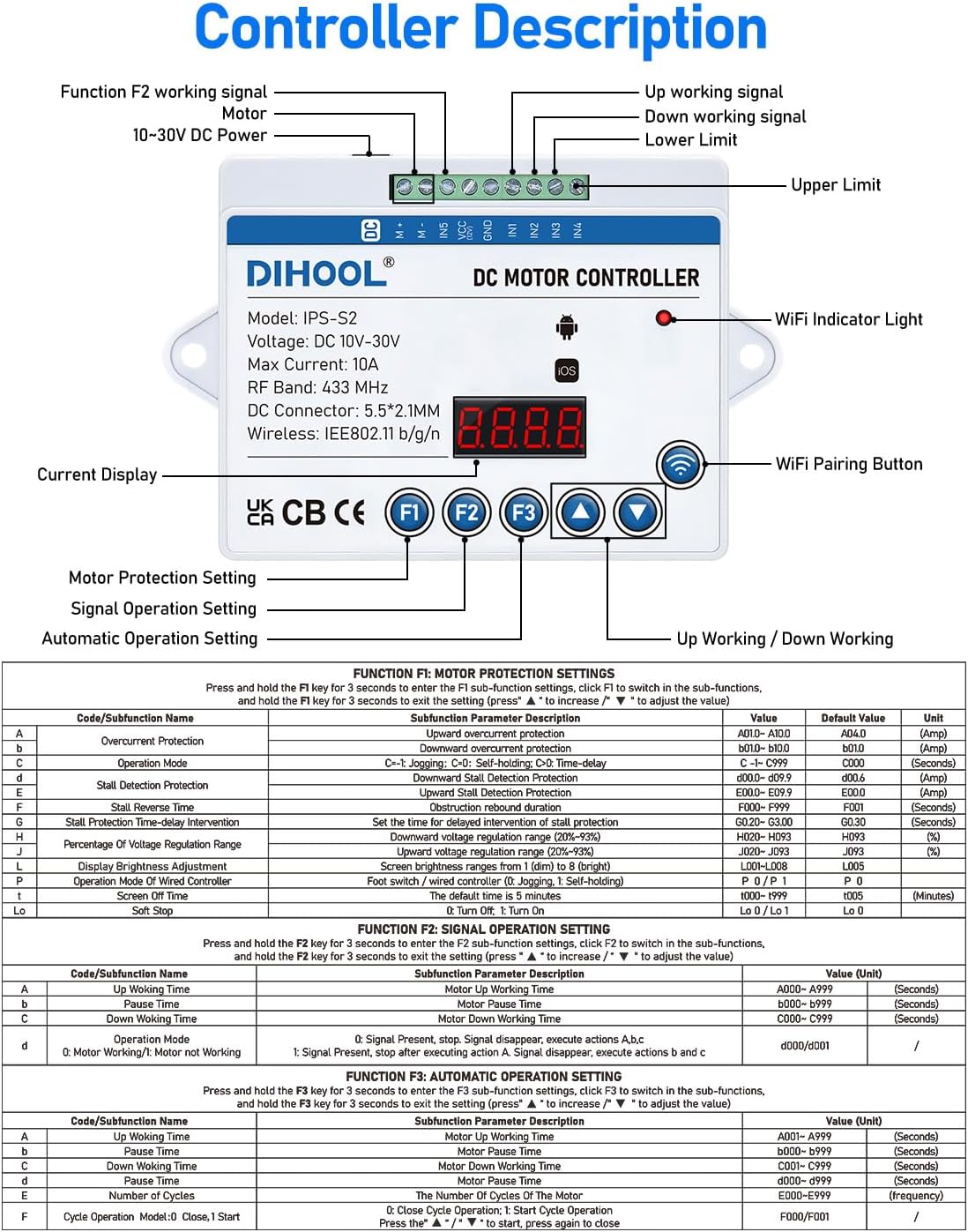
The IPS-S2 controller allows for advanced configuration of motor protection, signal operation, and automatic functions. Refer to the detailed tables on the controller diagram (Figure 6) for specific button presses and parameter adjustments.
- Function F1 (Motor Protection Settings): Adjust parameters like overcurrent protection, operation mode, stall detection, and percentage of voltage drop.
- Function F2 (Signal Operation Setting): Configure settings for upward and downward movement based on signals.
- Function F3 (Automatic Operation Setting): Set up automatic lifting and lowering cycles, including working time, rest time, and number of cycles.
7. Maintenance
Regular maintenance ensures the longevity and safe operation of your lift table.
- Cleaning: Keep the lift table clean and free from dust, debris, and liquids. Use a soft, damp cloth for cleaning. Avoid abrasive cleaners.
- Lubrication: Periodically check moving parts, especially the scissor mechanism and motor components, for smooth operation. Apply appropriate lubricant if necessary, following manufacturer recommendations for linear actuators.
- Cable Inspection: Regularly inspect all power and control cables for signs of wear, damage, or fraying. Replace any damaged cables immediately.
- Fastener Check: Ensure all bolts, screws, and fasteners are tight. Retighten as needed.
- Load Capacity Adherence: Always respect the maximum load capacity to prevent strain on the motor and structural components.
- Storage: When not in use for extended periods, store the lift table in a dry, clean environment.
8. Troubleshooting
If you encounter issues with your DIHOOL Electric Scissor Lift Table, refer to the following common problems and solutions:
| Problem | Possible Cause | Solution |
|---|---|---|
| Lift does not move | No power, loose connections, controller issue, motor overload. | Check power supply and connections. Ensure adapter is working. Inspect controller for error codes. Reduce load if overloaded. |
| Lift stops unexpectedly | Obstruction detected, motor overheating, power fluctuation. | Remove any obstructions. Allow motor to cool down if used continuously. Check power source stability. |
| Remote control unresponsive | Low battery, out of range, interference, pairing issue. | Replace remote battery. Move closer to the lift. Re-pair the remote with the controller if necessary (refer to controller manual for pairing instructions). |
| WiFi control not working | No WiFi connection, incorrect app settings, controller issue. | Ensure the controller is connected to your WiFi network. Check eWelink app settings and ensure the device is added correctly. Restart the controller and app. |
| Unusual noise during operation | Lack of lubrication, loose components, motor issue. | Lubricate moving parts. Check and tighten all fasteners. If noise persists, contact customer support. |
If the problem persists after attempting these solutions, please contact DIHOOL customer support for further assistance.
9. Applications
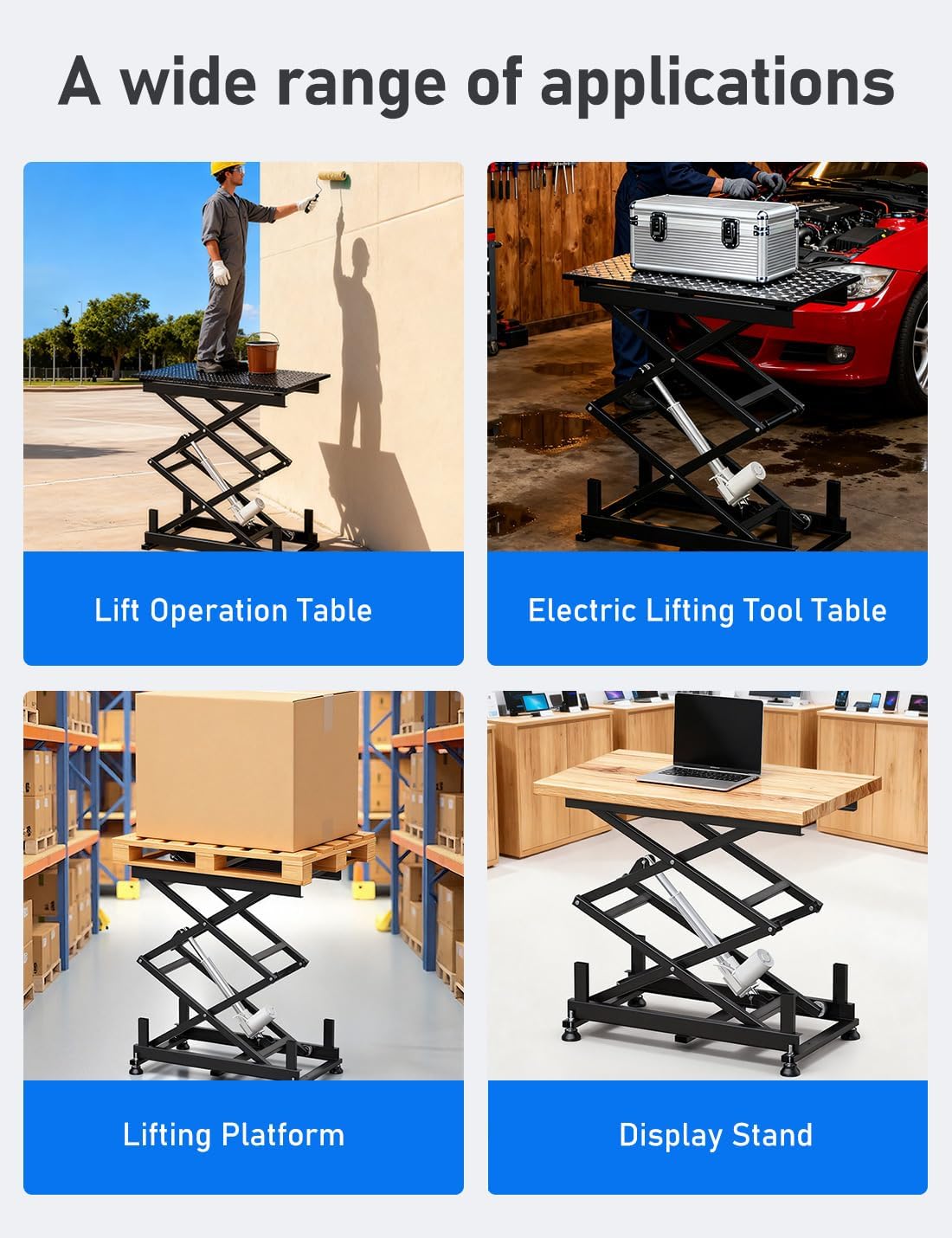
The DIHOOL Electric Scissor Lift Table is a versatile tool suitable for a wide range of applications in home, industrial, and commercial settings:
- Ergonomic Workstations: Create adjustable-height desks or workbenches.
- Medical Assistance: Aid in lifting and positioning for veterinary clinics or patient care.
- Automotive Repair: Use as a lifting tool table for vehicle maintenance.
- Industrial Maintenance: Support heavy equipment during repair or assembly.
- Exhibition Displays: Create dynamic, height-adjustable product displays.
- DIY Projects: Ideal for various home and garage projects requiring lifting or adjustable height.
- Lifting Platform: For moving goods in warehouses or workshops.

10. Warranty and Support
DIHOOL products are manufactured to high-quality standards. For warranty information, please refer to the documentation included with your purchase or visit the official DIHOOL website. If you require technical support, troubleshooting assistance, or have questions regarding your product, please contact DIHOOL customer service through the retailer where you purchased the product or via the contact information provided on the DIHOOL brand store.
