
1. Introduction
This manual provides essential information for the safe and efficient installation, operation, and maintenance of the Baxnore DDS578C 3 Phase 4 Wire Energy Meter. This device is designed for accurate measurement of active energy consumption in industrial and commercial environments. Please read this manual thoroughly before installation and use.
2. Safety Information
- Installation and maintenance must be performed by qualified electricians in accordance with local electrical codes and regulations.
- Ensure the power supply is disconnected before performing any installation, wiring, or maintenance procedures.
- Do not operate the meter if it appears damaged.
- Avoid exposing the meter to excessive moisture, dust, or extreme temperatures.
- The meter is designed for indoor use in a protected environment.
3. Product Overview
The Baxnore DDS578C is a 3-phase, 4-wire energy meter featuring a clear LCD display for energy readings. It is designed for DIN rail mounting, offering a compact and convenient solution for energy monitoring.

Figure 3.1: Front view of the DDS578C energy meter. The LCD displays the cumulative energy consumption in kWh. Indicator lights for phases A, B, C, reverse current (REV), and pulse output (PULSE) are visible above the display.

Figure 3.2: The meter's front panel, emphasizing the digital counter display for energy readings and its design for convenient rail-mounted installation.
4. Specifications
| Parameter | Value |
|---|---|
| Model | DDS578C |
| Reference Current | 3 x 5 (100) A |
| Frequency | 50Hz / 60Hz |
| Maximum Working Current | 100A |
| Energy Measuring Range | 0.0-99999.0 kWh |
| Accuracy Level | 1 |
| Display | LCD |
| Power Consumption | 2W, 10VA |
| Material | Metal + ABS |
| Dimensions (L x W x H) | 123 x 100 x 65 mm (4.84 x 3.94 x 2.56 in) |
| Operating Temperature | -25°C to +55°C |
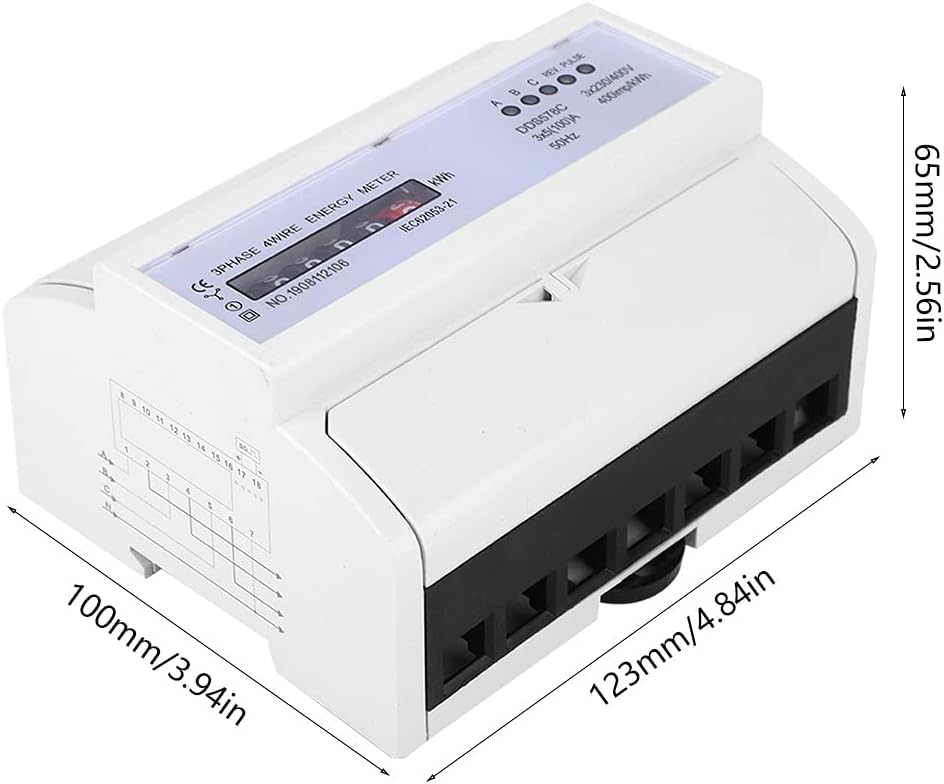
Figure 4.1: Physical dimensions of the DDS578C meter, showing its length (123mm), width (100mm), and height (65mm).
5. Installation
5.1 DIN Rail Mounting
The DDS578C meter is designed for standard 35mm DIN rail installation. Ensure the DIN rail is securely mounted within the distribution panel.
- Locate the DIN rail clip on the back of the meter.
- Hook the top edge of the meter onto the DIN rail.
- Press the bottom of the meter firmly until the clip engages with the DIN rail, securing the meter in place.

Figure 5.1: Rear view of the meter, illustrating the spring-loaded clip mechanism for DIN rail attachment.
5.2 Wiring Diagram
The DDS578C is a 3-phase, 4-wire energy meter. Proper wiring is critical for accurate measurement and safe operation. Refer to the wiring diagram below and ensure all connections are tight and correct.
- Terminals 1, 3, 5: Phase A, B, C Live Inputs
- Terminals 2, 4, 6: Phase A, B, C Live Outputs
- Terminal 7: Neutral Input
- Terminal 8: Neutral Output
- Terminals 9-18: Pulse Output and Communication Ports (refer to specific application requirements)

Figure 5.2: Top-down view of the wiring terminals and their corresponding connections for a 3-phase, 4-wire system.

Figure 5.3: The meter with terminal covers open, revealing the connection points and a simplified wiring diagram printed on the side for quick reference.
Warning: Ensure all wiring is correct and secure before restoring power. Incorrect wiring can lead to damage to the meter, electrical hazards, or inaccurate readings.
6. Operation
6.1 Power On
Once properly installed and wired, restore power to the circuit. The LCD display will illuminate, and the meter will begin measuring energy consumption.
6.2 LCD Display
The LCD displays the cumulative active energy consumption in kilowatt-hours (kWh). The reading will increment as energy is consumed.
6.3 Indicator Lights
- A, B, C (Green LEDs): Indicate the presence of voltage for each phase. They should be steadily lit when power is supplied to the respective phase.
- REV (Red LED): Illuminates if reverse current flow is detected. This indicates incorrect wiring or an issue with the load.
- PULSE (Green LED): Flashes to indicate active energy consumption. The flash rate is proportional to the power being consumed (400 imp/kWh).
7. Maintenance
The DDS578C energy meter requires minimal maintenance. Regular inspection is recommended to ensure optimal performance.
- Cleaning: Gently wipe the meter's exterior with a soft, dry cloth. Do not use abrasive cleaners or solvents.
- Inspection: Periodically check all wiring connections for tightness and signs of wear or damage. Ensure the meter is securely mounted.
- Environmental Conditions: Verify that the operating environment remains within the specified temperature and humidity ranges.
Caution: Do not attempt to open or repair the meter. Refer all servicing to qualified personnel.
8. Troubleshooting
| Problem | Possible Cause | Solution |
|---|---|---|
| LCD display is blank | No power supply; Faulty wiring | Check power supply to the meter. Verify all wiring connections are correct and secure. |
| Phase indicator (A, B, or C) is off | No voltage on that phase; Loose connection | Check the voltage supply for the affected phase. Inspect wiring connections for that phase. |
| REV indicator is lit | Reverse current detected | Review wiring for correct phase and neutral connections. Ensure current transformers (if used) are installed with correct polarity. |
| PULSE LED not flashing | No load connected; Meter malfunction | Ensure there is an active load consuming power. If load is present and other indicators are normal, contact support. |
| Inaccurate readings | Incorrect wiring; External interference | Double-check all wiring against the diagram. Ensure the meter is not exposed to strong electromagnetic fields. |
9. Warranty and Support
Warranty information for the Baxnore DDS578C energy meter is typically provided at the point of purchase or included with the product packaging. Please retain your proof of purchase for warranty claims.
For technical support, troubleshooting assistance beyond this manual, or warranty inquiries, please contact your retailer or the manufacturer directly using the contact information provided with your product.