
1. Introduction
This manual provides essential information for the safe and effective installation, operation, and maintenance of the Generic Power Supply Board. This board is designed as a replacement component for specific TCL television models. Please read this manual thoroughly before attempting any installation or repair to ensure proper function and personal safety.
2. Safety Information
WARNING: Working with television power supplies involves high voltage and can be extremely dangerous. Only qualified technicians should attempt installation or repair. Failure to follow these safety instructions may result in electric shock, personal injury, or damage to the television.
- Always disconnect the television from the main power outlet before beginning any work.
- Allow sufficient time for capacitors to discharge after disconnecting power.
- Use appropriate insulated tools.
- Wear safety glasses to protect against potential arcing or component failure.
- Do not touch live circuits.
- Ensure the replacement board matches the original board's specifications and model number.
3. Product Overview
The power supply board is a critical component responsible for converting AC power from the wall outlet into various DC voltages required by the television's internal circuits, including the main board, backlight, and audio systems. This replacement board is designed to restore power functionality to compatible TCL television models.
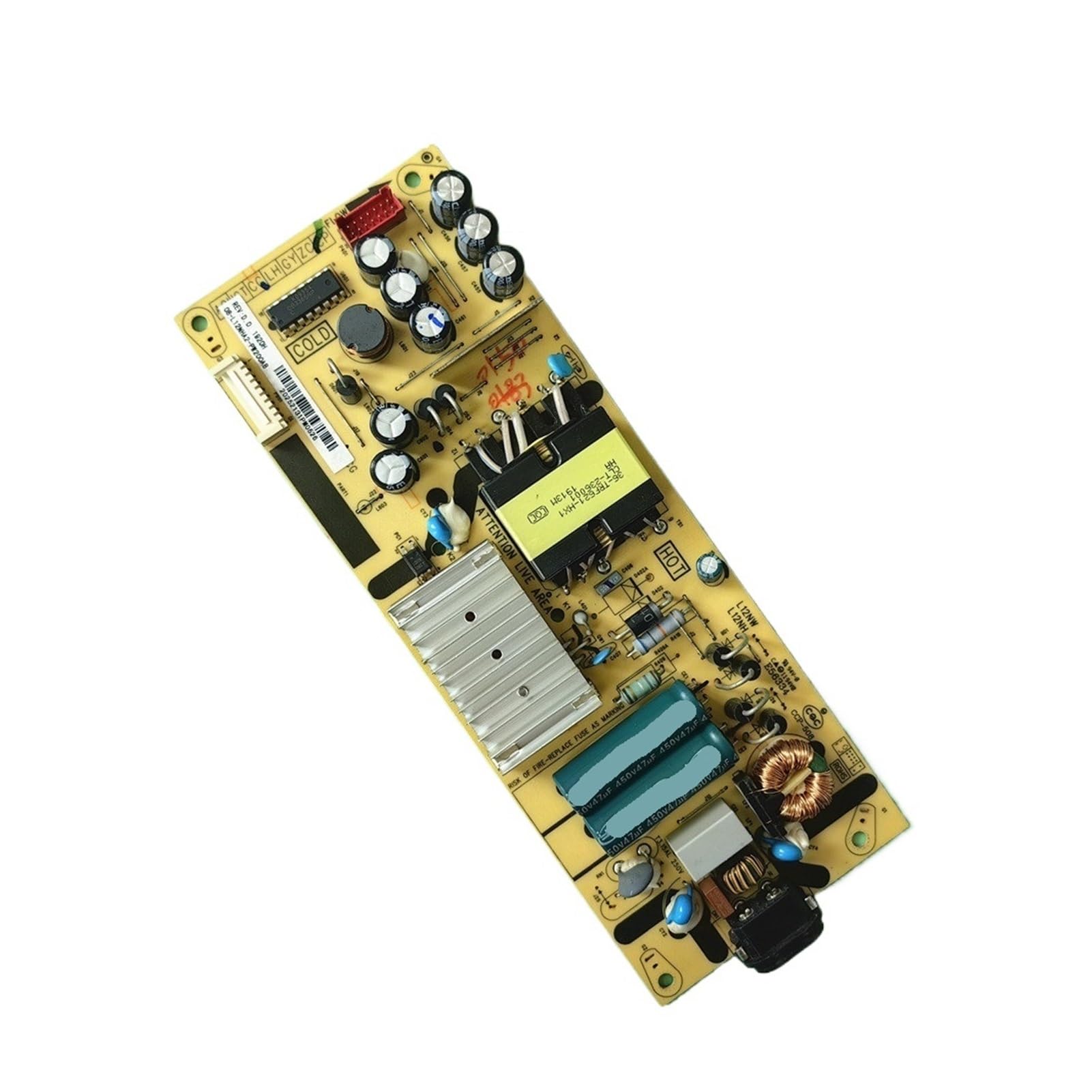
Figure 3.1: Top view of a green power supply board, showing the layout of capacitors, transformers, and other integrated circuits. This variant is often identified by part numbers like 40-L12NW4-PWC1CG or PWD1CG.

Figure 3.2: Top view of a yellow/tan power supply board, featuring a different component layout. This variant typically corresponds to part numbers such as 08-L12NHA2-PW200AB or 08-L12NHA2-PW200AA.
4. Compatibility
This power supply board is compatible with the following TCL television models. Always verify the part number on your existing board against the models listed below and the product images to ensure a correct match.
- TCL 55L680
- TCL 55DP602
- TCL 55EP658
- TCL 55S425
- And other models using part numbers 08-L12NHA2-PW200AB, 08-L12NHA2-PW200AA, 40-L12NW4-PWC1CG, PWD1CG.

Figure 4.1: Detail of a power supply board showing the model number label "08-L12NHA2-PW200AB" and a barcode with the number 20252131PM0526. Always cross-reference this information with your original board.
5. Setup and Installation
This section outlines the general steps for replacing a power supply board. Specific procedures may vary slightly depending on your television model. Refer to your TV's service manual for detailed instructions if available.
- Preparation:
- Disconnect the TV from all power sources and external devices.
- Place the TV face down on a soft, clean surface to prevent screen damage.
- Gather necessary tools: screwdrivers (Phillips, Torx), plastic pry tools, anti-static wrist strap.
- Accessing the Board:
- Remove the back cover of the television. Typically, this involves unscrewing multiple screws around the perimeter and sometimes in the center.
- Carefully lift the cover, noting any ribbon cables or connectors that may be attached. Disconnect them if necessary.
- Removing the Old Board:
- Locate the power supply board. It is usually the largest board with the main AC input connector.
- Take photos of all cable connections before disconnecting them. This will aid in reassembly.
- Carefully disconnect all cables and connectors from the old power supply board. Note that some connectors may have locking tabs.
- Unscrew the mounting screws holding the old board in place.
- Gently lift and remove the old power supply board.

Figure 5.1: Detail of the AC input section and large capacitors on the power supply board. Note the "ATTENTION LIVE AREA" warning, indicating high voltage components.
- Installing the New Board:
- Carefully place the new power supply board into position, aligning it with the screw holes.
- Secure the board with the mounting screws. Do not overtighten.
- Reconnect all cables and connectors, referring to your photos taken during disassembly. Ensure all connections are firm and correctly oriented.

Figure 5.2: View of the transformer and heat sink components on the power supply board, crucial for power conversion and heat dissipation.
- Testing and Reassembly:
- Before replacing the back cover, temporarily connect the TV to power and check if it powers on and displays an image.
- If the TV functions correctly, disconnect power again.
- Reattach the back cover, ensuring all screws are replaced and tightened.
- Reconnect all external devices.
6. Operating Instructions
Once the power supply board is correctly installed, the television should operate as normal. The power supply board itself does not require any user interaction beyond its initial installation. Its function is entirely internal to the television's operation.
7. Maintenance
The power supply board is a sealed unit and requires no routine maintenance. To ensure its longevity:
- Ensure adequate ventilation around the television to prevent overheating.
- Keep the television free from dust and debris, which can impede cooling.
- Avoid exposing the television to moisture or extreme temperatures.
8. Troubleshooting
If the television does not function correctly after installing the new power supply board, consider the following:
- No Power:
- Check all cable connections to ensure they are secure and correctly seated.
- Verify the power outlet is functional.
- Ensure the TV's power button is pressed or the remote is sending a signal.
- Intermittent Power:
- Recheck all connections for looseness.
- Ensure the TV is not overheating.
- Other Issues (e.g., No Picture, No Sound):
- These issues may indicate a problem with another component (e.g., main board, T-con board, backlight inverter) rather than the power supply board.
- Consult a qualified technician for further diagnosis.
If troubleshooting steps do not resolve the issue, it is recommended to seek professional assistance.
9. Specifications
| Feature | Detail |
|---|---|
| Model Numbers | 08-L12NHA2-PW200AB, 08-L12NHA2-PW200AA, 40-L12NW4-PWC1CG, PWD1CG |
| Compatibility | TCL 55L680, 55DP602, 55EP658, 55S425 |
| Item Weight | 3.53 ounces (approximately 100 grams) |
| Package Dimensions | 0.39 x 0.39 x 0.39 inches (1 x 1 x 1 cm) - Note: These dimensions appear to be placeholder values and may not reflect the actual product size. |
| Manufacturer | Generic |
| ASIN | B0F7FBFBQQ |
10. Warranty and Support
As a generic replacement part, specific warranty details may vary depending on the retailer or seller from whom the product was purchased. Please refer to your purchase documentation for warranty information.
For technical support or further assistance, please contact the seller directly or a qualified television repair technician.