Download PDFFree PDF. The Save button below keeps a bookmark and private notes in your account.
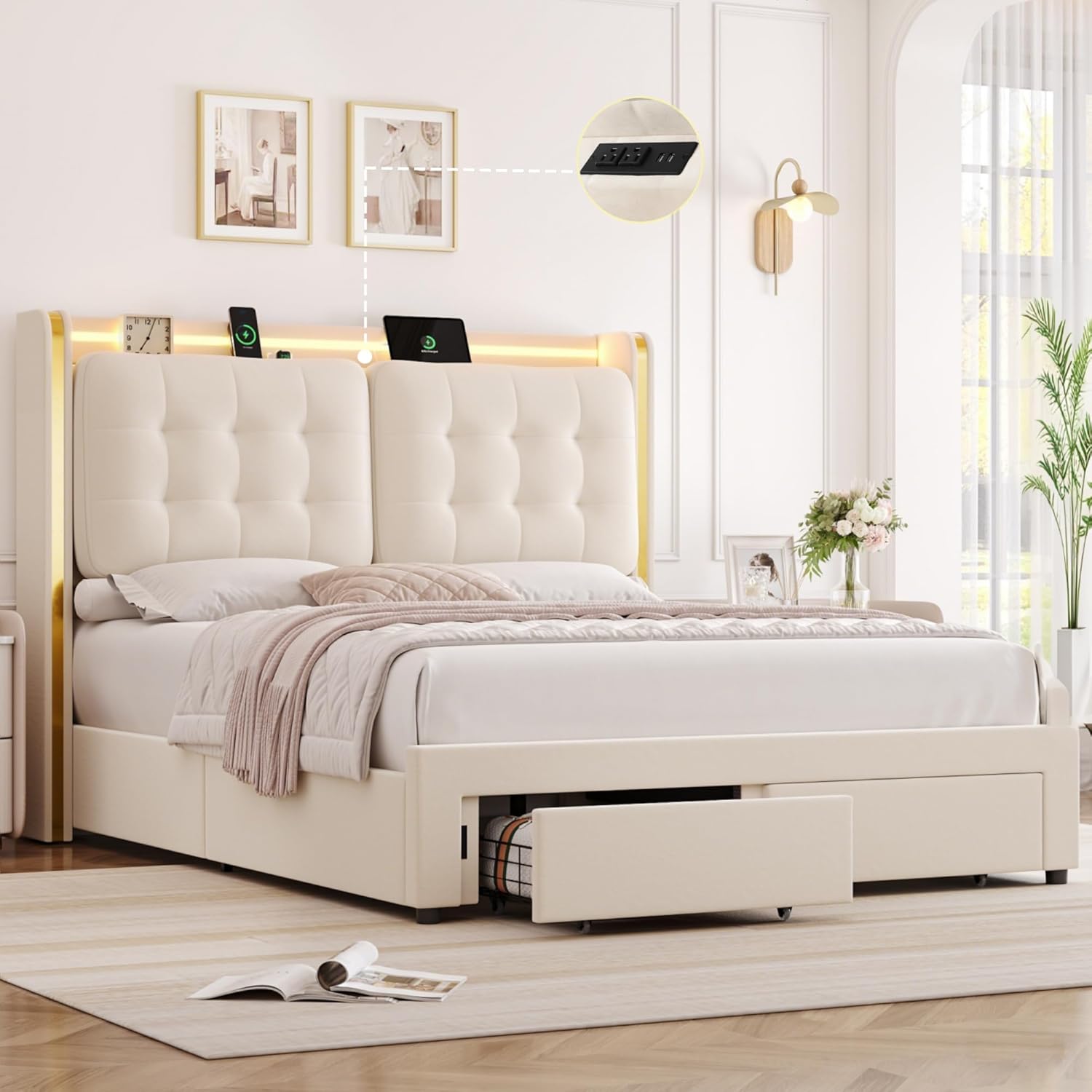
HIFIT Queen Size Upholstered LED Bed Frame
Model: UP-128/127-new Instruction Manual
Introduction
Thank you for choosing the HIFIT Queen Size Upholstered LED Bed Frame. This manual provides essential information for the safe assembly, operation, and maintenance of your new bed frame. Please read all instructions carefully before beginning assembly and retain this manual for future reference.
Safety Information
Always assemble the bed frame according to the provided instructions to ensure stability. Do not exceed the weight capacity of 900 lbs to prevent collapse or damage. Keep small parts away from children during assembly. Ensure all connections are secure before use.
Package Contents
Verify that all components are present before starting assembly. If any parts are missing or damaged, please contact customer support.
Upholstered LED Bed Frame components
Hardware Bag (screws, bolts, tools)
Installation Manual
Remote control for LED lights
Figure 1: Complete HIFIT Queen Size Upholstered LED Bed Frame.
Setup and Assembly
Assembly typically takes approximately 30 minutes with two people. Follow these steps carefully:
Unpack all components and lay them out on a clean, soft surface to prevent scratches.
Attach the side rails to the headboard and footboard using the provided hardware. Ensure all bolts are finger-tightened initially.
Install the central support beam and legs.
Place the wooden slats onto the frame. Secure them using the integrated velcro strips to prevent movement and noise.
Insert the storage drawers into their designated compartments. Ensure the fixing devices are engaged to prevent sliding.
Connect the LED light strip and charging station power cables as instructed in the detailed manual included in the package.
Once all components are in place, fully tighten all bolts and screws.
Figure 2: Securing wooden slats with velcro for stability.
Operating Instructions
LED Lighting System
Your bed frame features a multi-function RGB LED light strip integrated into the headboard. It can be controlled via a remote control or a dedicated smartphone application.
Power On/Off: Use the power button on the remote or app to turn the lights on or off.
Color Selection: Choose from over 20,000 colors using the color wheel on the app or preset buttons on the remote.
Modes: Select various lighting modes, including static colors, dynamic transitions, and music sync mode.
Music Sync: In music sync mode, the LED lights will flash and change color in rhythm with ambient music, providing an immersive experience.
Timing Function: Set schedules for the lights to turn on or off automatically.
Figure 3: LED lights syncing to music, controllable via remote or app.
Integrated Charging Station
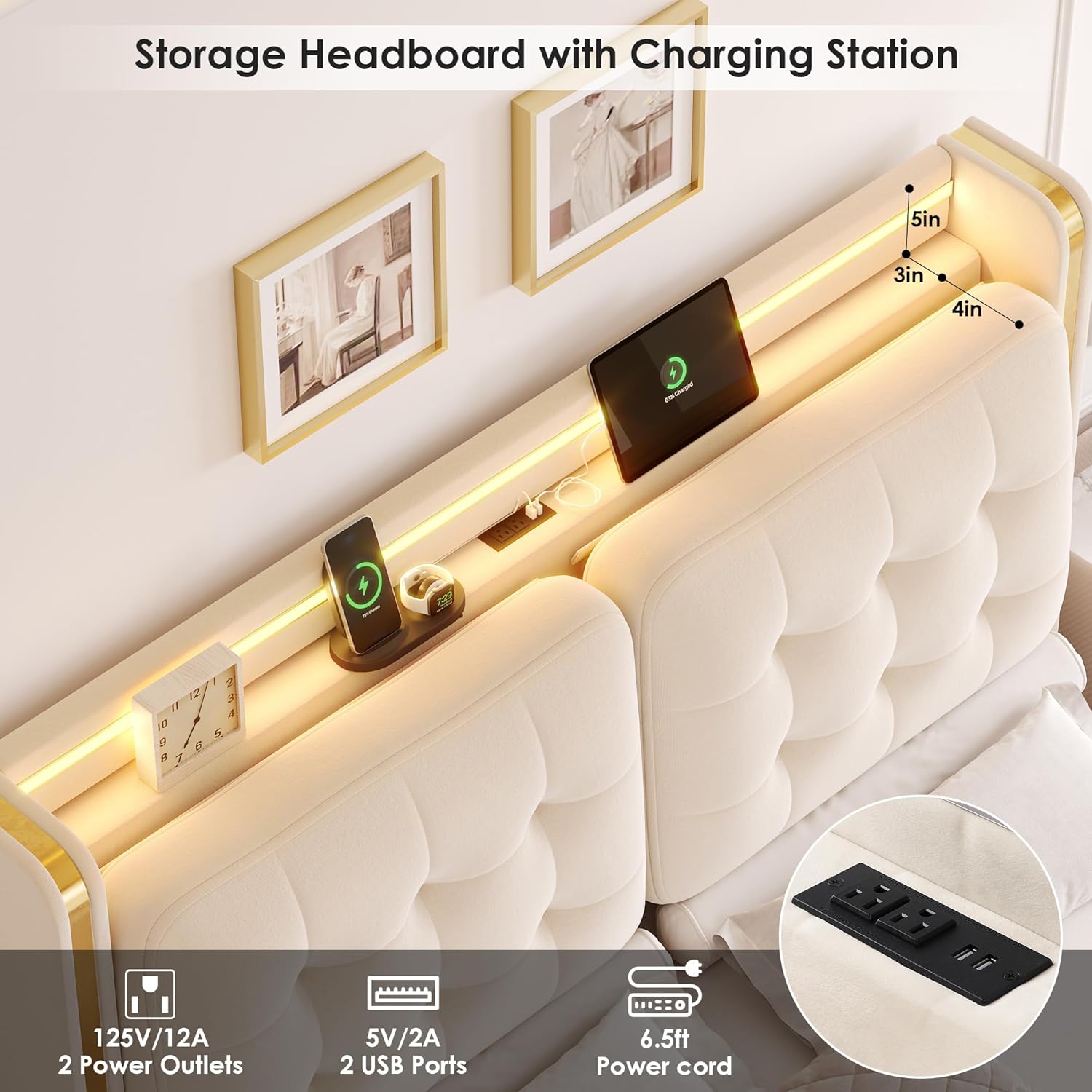
The headboard includes a convenient charging station to keep your devices powered and within reach.
AC Outlets: Two 125V/12A AC outlets are provided for standard electrical devices.
USB Ports: Two 5V/2A USB ports are available for charging smartphones, tablets, and other USB-powered devices.
Power Cord: The charging station is powered by a 6.5-foot power cord that plugs into a standard wall outlet.
Figure 4: Headboard charging station with AC outlets and USB ports.
Storage Drawers
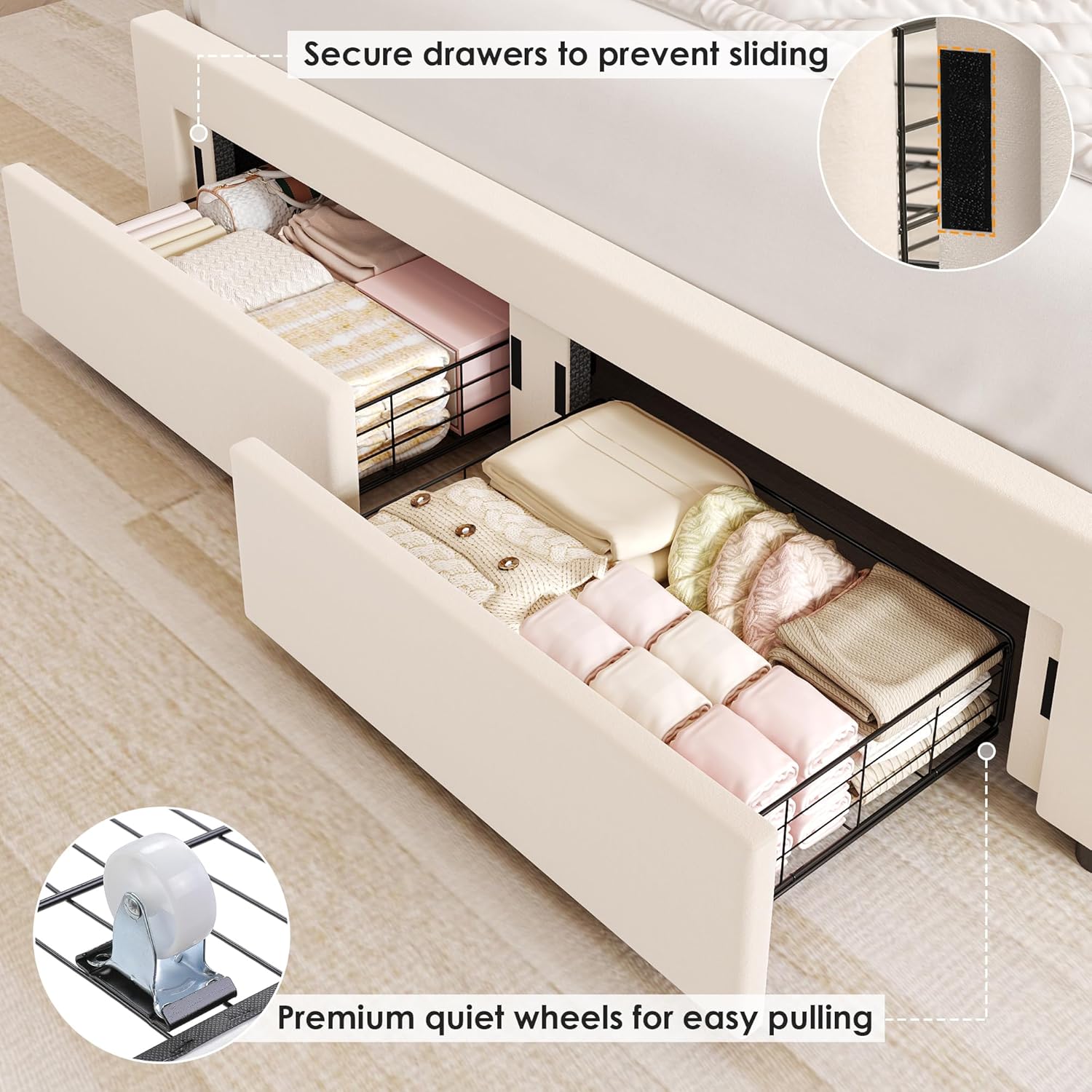
The bed frame features two spacious steel drawers for organizing various items.
Capacity: Ideal for storing bedding, clothes, books, and other personal items.
Smooth Operation: Each drawer is equipped with four smooth, silent wheels for effortless pulling and pushing.
Security: Two fixing devices on each drawer help keep them securely in place when closed, preventing accidental sliding.
Figure 5: Storage drawers with fixing devices and quiet wheels.
Maintenance
Upholstery Care: Regularly vacuum the velvet upholstery with a soft brush attachment to remove dust. For spills, blot immediately with a clean, dry cloth. Do not rub. For stubborn stains, consult a professional upholstery cleaner.
Frame Cleaning: Wipe the metal and wooden parts with a damp cloth and mild detergent. Dry thoroughly.
LED Lights: The LED strip is designed for long-term use and requires minimal maintenance. If dust accumulates, gently wipe with a dry, soft cloth.
Charging Station: Keep the charging ports free of dust and debris. Do not expose to liquids.
Hardware Check: Periodically check all bolts and screws to ensure they remain tight. Retighten as necessary to maintain stability.
Troubleshooting
Problem
Possible Cause
Solution
LED lights not turning on
Power cable disconnected; Remote battery low; App not connected.
Check power connections; Replace remote battery; Re-pair app with LED system.
Charging station not working
Power cord unplugged; Wall outlet not functional.
Ensure power cord is securely plugged into a working wall outlet.
Bed frame is wobbly or noisy
Loose bolts; Slats not properly secured.
Tighten all assembly bolts; Ensure velcro strips on slats are fully engaged.
Clear any obstructions from wheels; Reduce drawer load; Ensure fixing devices are disengaged when pulling out.
Specifications
Feature
Detail
Size
Queen
Product Dimensions
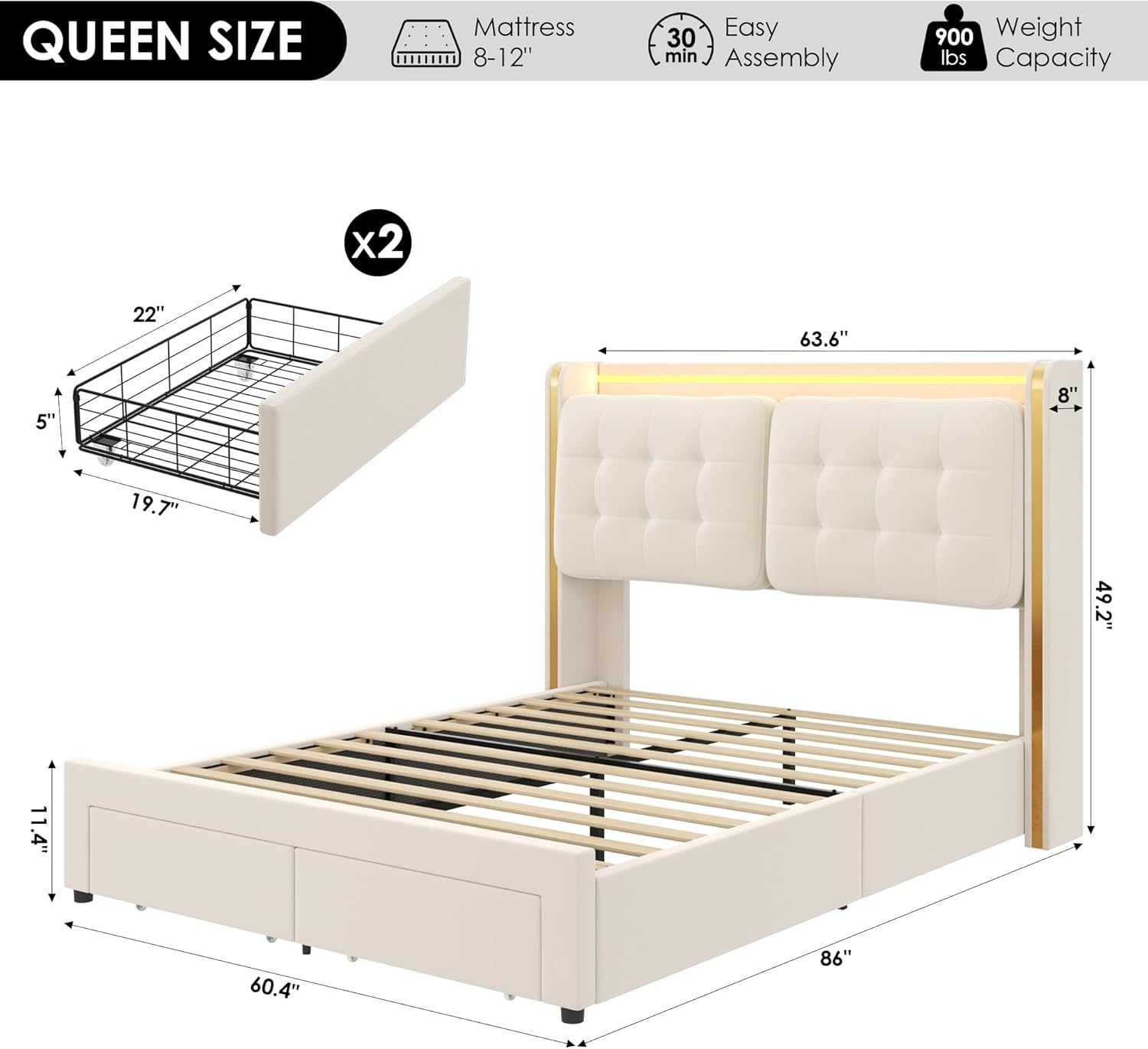
86"L x 63.6"W x 49.2"H
Weight Capacity
900 lbs
Recommended Mattress Thickness
8-12 inches (no box spring needed)
Headboard Features
4-inch thick back cushions, Wingback design, Tufted velvet, Gold stainless steel trim
Charging Station
2 AC outlets (125V/12A), 2 USB ports (5V/2A), 6.5ft power cord
LED Lighting
RGB, App/Remote control, Music Sync, Timing Function
Storage
2 spacious steel drawers with quiet wheels and fixing devices
Frame Material
Durable metal frame, Solid wood slats
Figure 6: Product dimensions overview.
Figure 7: Recommended mattress thickness.
Warranty Information
HIFIT products are designed for quality and durability. For specific warranty details regarding your bed frame, please refer to the warranty card included in your package or contact HIFIT customer support. Keep your purchase receipt as proof of purchase for any warranty claims.
Customer Support
If you have any questions, require assistance with assembly, or encounter any issues with your HIFIT bed frame, our customer service team is available to help. Please refer to the contact information provided in your package or visit the official HIFIT website for support.
Ask about setup, troubleshooting, compatibility, parts, safety, or missing instructions. Manuals+ will review the question and use this page’s manual context to help answer it.