
Sona SFS 9008CR
SONA 12-inch 2-in-1 Remote Portable DC Fan SFS 9008CR User Manual
Model: SFS 9008CR | Brand: Sona
Important Safety Instructions
Please read all instructions carefully before using this appliance. Keep this manual for future reference.
- Always ensure the fan is placed on a stable, flat surface.
- Do not insert fingers or any objects through the fan guards when the fan is operating.
- Unplug the fan from the power source before cleaning or performing any maintenance.
- Do not use the fan near water or in excessively humid environments.
- Keep the fan away from curtains, drapes, or any objects that may be drawn into the fan blades.
- This appliance is not intended for use by persons (including children) with reduced physical, sensory or mental capabilities, or lack of experience and knowledge, unless they have been given supervision or instruction concerning use of the appliance by a person responsible for their safety.
Product Overview
The Sona SFS 9008CR is a versatile 12-inch 2-in-1 portable DC fan designed for both indoor and outdoor use. It features a brushless DC motor for efficient performance and extended lifespan, multiple wind speeds and modes, 3D oscillation, and a timer function. The fan can be powered via a standard AC outlet or a power bank for portability.

Image: The Sona SFS 9008CR fan in its stand configuration, showcasing its sleek design and remote control capability.
Key Features:
- Brushless DC Motor for energy efficiency and quiet operation.
- 6 Wind Speeds and 3 Wind Modes (Normal, Natural, Sleep).
- 3D Oscillation for wide area coverage.
- 7-Hour Timer function.
- Memory Function to recall last settings.
- Connects to a PowerBank for outdoor use (USB Powered).
- Anti-Rusting Plastic Fan Guards for durability and easy maintenance.
- Remote Control for convenient operation.
Setup and Assembly
The Sona SFS 9008CR fan is designed for easy assembly. Follow these steps to set up your fan:
- Unpack Components: Carefully remove all parts from the packaging. Ensure all components listed in the packing list are present.
- Assemble Base: Attach the fan pole to the base, securing it firmly with the provided screws or locking mechanism.
- Attach Fan Head: Mount the fan head onto the top of the pole. Ensure it clicks into place or is secured with the designated fastener.
- Connect Power: Plug the power adapter into the fan's power input, then into a standard electrical outlet (100-240V~ 50/60Hz). For outdoor use, connect the fan to a compatible power bank via the USB Type-C connector.

Image: The SFS 9008CR fan shown in both its taller stand (105 cm) and shorter tatami (71 cm) configurations, highlighting its 2-in-1 design and compatibility with a power bank for outdoor use.
Operating Instructions
Your Sona SFS 9008CR fan can be operated using the control panel on the fan unit or the included remote control.
Power On/Off:
- Press the Power button once to turn the fan on.
- Press the Power button again to turn the fan off.
Adjusting Wind Speed:
The fan offers 6 wind speeds. Press the Speed button repeatedly to cycle through the available speeds (1 to 6).
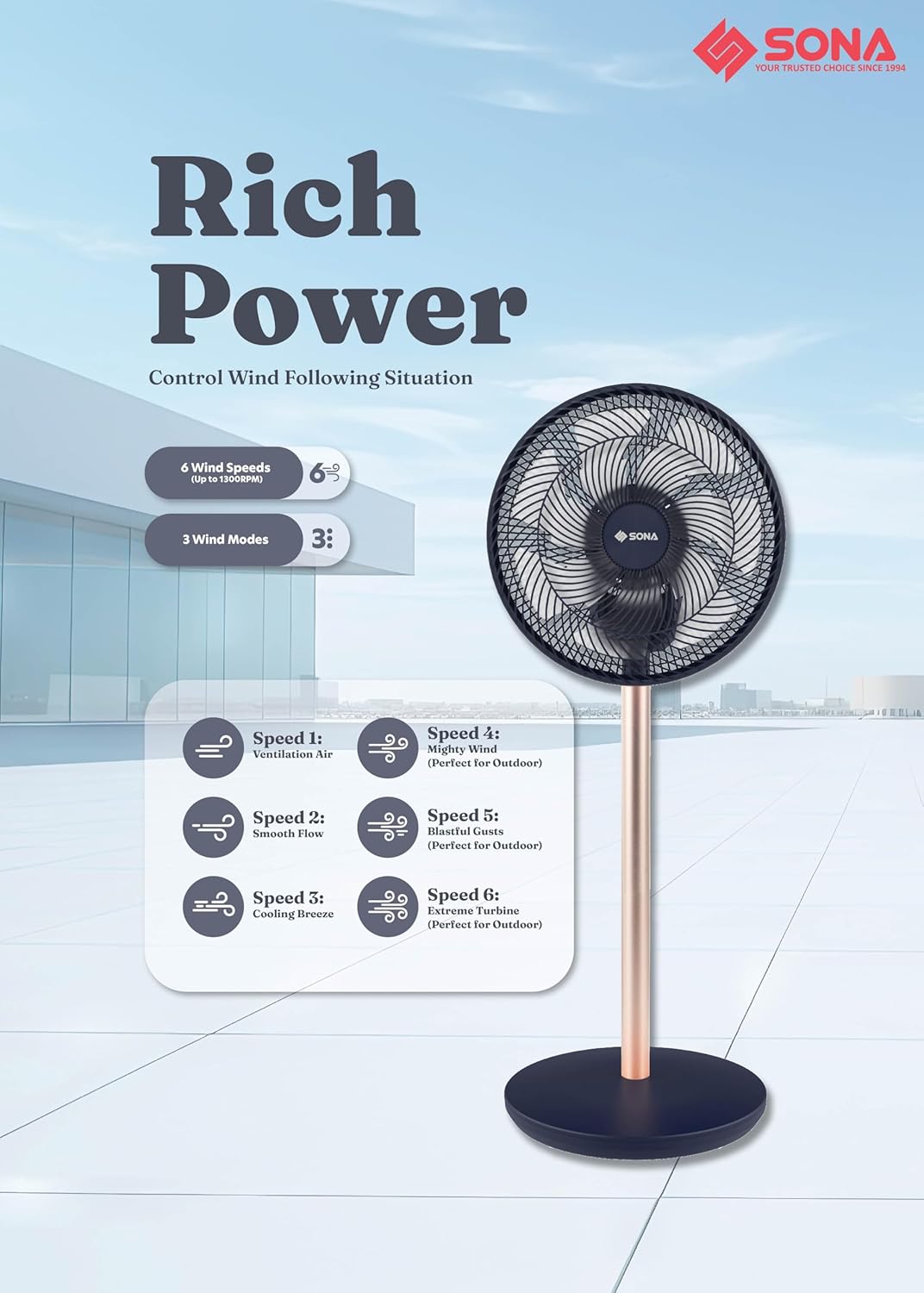
Image: Diagram illustrating the 6 wind speeds (Ventilation Air, Smooth Flow, Cooling Breeze, Highly Windy, Powerful, Extreme Hurricane) and 3 wind modes available on the SFS 9008CR fan.
Selecting Wind Mode:
Choose from 3 wind modes: Normal, Natural, and Sleep. Press the Mode button to switch between these settings.
- Normal Mode: Provides a consistent airflow at the selected speed.
- Natural Mode: Simulates natural breeze by varying wind speed.
- Sleep Mode: Operates at a lower, quieter speed, gradually decreasing over time for comfortable sleep.
Oscillation Function:
The fan features 3D oscillation for wider air distribution. Press the Oscillation button to activate or deactivate the oscillation feature.

Image: Visual representation of the 3D oscillation feature, showing the fan head moving in multiple directions, alongside an icon for the memory function.
Timer Function:
Set the fan to automatically turn off after a specified period, up to 7 hours. Press the Timer button repeatedly to select the desired duration.
Memory Function:
The fan is equipped with a memory function that recalls your last used settings (speed, mode, oscillation) when turned on again.
Outdoor Use with Power Bank:
For portable outdoor use, connect the fan to a compatible power bank (not included) via its USB Type-C input. Ensure the power bank has sufficient output to power the fan (36W).
Care and Maintenance
Regular cleaning and proper care will ensure the longevity and optimal performance of your Sona SFS 9008CR fan.
- Before Cleaning: Always unplug the fan from the power outlet or disconnect from the power bank before cleaning.
- Cleaning Fan Guards: The fan features anti-rusting plastic fan guards. Use a soft, damp cloth to wipe down the exterior surfaces and guards. For stubborn dirt, a mild soap solution can be used, followed by wiping with a clean, damp cloth.
- Cleaning Fan Blades: To clean the fan blades, carefully remove the front guard (refer to assembly instructions for reverse steps if needed). Wipe the blades with a soft, damp cloth. Ensure blades are completely dry before reassembling the guard.
- Storage: When not in use for extended periods, store the fan in a cool, dry place, preferably in its original packaging or covered to protect it from dust.
- Do Not Use: Avoid using abrasive cleaners, solvents, or harsh chemicals, as these can damage the fan's surfaces.

Image: A hand cleaning the anti-rusting plastic fan guards of the Sona SFS 9008CR fan with a cloth, demonstrating easy maintenance.
Troubleshooting
If you encounter any issues with your Sona SFS 9008CR fan, please refer to the following common problems and solutions:
| Problem | Possible Cause | Solution |
|---|---|---|
| Fan does not turn on. | No power supply; Power button not pressed; Power bank discharged. | Ensure the power adapter is securely plugged into a working outlet. If using a power bank, check its charge level and connection. Press the Power button. |
| Weak airflow. | Low speed setting; Fan guards or blades are dirty. | Increase the wind speed setting. Clean the fan guards and blades as per maintenance instructions. |
| Fan is noisy. | Loose parts; Obstruction in fan blades; Fan not on a stable surface. | Check for any loose components and tighten them. Ensure there are no obstructions. Place the fan on a flat, stable surface. |
| Remote control not working. | Batteries are dead or incorrectly inserted; Obstruction between remote and fan. | Replace the remote control batteries, ensuring correct polarity. Remove any obstructions between the remote and the fan's receiver. |
| Oscillation not working. | Oscillation function not activated. | Press the Oscillation button on the fan or remote control to activate it. |
If the problem persists after trying these solutions, please contact customer support.
Technical Specifications
| Model: | SFS 9008CR |
| Brand: | Sona |
| Power Input: | 100-240V~ 50/60Hz |
| Wattage: | 36W |
| Motor Type: | Brushless DC Motor |
| Fan Blade: | 7 Bladed AS Fan Blade |
| Wind Speeds: | 6 |
| Wind Modes: | 3 (Normal, Natural, Sleep) |
| Oscillation: | 3D Oscillation |
| Timer: | Up to 7 Hours |
| Special Features: | Memory Function, Remote Control, USB Powered (for outdoor use) |
| Material: | Plastic (Anti-Rusting Fan Guards) |
| Product Dimensions: | 33.2D x 34W x 89.5H centimetres |
| Mounting Type: | Floor Mount |

Image: Close-up view of the brushless DC motor, highlighting its advanced design for efficient and quiet operation.
Warranty and Customer Support
Warranty Information:
This Sona SFS 9008CR fan comes with a 2 Years Warranty on Motor from the date of purchase. Please retain your proof of purchase for warranty claims. The warranty covers manufacturing defects under normal use. It does not cover damage caused by misuse, accidents, unauthorized repairs, or normal wear and tear.
Customer Support:
For technical assistance, warranty claims, or any questions regarding your Sona product, please contact Sona customer support. Refer to the official Sona website or your purchase documentation for contact details.
- Online Support: Visit the official Sona website for FAQs and support resources.
- Email Support: For specific inquiries, please refer to the contact information provided with your product or on the official Sona website.
- Phone Support: For immediate assistance, please refer to the contact information provided with your product or on the official Sona website.
Ask a question about this manual
Ask about setup, troubleshooting, compatibility, parts, safety, or missing instructions. Manuals+ will review the question and use this page’s manual context to help answer it.