
Introduction
This manual provides comprehensive instructions for the safe and efficient operation of your Hyper Tough 20V Max Lithium Ion Battery Charger, Model HY-1444U1. Please read this manual thoroughly before initial use and retain it for future reference. Understanding the proper use and care of your charger will ensure its longevity and safe performance.
Safety Information
Always observe basic safety precautions when using electrical appliances to reduce the risk of fire, electric shock, and personal injury.
- Read all instructions: Before operating the charger, read all instructions and cautionary markings on the charger, battery, and product using the battery.
- Indoor use only: This charger is designed for indoor use only. Do not expose to rain or wet conditions.
- Proper voltage: Ensure the power outlet voltage matches the charger's specifications.
- Use specified batteries: Only charge Hyper Tough 20V Max Lithium Ion batteries with this charger. Attempting to charge other types of batteries may cause personal injury and damage.
- Avoid damaged cords: Never operate the charger if the cord or plug is damaged.
- Ventilation: Ensure adequate ventilation during charging. Do not block ventilation openings.
- Disconnect when not in use: Unplug the charger from the power outlet when not in use or before cleaning.
- Avoid short circuits: Do not short-circuit the battery terminals.
- Children and pets: Keep the charger and battery out of reach of children and pets.
Package Contents
Verify that all items listed below are included in your package:
- 1 x Hyper Tough 20V Max Lithium Ion Battery Charger (Model HY-1444U1)
- 1 x Instruction Manual
Setup
- Unpack the charger and inspect it for any signs of damage during shipping. If damaged, do not use and contact customer service.
- Place the charger on a stable, flat, non-flammable surface in a well-ventilated area.
- Plug the charger's power cord into a standard 120V AC electrical outlet.
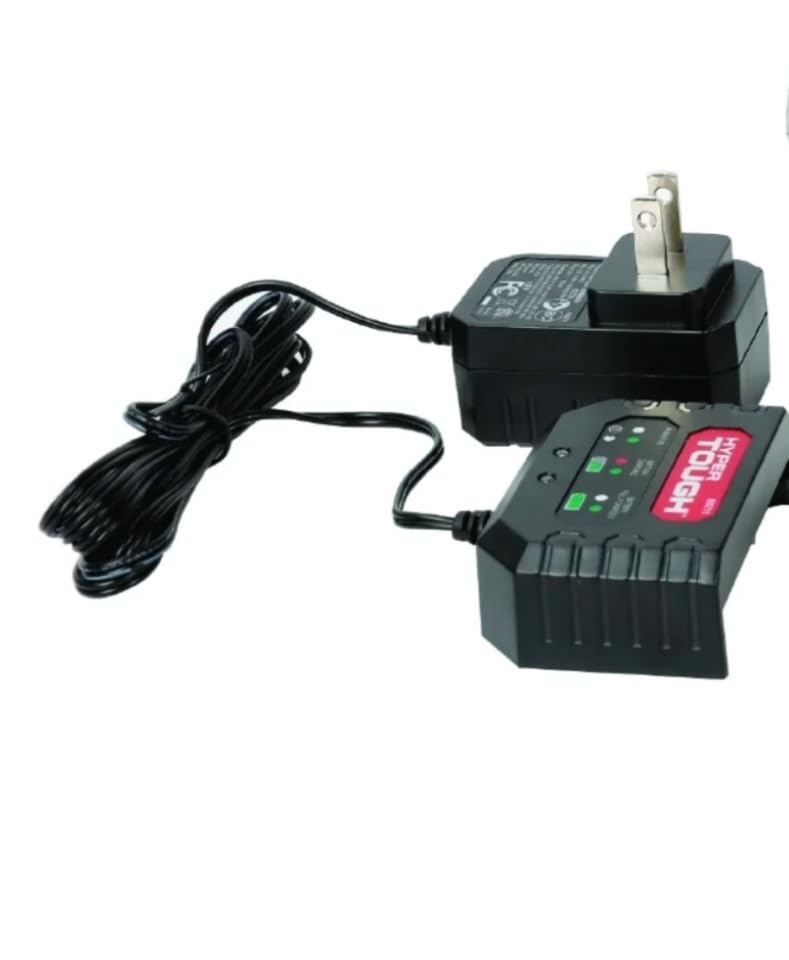
Image: The Hyper Tough 20V Max Lithium Ion Battery Charger (Model HY-1444U1) showing its main unit with indicator lights and the connected power adapter with a standard two-prong plug.
Operating Instructions
Follow these steps to charge your Hyper Tough 20V Max Lithium Ion battery:
- Ensure the charger is plugged into a live electrical outlet.
- Align the Hyper Tough 20V Max Lithium Ion battery with the charging port on the charger.
- Slide the battery firmly into the charger until it clicks into place.
- Observe the indicator lights on the charger. Typically, a red light indicates charging is in progress, and a green light indicates the battery is fully charged. Refer to the specific light pattern on your charger for exact status.
- Once the battery is fully charged (indicated by the green light), remove it from the charger by pressing the release button (if applicable) and sliding it out.
- Unplug the charger from the power outlet when charging is complete or if the charger will not be used for an extended period.
Maintenance
- Cleaning: Disconnect the charger from the power source before cleaning. Use a dry, soft cloth to wipe down the exterior of the charger. Do not use harsh chemicals or abrasive cleaners.
- Storage: Store the charger in a cool, dry place, away from direct sunlight and moisture. Keep it out of reach of children.
- Inspection: Periodically inspect the charger, cord, and plug for any signs of wear or damage. If damage is found, discontinue use and have it repaired by a qualified service technician.
Troubleshooting
| Problem | Possible Cause | Solution |
|---|---|---|
| Charger not powering on / No indicator lights | No power to the outlet; Loose connection; Damaged charger/cord. | Check the power outlet with another device. Ensure the charger plug is fully inserted. Inspect the cord and charger for damage. |
| Battery not charging | Battery not properly seated; Battery is defective; Battery is too hot/cold. | Ensure the battery is fully inserted into the charger. Try charging a different battery (if available). Allow battery to reach room temperature before charging. |
| Charger or battery feels hot during charging | Normal operation (slight warmth); Overheating due to poor ventilation or faulty battery. | Some warmth is normal. Ensure charger is in a well-ventilated area. If excessively hot, disconnect immediately and allow to cool. Do not use a battery that consistently overheats. |
Specifications
- Model: HY-1444U1
- Input Voltage: 120V AC, 60Hz (Standard US)
- Output Voltage: 20 Volts DC
- Product Dimensions: Approximately 6 x 6 x 6 inches
- Color: Black
- Certifications: UL, FCC
- Manufacturer: Hyper Tough
Warranty and Support
For information regarding product warranty, technical support, or replacement parts, please contact Hyper Tough customer service. Keep your purchase receipt as proof of purchase for warranty claims.
Customer Service Contact: Please refer to the Hyper Tough official website or product packaging for the most current contact information.


