
Introduction
The OCID Oticon Easy LE Adapter is a compact wireless Bluetooth USB-C dongle designed to facilitate audio streaming and hands-free calls between compatible devices and Oticon Intent hearing aids. This adapter utilizes Bluetooth Low Energy (LE) Audio technology for efficient and reliable connectivity. It is specifically engineered for use with Oticon Intent series hearing aids and devices featuring a USB-C port, such as Android smartphones, tablets, and personal computers.

Image: Front view of the OCID Oticon Easy LE Adapter. This compact black dongle features a USB-C male connector on one end and a USB-C female port on the side, indicating its pass-through charging capability.
Setup and Pairing
Follow these steps to connect your Oticon Easy LE Adapter with your hearing aids and compatible device.

Image: A visual guide illustrating the three steps for pairing the Easy LE Adapter with hearing aids. It shows the adapter plugged into a phone, hearing aids, and a phone displaying a connection icon.
Step 1: Connect the Adapter
- Plug the Easy LE Adapter into the USB-C port of your phone, tablet, or PC.
- The adapter will power on and automatically enter pairing mode if no existing pairing is found.
- Pairing mode is indicated by the LED indicator rapidly flashing blue. In this mode, the Easy LE Adapter will search for LE Audio devices within a range of approximately 6.5 feet (2 meters).
- Important: If the blue LED does not flash, reset the Easy LE Adapter by inserting a thin pointed tool into the reset pin hole until the LED indicator light flashes blue.
Step 2: Prepare Hearing Aids for Pairing
- Restart your hearing aids via the push button or by placing them in the charger and then removing them from the charger. This action will put them in pairing mode for 3 minutes.
Step 3: Complete Pairing
- Wait for the hearing aids and adapter to pair.
- Pairing is complete when the LED indicator changes from rapidly flashing blue to showing a steady blue light for 5 seconds, and then powers off.
- You are now ready to stream audio or make hands-free calls with the Easy LE Adapter.
- Note: The adapter can only be connected to one set of hearing aids at a time.
Tip: The Easy LE Adapter retains its pairing with the hearing aids. You do not need to re-pair when moving the adapter between different phones, tablets, or PCs.
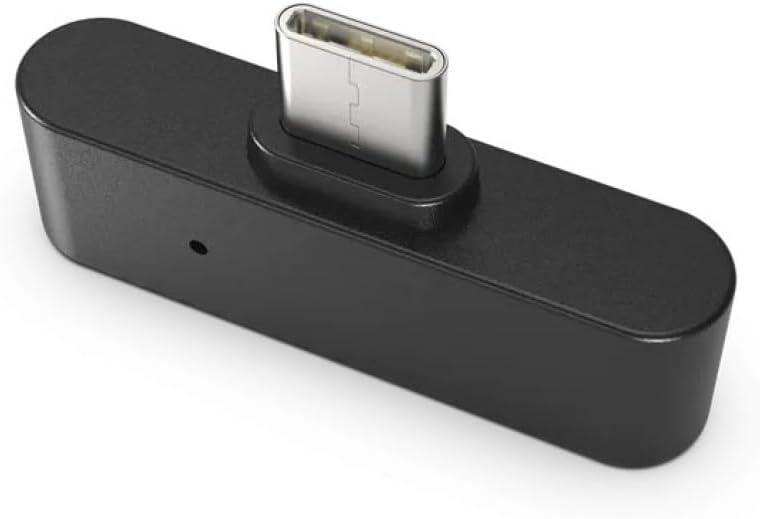
Image: The Oticon Easy LE Adapter securely plugged into the USB-C port of a smartphone, ready for use.
Operating Instructions
Once paired, the Easy LE Adapter enables seamless audio streaming and communication.
- Audio Streaming: Audio from your connected device (phone, tablet, PC) will automatically stream to your Oticon Intent hearing aids.
- Hands-Free Calls: When connected to a smartphone, you can make and receive calls with audio directed to your hearing aids and your voice picked up by the adapter's microphone.
- Volume Control: Adjust the audio volume directly from the connected device (e.g., your phone's volume buttons, or the speaker icon on your computer's taskbar). The Oticon app on your phone does not control the volume for the LE adapter.
- Connection Range: Bluetooth Low Energy (BLE) has a shorter transmission distance compared to classic Bluetooth. Maintain a reasonable proximity (within 6.5 feet or 2 meters) between the adapter and your hearing aids for optimal performance. Physical obstructions may also affect connection stability.

Image: A person smiling while holding a smartphone, with the Oticon Easy LE Adapter connected, illustrating its use for hands-free communication. The phone screen displays an active call interface.
Maintenance
To ensure the longevity and optimal performance of your Easy LE Adapter, follow these simple maintenance guidelines:
- Cleaning: Gently wipe the adapter with a dry, soft cloth. Avoid using liquids, solvents, or abrasive cleaners.
- Storage: Store the adapter in a cool, dry place away from direct sunlight and extreme temperatures.
- Protection: Avoid dropping the adapter or subjecting it to strong impacts. Keep it away from water and moisture.
- Connector Care: Ensure the USB-C connector is free from dust and debris before plugging it into a device.
Troubleshooting
If you encounter issues with your Easy LE Adapter, refer to the following common problems and solutions:
- Adapter does not power on or LED does not flash:
- Ensure the adapter is fully and securely inserted into the USB-C port of your device.
- Try plugging the adapter into a different USB-C port or device to rule out port issues.
- Perform a reset by inserting a thin pointed tool into the reset pin hole until the LED flashes blue.
- Hearing aids do not pair with the adapter:
- Confirm your hearing aids are Oticon Intent series. This adapter is not compatible with older Oticon models (e.g., Oticon Real, Oticon More) or other brands.
- Ensure your hearing aids are in pairing mode (restart them by pressing the button or cycling them in/out of the charger).
- Verify the adapter's LED is rapidly flashing blue, indicating it is in pairing mode. If not, reset the adapter.
- Keep the hearing aids within 6.5 feet (2 meters) of the adapter during pairing.
- No audio or poor audio quality:
- Check the volume settings on your connected device (phone, tablet, PC).
- Ensure the adapter is still paired and connected (LED will be off after successful pairing, but audio should stream).
- Minimize distance and remove obstructions between the adapter and your hearing aids.
- Restart both the connected device and your hearing aids, then re-attempt connection.
- Adapter not working with iPhone:
- The Oticon Easy LE Adapter is not compatible with iPhones. It is designed for Android phones and other devices with USB-C ports that support LE Audio.
Specifications
| Brand | OCID |
| Model | Easy LE Adapter |
| Connector Type | USB Type C |
| Compatible Devices | Oticon Intent Hearing Aids, Android Smartphones, Tablets, PCs (with USB-C and LE Audio support) |
| Incompatible Devices | iPhone, Oticon Real/More series hearing aids |
| Number of Ports | 1 (USB-C pass-through) |
| Item Weight | 0.634 ounces (0.02 Kilograms) |
| Package Dimensions | 2.87 x 1.97 x 0.75 inches |
Warranty and Support
For information regarding warranty coverage, please refer to the product packaging or contact the seller directly. If you require technical assistance or have questions not covered in this manual, please reach out to the product manufacturer or the point of purchase for support.
