
Introduction

Image: Hamilton 1.1 cu ft Countertop Touchscreen Microwave Oven.
This manual provides essential information for the safe and efficient operation of your Hamilton 1.1 Cu. Ft. Countertop Touchscreen Microwave Oven. Please read this manual thoroughly before use and retain it for future reference.
Important Safety Instructions
When using electrical appliances, basic safety precautions should always be followed to reduce the risk of fire, electric shock, and injury to persons, including the following:
- Read all instructions before using the appliance.
- Do not operate the oven if the door or door seals are damaged.
- Do not heat liquids or other foods in sealed containers since they are liable to explode.
- Only allow children to use the oven without supervision when adequate instructions have been given so that the child is able to use the oven in a safe way and understands the hazards of improper use.
- Refer to the "Child Safety Lock" section for specific instructions on this feature.
Product Features
- Powerful 1000W output for efficient cooking.
- 10 adjustable power levels for versatile cooking and reheating.
- User-friendly touchscreen control panel with LED display.
- Convenience cooking controls for popular foods (e.g., potatoes, popcorn, frozen dinners, pizza, beverages).
- 8 Smart Sensor auto cooking menus for precise results.
- Integrated child safety lock for enhanced security.
- Sleek white finish with stainless-steel accents.
Specifications
| Attribute | Detail |
|---|---|
| Brand | Hamilton |
| Model Number | HB8436193153-02 |
| Capacity | 1.1 Cubic Feet |
| Wattage | 1000 watts |
| Voltage | 120 Volts (AC) |
| Dimensions (D x W x H) | 21" x 12" x 19" |
| Installation Type | Countertop |
| Material (Exterior) | Steel |
| Material (Interior) | Stainless Steel |
| Included Components | Glass Turntable |
Setup
- Unpacking: Carefully remove the microwave oven and all packing materials from the carton. Check for any damage, such as dents or a misaligned door. Do not operate if damaged.
- Placement: Place the microwave on a flat, stable surface that can support its weight. Ensure adequate ventilation by leaving at least 4 inches of space around the sides, back, and top of the oven. Do not block air vents.
- Turntable Installation: Place the turntable ring in the center of the oven cavity. Then, place the glass turntable securely on top of the turntable ring. Ensure it rotates freely.
- Power Connection: Plug the microwave oven into a grounded 120V AC electrical outlet.

Image: Interior view of the Hamilton microwave, highlighting the removable glass turntable for easy cleaning.
Operating Instructions
Basic Operation
- Setting the Clock:
- Press the CLOCK button.
- Use the number pads to enter the current time.
- Press the CLOCK button again to confirm.
- Microwave Cooking:
- Place food in a microwave-safe container on the glass turntable.
- Close the door securely.
- Enter the desired cooking time using the number pads.
- Press the POWER LEVEL button to adjust power if needed (default is 100%). Use number pads to select power level (1-10).
- Press START/+30SEC to begin cooking.
- Express Cook: For quick cooking, simply press the 1 MIN, 2 MIN, or 3 MIN buttons for instant cooking at full power. Press PAUSE/CANCEL to stop or clear settings. Press +30SEC to add 30 seconds to cooking time.
- Defrosting:
- Press the WEIGHT DEFROST or TIME DEFROST button.
- Follow the prompts on the LED display to enter weight or time.
- Press START/+30SEC.
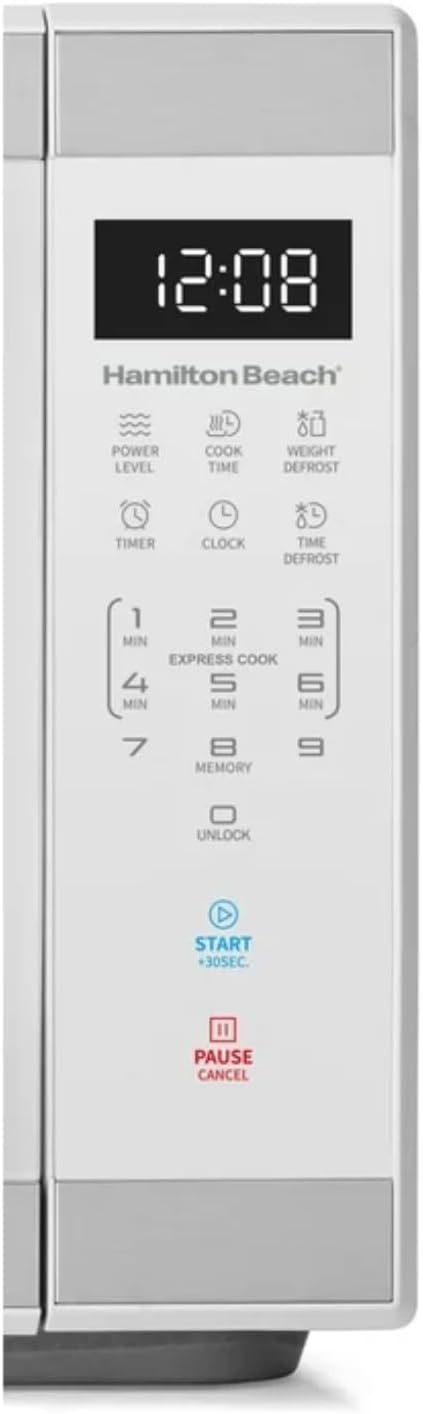
Image: Detailed view of the intuitive touchscreen control panel and LED display.
Child Safety Lock
This microwave features a child safety lock to prevent unintended operation. The door automatically locks when cooking starts.
To Open Microwave During or After Use:
- Press the 0/UNLOCK or PAUSE/CANCEL pad.
- Grasp the handle and open the door.
To Deactivate the Child Safety Lock:
- Press the 0/UNLOCK pad for 3 seconds. The display will indicate "Loc".
- Press the 7 pad.
- Press the 9 pad. The display will show "ULoc".
To re-activate the child safety lock, repeat the above steps.
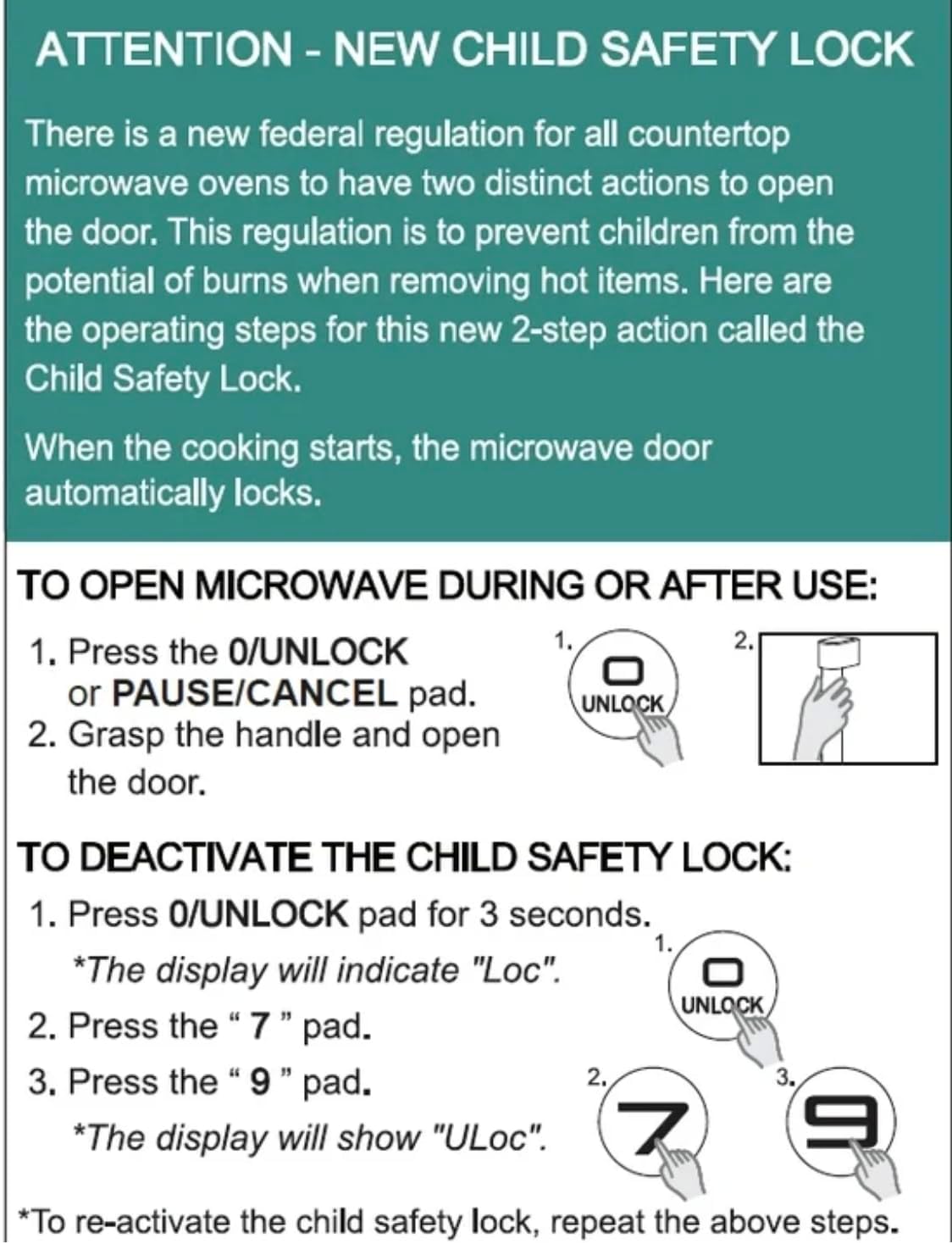
Image: Instructions for the new child safety lock feature, including how to open the door and deactivate the lock.
Maintenance and Cleaning
- Interior Cleaning: Wipe the inside of the oven with a damp cloth after each use. For stubborn stains, use a mild detergent. Ensure the interior is dry before next use.
- Exterior Cleaning: Clean the exterior surface with a soft, damp cloth. Do not use abrasive cleaners or harsh chemicals.
- Turntable Cleaning: The glass turntable and turntable ring can be removed for cleaning. They are dishwasher safe or can be hand-washed with warm, soapy water.
- Door Seals: Regularly inspect the door seals and surrounding areas for any damage or food residue. Clean as needed to ensure proper sealing.
Troubleshooting
| Problem | Possible Cause / Solution |
|---|---|
| Oven will not start. |
|
| Food is not cooking evenly. |
|
| Light bulb is out. | Contact customer support for bulb replacement. Do not attempt to replace it yourself. |
| Display shows "Loc". | Child safety lock is activated. Follow instructions in the "Child Safety Lock" section to deactivate. |
Warranty and Support
For warranty information or technical support, please refer to the warranty card included with your purchase or contact Hamilton customer service. Keep your proof of purchase for warranty claims.
Customer Service: Please visit the manufacturer's website or refer to your product packaging for contact details.


