
1. Introduction
This manual provides essential information for the safe and efficient operation of your new Farberware 1.1 Cu. Ft. 1000-Watt Countertop Microwave Oven. Please read all instructions carefully before use and retain this manual for future reference.
The Farberware 1.1 Cu. Ft. 1000-Watt Countertop Microwave Oven offers powerful cooking performance with a spacious interior designed to accommodate various dinnerware and microwave-safe cookware. It features multiple auto-cook presets, defrost functions, and customizable power levels for versatile cooking control. An easy-to-read LED display, express cooking function, and a child safety lock enhance user convenience and peace of mind.
2. Important Safety Instructions
WARNING: To reduce the risk of fire, electric shock, injury to persons, or exposure to excessive microwave energy, observe the following basic precautions:
- Read all instructions before using the appliance.
- Read and follow the specific "PRECAUTIONS TO AVOID POSSIBLE EXPOSURE TO EXCESSIVE MICROWAVE ENERGY" found on page 3 of the full user manual.
- This appliance must be grounded. Connect only to properly grounded outlets. See "GROUNDING INSTRUCTIONS" on page 4 of the full user manual.
- Install or locate this appliance only in accordance with the provided installation instructions.
- Do not heat whole eggs or hard-boiled eggs in microwave ovens as they may explode, even after microwave heating has ended.
- Do not operate this appliance if it has a damaged cord or plug, if it is not working properly, or if it has been damaged or dropped.
- Do not cover or block any openings on the appliance.
- Do not store this appliance outdoors. Do not use this product near water.
- Do not immerse cord or plug in water.
- Keep cord away from heated surfaces.
- Do not let cord hang over edge of table or counter.
- Use this appliance only for its intended use as described in this manual. Do not use corrosive chemicals or vapors in this appliance.
- As with any appliance, close supervision is necessary when used by children.
- Do not use this appliance for commercial purposes.
3. Product Features
- Powerful Performance: 1000 watts of cooking power and 10 adjustable power levels for customized heating.
- Easy Operation: Digital control panel with LED display and one-touch cooking presets for convenience.
- Spacious & Compact: 1.1 cu. ft. capacity fits full-sized plates while maintaining a space-saving design.
- Multiple Cooking Functions: Time and weight defrost options, express cooking, and memory function for easy meal prep.
- Child Safety Lock: Built-in safety feature prevents accidental operation, making it ideal for families.

Figure 1: Overview of key features including 1.1 cu.ft capacity, 10 power levels, and 1000 watts.

Figure 2: Close-up of the control panel highlighting auto-cook presets, defrost options, and child safety lock.
4. Setup
- Unpacking: Carefully remove the microwave oven and all packing materials from the carton. Check the oven for any damage, such as dents or a broken door. Do not operate the oven if it is damaged.
- Placement: Place the microwave oven on a flat, stable surface that can support its weight and the heaviest food item likely to be cooked in it. Ensure there is adequate ventilation around the unit (at least 3 inches of clearance on the sides and back, and 12 inches above).
- Turntable Installation: Place the roller ring in the center of the oven cavity. Position the glass turntable securely on top of the roller ring. Ensure the turntable rotates freely.
- Power Connection: Plug the power cord into a standard 120V, 60Hz grounded electrical outlet. Do not use an extension cord.
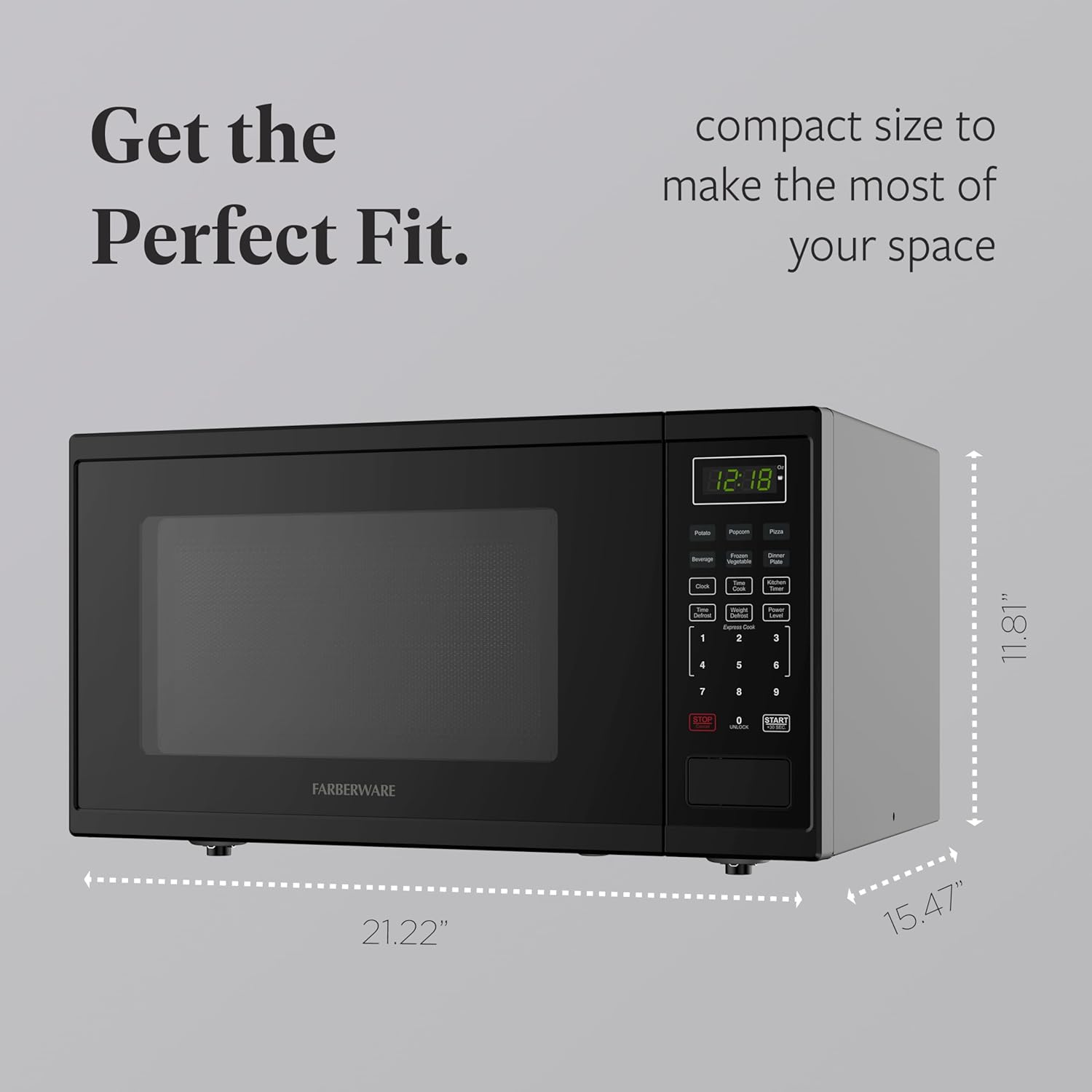
Figure 3: Side view of the microwave illustrating its compact dimensions for placement.
5. Operating Instructions
Your microwave oven is designed for ease of use with various cooking options.
5.1. Setting the Clock
- Press the "Clock" button.
- Use the number pads to enter the current time (e.g., 1-2-3-0 for 12:30).
- Press the "Clock" button again to confirm.
5.2. Time Cook
- Place food in the microwave.
- Press the "Time Cook" button.
- Enter the desired cooking time using the number pads (e.g., 1-0-0 for 1 minute).
- Press the "Power" button to adjust power level if desired (default is 100%). Use number pads 1-0 for 10%-100% power.
- Press "Start" to begin cooking.
5.3. Express Cook
For quick cooking, simply press any number pad from 1 to 6 for 1 to 6 minutes of cooking at 100% power. For example, pressing "1" will cook for 1 minute.
5.4. +30 Seconds Function
Press the "Start/+30 Sec" button to immediately start cooking for 30 seconds at 100% power. During cooking, pressing this button will add 30 seconds to the current cooking time.
5.5. Auto Cook Presets
The oven includes 6 one-touch auto-cook presets:
- Popcorn
- Potato
- Pizza
- Beverage
- Frozen Vegetable
- Dinner Plate
To use, press the desired preset button once. The oven will automatically set the appropriate cooking time and power level. For some presets, you may need to select the quantity (e.g., number of potatoes) using the number pads.
5.6. Defrost Functions
Your microwave offers both Time Defrost and Weight Defrost options.
- Time Defrost: Press "Time Defrost", enter the desired defrosting time, then press "Start".
- Weight Defrost: Press "Weight Defrost", enter the weight of the food in ounces (e.g., 16 for 1 lb), then press "Start". The oven will automatically calculate the defrosting time.
5.7. Child Safety Lock
To activate the child safety lock, press and hold the "Stop/Cancel" button for 3 seconds. The display will show "LOCK". To deactivate, press and hold the "Stop/Cancel" button again for 3 seconds.
6. Maintenance and Cleaning
Regular cleaning and maintenance will ensure the longevity and optimal performance of your microwave oven.
- Interior: Clean the oven cavity after each use with a damp cloth and mild detergent. For stubborn stains, a microwave-safe cleaner can be used.
- Exterior: Wipe the exterior surfaces with a soft, damp cloth. Avoid abrasive cleaners or harsh chemicals.
- Turntable and Roller Ring: The glass turntable and roller ring can be removed for cleaning. Wash them in warm, soapy water or in the dishwasher. Ensure they are completely dry before placing them back in the oven.
- Door Seals: Keep the door seals clean to ensure proper closure and efficient operation.

Figure 4: Interior view of the microwave, demonstrating the easy-to-clean design.
7. Troubleshooting
If you encounter issues with your microwave oven, refer to the following common problems and solutions:
| Problem | Possible Cause | Solution |
|---|---|---|
| Oven does not start | Power cord not securely plugged in; Door not closed properly; Fuse blown or circuit breaker tripped. | Ensure plug is secure; Close door firmly; Check household fuse/circuit breaker. |
| Food not heating | Incorrect cooking time/power level set; Food not microwave-safe. | Adjust time/power; Use microwave-safe cookware. |
| Turntable not rotating | Turntable not properly placed on roller ring; Obstruction under turntable. | Re-position turntable; Remove any obstructions. |
| Child Safety Lock engaged | Lock feature activated. | Press and hold "Stop/Cancel" for 3 seconds to deactivate. |
8. Specifications
- Brand: Farberware
- Model: 1.1 Cu. Ft. Countertop Microwave Oven
- Capacity: 1.1 Cubic Feet
- Wattage: 1000 Watts
- Voltage: 120 Volts
- Product Dimensions: 15.47"D x 21.22"W x 11.81"H
- Item Weight: 36.7 pounds
- Color: Black
- Material: Stainless Steel
- Installation Type: Countertop
- Special Features: Defrost, Express Cook, One Touch Button

Figure 5: Front view of the Farberware 1.1 Cu. Ft. Countertop Microwave Oven in black.
9. Warranty and Support
For warranty information and customer support, please refer to the warranty card included with your product or visit the official Farberware website. Keep your proof of purchase for any warranty claims.


