
1. Product Overview
The 5 Core EDA 80W Electric Drum Amplifier is a high-output sound solution designed for electronic drums, keyboards, and other musical instruments. It features an 8-inch speaker and 80 watts of power, providing clear and robust sound for various performance and practice settings. Its compact design and multiple connectivity options make it a versatile tool for musicians.
- 80W Powerful Output: Delivers high-output sound through an 8-inch speaker, suitable for practice, gigs, karaoke, and street or studio performances.
- All-in-One Connectivity: Features mic input, Bluetooth streaming, USB playback, Aux input, and headphone output for connecting various instruments, microphones, or mobile devices.
- Full Tone Control: Equipped with a 3-band equalizer (Bass, Mid, Treble) and volume controls for precise sound shaping.
- Durable Enclosed Design: Constructed with rugged edges and rubber pads for protection and enhanced bass response, ensuring stability.
- Compact & Portable: Includes a built-in carry handle and a compact size for easy transport to rehearsals, gigs, or outdoor sessions.
2. Package Contents
Please ensure all items are present upon unboxing:
- 1x 5 Core EDA 80W Electric Drum Amplifier
- 1x Power Cord
- 1x Power Adapter
Note: The 1/4-inch input/output cable for connecting instruments is not included and must be purchased separately.
3. Setup Instructions
- Placement: Position the amplifier on a stable, flat surface. The enclosed design with rubber pads provides stability and enhances bass.
- Power Connection: Connect the power adapter to the amplifier's power input (located on the rear panel). Plug the power cord into a standard AC outlet (110 Volts AC).
- Power On: Locate the power switch on the rear panel and switch it to the 'ON' position. The power indicator light on the control panel will illuminate.
- Instrument Connection:
- Electronic Drums/Keyboards: Use a 1/4-inch input/output cable (not included) to connect your instrument to the 'DRUM INPUT' or 'LINE INPUT' jacks on the control panel.
- Microphone: Connect a microphone to the 'MIC INPUT' jack.
- Auxiliary Devices: Connect a mobile device or other audio source to the 'AUX' input using an appropriate cable.
- USB Playback: Insert a USB drive with MP3 files into the USB port.
- Bluetooth Streaming: Activate Bluetooth on your mobile device and pair with the amplifier (refer to Operating Instructions for details).
- Headphone Connection: For private practice, connect headphones to the 'HEADPHONE OUTPUT' jack. This will mute the main speaker output.
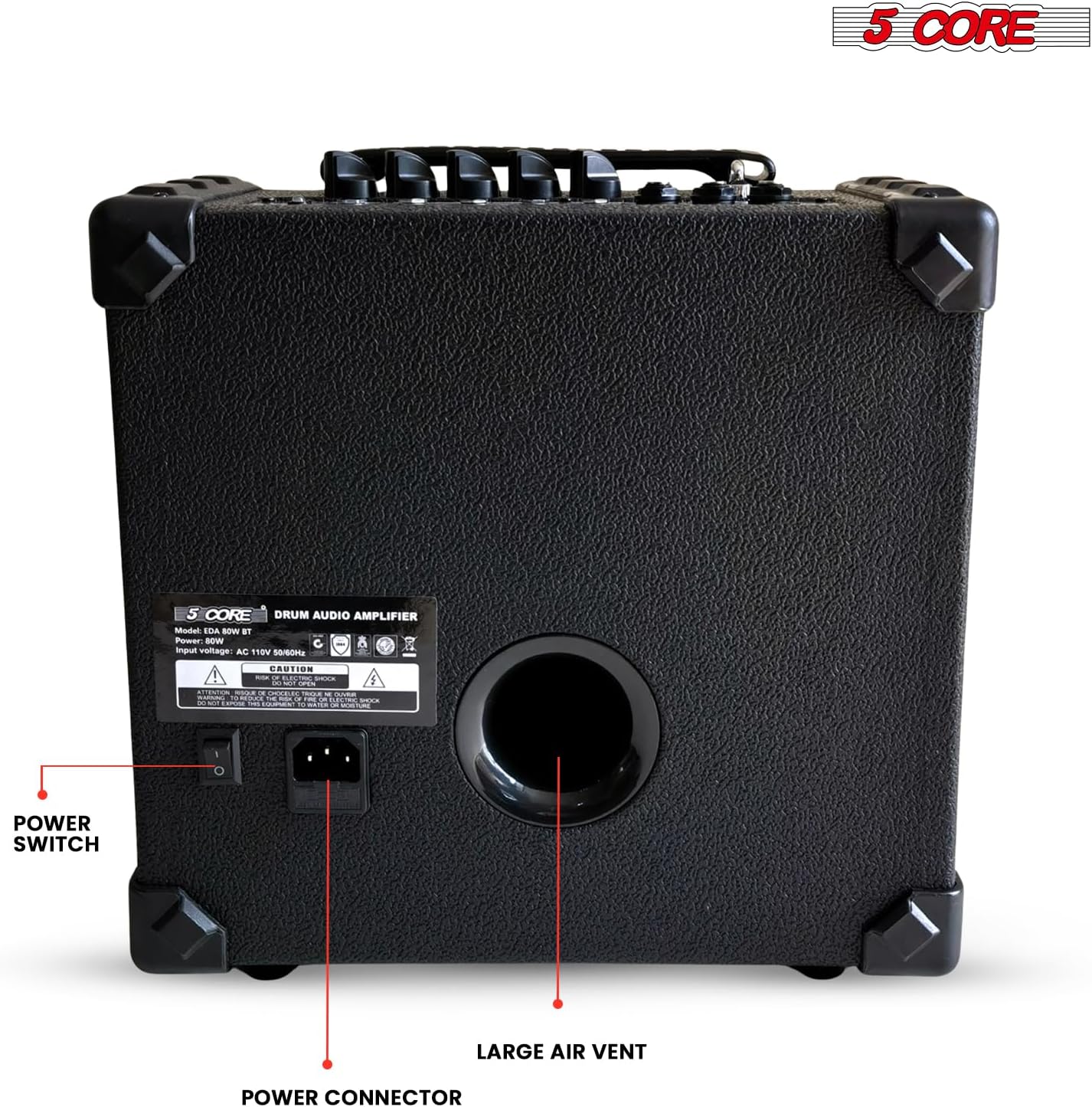
Figure 3.1: Rear panel with Power Switch and Power Connector.
4. Operating Instructions
4.1 Basic Operation
- Volume Control: Adjust the 'VOLUME' knob on the control panel to set the overall output level. Individual input volumes (e.g., 'MIC VOL', 'DRUM INPUT', 'LINE INPUT') can also be adjusted.
- Equalizer (EQ): Use the 'BASS', 'MID', and 'TREBLE' knobs to shape your sound. Turn clockwise to boost frequencies and counter-clockwise to cut them.
- Bluetooth Connectivity:
- Ensure the amplifier is powered on.
- On your mobile device, go to Bluetooth settings and search for available devices.
- Select '5 CORE EDA 80W' (or similar name) from the list to pair.
- Once connected, you can stream audio wirelessly from your device to the amplifier.
- USB Playback: Insert a USB drive containing MP3 audio files into the USB port. The amplifier will automatically detect and begin playing the files. Use the playback controls (play/pause, next/previous track) on the control panel.

Figure 4.1: Control Panel with EQ and Volume Knobs.

Figure 4.2: USB and Bluetooth Connectivity.
4.2 Connecting Various Instruments
- Electronic Drums: Connect the audio output of your electronic drum kit to the 'DRUM INPUT' jack. Adjust the drum volume using the dedicated knob.
- Keyboards/Other Line-Level Instruments: Connect to the 'LINE INPUT' jack.
- Microphones: Use the 'MIC INPUT' for vocal or instrument microphones. Adjust 'MIC VOL' as needed.

Figure 4.3: Versatile Connectivity Options.
4.3 Official Product Video
Video 4.1: Official overview of the 5 Core 80W Bluetooth Drum Amplifier with an 8-inch speaker, demonstrating its features and sound capabilities.
5. Maintenance
- Cleaning: Use a soft, dry cloth to clean the exterior of the amplifier. Avoid using abrasive cleaners or solvents.
- Storage: Store the amplifier in a cool, dry place away from direct sunlight and extreme temperatures.
- Handling: Always use the built-in carry handle for transport. Avoid dropping or subjecting the amplifier to strong impacts.
- Ventilation: Ensure the large air vent on the rear panel is not obstructed to prevent overheating.
6. Troubleshooting
6.1 No Sound Output
- Check if the amplifier is powered on and the power indicator light is illuminated.
- Ensure all volume knobs (Master, Mic, Drum, Line) are turned up.
- Verify that your instrument or audio source is properly connected and its volume is turned up.
- If headphones are connected, disconnect them to enable speaker output.
- Check all cables for damage or loose connections.
6.2 Poor Sound Quality
- Adjust the 'BASS', 'MID', and 'TREBLE' EQ knobs to optimize the sound.
- Ensure the input signal from your instrument is not too high, which can cause distortion. Reduce the instrument's output volume if necessary.
- Check for any interference if using Bluetooth or wireless connections.
6.3 Bluetooth Connection Issues
- Ensure the amplifier is within range of your Bluetooth device.
- Try unpairing and re-pairing the device.
- Restart both the amplifier and your Bluetooth device.
7. Specifications
| Output Wattage | 80 Watts |
| Speaker Size | 8 inches |
| Item Weight | 16.4 pounds |
| Product Dimensions | 11 x 11.7 x 11.5 inches |
| Item Model Number | EDA 80W BT |
| Color | Black |
| Material | Metal |
| Compatible Devices | Guitar, Keyboard, Drum, Vocals, All |
| Connector Type | 3.5mm Jack, USB |
| Power Source | AC adapter |
| Voltage | 110 Volts (AC) |

Figure 7.1: Amplifier highlighting speaker size and power.
8. Warranty and Support
For warranty information and customer support, please refer to the documentation included with your purchase or visit the official 5 CORE website. Keep your proof of purchase for any warranty claims.


