
1. Product Overview
The Alomejor Electric Bike Speed Controller Kit is designed to enhance the performance and control of your electric bike or scooter. This dual-drive controller system provides precise power management, improved durability, and a smoother riding experience. It is engineered for stability and longevity, supporting speeds up to 60km/h (depending on motor specifications).

Image 1.1: Overview of the Alomejor Electric Bike Speed Controller Kit and its application on electric bikes and scooters.
Key Features:
- Dual Drive System: Includes front and rear drive controllers for comprehensive power management.
- High Performance: Operates at 48V 25A with a 1200W capability, ensuring efficient power delivery.
- Enhanced Durability: Constructed with aluminum alloy and PCB for long-lasting stability and resistance to wear.
- Precise Control: Manages power output effectively for safe and reliable operation in various environments.
- Integrated Display: Comes with a display panel for monitoring key operational parameters.
- Comprehensive Kit: Includes all necessary components for a complete upgrade, such as controllers, display, and central control harness.

Image 1.2: The complete Alomejor dual drive controller kit, showing all included components.
2. Package Contents
Please verify that all items listed below are present in your package. If any components are missing or damaged, please contact customer support.
- Front Drive Controller (1 unit)
- Rear Drive Controller (1 unit)
- Display Panel (1 unit)
- Central Control Harness (1 unit)
- Accessories (3 units, typically connectors and mounting hardware)
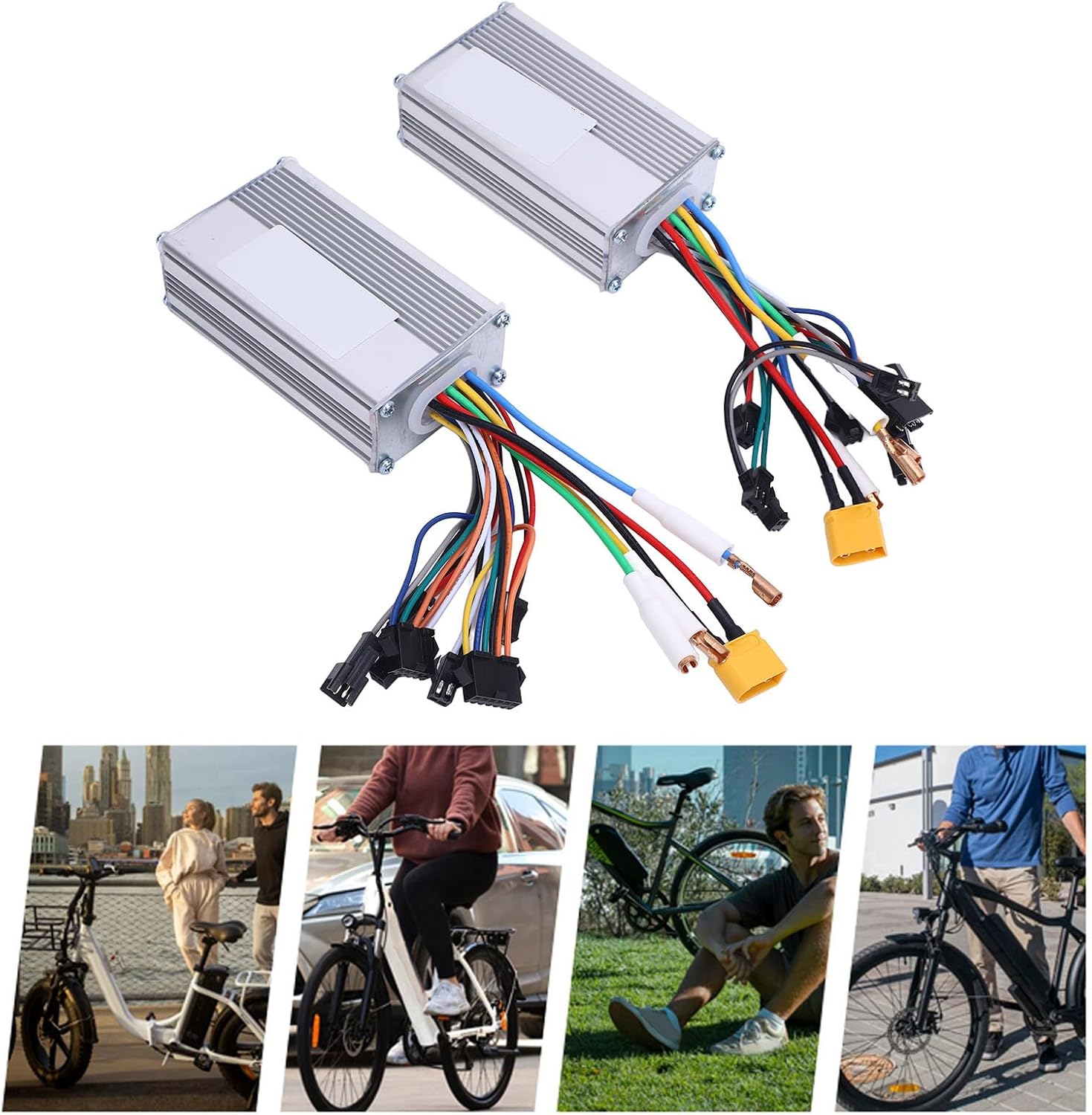
Image 2.1: All components included in the Alomejor Electric Bike Speed Controller Kit.
3. Setup and Installation
This section provides general guidelines for installing the Alomejor Electric Bike Speed Controller Kit. Professional installation is recommended if you are unfamiliar with electric bike wiring. Ensure the electric bike's power is completely off before beginning installation.
Safety Precautions:
- Always disconnect the battery before working on electrical components.
- Wear appropriate safety gear, including gloves and eye protection.
- Ensure all connections are secure and properly insulated to prevent short circuits.
- Do not modify the controllers or wiring harness.
Installation Steps:
- Mount the Controllers: Securely mount the front and rear drive controllers to the frame of your electric bike or scooter. Ensure they are protected from water and physical damage.
- Connect Motor Wires: Connect the motor phase wires (usually three thick wires) from your front and rear motors to the corresponding ports on each controller. Match colors carefully.
- Connect Hall Sensor Wires: Connect the Hall sensor wires (usually five thinner wires) from your motors to the controllers. These provide feedback on motor position.
- Connect Power Supply: Connect the main power wires from your battery (positive and negative) to the central control harness, and then to the controllers. Ensure correct polarity.
- Install Display Panel: Mount the display panel on your handlebars in an easily viewable position. Connect its wiring to the central control harness.
- Connect Other Accessories: Connect any other accessories such as throttle, brake levers, and pedal assist sensor (PAS) to the central control harness as per your bike's configuration.
- Secure All Connections: Double-check all connections for tightness and proper insulation. Use zip ties or cable management solutions to keep wires tidy and secure.
- Initial Power-Up: Reconnect the battery and power on the system. Observe the display for any error codes and test basic functions at a low speed in a safe environment.

Image 3.1: The controller kit components, highlighting the importance of secure and safe connections during installation.
4. Operating Instructions
Once installed, the Alomejor Electric Bike Speed Controller Kit provides intuitive control over your electric bike's propulsion.
Display Panel Functions:
The display panel provides real-time information and allows for adjustment of certain parameters. Refer to the specific display model's manual for detailed button functions. Common functions include:
- Power On/Off: Typically a long press of the power button.
- Speed Display: Shows current speed (km/h or mph).
- Battery Level: Indicates remaining battery charge.
- Assist Level: Adjusts the level of motor assistance (e.g., 1-5).
- Trip Distance/Odometer: Displays current trip distance or total distance traveled.
- Error Codes: Alerts to system malfunctions.
Riding with the Controller:
- Power On: Turn on the electric bike's battery and then the display panel.
- Select Assist Level: Use the display controls to select your desired pedal assist level. Higher levels provide more motor power.
- Throttle Operation (if applicable): If your bike has a throttle, gently twist or press it to engage motor power without pedaling. Use with caution, especially at higher assist levels.
- Braking: The controllers are designed to cut motor power when brake levers are engaged, ensuring safety.
- Monitor Display: Keep an eye on your speed, battery level, and any error messages during your ride.

Image 4.1: The controller kit enables powerful and efficient operation of your electric bike.
5. Maintenance
Proper maintenance ensures the longevity and optimal performance of your Alomejor Electric Bike Speed Controller Kit.
- Regular Inspection: Periodically check all wiring connections for looseness, corrosion, or damage. Ensure controllers are securely mounted.
- Cleaning: Keep the controllers and display panel clean and free from dust, dirt, and moisture. Use a soft, dry cloth for cleaning. Avoid using harsh chemicals or excessive water.
- Moisture Protection: While the controllers are designed to be durable, avoid prolonged exposure to heavy rain or submersion in water. Ensure all cable entries are sealed.
- Temperature Management: Ensure the controllers have adequate airflow to prevent overheating, especially during prolonged high-power operation.
- Cable Management: Ensure cables are routed safely, away from moving parts and sharp edges, to prevent wear and tear.

Image 5.1: The durable construction of the controller kit benefits from regular maintenance to ensure long-term performance.
6. Troubleshooting
This section addresses common issues you might encounter with your electric bike controller kit.
| Problem | Possible Cause | Solution |
|---|---|---|
| Motor not engaging / No power |
|
|
| Inconsistent or jerky motor operation |
|
|
| Display not working |
|
|
| Error code on display |
|
|
Important Note: If you are unable to resolve an issue, do not attempt further repairs. Contact qualified service personnel or Alomejor customer support.
7. Specifications
| Feature | Detail |
|---|---|
| Item Type | Dual Drive Controller Kit |
| Brand | Alomejor |
| Model Name | Alomejorgpsanm5c67 |
| Material | Aluminum Alloy, PCB |
| Voltage | 48V |
| Current | 25A |
| Power | 1200W |
| Max Speed Support | Up to 60km/h (motor dependent) |
| Package Dimensions (L x W x H) | 12.6 x 8.66 x 3.15 inches |
| Package Weight | 700 Grams |
| ASIN | B0F6YK9SHZ |
8. Warranty Information
The Alomejor Electric Bike Speed Controller Kit comes with a manufacturer's warranty.
- Warranty Period: 90 days from the date of purchase.
- Coverage: This warranty covers defects in materials and workmanship under normal use.
- Exclusions: The warranty does not cover damage caused by improper installation, misuse, accidents, unauthorized modifications, or normal wear and tear.
- Claim Process: To make a warranty claim, please retain your proof of purchase and contact Alomejor customer support.
9. Customer Support
For further assistance, technical support, or warranty inquiries, please contact Alomejor customer service.
- Online Support: Visit the official Alomejor store on Amazon for product information and support resources.Alomejor Amazon Store
- Model Number: Alomejorgpsanm5c67
- ASIN: B0F6YK9SHZ