
1. Introduction
This manual provides essential information for the safe and efficient operation of your new Pemberly Row 30" Slim Over the Range 1.2 cu. ft. Microwave. Designed to optimize kitchen space, this microwave features powerful cooking capabilities and convenient automatic presets. Please read this manual thoroughly before installation and use, and retain it for future reference.

Figure 1: Front view of the Pemberly Row Slim Over the Range Microwave.
2. Important Safety Information
To reduce the risk of fire, electric shock, injury to persons, or exposure to excessive microwave energy when using your appliance, follow basic precautions, including the following:
- Read all instructions before using the appliance.
- Do not operate any cooking appliance under a wall cabinet that is less than 30 inches from the cooking surface.
- Do not heat liquids or other foods in sealed containers as they are liable to explode.
- Do not use corrosive chemicals or vapors in this appliance.
- Only allow children to use the appliance under close supervision.
- Maintain the appliance in good condition and clean the waveguide cover regularly.
- Ensure proper grounding.
3. Package Contents
Verify that all items are present in the package:
- Pemberly Row 30" Slim Over the Range Microwave Unit
- 12.4" Turntable
- Charcoal Filters (for ductless operation)
- Installation Hardware (mounting plate, screws, etc.)
- User Manual (this document)
4. Installation
This microwave is designed for over-the-range installation. Due to the complexity and safety requirements, professional installation is highly recommended. Ensure that the installation area meets the following criteria:
- Sufficient clearance above the cooking surface (minimum 30 inches).
- Proper electrical outlet (120V/60Hz, 3-Prong Plug).
- Adequate structural support for the microwave's weight (51.1 lbs).
- Ventilation options: Rear or top exhaust opening, convertible to ductless operation with included charcoal filters.
Refer to the detailed installation guide provided with your unit for specific measurements, mounting instructions, and electrical requirements. Improper installation can lead to property damage or personal injury.
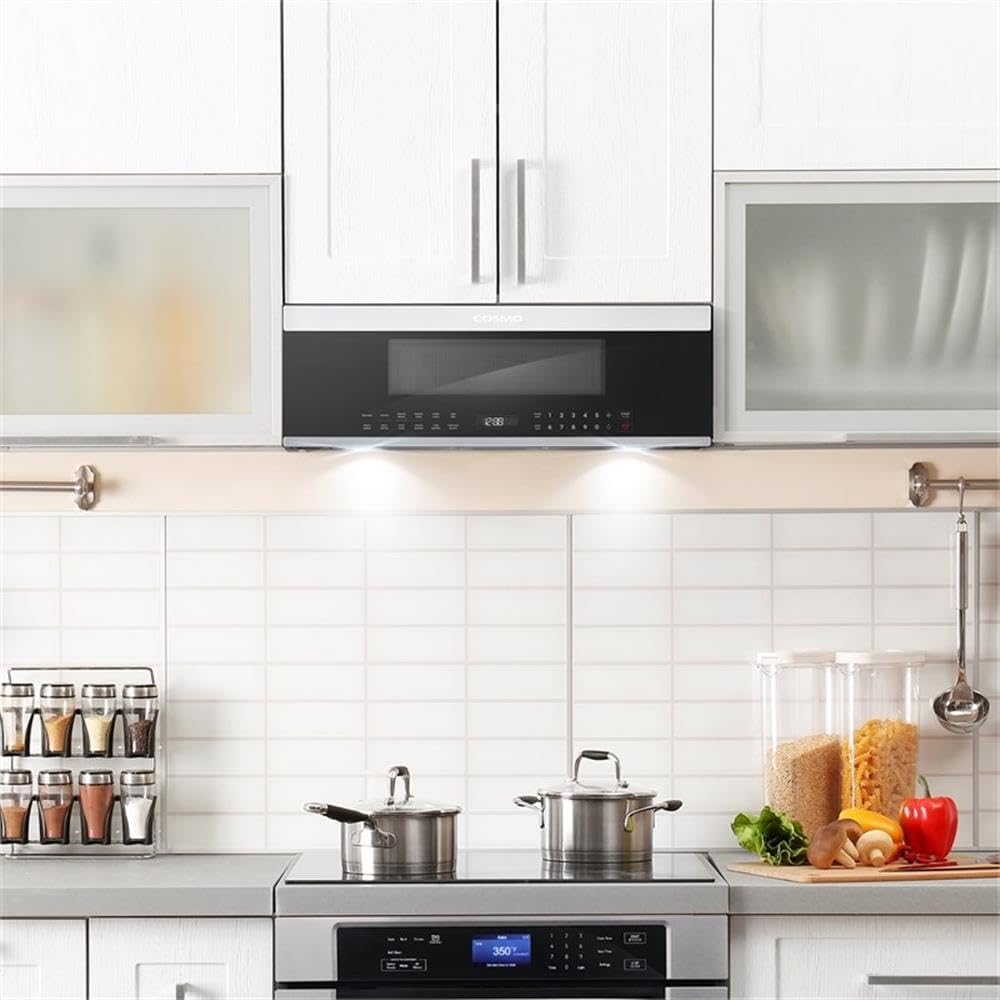
Figure 2: Microwave installed above a cooktop, showcasing its slim design.
5. Controls and Features Overview
Your microwave features sleek touch controls and a large digital display for easy operation. Familiarize yourself with the control panel layout and key functions:

Figure 3: Detailed view of the touch control panel and digital display.
Key Features:
- 1.2 cu. ft. Capacity: Provides ample cooking space within a slim profile.
- 1000 Watts Cooking Power: Ensures quick and efficient heating.
- 11 Power Levels: Offers precise control for various cooking needs, from melting to defrosting.
- 7 Auto Cooking Options: Includes presets for popcorn, potato, sensor cook, and sensor reheat.
- Smart Sensor Cooking: Automatically detects when food is ready and adjusts cooking time.
- 400 CFM Ventilation Fan: Two-speed fan efficiently removes smoke, odor, and moisture from the cooktop.
- Convertible Ventilation: Can be set up for rear, top, or ductless exhaust (charcoal filters included for ductless).
- Energy Efficient LED Lighting: Illuminates the cooktop surface for enhanced visibility.
- 12.4" Turntable: Ensures even cooking and can be turned on/off as desired.
6. Operating Instructions
6.1. Basic Microwave Operation
- Place food in a microwave-safe container on the turntable.
- Close the microwave door securely.
- Enter the desired cooking time using the number pad.
- Select the power level (default is usually 100% or 'High'). Press the 'Power Level' button and then a number from 1-11.
- Press 'START/+30 SEC' to begin cooking.
- To add 30 seconds during cooking, press 'START/+30 SEC'.
- To stop cooking, press 'STOP/CLEAR'.
6.2. Auto Cook Functions
The microwave includes several pre-programmed settings for common foods:
- Popcorn: For automatic popcorn preparation.
- Potato: For baking potatoes.
- Sensor Cook: Automatically adjusts cooking time and power for various foods.
- Sensor Reheat: Reheats food to an optimal temperature without overcooking.
To use an Auto Cook function, simply press the corresponding button. The microwave will automatically determine the appropriate cooking time and power level.
6.3. Defrost Functions
Your microwave offers both Weight Defrost and Time Defrost options:
- Weight Defrost: Press 'Weight Defrost', enter the food's weight, and press 'START'.
- Time Defrost: Press 'Time Defrost', enter the desired defrosting time, and press 'START'.
6.4. Ventilation Fan and Cooktop Light
The ventilation fan and cooktop light are located on the underside of the microwave.

Figure 4: Underside of the microwave with LED lighting and ventilation filters.
- Ventilation Fan: Press the fan button to cycle through High, Low, and Off settings.
- Cooktop Light: Press the light button to cycle through High, Low, and Off settings for illuminating your cooking surface.
6.5. Turntable On/Off
The 12.4" glass turntable ensures even heating. You can turn it on or off by pressing the 'Turntable On/Off' button on the control panel.

Figure 5: Interior of the microwave, highlighting the glass turntable.
7. Maintenance and Cleaning
Regular cleaning and maintenance will ensure the longevity and optimal performance of your microwave.
7.1. Exterior Cleaning
Wipe the exterior surfaces with a soft, damp cloth and mild soap. Avoid abrasive cleaners or scouring pads that could scratch the finish.
7.2. Interior Cleaning
Clean the interior cavity with a soft cloth, warm water, and mild soap. For stubborn food splatters, place a bowl of water with lemon slices inside and microwave for a few minutes to loosen residue before wiping.
The glass turntable can be removed for cleaning. It is dishwasher safe.
7.3. Grease and Charcoal Filters
The grease filters should be cleaned regularly (monthly or as needed) by washing them in hot water with detergent or in a dishwasher. The charcoal filters (used for ductless operation) are not washable and should be replaced approximately every 6-12 months, depending on usage.
8. Troubleshooting
If you encounter issues with your microwave, consult the following common problems and solutions before contacting customer service:
| Problem | Possible Cause | Solution |
|---|---|---|
| Microwave does not start | Door not closed properly; Power outage; Circuit breaker tripped. | Ensure door is latched; Check power supply; Reset circuit breaker. |
| Food not heating evenly | Food not stirred/rotated; Turntable not rotating. | Stir/rotate food; Check turntable placement and ensure it's enabled. |
| Excessive noise during operation | Turntable/roller ring improperly placed; Foreign object in cavity. | Re-seat turntable components; Remove any obstructions. |
| Ventilation fan not working | Fan setting is 'Off'; Motor malfunction. | Ensure fan is set to High or Low; Contact service if issue persists. |
9. Specifications
- Brand Name:
- Pemberly Row
- Model Info:
- PR-4753-2766988
- Item Weight:
- 51.1 pounds
- Product Dimensions:
- 18.5"D x 30"W x 10.3"H
- Capacity:
- 1.2 Cubic Feet
- Installation Type:
- Over-the-Range
- Special Features:
- Auto Cook
- Oven Cooking Mode:
- Microwave
- Color:
- Black
- Voltage:
- 120 Volts (AC)
- Wattage:
- 88 watts (Note: Product description states 1000 watts cooking power, 88 watts might refer to standby or specific component. Refer to product label for exact cooking wattage.)
- Defrost:
- Auto Defrost
- Material Type:
- Stainless Steel
- Inner Material Type:
- Stainless Steel
- Included Components:
- Turntable
10. Warranty and Support
Your Pemberly Row microwave is covered by a manufacturer's limited warranty. Please refer to the warranty card included in your product packaging for specific terms, conditions, and duration of coverage. For technical support, service, or to order replacement parts, please contact Pemberly Row customer service through their official website or the contact information provided in your warranty documentation.