
1. Introduction
Thank you for choosing the ropelux SD04USRP1 Solar Shed Light. This product is designed to provide efficient and versatile lighting for various indoor and outdoor applications, including sheds, barns, garages, patios, and gazebos. Featuring a 3000-lumen output, multiple lighting modes, adjustable color temperatures, and dual motion sensors, this light offers convenience and enhanced security. Please read this manual thoroughly before installation and operation to ensure proper use and longevity of your product.
2. Safety Information
- Ensure all components are securely connected before use.
- Do not attempt to modify or disassemble the product. This may void the warranty and pose safety risks.
- Keep the solar panel clean and free from obstructions to ensure optimal charging efficiency.
- Avoid direct eye exposure to the light source when it is operating at full brightness.
- Dispose of batteries and electronic components according to local regulations.
- This product is IP65 waterproof, suitable for outdoor use, but avoid submerging it in water.
3. Package Contents
Verify that all items listed below are included in your package:
- 2 x Solar Light Fixtures
- 2 x Solar Panels with 15.6ft Cables
- 2 x Remote Controls
- Mounting Hardware (screws, anchors)
- 1 x Instruction Manual

Image 3.1: Package contents including two solar lights, two solar panels, and two remote controls.
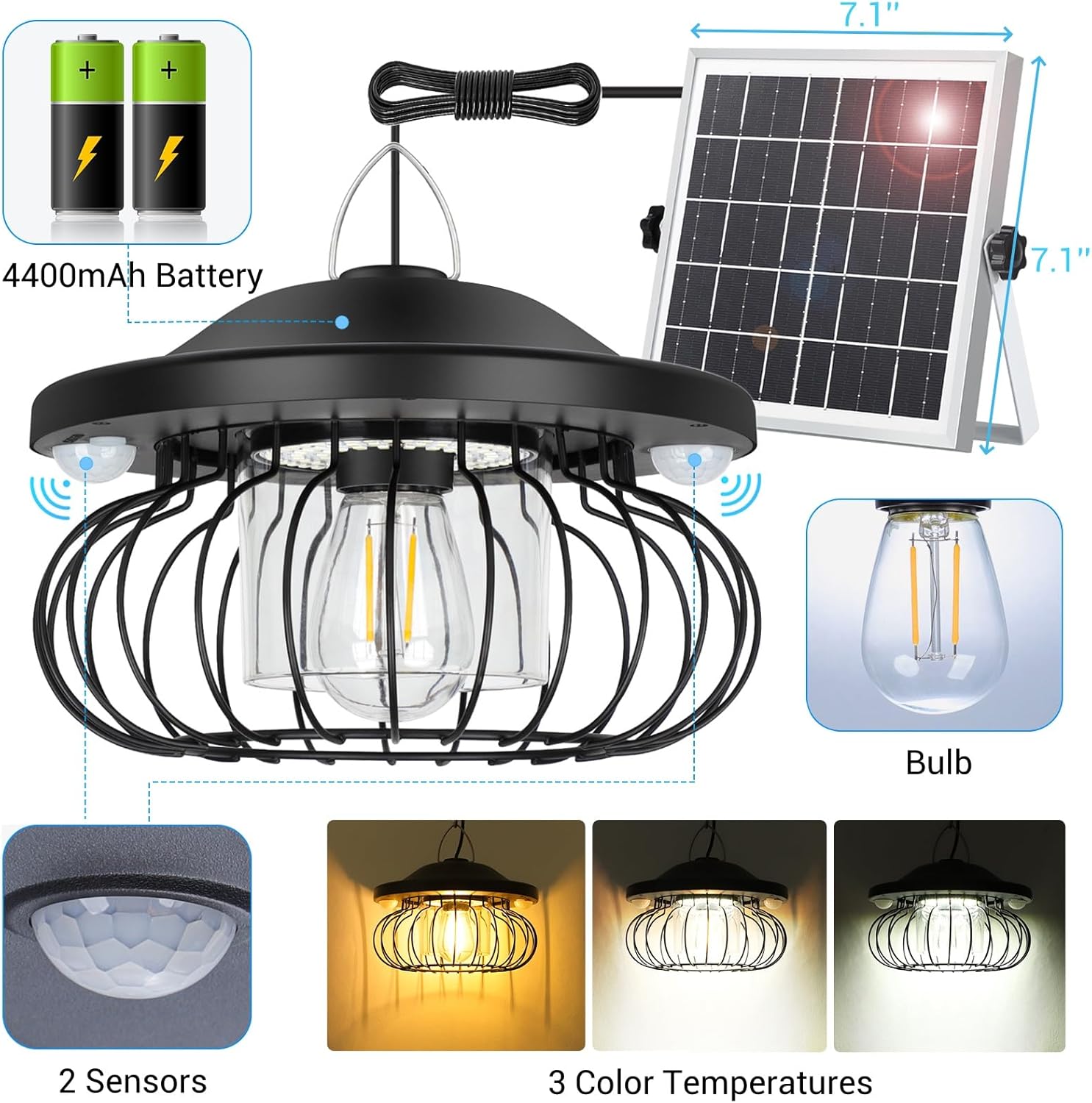
Image 3.2: Detailed view of the solar light fixture, solar panel, remote, and included hardware.
4. Specifications
| Feature | Specification |
|---|---|
| Brand | ropelux |
| Model Name | SD04USRP1 |
| Brightness | 3000 Lumens (Max) |
| Battery Capacity | 4400mAh |
| Color Temperatures | Warm White (3000K), Natural White (4500K), Cool White (6500K) |
| Dimming Levels | 4 Levels (25%, 50%, 75%, 100%) |
| Motion Sensor Range | Up to 26 feet, 180° detection angle (Dual PIR sensors) |
| Solar Panel Cable Length | 15.6 feet |
| Water Resistance | IP65 Waterproof |
| Material | ABS, Aluminum, Polycarbonate, Tempered Glass, Wrought Iron |
| Product Dimensions | 7.87"L x 7.87"W x 5.5"H |
5. Setup and Installation
5.1 Solar Panel Placement
The solar panel should be installed in a location that receives direct sunlight for at least 6-8 hours daily. The 15.6ft cable allows for flexible placement, enabling you to position the light fixture in shaded areas while the panel remains in optimal sunlight.
- Choose a south-facing location (in the Northern Hemisphere) for maximum sun exposure.
- Ensure no trees, buildings, or other obstructions block sunlight from reaching the panel throughout the day.
- Use the included mounting hardware to securely attach the solar panel. The panel's angle can be adjusted to optimize sun capture.

Image 5.1: Example of separate solar panel installation for optimal sun exposure.
5.2 Light Fixture Installation
The light fixture is designed for hanging mounting. Choose a suitable location such as a shed ceiling, gazebo beam, or porch overhang.
- Use the provided mounting hardware to hang the light fixture securely.
- Connect the solar panel cable to the light fixture. Ensure the connection is tight and waterproof.
- Allow the solar panel to charge the light for at least 8-10 hours in direct sunlight before initial use.
6. Operating Instructions
The ropelux Solar Shed Light can be controlled via the included remote control or the push button on the light fixture.
6.1 Remote Control Functions
The remote control allows for easy adjustment of modes, brightness, color temperature, and timer settings.
- ON/OFF: Power the light on or off.
- Mode Buttons (M1-M5): Select desired lighting mode.
- Brightness Buttons (+/-): Adjust brightness levels.
- Color Temperature Buttons (3000K, 4500K, 6500K): Change light color.
- Timer Buttons (4H, 6H): Set the timer for modes 1-3.
6.2 Lighting Modes
The light features 5 distinct operating modes, including options for both night-only and all-day functionality.

Image 6.1: Overview of the 5 lighting modes.
- Mode 1 (Night-Only, Motion-Activated): Low light at night, brightens to 100% for 20 seconds upon motion detection, then returns to low light.
- Mode 2 (Night-Only, Motion-Activated): Light stays off at night, brightens to 100% for 20 seconds upon motion detection, then turns off.
- Mode 3 (Night-Only, Constant Light): Provides continuous illumination at night.
- Mode 4 (All-Day, Motion-Activated): Light stays off all day, brightens to 100% for 20 seconds upon motion detection, then turns off. Ideal for dim indoor spaces like sheds.
- Mode 5 (All-Day, Constant Light): Provides continuous illumination all day. Suitable for consistently dark indoor areas.
- 3000K Warm White: For a cozy and inviting ambiance.
- 4500K Natural White: A balanced, neutral light for general tasks.
- 6500K Cool White: Bright, crisp light for enhanced visibility.

Image 6.2: Mode 1 operation.

Image 6.3: Mode 2 operation.

Image 6.4: Mode 3 operation.

Image 6.5: Mode 4 operation.

Image 6.6: Mode 5 operation.
6.3 Color Temperatures
The light offers three adjustable color temperatures to suit different preferences and environments:
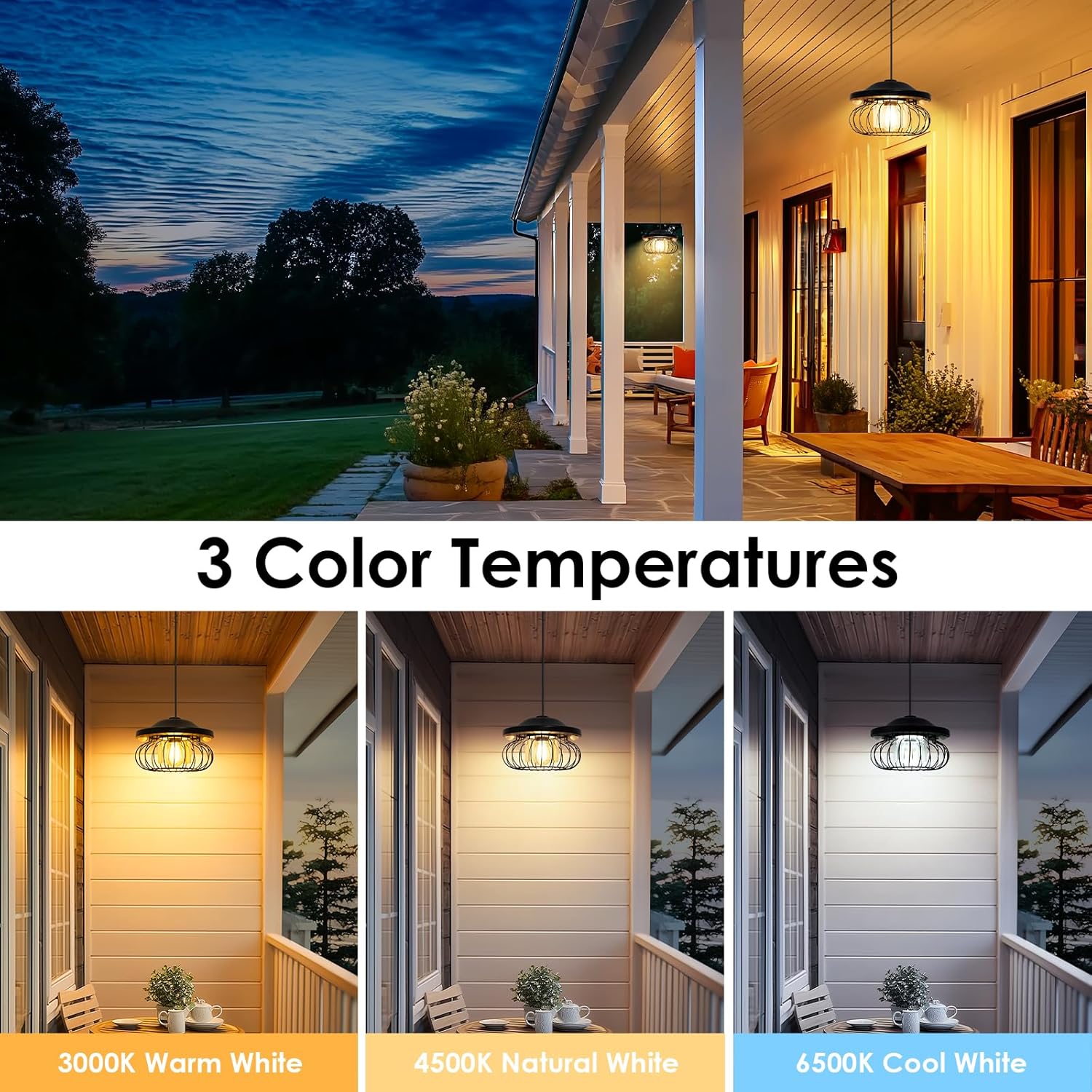
Image 6.7: Examples of 3 color temperatures.

Image 6.8: Color temperature options in a garage setting.
6.4 Brightness Levels
The light offers 4 levels of brightness adjustment. In sensor modes (Mode 1, 2, 4), the motion-triggered brightness is 100%. In constant modes (Mode 3, 5), you can adjust the continuous brightness from 25% to 100%.

Image 6.9: 4-level brightness adjustment.
6.5 Motion Sensor
Equipped with dual high-sensitivity PIR motion sensors, the light detects movement up to 26 feet within a 180° range, providing quick and reliable illumination when needed.
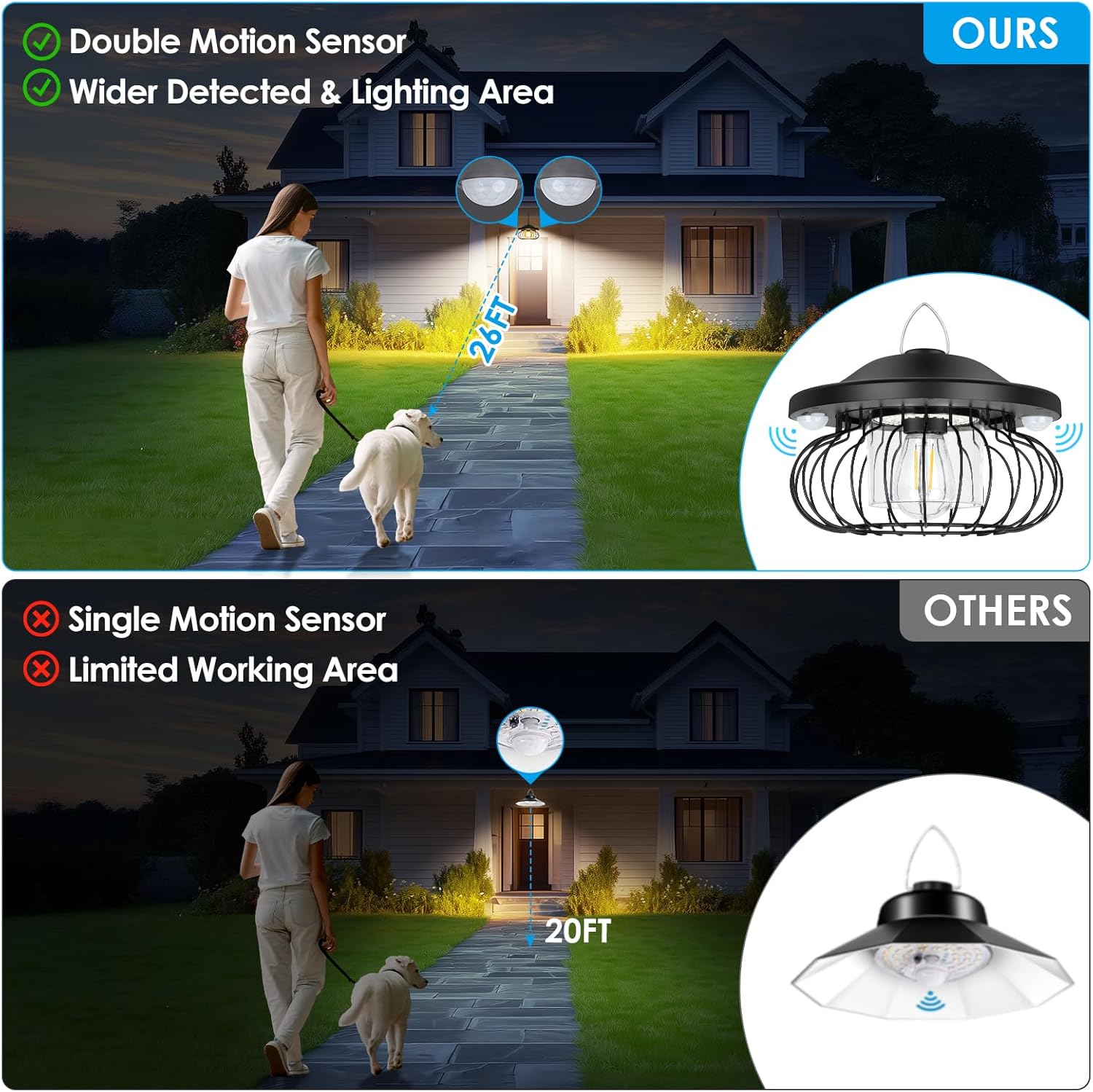
Image 6.10: Dual motion sensor for wider detection.

Image 6.11: Benefits of dual motion sensors.
6.6 Timer Function
For Modes 1-3, you can set a timer for 4 or 6 hours. The light will operate in the selected mode for the set duration and then turn off, cycling daily. To cancel the timer, simply turn the light off using the remote or button.

Image 6.12: Timer function for Modes 1-3.
7. Maintenance
- Cleaning: Regularly wipe the solar panel with a soft, damp cloth to remove dust, dirt, or debris. A clean panel ensures maximum charging efficiency. Clean the light fixture as needed.
- Battery: The integrated 4400mAh battery is designed for long-term use. If the light's performance significantly degrades over time, it may indicate battery aging. Battery replacement should only be performed by qualified personnel.
- Environmental Factors: While IP65 waterproof, extreme weather conditions (heavy snow, prolonged freezing temperatures) can affect performance. Ensure the solar panel is clear of snow and ice.
8. Troubleshooting
| Problem | Possible Cause | Solution |
|---|---|---|
| Light does not turn on. | Insufficient charge; Solar panel obstructed; Light switch off; Remote battery dead. | Ensure solar panel receives direct sunlight for 8-10 hours. Clean panel. Check light switch/remote. Replace remote battery. |
| Light runtime is short. | Insufficient charging; Cloudy weather; Battery degradation. | Relocate solar panel for better sun exposure. Allow more charging time. Consider battery replacement if very old. |
| Motion sensor not working. | Sensor obstructed; Incorrect mode selected; Sensor range too far. | Clear obstructions from sensor. Ensure light is in a motion-sensing mode (M1, M2, M4). Test within 26ft range. |
| Remote control not responding. | Remote battery dead; Obstruction between remote and light. | Replace remote control battery. Ensure clear line of sight to the light fixture. |
9. Warranty and Support
ropelux products are manufactured with quality and durability in mind. For specific warranty details, please refer to the product packaging or contact ropelux customer support. If you encounter any issues or have questions regarding your ropelux SD04USRP1 Solar Shed Light, please reach out to our customer service team for assistance. We are committed to providing reliable support and ensuring your satisfaction.
For support, please visit the ropelux store on Amazon: ropelux Amazon Store
