
1. Product Overview
The CARPURIDE W125S is an advanced 11.26-inch HD portable car stereo system designed to enhance your driving experience with integrated smart features and comprehensive recording capabilities. It features wireless Apple CarPlay and Android Auto, a triple camera dash cam system (4K front, 1080P infrared interior, 1080P rear), and various connectivity options.

Figure 1.1: CARPURIDE W125S main unit with integrated cameras and a view of the display showing the CarPlay interface.

Figure 1.2: Overview of CARPURIDE W125S key features including CarPlay, Android Auto, and the triple camera system.
Key Features:
- Three Cam Car Navigation Screen: Features a 4K front camera, 1080P infrared interior camera, and 1080P rear camera. The 170° wide-angle covers the whole cabin. The 350° rotatable front camera with vertical adjustment fits various vehicles.
- Loop Recording & Gravity Sensor: Equipped with a pre-installed 64GB TF card (supports up to 256GB). Loop recording automatically overwrites old files. The built-in gravity sensor automatically locks key videos in the event of a collision.
- Seamless Smartphone Integration: Compatible with wireless Apple CarPlay (iOS 6 and above) and Android Auto (Android 11 and above) for navigation, messaging, calls, and music.
- Real-time Maps Navigation: Magnifies map details for better visibility, supporting apps like Google Maps and Waze.
- Mirror Link & Audio Outputs: Supports mirroring via Airplay (iPhone) and Super Link (iOS/Android). Offers audio output via Bluetooth, local speakers, FM radio, and AUX (3.5mm).
- Anti-Glare Screen & Sensor Light Design: 11.26-inch HD IPS display (10.26-inch inner screen) with 1920x720 resolution. Automatically adjusts screen brightness based on ambient light.
- Smart Voice Control: Built-in clear microphone technology for hands-free calls and voice commands via Siri or Google Assistant.
- Customization Options: Includes a 2.5mm jack for a rearview camera. Customizable boot logos and screens.
2. Setup & Installation
2.1 What's in the Box
Verify that all components are present before beginning installation:
- 1x CARPURIDE W125S Car Stereo
- 2x Mounting Brackets (Suction Cup and Sticker)
- 1x Car Charger
- 1x Backup Camera
- 1x AUX Cable
- 1x Suction Cup Gasket
- 1x Rear View Camera & Wire
- 1x User Manual

Figure 2.1: Included components and dimensions.
2.2 Mounting the Device
The W125S can be mounted using either the suction cup bracket for windshields or the sticker bracket for dashboards.
- Attach the CARPURIDE screen to your chosen mount (suction cup or sticker bracket).
- Secure the mount to your car's front windshield or dashboard. Ensure the surface is clean and dry for optimal adhesion.

Figure 2.2: Instructions for rotating the front camera and attaching the mounting bracket.
The front camera can be rotated 350° for optimal coverage. Caution: Avoid over-rotation to prevent cable loosening or disconnection. Gently adjust within the marked range.
2.3 Power Supply
The device uses a Type-C 12V power supply. Use only the original Carpuride car charger, as it includes a built-in FM antenna. Using other chargers may affect FM performance.
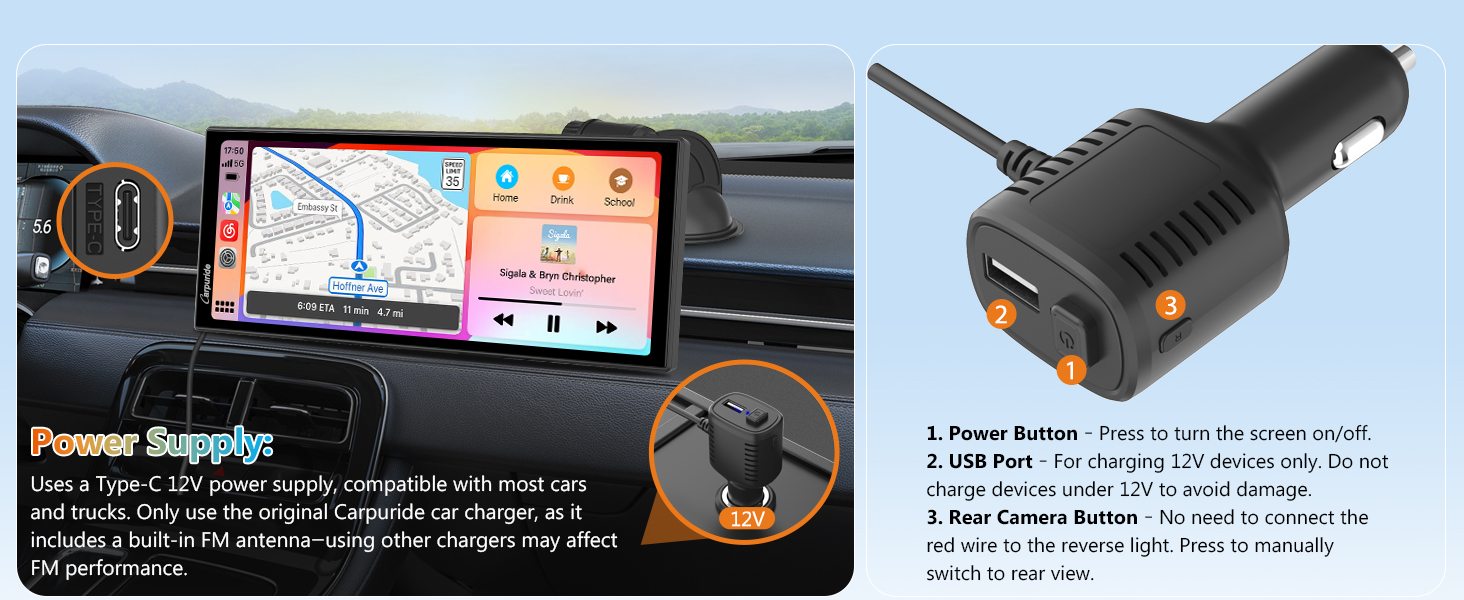
Figure 2.3: Car charger details.
- Power Button: Press to turn the screen on/off.
- USB Port: For charging 12V devices only. Do not charge devices under 12V to avoid damage.
- Rear Camera Button: No need to connect the red wire to the reverse light. Press to manually switch to rear view.
3. Operation
3.1 Camera System and Recording
The W125S features a robust three-camera system for comprehensive vehicle monitoring.

Figure 3.1: Triple Camera System for Comprehensive Coverage.

Figure 3.2: Hi-Res 3 Channel recording.
The 4K front camera, 1080P infrared interior camera, and 1080P rear camera provide detailed footage. The front camera can rotate 350° to monitor the road or backseat children.
Loop Recording & Gravity Sensor
The device supports loop recording, automatically overwriting the oldest files when the 64GB TF card is full. The built-in gravity sensor detects sudden shakes or collisions and automatically locks the corresponding video footage to prevent it from being overwritten, preserving accident evidence.
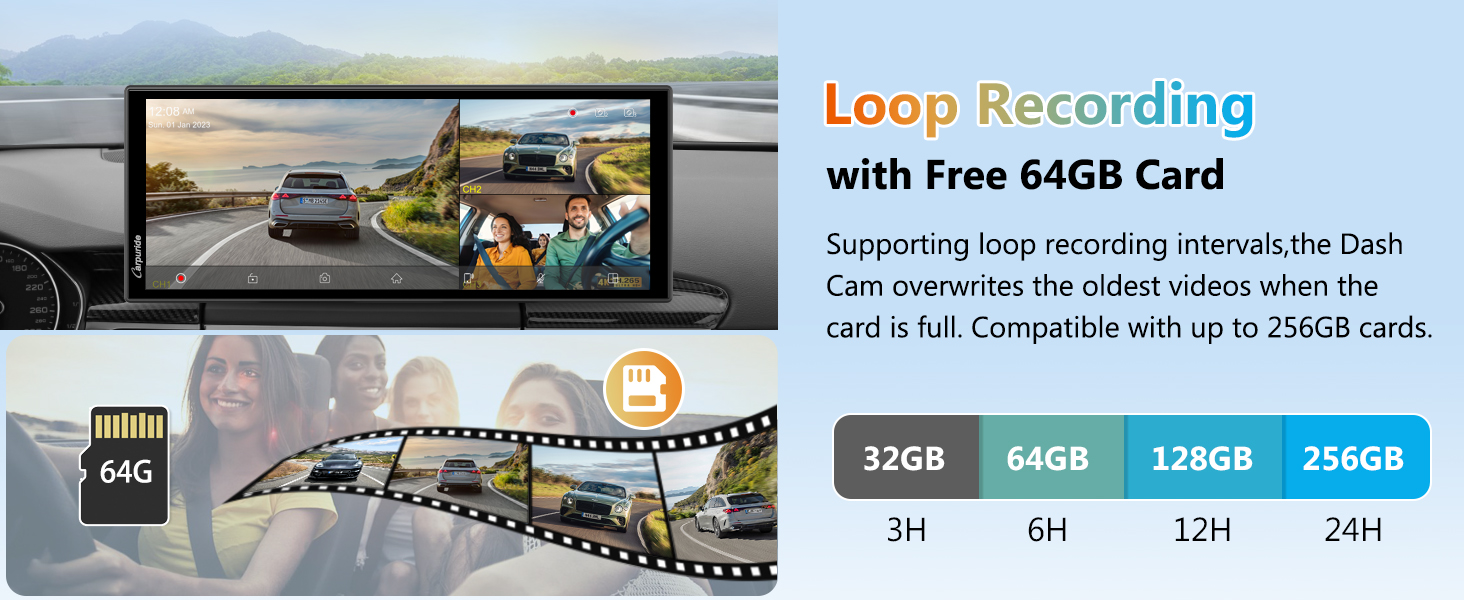
Figure 3.3: Loop Recording functionality.

Figure 3.4: Gravity Sensor in action.
1080P Infrared Camera Usage
The infrared camera is designed for interior recording. Please angle it towards the vehicle interior and avoid direct exposure to window glass or reflective surfaces. Reflected infrared light can cause signal interference and flickering images. For best performance, use the infrared camera only for recording inside the vehicle.

Figure 3.5: Infrared Camera day and night views.
Split Screen Display
The device supports various split-screen modes, allowing you to view navigation, music, and camera feeds simultaneously.

Figure 3.6: Split Screen Display options.

Figure 3.7: Split Display Design modes.
3.2 Connectivity and Smart Features
Wireless CarPlay & Android Auto
Connect your smartphone wirelessly to access navigation, messaging, phone calls, and music through the device's HD touchscreen.

Figure 3.8: Wireless CarPlay & Android Auto interface.
Apple CarPlay Use:
- On your iPhone, open CarPlay, turn on Wi-Fi and Bluetooth.
- Find "Carpuride_BT-xxxx" in your Bluetooth settings, click and connect to CarPlay.
- The connection is successful.
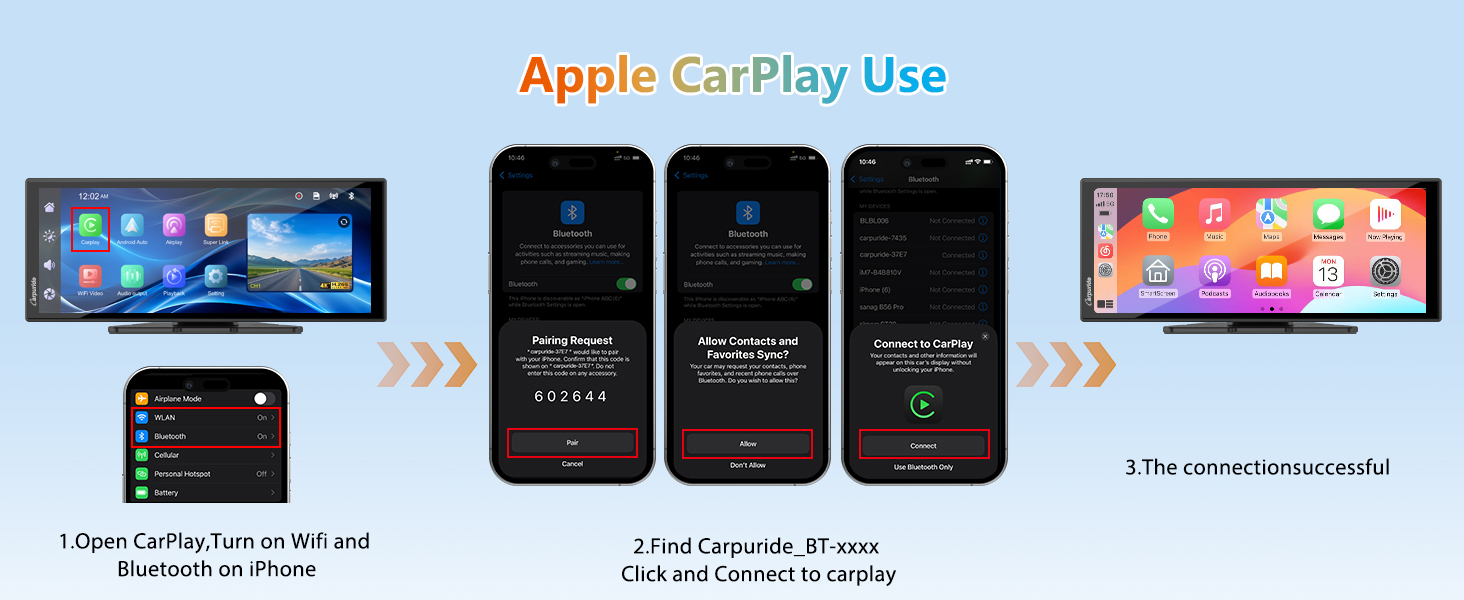
Figure 3.9: Apple CarPlay connection steps.
Android Auto Use:
- On your Android phone, open Android Auto, turn on Wi-Fi and Bluetooth.
- Find "Carpuride_BT-xxxx" in your Bluetooth settings, click "Pair" and activate Carpuride-xxxx.
- The connection is successful.

Figure 3.10: Android Auto connection steps.
Real-time Maps Navigation
Utilize popular navigation apps directly from your car's dashboard for clear, intuitive guidance.

Figure 3.11: GPS Navigation & Voice Control.

Figure 3.12: Online Navigation options.
Mirror Link (Super Link)
Effortlessly mirror audio, videos, games, and apps from your smartphone directly onto the carplay screen. This includes online video viewing and mirror casting.

Figure 3.13: Super Link features.
SuperLink Use with iOS:
- Scan the QR code on the device screen and download the corresponding EveLink app.
- Select the "Wi-Fi Direct" connection mode. Find "EVELINK-xxxx". Once connected, select "Screen Mirroring" in the control center and click "Smartsreen" for wireless mirroring.
- To watch online video, select Settings and click the Lab to play online video.

Figure 3.14: SuperLink connection steps for iOS.
SuperLink Use with Android:
- Scan the QR code on the device screen and download the corresponding EveLink app.
- Select the "Wi-Fi Direct" connection mode. Find "EVELINK-xxxx". Once connected, you can see the video.

Figure 3.15: SuperLink connection steps for Android.
Download the EveLink app from: https://camtree.cc/dl?zone=en&id=evelink
Audio Outputs
Choose your preferred audio output: Bluetooth audio, local speakers, FM radio, or AUX (3.5mm).

Figure 3.16: Audio Output options.
Smart Voice Control
Use voice commands with Siri or Google Assistant for hands-free operation, including calls and music playback.

Figure 3.17: Smart Voice Control.
3.3 Display and User Interface
Anti-Glare Screen & Sensor Light Design
The 11.26-inch HD IPS capacitive monitor features a 1920x720 resolution. It automatically adjusts screen brightness based on ambient light, with a customizable range from 0% to 100% for automatic adjustment limits.

Figure 3.18: Anti-Glare Screen & Sensor Light Design.

Figure 3.19: Light Sensor Design.
HD IPS + 2.5D Curved Touchscreen
The screen is designed to reduce glare, ensuring clear visibility even when wearing polarized glasses.

Figure 3.20: HD IPS + 2.5D Curved Touchscreen.
Customization Options
Personalize your device with customizable boot logos and screens. You can set your boot logo to match your car model or display a cherished family photo.

Figure 3.21: Customizable boot logos and screens.
4. Maintenance
- TF Card Functionality: The pre-installed 64GB TF card is designed exclusively for dashcam video storage. It does not support media playback (music/videos) directly from the card.
- Rotatable Camera Caution: When adjusting the 350° rotatable front camera, gently adjust within the marked range. Avoid over-rotation to prevent cable loosening or disconnection.
- Cleaning: Use a soft, dry cloth to clean the screen and device exterior. Avoid abrasive cleaners or solvents.
5. Troubleshooting
Common Issues and Solutions:
- Infrared Camera Flickering Images: This can occur if the infrared camera is pointed at windows or reflective surfaces. For best performance, ensure the infrared camera is angled towards the vehicle interior and avoids direct exposure to smooth, reflective surfaces.
- Android Auto Day/Night Mode Not Switching Automatically: Android Auto cannot automatically switch according to the time. You need to find the day and night mode in the Android Auto settings and manually switch to night mode. When the screen restarts, the map will automatically switch to day mode, and you will need to manually set it again.
- FM Performance Issues: Ensure you are using the original Carpuride car charger, as it contains a built-in FM antenna. Using other chargers may affect FM transmission quality.
- Cable Loosening/Disconnection: This can be caused by over-rotation of the front camera. Always adjust the camera gently and within its specified rotation range.
- No Media Playback from TF Card: The TF card is solely for dashcam video storage and does not support direct media playback.
6. Specifications
| Feature | Detail |
|---|---|
| Model Name | W125S |
| Screen Size | 11.26 inches (Full screen), 10.26 inches (Inner screen) |
| Display Type | HD IPS + 2.5D Curved Touchscreen |
| Resolution | 1920x720 |
| Front Camera | 4K UHD, 170° wide-angle, 350° rotatable |
| Interior Camera | 1080P Infrared |
| Rear Camera | 1080P |
| Storage | Pre-installed 64GB TF Card (supports up to 256GB) |
| Connectivity | Wireless CarPlay, Android Auto, Bluetooth, Wi-Fi, FM, AUX (3.5mm) |
| Special Features | Loop Recording, Gravity Sensor, GPS Navigation, Voice Control (Siri/Google Assistant), Mirror Link (Airplay/Super Link), Light Sensor |
| Power Supply | Type-C 12V (12-24V compatible) |
| Item Weight | 2.75 pounds |
| Package Dimensions | 11.14 x 5 x 4.02 inches |
7. Warranty and Support
For warranty information, technical support, or service inquiries, please contact Carpuride customer support directly. Refer to the contact details provided with your product packaging or visit the official Carpuride website.
Manufacturer: Carpuride
For additional resources and product information, you may visit the Carpuride store on Amazon: Carpuride Amazon Store


