
1. Introduction
This manual provides detailed instructions for the safe and effective use of your ResponseBridge Wireless Voice Amplifier with Bluetooth Lavalier Microphone, Model B006. This professional-grade system is designed to provide clear and amplified voice projection for various applications, including teaching, presentations, and public speaking. Please read this manual thoroughly before operating the device and retain it for future reference.
2. What's in the Box
Carefully unpack your ResponseBridge B006 system and ensure all items are present:
- 1x Wireless Voice Amplifier B006
- 1x Wireless Lavalier Microphone
- 1x Adjustable Belt
- 1x Type-C Charging Cable
- 1x User Manual

Image: Contents of the ResponseBridge B006 package, including the amplifier, lavalier microphone, adjustable belt, Type-C charging cable, and user manual.
3. Product Overview
Familiarize yourself with the main components and controls of your voice amplifier system.
3.1. Amplifier Unit

Image: The ResponseBridge B006 Wireless Voice Amplifier and its accompanying lavalier microphone.
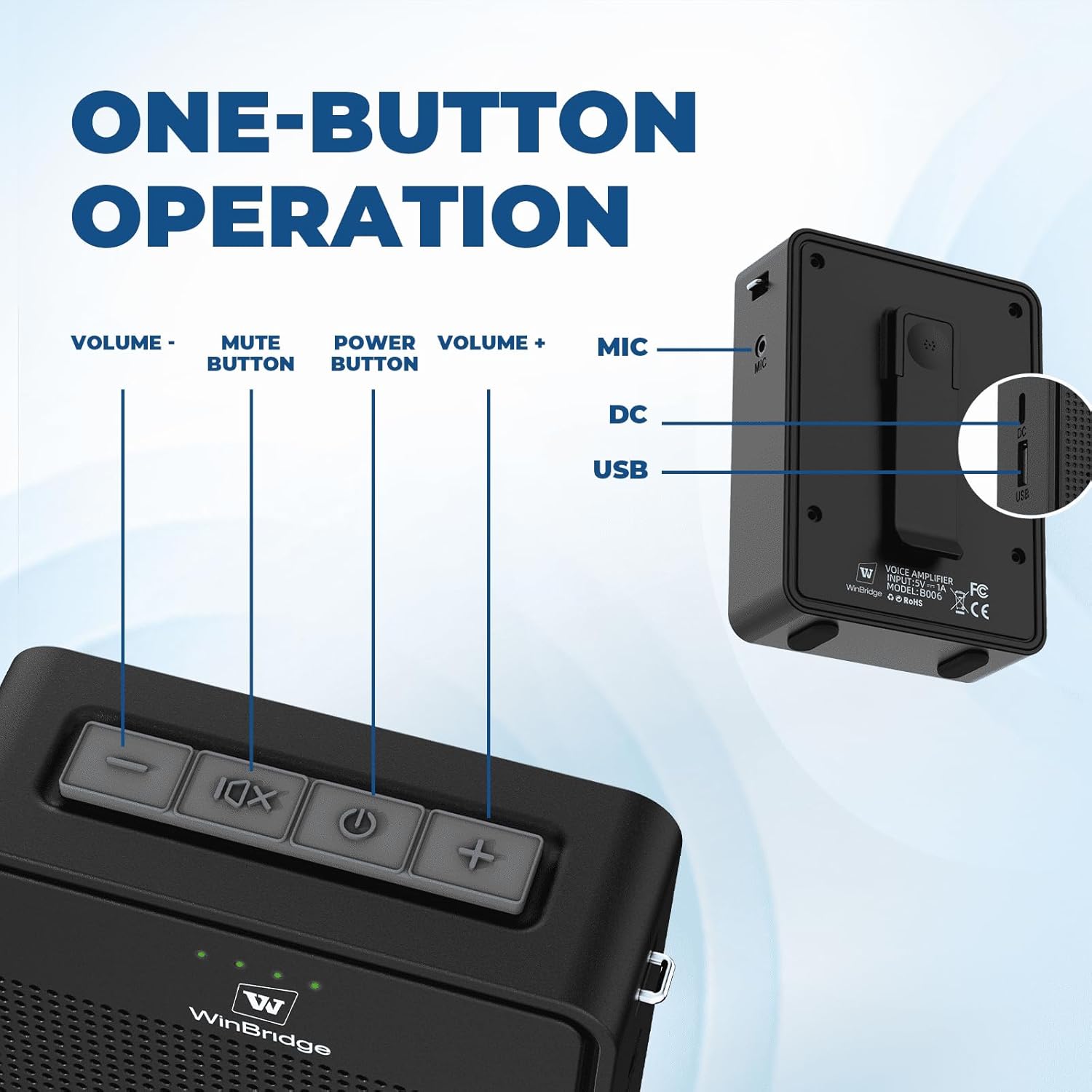
Image: Detailed view of the ResponseBridge B006 Voice Amplifier's control panel, highlighting the Volume Down button, Mute button, Power button, Volume Up button, MIC input, DC charging port, and USB port.
- Volume - Button: Decreases the amplifier's output volume.
- Mute Button: Toggles the microphone mute function.
- Power Button: Turns the amplifier on/off.
- Volume + Button: Increases the amplifier's output volume.
- MIC Input: For connecting a wired microphone (if applicable).
- DC Charging Port: For charging the amplifier.
- USB Port: For USB playback of audio files.
3.2. Wireless Lavalier Microphone

Image: Close-up of the ResponseBridge B006 Professional Bluetooth Lavalier Microphone, emphasizing its features: excellent sound pickup, noise reduction, and high-definition sound.
- Power Button: Turns the microphone on/off.
- Volume Controls: Adjusts the microphone's input sensitivity.
- Clip: For attaching the microphone to clothing.
4. Setup
4.1. Charging the Devices
Before first use, fully charge both the amplifier and the wireless microphone.
- Connect the supplied Type-C charging cable to the respective charging ports on the amplifier and microphone.
- Plug the other end of the cable into a standard USB power adapter (not included).
- Charging indicators will illuminate during charging and turn off or change color when fully charged. The amplifier provides 15+ hours of operation, and the microphone provides 7-9 hours on a full charge.

Image: Illustration of the extended battery life of the ResponseBridge B006, showing 15+ hours for the microphone and 7-9 hours for the speaker on a single charge.
4.2. Initial Pairing
The ResponseBridge B006 system features automatic pairing for convenience.
- Turn on the amplifier unit by pressing and holding its Power button.
- Turn on the wireless lavalier microphone by pressing and holding its Power button.
- The microphone and amplifier will automatically connect. A successful connection is usually indicated by a steady light on both devices.

Image: Diagram illustrating the automatic connection process between the ResponseBridge B006 wireless microphone and amplifier when both are powered on.
4.3. Wearing the Amplifier and Microphone
The system offers flexible wearing options for comfort and optimal performance.
- Lavalier Microphone: Clip the microphone to your collar or clothing, approximately 6-8 inches from your mouth, for optimal voice pickup.
- Amplifier Unit: Use the adjustable belt to wear the amplifier around your waist, or utilize the back clip to attach it to your belt or pocket. It can also be hung over the neck using a strap (not included).

Image: Three examples of wearing the ResponseBridge B006 Voice Amplifier: tied to the waist with the adjustable belt, hung over the neck, and attached with the back clip.
5. Operating Instructions
5.1. Voice Amplification
Once the microphone and amplifier are paired, your voice will be amplified through the speaker.
- Speak clearly into the lavalier microphone.
- Adjust the amplifier's volume using the Volume + and Volume - buttons on the amplifier unit to achieve the desired output level.
- The system features anti-feedback technology to minimize distortion and screeching.

Image: The ResponseBridge B006 Wireless Voice Amplifier in use, illustrating its wireless range of over 15 meters and coverage area of up to 1500 square feet.
5.2. Bluetooth Audio Playback
The amplifier supports Bluetooth 5.0 for wireless audio streaming from compatible devices.
- Ensure the amplifier is powered on.
- Activate Bluetooth on your smartphone, tablet, or other audio device.
- Search for "B006" (or similar device name) in your device's Bluetooth settings and pair with it.
- You can now play music or other audio through the amplifier while simultaneously using the microphone for voice amplification.
5.3. USB Playback
The amplifier can play audio files directly from a USB drive.
- Insert a USB drive containing audio files into the USB port on the amplifier.
- The amplifier will automatically detect and begin playing audio from the USB drive.
- Use the amplifier's volume controls to adjust playback volume.
5.4. Mute Function
To temporarily silence your voice without turning off the microphone or amplifier:
- Press the Mute button on the amplifier unit.
- Press it again to unmute.

Image: The ResponseBridge B006 Wireless Voice Amplifier and microphone, highlighting the one-touch mute button on the amplifier and independent volume controls.
6. Maintenance
Proper care ensures the longevity and optimal performance of your device.
- Cleaning: Wipe the devices with a soft, dry cloth. Do not use abrasive cleaners or solvents.
- Storage: Store the amplifier and microphone in a cool, dry place away from direct sunlight and extreme temperatures.
- Battery Care: For optimal battery life, avoid fully discharging the batteries frequently. Charge them regularly, even if the device is not in use for extended periods.
- Avoid Water: The devices are not waterproof. Keep them away from liquids.
7. Troubleshooting
If you encounter issues, refer to the following common solutions:
| Problem | Possible Cause | Solution |
|---|---|---|
| No sound from amplifier | Amplifier or microphone is off; low battery; not paired; volume too low; microphone muted. | Ensure both devices are powered on and charged. Re-pair if necessary. Increase amplifier volume. Check if microphone is muted. |
| Distorted or unclear sound | Microphone too close/far from mouth; volume too high; interference. | Adjust microphone position. Lower amplifier volume. Move away from potential sources of interference. |
| Bluetooth device cannot connect | Amplifier not in pairing mode; Bluetooth off on source device; too far from amplifier. | Ensure amplifier is on. Enable Bluetooth on your device and search for "B006". Move closer to the amplifier. |
| Short battery life | Not fully charged; aged battery. | Ensure full charge before use. If battery life significantly degrades, contact support. |
8. Specifications
| Feature | Detail |
|---|---|
| Model Number | B006 |
| Brand | ResponseBridge |
| Mounting Type | Portable |
| Power Source | Battery Powered |
| Connector Type | USB Type-C |
| Material | Acrylonitrile Butadiene Styrene (ABS) |
| Number of Channels | 2 |
| Audio Input | Bluetooth, AUX, USB |
| Product Dimensions (L x W x H) | 3.35 x 1.22 x 4.53 inches |
| Item Weight | 11.3 ounces |
| Batteries | 1 AAA batteries required (included) |
| Connectivity Technology | AUX, Bluetooth, USB |
| Color | Black |
| Recommended Uses | Teaching, Training, Singing, Yoga, Meetings, Speeches, Classroom, Public Speaking, Presentation, Sales Promotion, Tour guide, Wedding Ceremony, Fitness Instructor, Parkinson's, Teacher, Teaching, Workout, Classes, Indoor, Outdoor activities |
9. Warranty and Support
Your ResponseBridge B006 Wireless Voice Amplifier is backed by a 24-month warranty, ensuring peace of mind regarding product quality and performance.
- Warranty Coverage: This warranty covers manufacturing defects and malfunctions under normal use for 24 months from the date of purchase.
- Customer Support: For any issues, questions, or warranty claims, please contact our US-based support team directly. Refer to the contact information provided on the product packaging or our official website for prompt resolution.