
Introduction
This manual provides essential information for the proper setup, operation, and maintenance of your DUMBORC DDF-350 P4FM 2.4G 4-channel receiver. This compact receiver is designed for miniature RC cars and mini-Z models, offering reliable performance and compatibility with DUMBORC DDF-350, X6PM, and X10P transmitters. Please read this manual thoroughly before use to ensure safe and optimal performance.
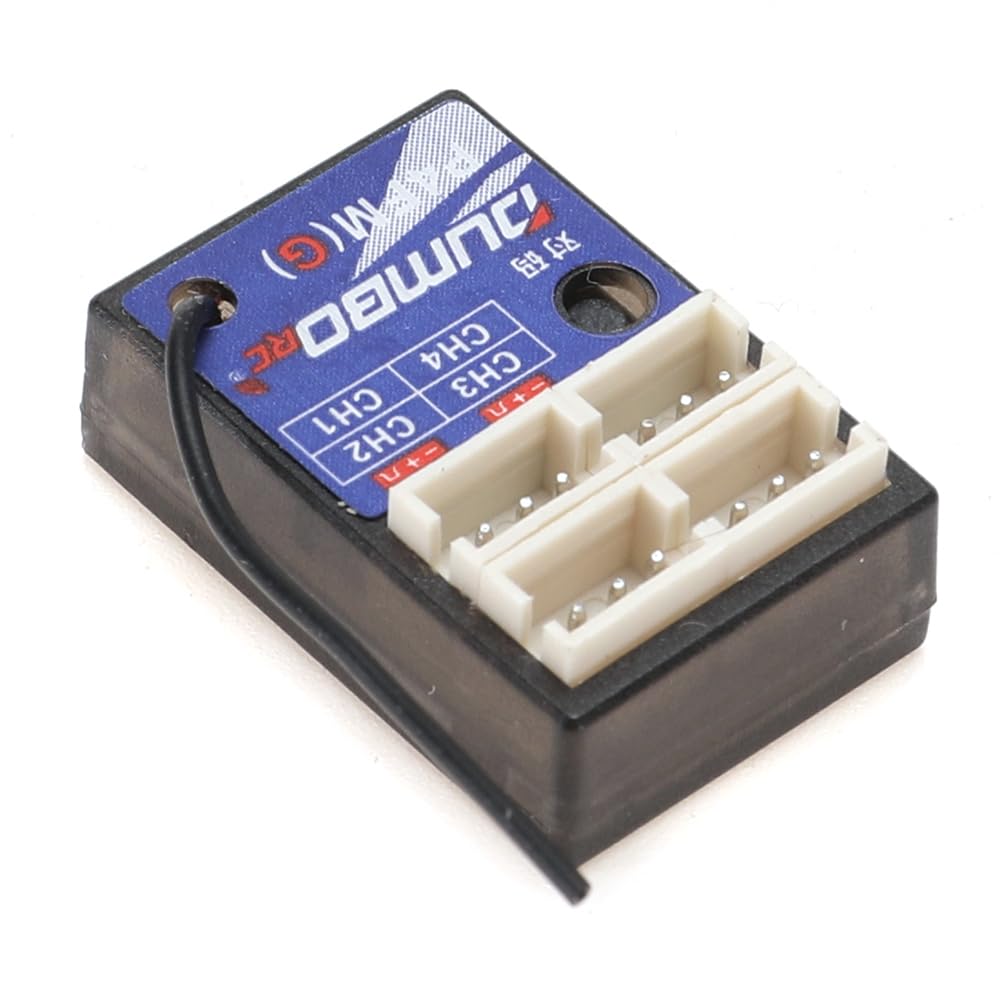
Image: DUMBORC DDF-350 P4FM 2.4G 4-Channel Receiver, a small black rectangular unit with channel ports labeled 1-4 and a binding button.
Safety Information
No specific safety notices were provided in the product information. Always follow general safety guidelines for RC equipment:
- Ensure all connections are secure before operation.
- Keep the receiver away from water, moisture, and extreme temperatures.
- Do not attempt to modify or disassemble the receiver.
- Use only compatible power sources and components as specified by the manufacturer.
- Operate RC models in open areas, away from people, animals, and obstacles.
Product Features
- 4-Channel Mini Receiver: Provides control for up to four functions.
- Compact Design: Space-saving form factor, ideal for small-scale RC models like mini-Z cars.
- Compatibility: Fully compatible with DUMBORC DDF-350, X6PM, and X10P series transmitters.
- Model Type: P4FM (Non-gyro integrated version). A gyro-integrated version (P4FMG) is also available separately.
Setup
Binding Procedure
To establish communication between your DUMBORC transmitter and the DDF-350 P4FM receiver, follow these binding steps:
- Ensure your DUMBORC transmitter (e.g., DDF-350, X6PM, X10P) is powered on and in binding mode or ready to bind. Refer to your transmitter's manual for specific instructions.
- Connect the DDF-350 P4FM receiver to a power source. This is typically done by plugging it into an Electronic Speed Controller (ESC) which provides power.
- Locate the small binding button on the side of the DDF-350 P4FM receiver.
- Press and hold the binding button for approximately 3 seconds or more.
- The receiver's indicator light should change, typically becoming solid, to confirm successful binding. This process usually completes within a few seconds.
- After binding, power cycle both the transmitter and receiver. Then, test the connection by operating your RC model's controls to ensure all channels respond correctly.
Operating Instructions
Once the receiver is successfully bound to your transmitter, it will relay control signals to your RC model's components.
- Power On Sequence: Always power on your transmitter first, then power on the receiver (via the ESC or separate power source). This prevents unintended movements.
- Control Check: Before operating your model, verify that all control surfaces (steering, throttle, etc.) respond correctly and in the desired direction to your transmitter inputs. Adjust servo directions on your transmitter if necessary.
- Range Check: Perform a range check in a safe area to ensure reliable signal reception at your intended operating distance.
- Power Off Sequence: Always power off the receiver first, then power off the transmitter. This ensures the model does not unexpectedly move if the transmitter is accidentally left on.
Maintenance
Proper maintenance will extend the lifespan and ensure the reliability of your DDF-350 P4FM receiver.
- Cleanliness: Keep the receiver clean and free from dust, dirt, and debris. Use a soft, dry brush or compressed air for cleaning.
- Moisture Protection: Avoid exposing the receiver to water or high humidity. If it gets wet, disconnect power immediately and allow it to dry completely before reuse.
- Connection Inspection: Regularly inspect all wiring, servo connectors, and the antenna for signs of wear, damage, or loose connections. Replace damaged components promptly.
- Physical Protection: Mount the receiver securely within your model to protect it from excessive vibrations and impacts during operation.
- Storage: When not in use, store the receiver in a dry, cool environment, away from direct sunlight and extreme temperatures.
Troubleshooting
If you encounter issues with your DDF-350 P4FM receiver, refer to the table below for common problems and solutions.
| Issue | Possible Cause | Solution |
|---|---|---|
| No response from model | Receiver not bound, power issue, incorrect connections, transmitter off | Perform binding procedure, check battery levels (transmitter & model), verify all connections are secure, ensure transmitter is powered on. |
| Intermittent control or glitches | Radio interference, loose connection, low battery, receiver too close to noisy electronics | Check for sources of interference, secure all wiring, charge/replace batteries, reposition receiver away from motors/ESCs. |
| Receiver indicator light not solid | Not bound, signal loss, power issue | Perform binding procedure, ensure transmitter is within range and powered on, check power supply to receiver. |
| Controls reversed | Incorrect servo direction setting | Adjust servo reverse settings on your transmitter. |
Specifications
- Channels: 4CH
- Model Type: P4FM (Non-gyro integrated)
- Operating Voltage: DC 4.8-10V (Typical for DUMBORC receivers)
- Servo Connector: FUTABA Interface (Standard for DUMBORC receivers)
- Material: Plastic
- Compatibility: DUMBORC DDF-350, X6PM, X10P Transmitters
Warranty and Support
Warranty Information
Specific warranty details for the DUMBORC DDF-350 P4FM receiver are not provided in the product information. Please retain your proof of purchase and refer to the retailer or the official DUMBORC manufacturer's website for the most current warranty terms and conditions.
Customer Support
For technical assistance, troubleshooting guidance, or any further inquiries regarding your DUMBORC DDF-350 P4FM receiver, please contact your product retailer. You may also visit the official DUMBORC website for support resources, FAQs, and contact information.


