
iWALK UBP001
iWALK Mini Portable Charger UBP001 User Manual
Model: UBP001
Introduction
This manual provides detailed instructions for the safe and efficient use of your iWALK Mini Portable Charger (Model UBP001). Please read this manual thoroughly before using the product and retain it for future reference.

Image: The iWALK Mini Portable Charger, a compact black device with a built-in USB-C cable, held in a person's hand, demonstrating its small size.
Product Overview
The iWALK Mini Portable Charger UBP001 is a compact 10,000mAh power bank designed for on-the-go charging. It features a built-in USB-C cable and supports 22.5W fast charging output.
Key Features:
- Ultra-Compact Design: Smaller than a credit card, weighing approximately 6.49 oz (184g).
- High Capacity: 10,000mAh battery provides multiple charges for smartphones.
- Built-in USB-C Cable: Integrated cable for convenient charging and use as a carry strap.
- Fast Charging: 22.5W output for rapid device charging.
- Digital Display: LED display shows remaining battery percentage.

Image: The iWALK Mini Portable Charger shown next to a credit card, illustrating its compact dimensions (1.9in width, 3.5in height, 1in depth).

Image: A lifestyle shot showing two people outdoors, one holding the iWALK Power Mini portable charger, highlighting its ease of use and portability.
Setup
Initial Charging of the Power Bank:
- Before first use, fully charge the iWALK Mini Portable Charger.
- Connect the built-in USB-C cable to a compatible USB power adapter (not included).
- Plug the power adapter into a wall outlet.
- The LED digital display will show the charging progress, indicating 100% when fully charged.
It is recommended to use a power adapter that supports 18W input for optimal recharging speed.
Image: The iWALK Mini Portable Charger connected to a wall adapter via its built-in USB-C cable for recharging, showing an 18W input.
Operating Instructions
Charging Your Device:
- Ensure the power bank is sufficiently charged. Check the LED display for the battery percentage.
- Unplug the built-in USB-C cable from its storage slot.
- Connect the USB-C end of the built-in cable directly into your compatible device's charging port.
- The power bank will automatically begin charging your device. The LED display will show the power bank's remaining charge.
- To stop charging, simply disconnect the cable from your device.
The 10,000mAh capacity can provide approximately 1.76 charges for an iPhone 16 Pro or 1.92 charges for an iPhone 15 Pro.

Image: A person holding the iWALK Mini Portable Charger connected to a smartphone, illustrating its charging capacity for various devices.

Image: The iWALK Mini Portable Charger connected to an iPhone 16 Pro, demonstrating 22.5W fast charging, showing 57% charge in 30 minutes.
Recharging the Power Bank:
To recharge the power bank, follow the steps outlined in the "Initial Charging of the Power Bank" section. The built-in USB-C cable is used for both charging devices and recharging the power bank itself.
Pass-Through Charging:
The iWALK Mini Portable Charger supports pass-through charging, allowing you to charge both the power bank and a connected device simultaneously. Connect the power bank to a wall adapter, then connect your device to the power bank's built-in cable.
Image: The iWALK Mini Portable Charger connected to a wall outlet and simultaneously charging a smartphone, demonstrating pass-through charging functionality.
Compatibility
The iWALK Mini Portable Charger is universally compatible with devices that use a USB-C charging port. This includes, but is not limited to:
- iPhone 15/16 Series (and newer models with USB-C)
- Samsung Galaxy S23/S24 Series (and newer models)
- Google Pixel devices
- iPad Air/Pro Series (with USB-C)
- Other Android devices with USB-C ports
- AirPods and Galaxy Buds Pro (with USB-C charging cases)
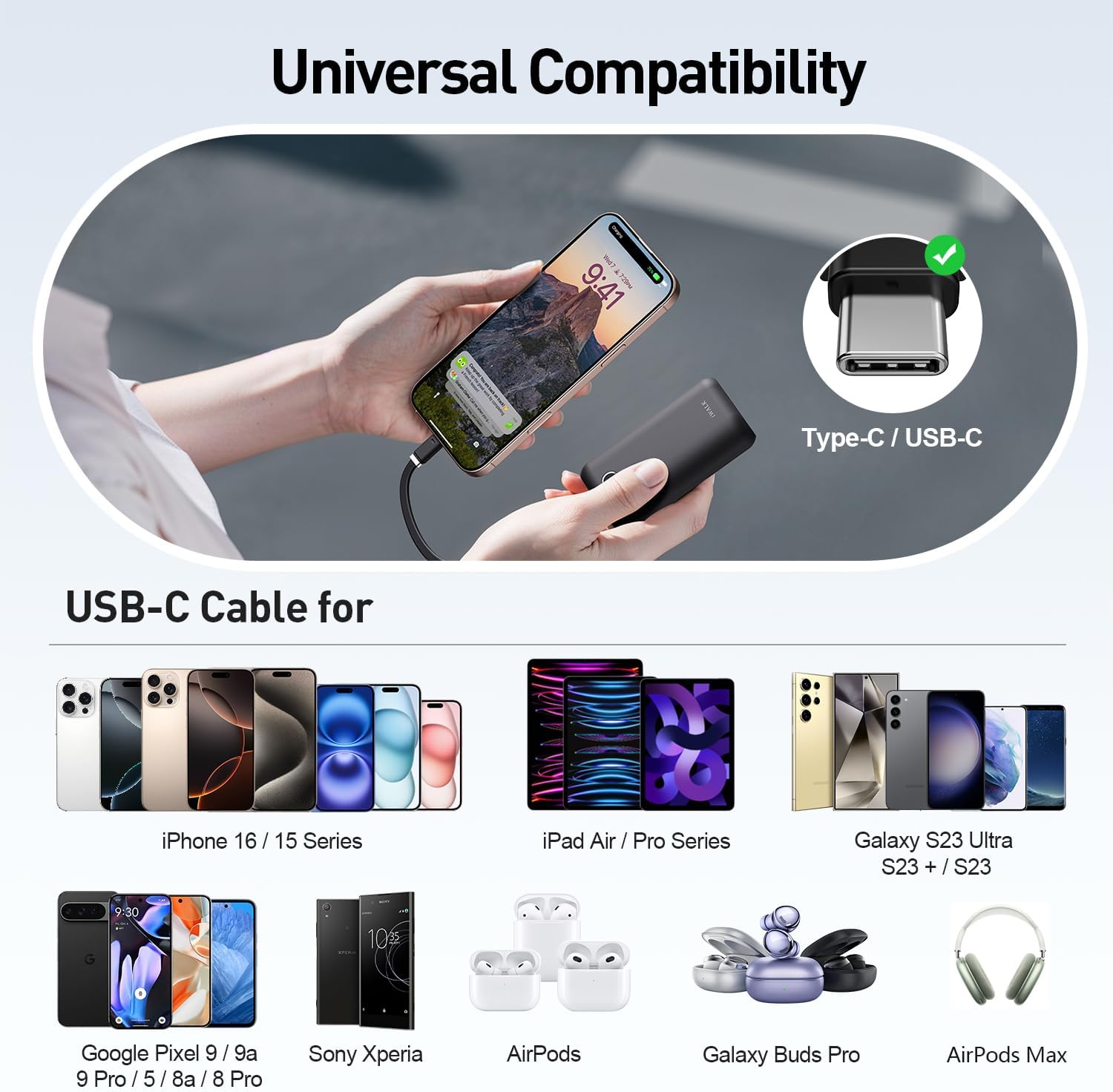
Image: A visual representation of various devices compatible with the iWALK Mini Portable Charger, including iPhones, Samsung phones, Google Pixel phones, iPads, and wireless earbuds, all featuring USB-C connectivity.
Specifications
| Brand | iWALK |
| Model Number | UBP001 |
| Battery Capacity | 10,000 mAh |
| Output Power | 22.5W (Max) |
| Input Power | 18W (Max) |
| Connector Type | USB Type-C (Built-in cable) |
| Product Dimensions | 1.9 x 3.5 x 1 inches (4.8 x 8.9 x 2.5 cm) |
| Item Weight | 9.9 ounces (280 grams) |
| Battery Type | Lithium Polymer |
| Special Features | Built-in Cable, Digital Display, Fast Charging, Pocket Size |
Maintenance
- Cleaning: Use a soft, dry cloth to clean the surface of the power bank. Avoid using liquids or abrasive cleaners.
- Storage: Store the power bank in a cool, dry place away from direct sunlight and extreme temperatures.
- Battery Care: To prolong battery life, fully charge the power bank at least once every three months if not in regular use. Avoid completely draining the battery frequently.
- Handling: Do not drop, disassemble, or attempt to repair the power bank yourself. This may void the warranty and cause damage.
Troubleshooting
- Power bank is not charging:
- Ensure the charging cable is securely connected to both the power bank and the power adapter.
- Verify that the power adapter is functioning correctly and the wall outlet has power.
- Try using a different USB-C cable or power adapter if available.
- Device is not charging from the power bank:
- Check if the power bank has sufficient charge remaining (refer to the LED display).
- Ensure the built-in USB-C cable is firmly connected to your device.
- Confirm your device is compatible with USB-C charging.
- Restart your device and try again.
- Slow charging speed:
- Ensure your device supports fast charging and the cable is properly connected.
- The charging speed may vary depending on your device's battery level and current usage.
Safety Information
- Do not expose the power bank to water, moisture, or extreme temperatures.
- Avoid dropping or subjecting the power bank to strong impacts.
- Keep out of reach of children.
- Do not use the power bank if it is damaged, swollen, or leaking.
- Dispose of the power bank responsibly according to local regulations. Do not dispose of it in household waste.
- This product contains a Lithium Polymer battery.
Warranty and Support
For warranty information and customer support, please refer to the documentation included with your product or visit the official iWALK website. If you encounter any issues not covered in this manual, please contact iWALK customer service for assistance.
Contact information can typically be found on the product packaging or the manufacturer's official website.
Related documentsUBP001


Ask a question about this manual
Ask about setup, troubleshooting, compatibility, parts, safety, or missing instructions. Manuals+ will review the question and use this page’s manual context to help answer it.