
RAINPOINT B0F6XNLFM1
RAINPOINT Sprinkler Timer with 4 Outlets and 25ft Soaker Hose
User Manual
1. Introduction
Thank you for choosing the RAINPOINT Sprinkler Timer with 4 Outlets and 25ft Soaker Hose. This product is designed to automate your garden watering, providing efficient and precise irrigation for various plants and landscapes. Please read this manual carefully before installation and operation to ensure proper use and longevity of your device.

Image: The RAINPOINT Sprinkler Timer and the included 25ft Soaker Hose.
2. Product Features
- 4 Individual Programmable Zones: Allows for independent watering schedules for up to four different areas.
- 3 Timed Watering Cycle Modes: Offers flexible scheduling options to suit various plant needs and weather conditions.
- Water Saving Design: The included 25ft soaker hose is designed to save up to 80% water by delivering it directly to the plant roots.
- DIY Irrigation System: Provides components for creating a customized and efficient watering setup.
- Large LCD & Dial: Features an easy-to-read display and intuitive dial for straightforward setup and programming.
3. Package Contents
Please check the package contents to ensure all items are present:
- RAINPOINT 4-Outlet Sprinkler Timer
- 25ft Flat Soaker Hose
- User Manual (this document)
- Required connectors and adapters for installation
4. Safety Information
To ensure safe operation and prevent damage, please observe the following:
- Do not immerse the timer in water.
- Use only fresh alkaline batteries of the specified type (typically AA, not included).
- Protect the timer from freezing temperatures. Remove batteries and store indoors during winter.
- Ensure all connections are tight to prevent leaks.
- Keep out of reach of children.
5. Setup
5.1 Battery Installation
- Locate the battery compartment on the back of the timer.
- Open the battery cover.
- Insert new alkaline batteries (e.g., 4 x AA batteries) according to the polarity indicators (+/-).
- Close the battery cover securely to ensure a watertight seal.
5.2 Connecting the Timer to the Faucet
- Ensure the faucet is turned off.
- Screw the timer's inlet connector onto your outdoor faucet. Hand-tighten only. Do not overtighten.
- Ensure the rubber washer is properly seated in the connector to prevent leaks.

Image: The sprinkler timer attached to an outdoor faucet, showing its dimensions and display.
5.3 Connecting Hoses to Outlets
- Connect your garden hoses or the included soaker hose to the four individual outlets at the bottom of the timer.
- Ensure each connection is secure to prevent leaks.
5.4 Initial Clock Setting
- Turn the dial to 'SET CLOCK'.
- Use the '+' and '-' buttons to adjust the current time.
- Press 'OK' to confirm and move to the next setting (e.g., AM/PM).
- Once the clock is set, turn the dial to 'ON' to return to the main screen.
6. Operating Instructions
6.1 Programming Watering Zones
The timer features four independent zones (1, 2, 3, 4) that can be programmed individually.

Image: The sprinkler timer mounted on a wall, illustrating its four programmable outlets and how they can water different zones.
- Turn the dial to 'START TIME'. Use the 'ZONE' button to select the zone you wish to program (1, 2, 3, or 4).
- Adjust the desired start time using '+' and '-' buttons. Press 'OK' to confirm.
- Turn the dial to 'HOW LONG'. Select the zone and set the watering duration (e.g., minutes, hours). Press 'OK'.
- Turn the dial to 'HOW OFTEN'. Select the zone and set the watering frequency (e.g., every X hours, every X days). Press 'OK'.
- Repeat for each zone as needed.
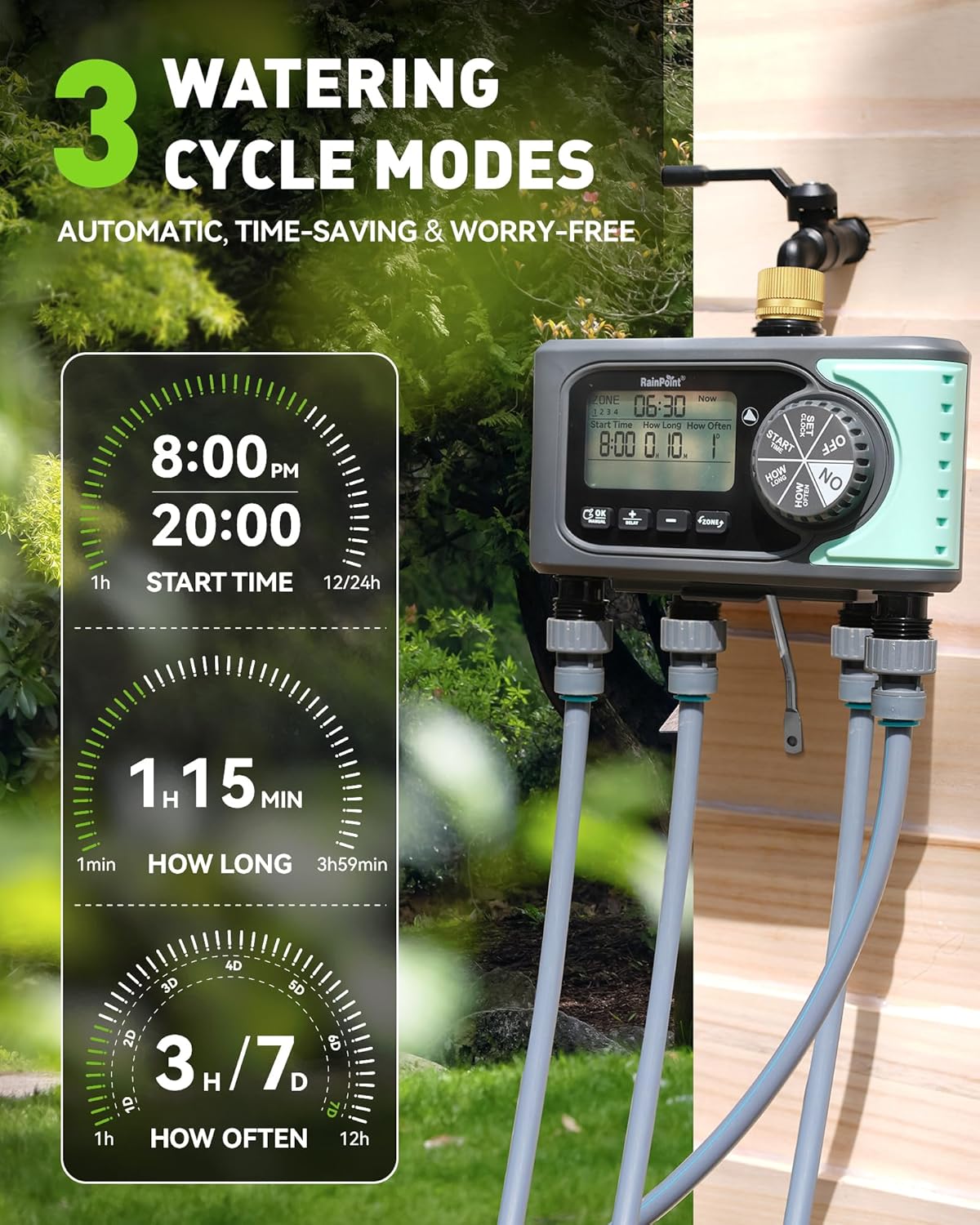
Image: The sprinkler timer displaying its three watering cycle modes: Start Time, How Long, and How Often, with examples of settings.
6.2 Manual Watering
To water manually without affecting your programmed schedule:
- Turn the dial to 'ON'.
- Press the 'MANUAL' button.
- Use the 'ZONE' button to select the zone(s) you wish to water manually (e.g., Zone 1, Zone 2, Zone 3, Zone 4, or ALL).
- Use '+' and '-' buttons to set the desired manual watering duration.
- Press 'OK' to start manual watering. The timer will automatically revert to its programmed schedule after the manual watering is complete.

Image: The sprinkler timer displaying manual watering options, including setting duration and selecting specific zones or all zones.
6.3 Delay Function
The delay function allows you to pause your watering schedule for a set period, useful during rain or when you need to perform garden tasks.
- Turn the dial to 'ON'.
- Press the 'DELAY' button.
- Use '+' and '-' buttons to set the desired delay duration (e.g., 24 hours, 48 hours).
- Press 'OK' to activate the delay. The timer will resume its programmed schedule after the delay period ends.
6.4 Turning Off the Timer
To stop all watering and turn off the timer, simply turn the dial to 'OFF'.
7. Soaker Hose Usage
The included 25ft flat soaker hose is designed for efficient, targeted watering, reducing water waste.

Image: Close-up of the soaker hose with water droplets, illustrating its water-saving capability by delivering water directly to the roots.
7.1 Placement and Configuration
The soaker hose can be laid out in various configurations to suit your garden layout:
- Circle Around Plants: Ideal for individual plants, shrubs, or trees. Lay the hose in a circle around the base of the plant.
- S-shape or Straight Lines: Suitable for rows of vegetables, flower beds, or hedges. Weave the hose through the plants or lay it in straight lines.

Image: Examples of soaker hose layouts, including a circular arrangement around a tree and an S-shape layout in a garden bed, demonstrating its versatility.
7.2 Water Pressure Recommendation
For optimal performance and longevity of the soaker hose, maintain water pressure between 30-40 PSI. Excessive pressure (above 60 PSI) can damage the hose and lead to inefficient watering.

Image: A soaker hose in a garden setting, with an overlay indicating the recommended water pressure range of 30-40 PSI and a warning against pressure exceeding 60 PSI.
8. Maintenance
8.1 Cleaning
Periodically check the filter washer at the timer's inlet for debris. Clean it by rinsing under running water. Do not use harsh chemicals or abrasive materials on the timer or hose.
8.2 Battery Replacement
Replace batteries when the low battery indicator appears on the display or if the timer's functions become erratic. Always use new alkaline batteries.
8.3 Winterization
Before the first frost, disconnect the timer from the faucet and hoses. Remove the batteries. Store the timer and soaker hose indoors in a dry, protected area to prevent damage from freezing temperatures.
9. Troubleshooting
| Problem | Possible Cause | Solution |
|---|---|---|
| Timer not watering | Low batteries; Faucet off; Incorrect programming; Filter clogged. | Replace batteries; Turn on faucet; Check programming; Clean filter. |
| Water leaking from connections | Loose connections; Missing/damaged washer. | Tighten connections; Replace washer. |
| Display is blank or dim | Dead batteries. | Replace batteries. |
| Soaker hose not dripping evenly | Insufficient water pressure; Kink in hose. | Check water pressure (aim for 30-40 PSI); Straighten hose. |
10. Specifications
- Model: B0F6XNLFM1
- Outlets: 4 Independent
- Power Source: Batteries (type not specified, typically AA)
- Water Pressure Range: 30-40 PSI (recommended for soaker hose)
- Soaker Hose Length: 25ft
11. Warranty and Support
RAINPOINT products are manufactured to high-quality standards. For warranty information, technical support, or assistance with your product, please refer to the contact information provided on the product packaging or visit the official RAINPOINT website. Please retain your proof of purchase for warranty claims.
Ask a question about this manual
Ask about setup, troubleshooting, compatibility, parts, safety, or missing instructions. Manuals+ will review the question and use this page’s manual context to help answer it.