
1. Introduction
The Aaoyun Portable Charger Power Bank (Model B2) is a compact and efficient external battery pack designed to provide reliable power for your mobile devices. Featuring a 10000mAh capacity and 22.5W PD fast charging, it ensures your devices are charged quickly and safely. Its durable aerospace metal casing and built-in USB-C cable offer convenience and longevity.
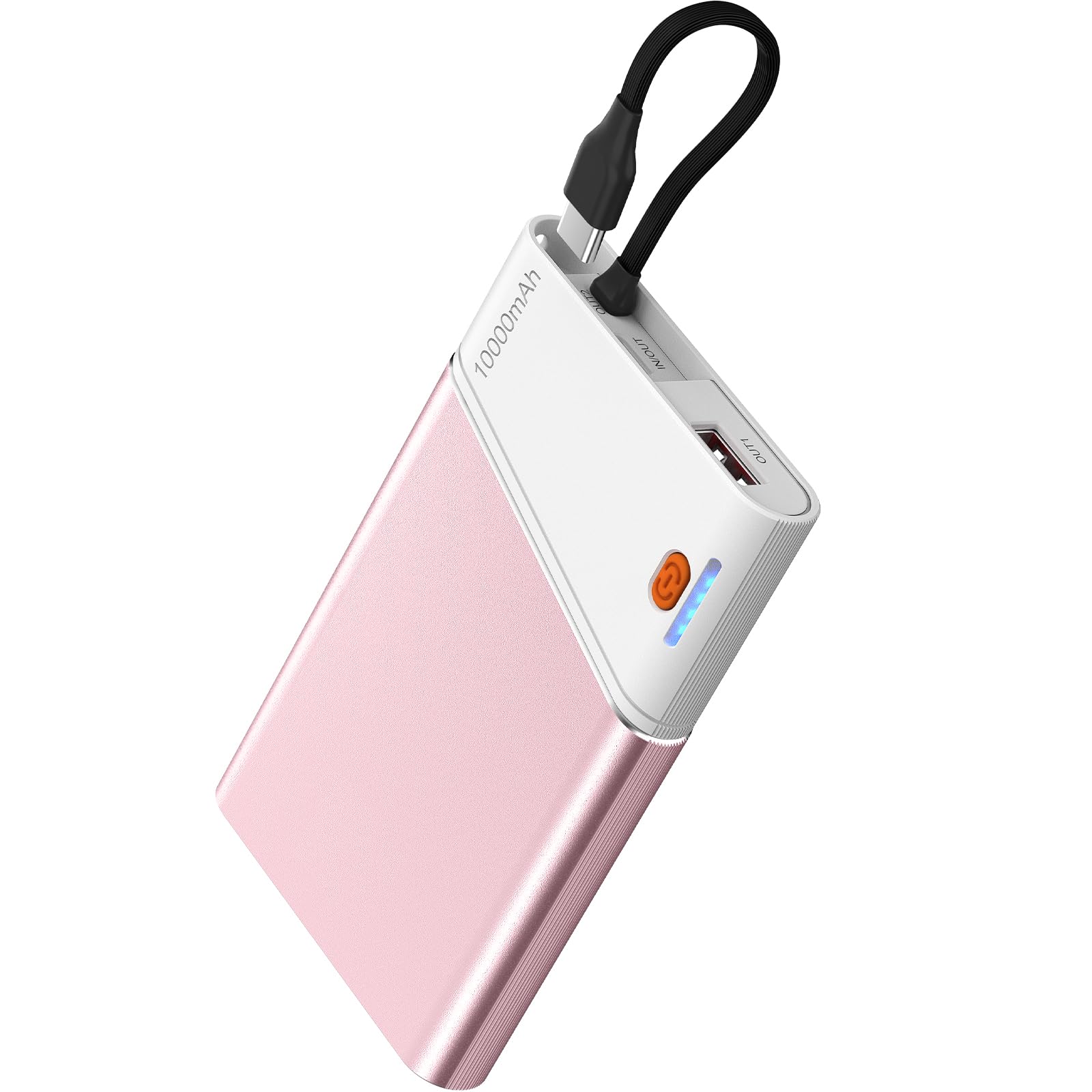
Image 1.1: The Aaoyun Portable Charger Power Bank, Model B2.

Image 1.2: Internal components highlighting the 10000mAh battery capacity.
2. Setup
2.1 Initial Charging of the Power Bank
Before first use, fully charge your Aaoyun Power Bank. Use a compatible USB-C wall adapter (not included) and the built-in USB-C cable or a separate USB-C cable to connect the power bank to a power source. The LED indicators will show the charging status.
- Connect the built-in USB-C cable to a USB-C power adapter.
- Plug the power adapter into a wall outlet.
- The indicator lights will illuminate to show the charging progress. All lights will be solid when fully charged.

Image 2.1: Charging the power bank using its built-in USB-C cable.
2.2 Checking Battery Level
Press the power button once to check the remaining battery level indicated by the LED lights.
3. Operation
3.1 Charging Devices
The power bank supports charging up to three devices simultaneously using its built-in USB-C cable, a USB-C input/output port, and a USB-A output port.
- Using the Built-in USB-C Cable: Connect the built-in USB-C cable directly to your compatible device's USB-C port.
- Using the USB-C Output Port: Connect a USB-C to USB-C cable (not included) from the power bank's USB-C port to your device.
- Using the USB-A Output Port: Connect a standard USB-A to device-specific cable (not included) from the power bank's USB-A port to your device.

Image 3.1: The power bank charging multiple devices at once.
3.2 Fast Charging Capability
The power bank features 22.5W PD (Power Delivery) fast charging. For optimal fast charging, ensure your device and charging cable are compatible with PD 22.5W or higher.
Image 3.2: Illustration of 22.5W fast charging speed compared to standard charging.
3.3 Universal Compatibility
This power bank is compatible with a wide range of devices, including iPhones (17, 16, 15, 14, 13, 12, 11, SE, XS, XR, X, 8 series), Samsung Galaxy phones (S24, S23, S22, S21, S20, S10, Note series), Google Pixel phones (6, 5, 4A, 3a, 3XL, 3, 2XL, 2), iPads (Pro, Air), Apple Watches, and AirPods.

Image 3.3: The power bank's compatibility with different mobile devices.
3.4 Portability and Travel
The compact design and 10000mAh capacity make this power bank suitable for travel and is TSA-approved for air travel.

Image 3.4: The power bank is approved for air travel.
3.5 Safety Features
The power bank incorporates multiple protection mechanisms to ensure safe charging for both the power bank and your devices. These include over-charge protection, over-voltage protection, over-current protection, short circuit protection, and over-discharge protection.

Image 3.5: Multi-protection features for safe charging.
4. Maintenance
- Storage: Store the power bank in a cool, dry place away from direct sunlight and extreme temperatures.
- Cleaning: Use a soft, dry cloth to clean the exterior of the power bank. Do not use liquid cleaners or solvents.
- Avoid Drops: While durable, avoid dropping the power bank to prevent internal damage.
- Regular Use: To maintain battery health, use and recharge the power bank at least once every three months.
5. Troubleshooting
5.1 Power Bank Not Charging
- Ensure the charging cable is securely connected to both the power bank and the power adapter.
- Verify that the wall outlet is functional.
- Try using a different USB-C cable and/or power adapter.
5.2 Device Not Charging from Power Bank
- Check if the power bank has sufficient charge. Press the power button to check LED indicators.
- Ensure the cable connecting your device to the power bank is securely plugged in at both ends.
- Try using a different charging port on the power bank or a different cable.
- Confirm your device is compatible with the power bank's output ports.
5.3 Slow Charging
- Ensure you are using a fast-charging compatible cable and your device supports fast charging.
- Charging multiple devices simultaneously may reduce the charging speed for individual devices.
- High temperatures can sometimes reduce charging efficiency. Ensure the power bank is in a well-ventilated area.
6. Specifications
| Brand | Aaoyun |
| Model Number | B2 |
| Battery Capacity | 10000 milliamp-hours |
| Special Feature | PD 22.5W fast charging |
| Connector Type | USB Type C |
| Number of Ports | 2 (USB-C Input/Output, USB-A Output, plus built-in USB-C cable) |
| Battery Cell Type | Lithium Ion |
| Item Weight | 6.9 ounces (194g) |
| Item Dimensions (L x W x Th) | 4.46" x 2.67" x 0.6" |
| UPC | 768825403825 |

Image 6.1: The compact size and weight of the power bank.
7. Warranty and Support
7.1 Warranty Information
The Aaoyun Portable Charger Power Bank is backed by a 3-year warranty. This warranty covers defects in materials and workmanship under normal use. For warranty claims, please retain your proof of purchase.
Image 7.1: The 3-year warranty shield.
7.2 Customer Support
For any questions, technical support, or warranty inquiries, please contact Aaoyun Customer Service. We offer 24/7 friendly customer service and lifetime technical support.
- Online Support: Visit the official Aaoyun website for FAQs and support resources.
- Email Support: Refer to your product packaging or the official website for contact email.
8. Product Videos
8.1 EVERYthing You Need to Know About This Phone Charger
Video 8.1: A detailed overview of the Aaoyun Portable Charger, covering its features and usage. (Source: Product Demo Lab)
8.2 Stay powered with this portable charger!
Video 8.2: A brief demonstration highlighting the convenience and portability of the charger. (Source: Nicole N)
8.3 Portable charger that is a game changer!
Video 8.3: A demonstration showcasing the charger's features and ease of use. (Source: Tiara Zimmerman)

