
1. Introduction
This manual provides essential information for the safe and efficient use of your new vivo T4 5G smartphone. Please read this guide thoroughly before operating the device to ensure proper functionality and to understand its features. Keep this manual for future reference.
2. Device Overview
Familiarize yourself with the physical components of your vivo T4 5G smartphone.
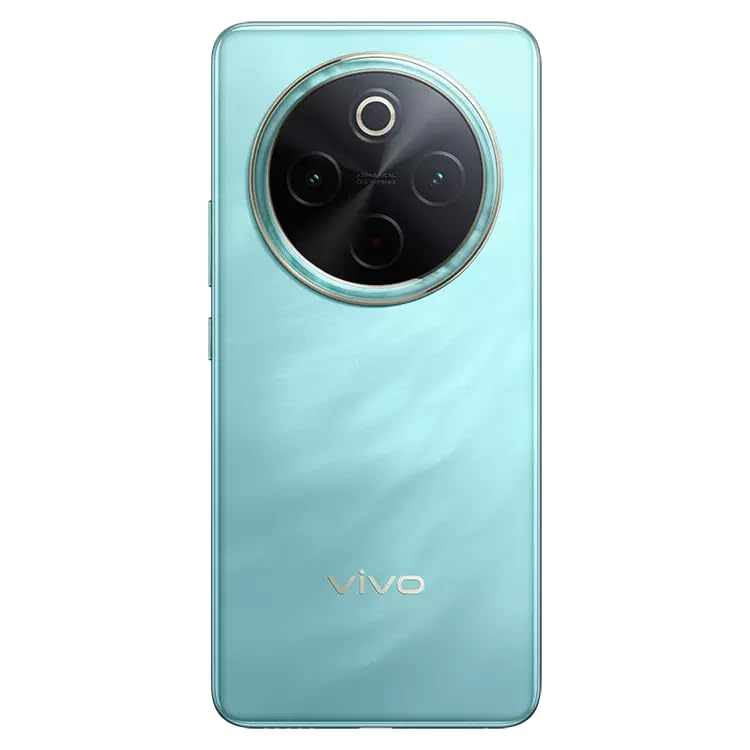
Figure 2.1: Front view of the vivo T4 5G smartphone, showing the display and front camera.
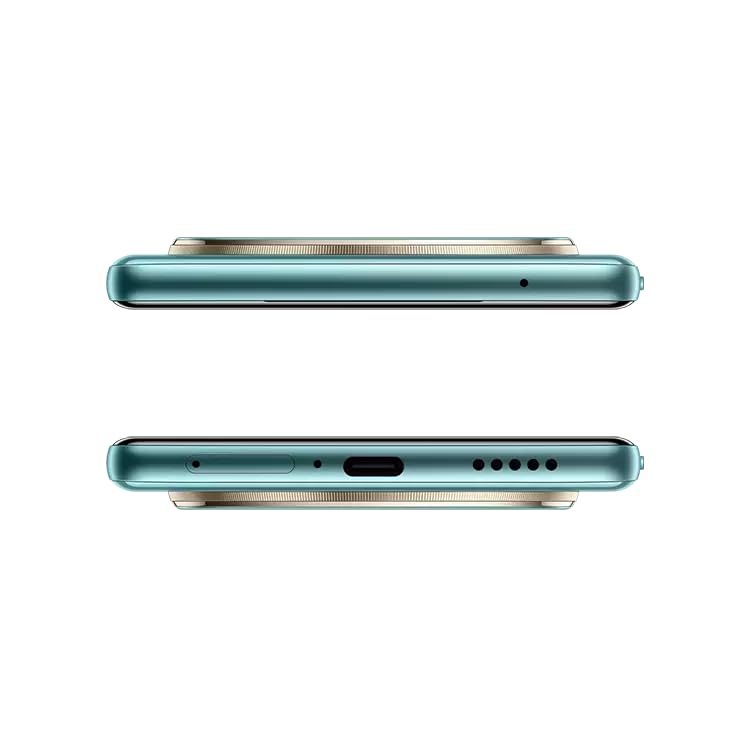
Figure 2.2: Back view of the vivo T4 5G smartphone, highlighting the circular camera module.
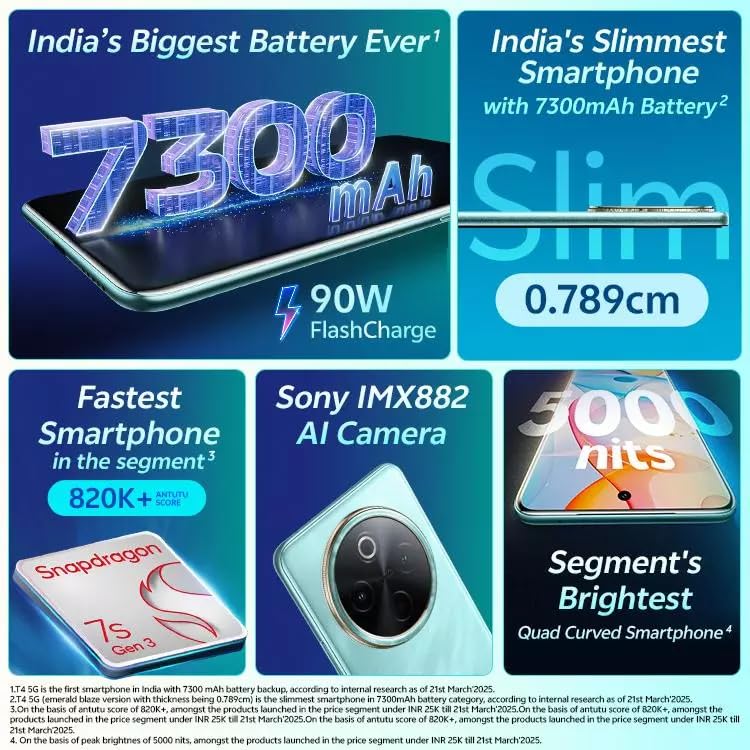
Figure 2.3: Side and bottom view of the vivo T4 5G, illustrating the USB port, speaker grille, and SIM tray.
3. Setup
3.1 Inserting the SIM Card
- Locate the SIM card tray on the side of the device (refer to Figure 2.3).
- Insert the SIM ejector tool into the small hole next to the tray and push gently until the tray pops out.
- Place your Nano SIM card(s) into the tray with the gold contacts facing down. The vivo T4 5G supports Dual SIM.
- Carefully reinsert the tray into the phone.
3.2 Initial Power On and Configuration
- Press and hold the Power button until the vivo logo appears.
- Follow the on-screen instructions to select your language, connect to a Wi-Fi network, and set up your Google account.
- Configure security features such as fingerprint recognition.
4. Operating Instructions
4.1 Power On/Off and Restart
- Power On: Press and hold the Power button until the device vibrates and the vivo logo appears.
- Power Off: Press and hold the Power button for a few seconds, then tap "Power off" on the screen.
- Restart: Press and hold the Power button for a few seconds, then tap "Restart" on the screen.
4.2 Display Features
The vivo T4 5G features a 120Hz Quad-Curved AMOLED display with a resolution of 2392 x 1080 pixels. This display offers vibrant colors and smooth scrolling. Adjust display settings such as brightness, refresh rate, and color mode in the Settings menu.
4.3 Camera Operation
Your device is equipped with a 50MP Sony IMX882 AI main camera, a 32MP front wide-angle camera, and a 2MP bokeh camera. The AI Photo Enhance feature optimizes image quality.

Figure 4.1: Overview of the vivo T4 5G camera system, including the 50MP main, 32MP front, and 2MP bokeh cameras, along with the infrared blaster.
- Open the Camera app from the home screen or lock screen.
- Select your desired mode (Photo, Portrait, Video, etc.).
- Tap the shutter button to capture photos or start/stop video recording.
- Utilize AI features for enhanced photography.
4.4 Battery and Charging
The vivo T4 5G features a 7300mAh battery and supports 90W FlashCharge technology for rapid charging.

Figure 4.2: Visual representation of the 7300mAh battery capacity and 90W FlashCharge capability.
- Use only the official vivo charger and cable provided with your device.
- Connect the USB cable to the phone's USB port and the charger to a power outlet.
- Avoid using the phone while charging for optimal battery health.
4.5 Performance and Software
Powered by the Snapdragon 7s Gen 3 processor and 12GB RAM, the vivo T4 5G delivers smooth performance. It runs on Funtouch OS 15, which includes various AI features for an optimized user experience.

Figure 4.3: A detailed view of the Snapdragon 7s Gen 3 processor, the core of the vivo T4 5G's performance.

Figure 4.4: The Funtouch OS 15 logo, representing the operating system of the vivo T4 5G.
4.6 Gaming Experience
The New Ultra Game Mode enhances your gaming experience by optimizing performance and minimizing distractions.

Figure 4.5: A user holding the vivo T4 5G, showcasing the Ultra Game Mode interface during a racing game.
5. Maintenance
To ensure the longevity and optimal performance of your vivo T4 5G, follow these maintenance guidelines:
- Cleaning: Use a soft, lint-free cloth to clean the screen and body. Avoid harsh chemicals or abrasive materials.
- Water Resistance: The device is water resistant. Avoid submerging it in water or exposing it to high-pressure water jets.
- Durability: The vivo T4 5G features a Military Grade Build (MIL-STD-810H certified) for enhanced durability against drops and environmental factors. However, extreme impacts should still be avoided.

Figure 5.1: The MIL-STD-810H certification badge, indicating the phone's military-grade durability against various conditions.
6. Troubleshooting
If you encounter issues with your device, try the following solutions:
| Problem | Possible Solution |
|---|---|
| Device does not power on. | Ensure the battery is charged. Connect the charger and wait a few minutes before attempting to power on again. |
| Screen is unresponsive. | Perform a forced restart by holding the Power button for approximately 10-15 seconds. |
| Apps are crashing or freezing. | Clear the cache of the problematic app or reinstall it. Ensure your Funtouch OS is updated to the latest version. |
| Poor battery life. | Check background app usage, reduce screen brightness, or enable power-saving modes. Avoid extreme temperatures. |
7. Specifications
| Feature | Detail |
|---|---|
| Brand | vivo |
| Model | T4 5G |
| Operating System | Android (with Funtouch OS 15) |
| Processor | Snapdragon 7s Gen 3, 1.8 GHz |
| RAM | 12 GB |
| Internal Storage | 256 GB |
| Display Type | AMOLED, Quad-Curved |
| Screen Size | 6.77 Inches |
| Resolution | 2392 x 1080 Pixels |
| Refresh Rate | 120 Hz |
| Rear Camera | 50 MP (Sony IMX882 AI) |
| Front Camera | 32 MP (Wide-Angle) |
| Bokeh Camera | 2 MP |
| Battery Capacity | 7300 Milliamp Hours |
| Charging | 90W FlashCharge |
| SIM Card Slot | Dual SIM (Nano) |
| Biometric Security | Fingerprint Recognition |
| Water Resistance | Water Resistant |
| Build Quality | Military Grade Build (MIL-STD-810H Certified) |
| Dimensions | 16.5 x 7.6 x 0.8 Centimeters |
| Weight | 205 Grams |
| Connectivity | 5G, Bluetooth, USB, Wi-Fi |
8. Warranty and Support
For warranty information, please refer to the warranty card included with your product or visit the official vivo website. For technical support or service inquiries, please contact:
Vivo Mobile India Pvt. Ltd.Plot No. 7 & 8, Sector 1,
Greater Noida, Uttar Pradesh – 201306, India
Official vivo India Website


