
1. Introduction
Thank you for choosing the Xqscvqwfa TP.MS3393.PB801 Three-in-One TV Motherboard. This manual provides detailed instructions for the proper installation, operation, maintenance, and troubleshooting of your new TV motherboard. Please read this manual thoroughly before installation and retain it for future reference. This motherboard is designed for system stability, high definition support, and includes anti-static and overvoltage protection.
2. Safety Information
Important Safety Instructions:
- Always disconnect power from the television before attempting any installation or maintenance.
- This product should only be installed by qualified technicians to prevent electric shock or damage to the equipment.
- Handle the motherboard with care, avoiding contact with electronic components to prevent electrostatic discharge (ESD) damage. Use an anti-static wrist strap if available.
- Ensure proper ventilation around the motherboard once installed to prevent overheating.
- Do not expose the motherboard to moisture or extreme temperatures.
- The motherboard features built-in anti-static and overvoltage protection, but proper handling and installation are still crucial.
3. Product Overview
The TP.MS3393.PB801 is a versatile three-in-one TV motherboard designed to integrate power supply, main board, and LED driver functions into a single unit. It is compatible with various display panels, including LSC320AN10, and supports a power output of 65W with a voltage range of 45-65V and 330mA current. This board is engineered for reliable performance and high-definition video processing.
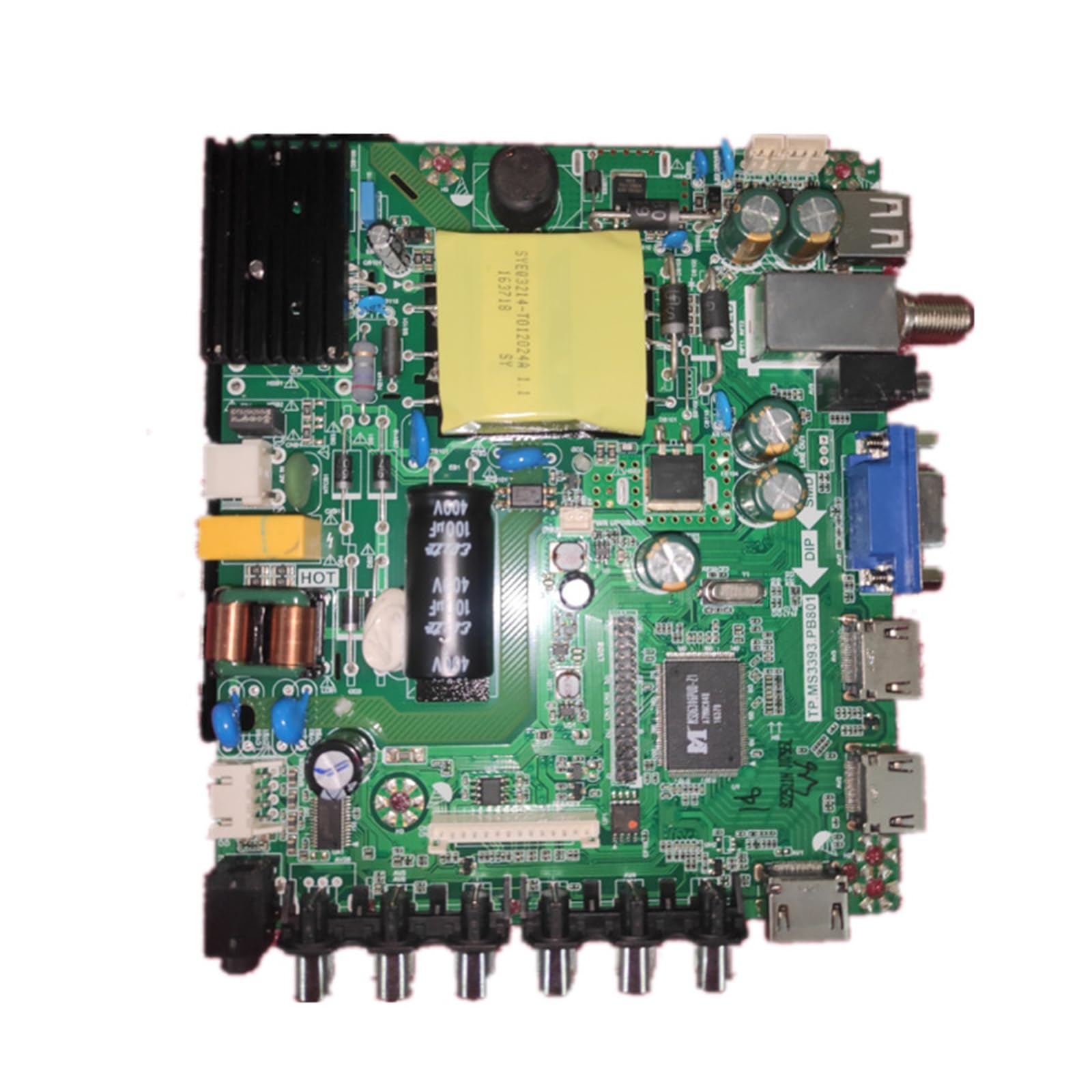
Figure 3.1: Top view of the TP.MS3393.PB801 Motherboard. This image displays the main components including the transformer, capacitors, various input/output ports (HDMI, VGA, USB, antenna), and the main processing chip.

Figure 3.2: Bottom view of the TP.MS3393.PB801 Motherboard. This image shows the underside of the circuit board, including solder points and a black protective cover over some components.
4. Setup and Installation
Before Installation:
- Ensure the TV is unplugged from the power outlet.
- Prepare a clean, static-free workspace.
- Gather necessary tools, such as screwdrivers and an anti-static wrist strap.
Installation Steps:
- Carefully open the back panel of your television, following the TV manufacturer's instructions.
- Locate the existing motherboard. Take photos of all cable connections before disconnecting them for reference.
- Gently disconnect all cables from the old motherboard, including power, display panel, and input/output cables.
- Unscrew and remove the old motherboard.
- Position the new TP.MS3393.PB801 motherboard in the TV chassis, aligning it with the screw holes.
- Secure the new motherboard with the appropriate screws, ensuring it is firmly seated.
- Reconnect all cables to their corresponding ports on the new motherboard. Refer to your photos taken in step 2. Pay close attention to the display panel cable (LVDS) and power connections.
- Double-check all connections to ensure they are secure and correctly oriented.
- Before closing the TV back panel, temporarily plug in the TV and perform a quick power-on test to ensure basic functionality.
- If the test is successful, unplug the TV and carefully reattach the back panel.

Figure 4.1: Detail of the motherboard label, indicating compatibility with LSC320AN10 and power specifications. Verify these details during installation.
5. Operating Instructions
Once the TP.MS3393.PB801 motherboard is correctly installed, the television should function as expected. The motherboard provides system stability and high-definition support for your display. Power on your TV and proceed with any initial setup or configuration steps required by your television model, such as channel scanning or input selection.
- Power On: Connect the TV to a power source and press the power button on the TV or remote control.
- Input Selection: Use your TV remote to select the desired input source (HDMI, VGA, AV, etc.) corresponding to your connected devices.
- Picture/Sound Settings: Adjust picture and sound settings via the TV's on-screen menu as needed.
6. Maintenance
The TP.MS3393.PB801 motherboard is designed for long-term reliability with minimal maintenance. However, following these general guidelines can help ensure its longevity:
- Keep the television in a clean, dry environment, away from excessive dust and humidity.
- Ensure adequate airflow around the TV to prevent heat buildup, which can stress electronic components.
- Avoid sudden power surges by using a surge protector for your television.
- Do not attempt to clean the motherboard directly with liquids. If cleaning is necessary, use a soft, dry brush or compressed air while the TV is unplugged.
7. Troubleshooting
If you encounter issues after installing the TP.MS3393.PB801 motherboard, consider the following troubleshooting steps:
- No Power: Ensure the TV is securely plugged into a working power outlet. Check all internal power connections to the motherboard.
- No Picture/Sound: Verify that all display panel cables (LVDS) and audio/video input cables are correctly and securely connected. Try different input sources.
- Distorted Picture/Sound: Check cable connections for looseness or damage. Ensure the correct display resolution is selected if applicable.
- Intermittent Issues: This could indicate a loose connection. Re-check all cable connections on the motherboard.
- TV Not Responding to Remote: Ensure the TV's IR receiver is not obstructed and the remote control batteries are functional.
If problems persist after attempting these steps, it is recommended to consult a professional technician or contact customer support.
8. Specifications
Below are the technical specifications for the Xqscvqwfa TP.MS3393.PB801 Three-in-One TV Motherboard:
| Feature | Specification |
|---|---|
| Model Number | TP.MS3393.PB801 |
| Brand | Xqscvqwfa |
| Type | Three-in-One TV Motherboard (Power, Main, LED Driver) |
| Power Output | 65W |
| Voltage Range | 45-65V |
| Current | 330mA |
| Compatible Display Panels | LSC320AN10 (and others) |
| Product Dimensions | 0.39 x 0.39 x 0.39 inches |
| Item Weight | 1.76 ounces (50 Grams) |
| Features | Easy to install, System stability, Fix multiple faults, High definition support, Anti static and overvoltage protection |
9. Warranty and Support
For warranty information, please refer to the terms and conditions provided by your retailer at the time of purchase. If you require technical assistance, have questions about installation, or need to troubleshoot an issue not covered in this manual, please contact the seller or manufacturer directly. The manufacturer, Xqscvqwfa, has over 20 years of experience in TV motherboards and is available to assist with inquiries.
Manufacturer: tangyaoshop