
1. Introduction
This manual provides essential information for the proper installation, operation, and maintenance of your Xqscvqwfa TP.MS3393.PB801 Three-in-One TV Motherboard. Please read these instructions carefully before proceeding with any installation or operation to ensure safe and efficient use of the product. This motherboard is designed to integrate multiple functions into a single unit, offering system stability and high-definition support for compatible display equipment.
2. Safety Information
WARNING: Electrical components can be hazardous. Installation should only be performed by qualified personnel.
- Always disconnect the power supply to the television before attempting any installation or maintenance.
- Wear anti-static wrist straps and work on an anti-static mat to prevent electrostatic discharge (ESD) damage to sensitive components.
- Ensure proper ventilation around the motherboard to prevent overheating.
- Do not expose the motherboard to moisture or extreme temperatures.
- Verify all connections are secure and correctly oriented before applying power.
- This product includes anti-static and overvoltage protection features, but proper handling is still crucial.
3. Product Overview
The Xqscvqwfa TP.MS3393.PB801 is a versatile three-in-one TV motherboard designed for display equipment. It offers several key advantages:
- Easy Installation: Designed for straightforward integration into compatible TV models.
- System Stability: Engineered for reliable and consistent performance.
- Fault Resolution: Capable of addressing multiple common TV faults.
- High Definition Support: Ensures compatibility with high-definition video signals.
- Protection Features: Includes built-in anti-static and overvoltage protection.

Image 3.1: Top view of the Xqscvqwfa TP.MS3393.PB801 TV Motherboard, showcasing its various components, ports (HDMI, USB, VGA, Antenna), and integrated circuits. The blue transformer is visible in the center.
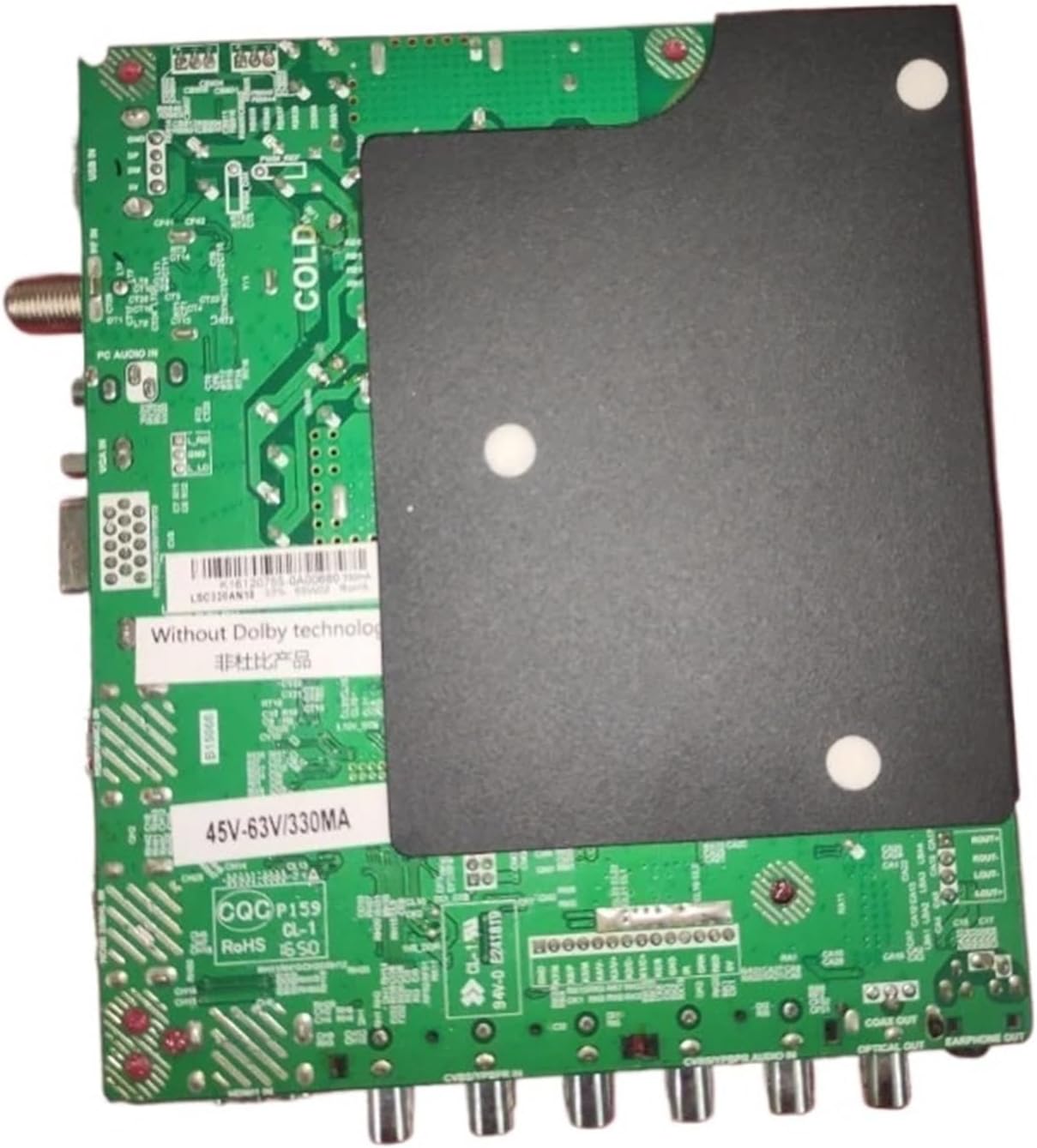
Image 3.2: Back view of the Xqscvqwfa TP.MS3393.PB801 TV Motherboard, showing the solder points and a label indicating specifications such as "LSC320AN10", "65W", "330mA", and "45V-63V".
4. Setup and Installation
This section outlines the general steps for installing the TP.MS3393.PB801 motherboard. Specific TV models may have unique requirements; always refer to your TV's service manual for detailed instructions.
- Preparation:
- Ensure the TV is completely unplugged from the power outlet.
- Gather necessary tools: screwdrivers, anti-static wrist strap, anti-static mat.
- Clear a clean, well-lit workspace.
- Accessing the TV Interior:
- Carefully remove the back cover of your television, following the manufacturer's guidelines.
- Locate the existing motherboard.
- Removing the Old Motherboard:
- Disconnect all cables connected to the old motherboard (power, LVDS, speakers, buttons, IR sensor, etc.). Take photos if necessary to remember connections.
- Unscrew the old motherboard from the TV chassis.
- Carefully lift and remove the old motherboard.
- Installing the New Motherboard:
- Position the Xqscvqwfa TP.MS3393.PB801 motherboard into the chassis, aligning it with the screw holes.
- Secure the motherboard with screws. Do not overtighten.
- Reconnect all cables to their corresponding ports on the new motherboard. Ensure the LVDS cable (for the display panel, e.g., LSC320AN10) is correctly seated and locked.
- Double-check all connections for security and correct orientation.
- Initial Power-Up:
- Before replacing the back cover, connect the TV to power and perform a brief test to ensure basic functionality (power on, display, sound).
- If issues arise, immediately disconnect power and re-check connections.
- Final Assembly:
- Once functionality is confirmed, disconnect power and reattach the TV's back cover.
5. Operating Instructions
Once the TP.MS3393.PB801 motherboard is correctly installed, its operation is integrated with the television's standard functions. There are no specific operating instructions for the motherboard itself beyond ensuring proper power and signal input.
- Power On/Off: Use your TV's remote control or power button to turn the television on or off.
- Input Selection: Use the TV's input/source button to select between connected devices (HDMI, VGA, Antenna, USB).
- Firmware Updates: If firmware updates are available for this motherboard, they should be performed according to the manufacturer's specific instructions, typically via USB. Consult the Xqscvqwfa support resources for details.
6. Maintenance
Proper maintenance can extend the lifespan of your motherboard and ensure optimal performance.
- Cleaning: Periodically, with the TV unplugged, gently clean any dust accumulation on the motherboard using compressed air or a soft, dry brush. Avoid using liquids.
- Ventilation: Ensure the TV's ventilation openings are not blocked to allow for adequate airflow and heat dissipation.
- Environmental Conditions: Operate the TV in a stable environment, avoiding excessive humidity, dust, or extreme temperature fluctuations.
7. Troubleshooting
If you encounter issues after installing the motherboard, refer to the following common troubleshooting steps:
| Problem | Possible Cause | Solution |
|---|---|---|
| TV does not power on. | Loose power connection, faulty power supply, incorrect installation. |
|
| No display/blank screen. | Loose LVDS cable, incorrect panel settings, faulty display panel. |
|
| No sound. | Loose speaker connections, incorrect audio settings. |
|
| Distorted image or colors. | Faulty LVDS cable, incorrect panel settings, damaged display panel. |
|
If these steps do not resolve the issue, it is recommended to consult a professional technician or contact Xqscvqwfa customer support.
8. Specifications
| Feature | Detail |
|---|---|
| Model Number | TP.MS3393.PB801 |
| Brand | Xqscvqwfa |
| Power Output | 65W |
| Voltage Range | 45-65V |
| Current | 330mA |
| Compatible Panel | LSC320AN10 (and similar compatible panels) |
| Product Dimensions | 0.39 x 0.39 x 0.39 inches (approximate) |
| Item Weight | 1.76 ounces |
| ASIN | B0F6VMPK6Y |
| Date First Available | April 29, 2025 |
Note: Specifications are subject to change without prior notice.
9. Warranty and Support
For warranty information and customer support regarding your Xqscvqwfa TP.MS3393.PB801 TV Motherboard, please refer to the documentation provided at the time of purchase or contact the seller directly. You may also visit the official Xqscvqwfa website for further assistance and contact details.
When contacting support, please have your product model number (TP.MS3393.PB801) and ASIN (B0F6VMPK6Y) readily available.