1. Introduction
The IRRADIO IR-203 Sound+ is a compact and portable wireless speaker designed for high-quality audio playback. Featuring Bluetooth 5.0 connectivity and a USB port for external media, it offers versatile listening options. Its robust design and long-lasting battery make it ideal for both home use and on-the-go entertainment.

Figure 1.1: IRRADIO IR-203 Sound+ Wireless Speaker. This image shows the speaker from an angled perspective, highlighting its compact size and fabric grille.
2. Safety Information
Please read all safety instructions carefully before using the device. Keep this manual for future reference.
- Do not expose the speaker to water or excessive moisture. This product is not waterproof.
- Avoid extreme temperatures. Do not place near heat sources or in direct sunlight.
- Do not disassemble, repair, or modify the device. This will void the warranty and may cause damage or injury.
- Use only the specified charging voltage (DC 5V/2A).
- Keep out of reach of children.
3. Package Contents
Ensure all items are present in the package:
- IRRADIO IR-203 Sound+ Wireless Speaker
- USB Charging Cable
- User Manual (this document)
4. Product Overview
4.1. Controls and Ports

Figure 4.1: Side view of the speaker showing control buttons. From left to right: Mode button (M), Volume Down (-), Volume Up (+), Play/Pause/Next Track button (▶).

Figure 4.2: Back view of the speaker showing connectivity ports. From left to right: TF (MicroSD) card slot, USB-A port, ON/OFF switch, DC 5V charging port.
The speaker features intuitive controls on its top edge and essential connectivity ports on its rear panel.
- Mode Button (M): Press to switch between Bluetooth and USB playback modes.
- Volume Down (-): Press to decrease volume.
- Volume Up (+): Press to increase volume.
- Play/Pause/Next Track (▶): Press to play or pause audio. Long press to skip to the next track.
- TF Card Slot: Insert a MicroSD card for direct audio playback.
- USB-A Port: Insert a USB flash drive for direct audio playback.
- ON/OFF Switch: Slide to power the speaker on or off.
- DC 5V Port: Connect the USB charging cable here to charge the speaker.
5. Setup
5.1. Charging the Speaker
Before first use, fully charge the speaker. The battery capacity is 400 mAh.
- Connect the provided USB charging cable to the DC 5V port on the speaker.
- Connect the other end of the USB cable to a compatible USB power adapter (DC 5V/2A recommended) or a computer USB port.
- The charging indicator light will illuminate (color may vary) to show that the speaker is charging.
- Charging typically takes approximately 2 hours for a full charge. The indicator light will change or turn off once charging is complete.
A full charge provides approximately 2 hours and 40 minutes of continuous playback at 50% volume.
5.2. Powering On/Off
To power on the speaker, slide the ON/OFF switch to the 'ON' position. You will hear an audible prompt. To power off, slide the switch to the 'OFF' position.
6. Operating Instructions
6.1. Bluetooth Pairing
The speaker uses Bluetooth 5.0 for stable wireless connection up to 10 meters.
- Ensure the speaker is powered on and in Bluetooth mode. If not, press the 'M' (Mode) button to switch to Bluetooth mode. The speaker will enter pairing mode, indicated by a flashing LED light and an audible prompt.
- On your device (smartphone, tablet, laptop), enable Bluetooth and search for available devices.
- Select "IRRADIO IR-203 Sound+" from the list of found devices.
- Once paired, the speaker will provide an audible confirmation, and the LED light will stop flashing.
- You can now play audio from your device through the speaker.
Note: The speaker will automatically attempt to reconnect to the last paired device when powered on.
6.2. USB/TF Card Playback
The speaker supports direct audio playback from a USB flash drive or a MicroSD (TF) card.
- Insert a USB flash drive into the USB-A port or a MicroSD card into the TF card slot.
- The speaker will automatically switch to USB/TF card mode and begin playing audio files (MP3, WAV, etc.) from the inserted storage device. If it does not switch automatically, press the 'M' (Mode) button to select the correct mode.
- Use the Play/Pause/Next Track button (▶) to control playback.
6.3. Volume Control
Use the '+' and '-' buttons on the speaker to adjust the volume. You can also control the volume from your connected device.
7. Maintenance
To ensure the longevity and optimal performance of your speaker, follow these maintenance guidelines:
- Cleaning: Use a soft, dry cloth to wipe the speaker's surface. Do not use abrasive cleaners, alcohol, or chemical solvents.
- Storage: When not in use for extended periods, store the speaker in a cool, dry place away from direct sunlight and extreme temperatures.
- Battery Care: To preserve battery life, avoid fully discharging the battery frequently. Charge the speaker regularly, even if not in use.
8. Troubleshooting
If you encounter issues with your IRRADIO IR-203 Sound+ speaker, refer to the following common problems and solutions:
| Problem | Possible Cause | Solution |
|---|---|---|
| Speaker does not turn on. | Battery is depleted. | Charge the speaker for at least 30 minutes. |
| No sound. | Volume is too low or muted. Incorrect mode selected. | Increase volume on both speaker and connected device. Press 'M' button to switch modes. |
| Cannot pair via Bluetooth. | Speaker not in pairing mode. Device too far. Interference. | Ensure speaker is in Bluetooth pairing mode (flashing LED). Move device closer to speaker (within 10m). Turn off other Bluetooth devices. |
| USB/TF card not playing. | Incorrect file format. Card/drive not inserted correctly. | Ensure audio files are in supported format (e.g., MP3). Reinsert the USB drive or TF card firmly. Press 'M' button to select USB/TF mode. |
If the problem persists after trying these solutions, please contact customer support.
9. Specifications
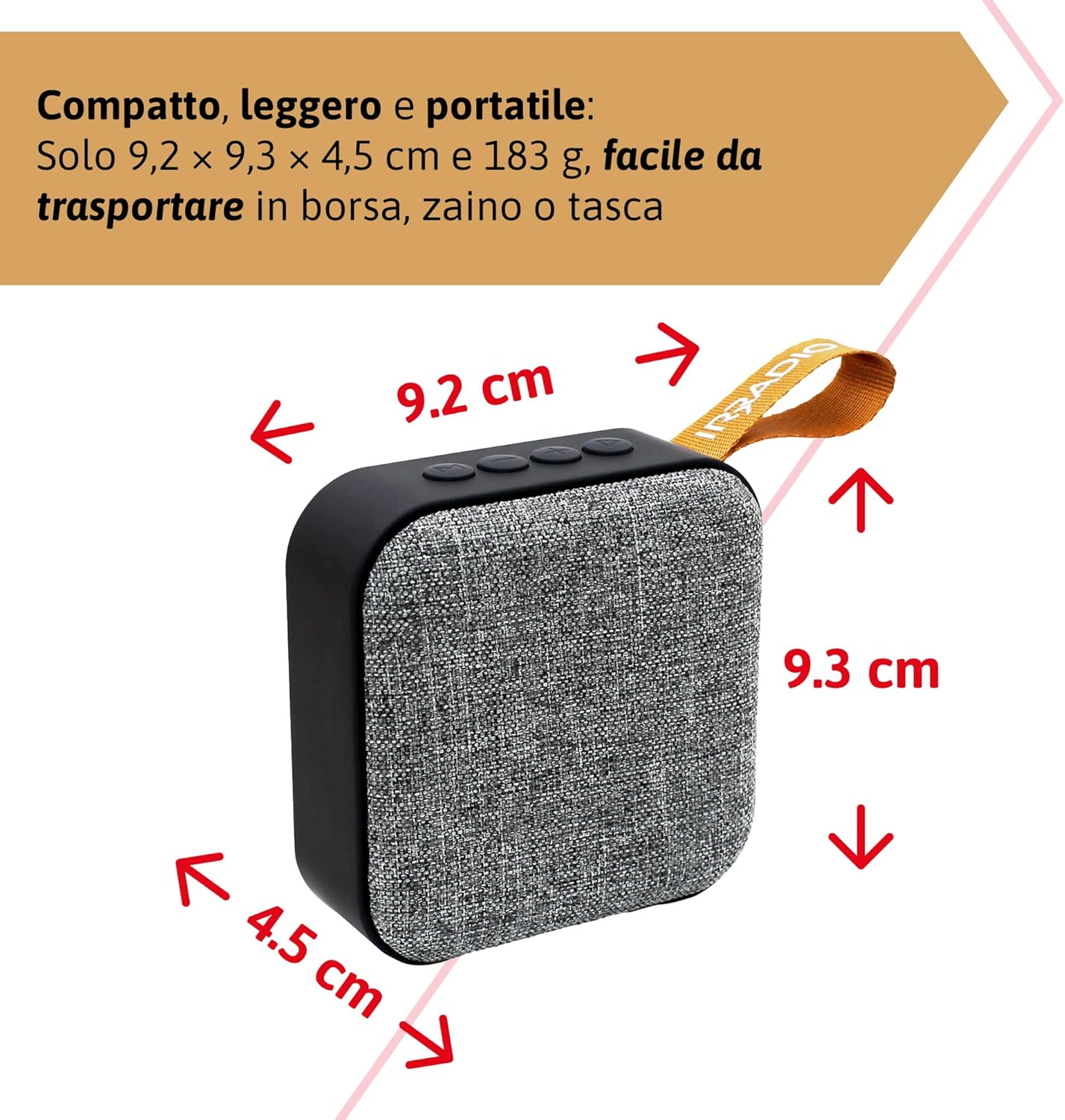
Figure 9.1: Dimensions of the IRRADIO IR-203 Sound+ speaker: 9.2 cm (width) x 9.3 cm (height) x 4.5 cm (depth).
| Feature | Detail |
|---|---|
| Model Name | IR-203 Sound+ |
| Item Model Number | 550922126 |
| Brand | IRRADIO |
| Product Dimensions | 9.2 x 9.3 x 4.5 cm |
| Weight | 183 grams |
| Speaker Type | Woofer (Full Range 50mm Driver + Passive Radiator) |
| Max Speaker Output Power | 3.5 Watts RMS |
| Connectivity Technology | Bluetooth 5.0, USB |
| Wireless Transmission Distance | Up to 10 meters (without obstacles) |
| Audio Output Mode | Stereo |
| Battery Capacity | 400 mAh (3.7V, 1.48 Wh) |
| Battery Life | Approx. 2 hours 40 minutes (at 50% volume) |
| Charging Time | Approx. 2 hours |
| Charging Input | DC 5V/2A |
| Compatible Devices | Smartphones, Tablets, Laptops, Desktop Computers, MP3 Players, USB Flash Drives |
| Color | Gray |
| Waterproof | No |
10. Warranty and Support
10.1. Warranty Information
For information regarding warranty and returns, please refer to the purchase platform's policies. Typically, products purchased on Amazon.it can be returned within 30 days of receipt if you change your mind. For defective or damaged products, specific return policies apply.
For specific information on purchases made through the Marketplace, please consult the relevant help page on the platform.
10.2. Customer Support
For further assistance, technical support, or inquiries about your IRRADIO IR-203 Sound+ speaker, please visit the official IRRADIO store page:


