
1. Product Overview
This manual provides detailed instructions for the assembly, operation, and maintenance of your SEDETA L Shaped Gaming Desk. This versatile desk features a reversible design, integrated power outlet, LED lighting, and various storage options including shelves, a fabric drawer, and a CPU stand.
2. Safety Guidelines
Please read and follow these safety instructions carefully to ensure safe use and prolong the life of your desk.
- Always assemble the desk according to the provided instructions.
- Ensure all screws are tightened securely for stability.
- Never overload the desk, especially around the power outlet.
- Keep the desk away from water and heat sources.
- Always unplug the power outlet when not in use or when cleaning.
3. Assembly Instructions
Assembly is required for this desk. Please refer to the included assembly guide for step-by-step instructions. The desk is designed for a reversible configuration, allowing the storage hutch to be placed on either the left or right side to suit your space.

Figure 3.1: Desk dimensions and four-way installation options.

Figure 3.2: Visual representation of the four possible configurations for the L-shaped desk.
4. Features and Operation
4.1. Integrated Power Outlet
The desk includes a built-in power strip with 4 AC outlets and 2 USB ports, providing convenient charging for up to 6 devices simultaneously. This allows you to power various electronics such as printers, cell phones, tablets, and gaming gear directly from your desk.

Figure 4.1: Convenient charging station with 4 AC outlets and 2 USB ports.
4.2. RGB LED Lights
Enhance your workspace or gaming setup with the integrated RGB LED lights. These lights can be controlled via an app and offer multiple colors and 29 flashing modes. A music sync function with a built-in sensitivity-adjustable microphone allows the light color to change with the rhythm of sound and music.

Figure 4.2: L-shaped desk illuminated by RGB LED lights.
Video 4.1: A 3D display video showcasing the SEDETA L Shaped Gaming Desk, highlighting its features and design.
Video 4.2: A display video demonstrating the SEDETA 51.2" L Shaped Gaming Desk, showing its various functionalities.
4.3. Storage Solutions
The desk offers multiple storage options to keep your workspace organized:
- 3-Tier Storage Shelves: The top hutch features three adjustable shelves for books, decor, or office supplies.
- Fabric Drawer: A convenient fabric drawer provides enclosed storage for office supplies and personal items, keeping them within reach without cluttering the desktop.
- CPU Stand: A dedicated CPU shelf protects your computer tower from dust and moisture while providing proper ventilation.
- 4 Iron Hooks: Use the integrated iron hooks to hang headphones, backpacks, or other accessories.
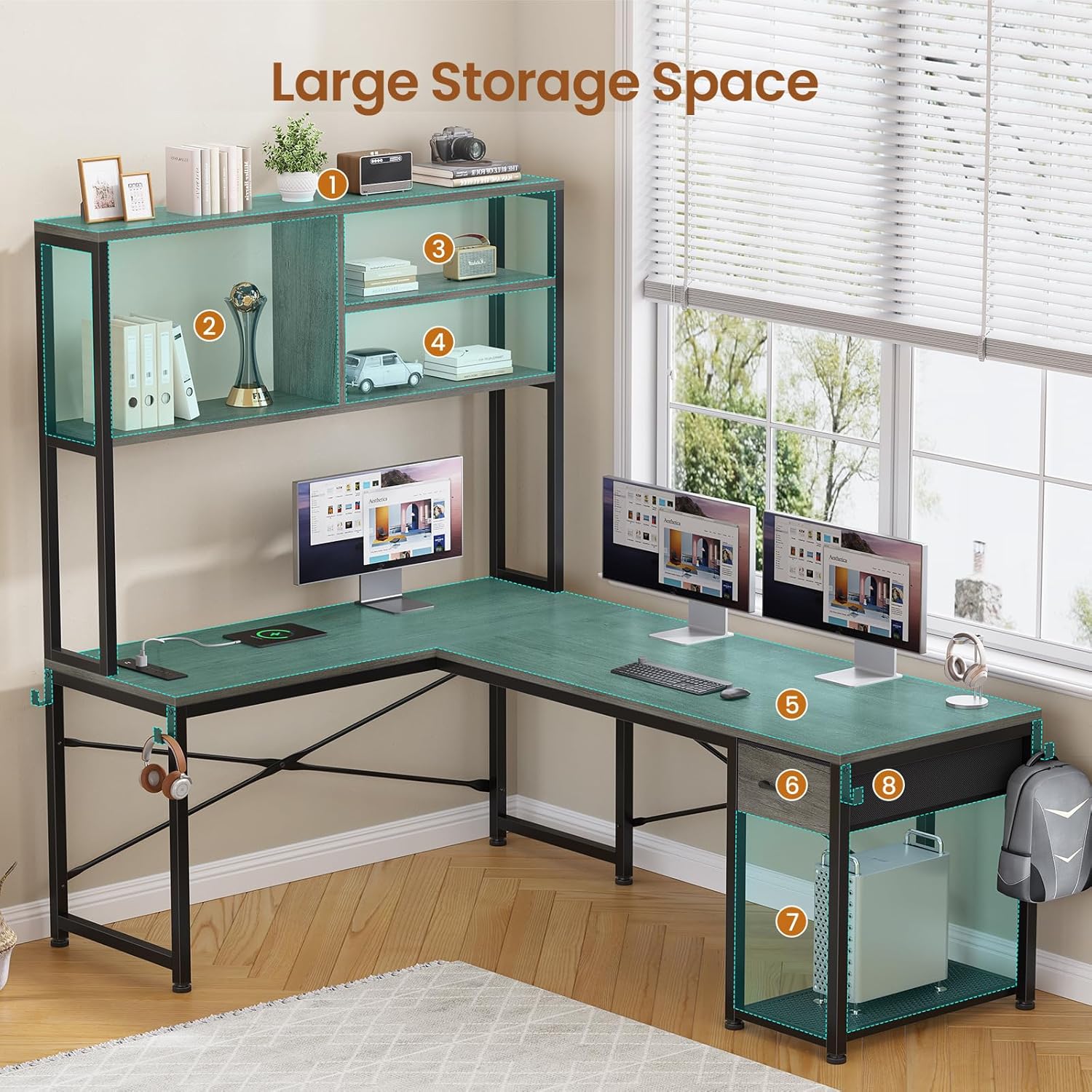
Figure 4.3: Desk showcasing large storage space with shelves, drawer, and CPU stand.

Figure 4.4: Fabric drawer for organized storage.

Figure 4.5: CPU stand for computer tower protection and ventilation.

Figure 4.6: Four iron hooks for hanging accessories.
5. Care and Maintenance
- Cleaning: Wipe the desk surfaces with a soft, damp cloth. Avoid harsh chemicals or abrasive cleaners that may damage the finish.
- Power Outlet: Ensure the power outlet is unplugged before cleaning or if not in use for extended periods.
- Tighten Fasteners: Periodically check and tighten all screws and fasteners to maintain stability.
- Avoid Overloading: Do not place excessive weight on the desk or shelves to prevent damage.
6. Troubleshooting
If you encounter any issues during assembly or use, please review the assembly instructions carefully. For problems not resolved by the instructions, or if parts are damaged or missing, please contact customer support.
7. Product Specifications
| Feature | Detail |
|---|---|
| Brand | SEDETA |
| Model Number | 1.3m |
| Shape | L-Shape |
| Product Dimensions | 17.7"D x 51.2"W x 29.9"H |
| Color | Grey |
| Style | Industrial |
| Base Material | Metal |
| Top Material Type | Engineered Wood |
| Finish Type | Powder Coated |
| Special Feature | Built-In USB Outlet, RGB LED Lights |
| Number of Drawers | 1 (fabric) |
| Item Weight | 41 Pounds |
| Required Assembly | Yes |
| Storage Options | 3-tier shelves, 1 fabric drawer, 1 CPU shelf |
8. Customer Support
Thank you for your purchase. We are committed to providing excellent after-sales service. If your desk arrives damaged, scratched, or with missing parts, please do not hesitate to contact our customer support team. We aim to address your concerns within 24 hours.
For assistance, please visit the SEDETA Store on Amazon or refer to your purchase documentation for direct contact information.