
1. Introduction
Thank you for choosing the 5Rcom Floor TV Stand, Model TF1402U. This stand is designed to provide a stable and versatile mounting solution for televisions ranging from 32 to 60 inches, with a maximum load capacity of 88 lbs. It features a swivel function, height adjustment, and a sturdy wood base with an integrated shelf for media devices. This manual provides essential information for safe assembly, operation, and maintenance of your TV stand.
2. Safety Information
- Weight Capacity: Do not exceed the maximum weight capacity of 88 lbs (40 kg) for the TV mount and 22 lbs (10 kg) for the shelf. Overloading can result in serious injury or property damage.
- TV Size: This stand is compatible with TVs between 32 and 60 inches. Ensure your TV's VESA pattern is within 100x100mm to 400x400mm.
- Stability: Always ensure the stand is placed on a flat, stable, and level surface. The wood base and support feet are designed for enhanced stability.
- Assembly: Follow all assembly instructions carefully. Incorrect assembly can lead to instability and potential hazards. If you encounter any difficulties, contact customer support.
- Children and Pets: Keep children and pets away from the stand during assembly. Do not allow them to climb on or play with the stand or mounted TV.
- Cable Management: Use the provided cable management solutions to prevent tripping hazards and ensure a tidy setup.
3. Package Contents
Before assembly, verify that all components and hardware are present and undamaged. The package includes all necessary tools and an intuitive visual guide for setup.
Note: A detailed parts list with individual component identifiers is typically included in the physical manual. Refer to that document for specific part numbers.
4. Setup and Assembly Instructions
The 5Rcom Floor TV Stand is designed for quick and easy assembly, typically within 15 minutes, without the need for drilling into walls or furniture. Follow the visual instructions provided with your product for a smooth setup process.
Assembly Overview
- Unpack all components and lay them out on a clean, soft surface to prevent scratches.
- Assemble the base and vertical support pole according to the visual guide. Ensure all screws are tightened securely.
- Attach the TV mounting bracket to the vertical support pole.
- Mount your TV to the bracket, ensuring it is centered and level.
- Install the adjustable shelf at your desired height.
- Utilize the cable management straps to organize wires.
For a visual guide on assembly and features, please watch the official product video:
Video: Official 5Rcom Floor TV Stand Assembly and Feature Overview. This video demonstrates the assembly process and highlights key features like swivel and height adjustment.
Key Stability Features

The stand features a durable wooden base and foldable support feet for enhanced stability and load-bearing performance, preventing toppling.

Detail of the wide wooden base, non-slip feet, and integrated cable management for a secure and organized setup.
5. Operating Instructions
Swivel Function
Your 5Rcom Floor TV Stand allows for a ±35° swivel to both the left and right, providing a total swivel range of 70°. This feature helps reduce glare and allows you to adjust the viewing angle for optimal comfort from various positions in the room.

Illustration of the TV stand's swivel function, allowing for a 70-degree total rotation to achieve comfortable viewing angles.
Height Adjustment
The TV stand offers ergonomic height adjustment, allowing you to position your screen between 51.7 inches and 54 inches from the floor. This helps mitigate neck and eye strain during prolonged viewing. To adjust the height, loosen the securing mechanism on the vertical pole, slide the TV mount to the desired height, and re-secure it firmly.
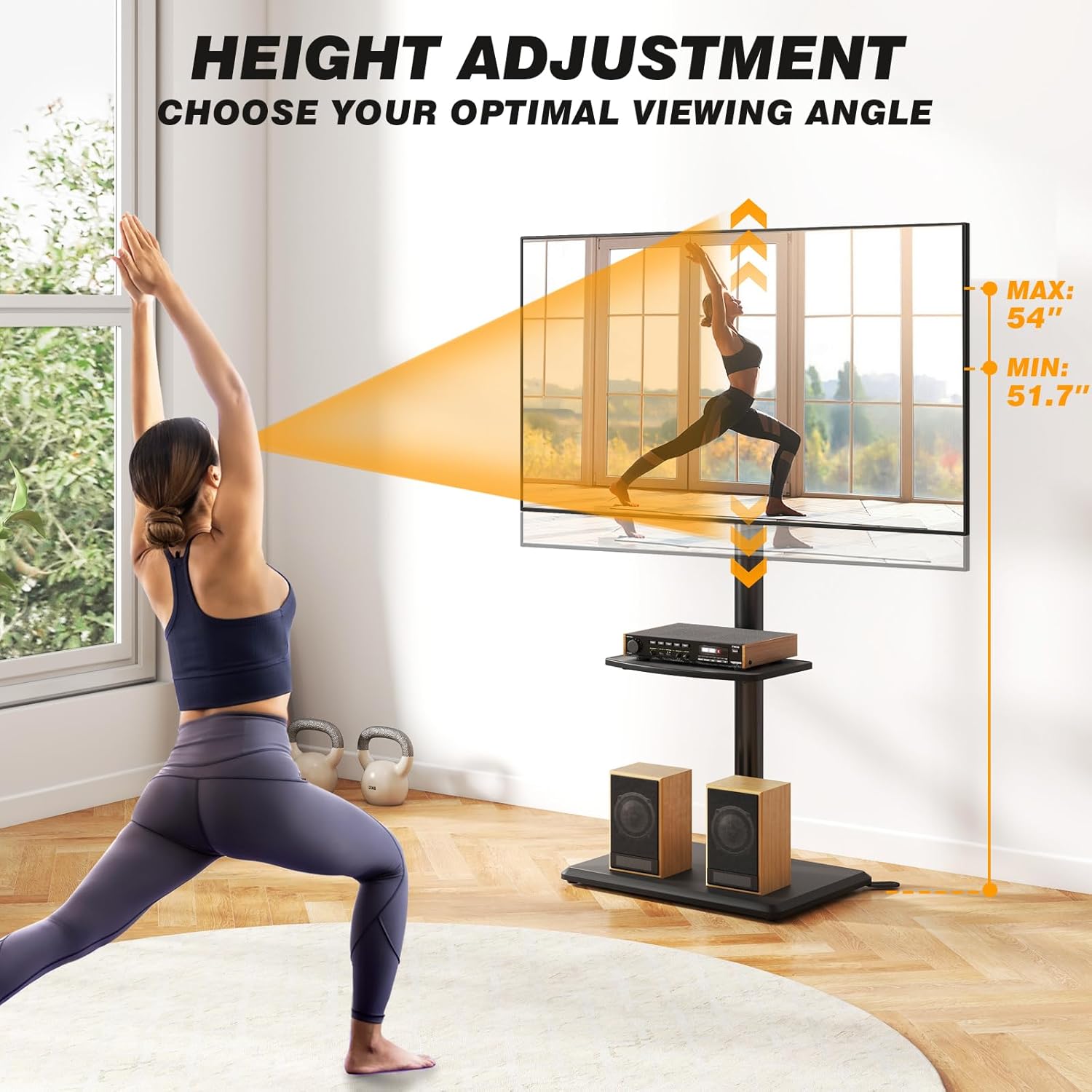
Visual representation of the TV stand's adjustable height feature, indicating the minimum and maximum viewing heights.
Adjustable Shelf
The integrated shelf can be adjusted vertically along the main pole to accommodate various media devices such as soundbars, DVD players, or gaming consoles. It has a maximum capacity of 22 lbs (10 kg). Ensure the shelf is securely fastened at your chosen height.
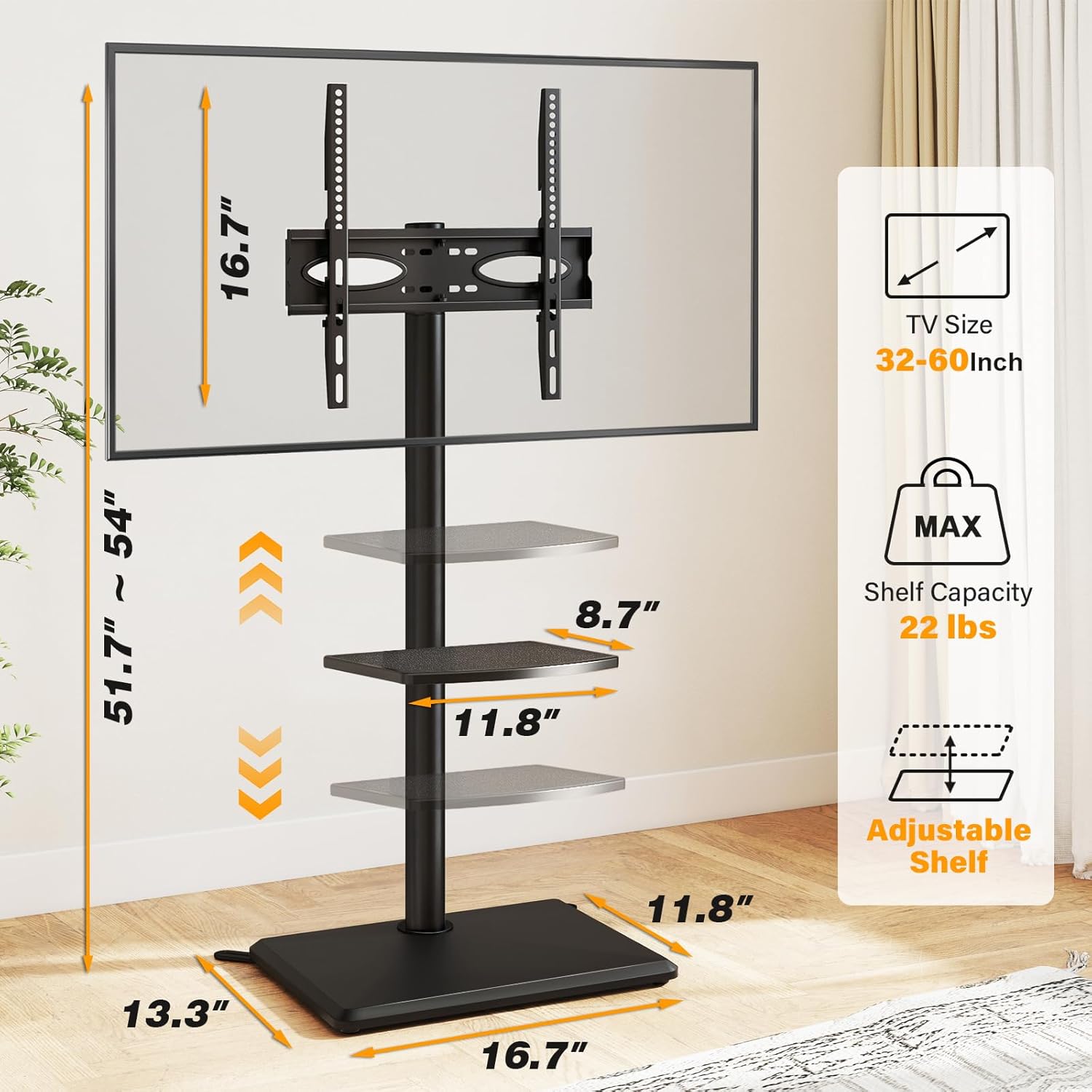
Diagram illustrating the overall dimensions of the TV stand and the adjustable nature of its media shelf.
6. Maintenance
- Cleaning: Wipe the stand with a soft, dry cloth. For stubborn marks, a slightly damp cloth can be used, followed by immediate drying. Avoid harsh chemicals or abrasive cleaners.
- Inspection: Periodically check all screws and connections to ensure they remain tight. Re-tighten if necessary.
- Cable Management: Ensure cables are neatly managed and not pinched or strained.
7. Troubleshooting
Stand is unstable:
- Ensure all assembly screws are fully tightened.
- Verify the stand is on a flat, level surface.
- Confirm the TV weight does not exceed 88 lbs and the shelf weight does not exceed 22 lbs.
TV does not fit the mount:
- Check your TV's VESA mounting pattern. It must be between 100x100mm and 400x400mm.
- Confirm your TV size is between 32 and 60 inches.

Diagram showing the compatibility range for TV sizes (32-60 inches), maximum load (88 lbs), and VESA patterns (100x100mm to 400x400mm).
8. Specifications
| Feature | Specification |
|---|---|
| Model Number | TF1402U |
| Mounting Type | Floor Mount |
| Movement Type | Swivel (±35° left/right) |
| Compatible TV Sizes | 32 - 60 inches |
| Max TV Load Capacity | 88 lbs (40 kg) |
| VESA Compatibility | 100x100mm to 400x400mm |
| Height Adjustment Range | 51.7 - 54 inches |
| Shelf Load Capacity | 22 lbs (10 kg) |
| Material | Metal, Wood Base |
| Color | Black |
9. Warranty and Support
This 5Rcom Floor TV Stand comes with a 1-Year Warranty from the date of purchase, covering manufacturing defects. Please retain your proof of purchase for warranty claims.
For any questions regarding assembly, operation, or troubleshooting, please contact the 5Rcom customer service team. They are available to provide professional technical support.
Contact information can typically be found on the product packaging or the official 5Rcom website.