
1. Introduction
This manual provides detailed instructions for the assembly, operation, and maintenance of your SEDETA L Shaped Gaming Desk (Model 1.3m). Designed for versatility and efficiency, this desk features a reversible L-shaped configuration, integrated power outlets, LED lighting, and ample storage solutions. Please read this manual thoroughly before assembly and use to ensure proper setup and safe operation.

Figure 1: Overall view of the SEDETA L Shaped Gaming Desk.
2. Safety Information
Please observe the following safety guidelines to prevent injury or damage to the product:
- Always assemble the desk according to the provided instructions.
- Ensure all screws and fasteners are tightened securely for stability before use.
- Do not overload the desk, especially near the power outlet. Refer to specifications for weight limits.
- Keep the desk away from water, excessive moisture, and direct heat sources to prevent damage to materials and electrical components.
- Always unplug the power outlet when not in use, during cleaning, or before moving the desk.
- Do not allow children to climb on or play with the desk.
3. Package Contents
Verify that all components are present before beginning assembly. If any parts are missing or damaged, please contact customer support.
- Desk panels (L-shaped main desk, hutch shelves)
- Metal frame components
- Fabric drawer
- CPU stand
- 4 Iron hooks
- Power outlet strip (4 AC outlets, 2 USB ports)
- RGB LED light strip with remote control
- Assembly hardware (screws, bolts, Allen wrench)
- Instruction manual

Figure 2: Desk dimensions and reversible configuration options.
4. Setup & Assembly
Assembly typically requires two people. Follow the step-by-step instructions provided in the separate assembly guide included in your package. Ensure you have adequate space and the necessary tools (usually an Allen wrench, provided) before starting.
- Unpack and Identify Parts: Lay out all components and hardware. Compare them with the parts list in the assembly guide.
- Assemble the Frame: Connect the metal frame components as per the diagrams. Do not fully tighten screws until all parts are aligned.
- Attach Desk Panels: Secure the main L-shaped desk panels to the frame.
- Install Storage Hutch: The top hutch can be installed on either the left or right side of the desk. Follow the guide for your desired orientation. The 3-layer bookshelf within the hutch is also adjustable.
- Integrate Power Outlet: Secure the power outlet strip into its designated slot on the desk.
- Attach Accessories: Install the fabric drawer, CPU stand, and iron hooks.
- Final Tightening: Once all components are in place and aligned, securely tighten all screws.
- Apply LED Lights: Adhere the RGB LED light strip to the designated area, typically under the hutch or along the desk edges, as shown in the assembly guide.
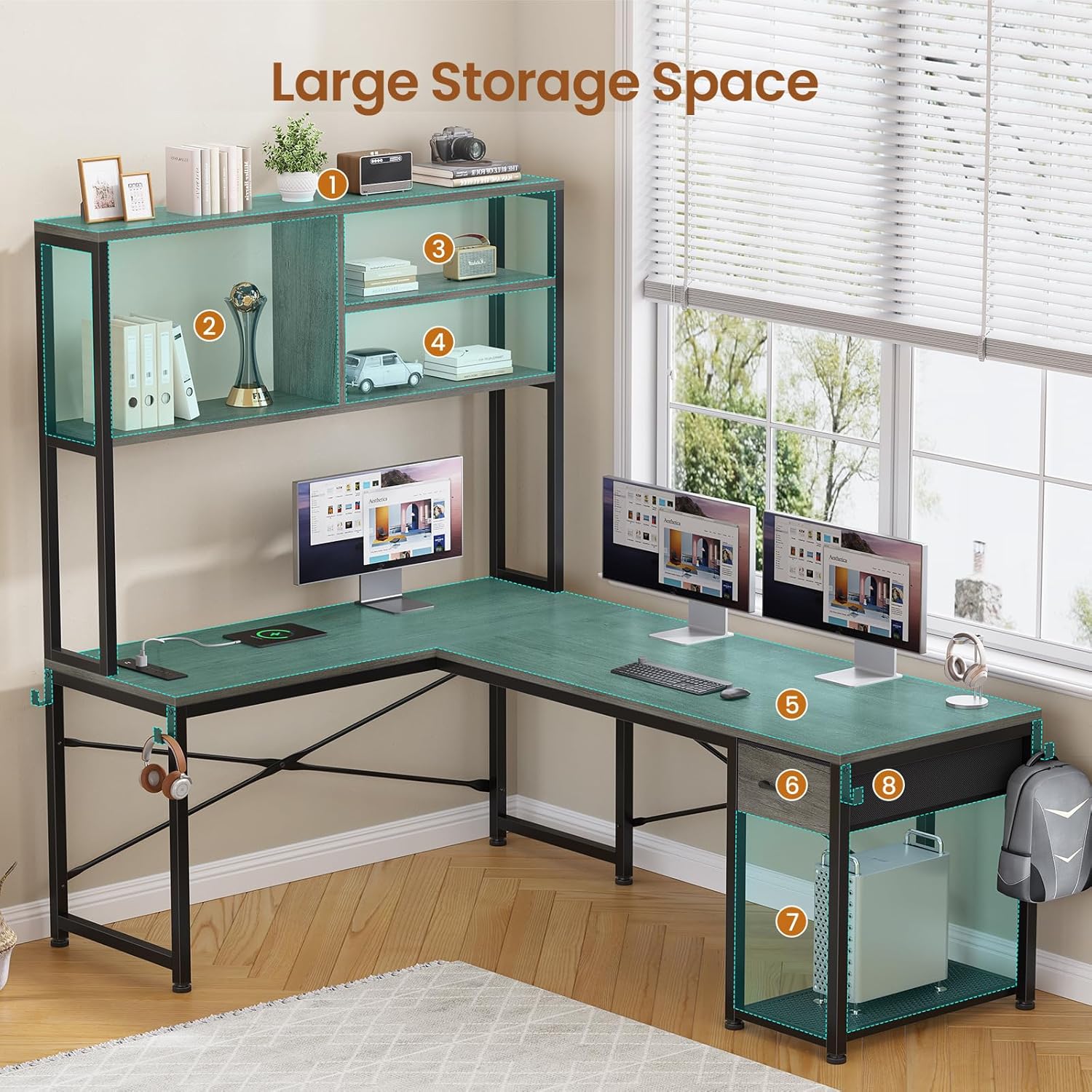
Figure 3: Desk with integrated storage shelves and fabric drawer.

Figure 4: Detail of the fabric drawer, CPU stand, and iron hooks for accessories.
5. Operating Instructions
5.1. Power Outlet
The desk includes a built-in power strip with 4 AC outlets and 2 USB ports. This allows you to power multiple devices simultaneously.
- To Use: Plug the desk's main power cord into a wall outlet. Then, plug your devices (e.g., monitor, laptop, phone charger) into the available AC outlets or USB ports on the desk.
- Safety Note: Do not exceed the maximum power rating of 1500W for the power strip. Avoid plugging in high-power appliances that may draw excessive current.

Figure 5: Integrated power outlet for convenient charging.
5.2. RGB LED Lights
The integrated RGB LED light strip offers customizable lighting effects to enhance your workspace or gaming environment.
- Control: The LED lights can be controlled via the included remote control or a dedicated smartphone application (refer to the LED light manual for app download and pairing instructions).
- Features:
- Multiple colors and 29 flashing modes.
- Music sync function: Built-in microphone allows lights to change with sound and music rhythm.
- Brightness and speed adjustment.

Figure 6: Desk with LED lights providing ambient illumination.
Video 1: A 3D display video showcasing the SEDETA L Shaped Gaming Desk features, including the LED lights and storage options.
Video 2: A display video demonstrating the SEDETA 51.2" L Shaped Gaming Desk, highlighting its design and functionality.
5.3. Reversible Storage Design
The desk's design allows for flexibility in configuration:
- Hutch Placement: The top hutch with shelves can be positioned on either the left or right side of the L-shaped desk during assembly to suit your room layout.
- Adjustable Shelves: The 3-layer bookshelf within the hutch can be adjusted to accommodate items of various heights.

Figure 7: The open removable shelf feature, allowing for flexible storage.
6. Maintenance
Regular maintenance will help prolong the life and appearance of your desk.
- Cleaning: Wipe surfaces with a soft, damp cloth. Avoid harsh chemicals or abrasive cleaners that may damage the finish. For spills, clean immediately.
- Dusting: Regularly dust all surfaces, including shelves and metal frames, with a dry, soft cloth.
- Hardware Check: Periodically check all screws and fasteners to ensure they remain tight. Retighten if necessary to maintain stability.
- Electrical Components: Ensure the power strip and LED lights are kept dry. Do not attempt to repair electrical components yourself; contact qualified personnel if issues arise.
7. Troubleshooting
If you encounter issues with your SEDETA L Shaped Gaming Desk, refer to the following common problems and solutions:
| Problem | Possible Cause | Solution |
|---|---|---|
| Desk is wobbly. | Loose screws; uneven floor. | Check and tighten all assembly screws. Adjust the leveling feet on the desk legs if your floor is uneven. |
| Power outlet not working. | Desk power cord unplugged; wall outlet issue; overloaded circuit. | Ensure the desk's power cord is securely plugged into a functional wall outlet. Test the wall outlet with another device. Reduce the number of devices plugged into the desk's power strip. |
| LED lights not turning on/responding. | LED strip unplugged; remote battery dead; app connection issue. | Check if the LED light strip is properly connected to its power source. Replace the remote control battery. Re-pair the LED lights with the app if using app control. |
| Fabric drawer does not slide smoothly. | Obstruction; improper installation. | Check for any items obstructing the drawer's path. Ensure the drawer is correctly inserted into its runners as per assembly instructions. |
If the problem persists after attempting these solutions, please contact SEDETA customer support for further assistance.
8. Specifications
| Feature | Detail |
|---|---|
| Brand | SEDETA |
| Model Number | 1.3m |
| Shape | L-Shape |
| Product Dimensions (D x W x H) | 17.7" x 51.2" x 29.9" |
| Color | Grey |
| Style | Industrial |
| Base Material | Metal |
| Top Material Type | Engineered Wood |
| Special Feature | Built-In USB Outlet, RGB LED Lights, Reversible Design |
| Number of Drawers | 1 (Fabric) |
| Item Weight | 41 Pounds |
| Storage Options | 3-tier shelves, 1 fabric drawer, 1 CPU shelf |
| Power Outlet | 4 AC Outlets (120V/12A), 2 USB Ports (5V/2A), Max Power 1500W, 5.3-Foot Power Cord |
| Assembly Required | Yes |
9. Warranty & Support
SEDETA stands behind the quality of its products. While specific warranty details are not provided in this manual, typically products are covered against manufacturing defects for a limited period from the date of purchase.
Customer Support: If your desk arrives damaged, scratched, or with missing parts, or if you encounter any issues during assembly or use, please contact SEDETA customer support. Our team is dedicated to addressing your concerns promptly.
For assistance, please refer to the contact information provided on your purchase receipt or the SEDETA official website. Please have your model number (1.3m) and purchase date ready when contacting support.