
Introduction
Thank you for purchasing the WISCENT WTB-733 Retro Cassette Player Recorder. This device combines classic audio playback with modern features, including AM/FM/SW radio, Bluetooth connectivity, USB/Micro SD playback, and voice recording. Please read this manual thoroughly before use to ensure proper operation and to maximize your listening experience.
Safety Information
- Do not expose the unit to rain or moisture to prevent fire or electric shock.
- Avoid placing the unit near heat sources such as radiators, heat registers, stoves, or other apparatus that produce heat.
- Use only attachments/accessories specified by the manufacturer.
- Unplug the unit during lightning storms or when unused for long periods.
- Do not open the casing. Refer all servicing to qualified service personnel.
- Keep out of reach of children.
Product Overview
The WISCENT WTB-733 is a versatile audio system designed for both retro and modern listening. Key features include:
- Cassette Player/Recorder: Play and record audio cassettes.
- AM/FM/SW Radio: Multi-band radio tuner for various broadcasts.
- Bluetooth Connectivity: Wireless audio streaming from compatible devices.
- USB/Micro SD (TF) Playback: Play MP3/WMA files from external storage.
- Built-in Microphone: For voice recording.
- RGB Colorful Lights: Dynamic lighting effects on speakers.
- Headphone Jack: For private listening.
- Dual Power Options: AC or battery powered.

Figure 1: Front view of the WISCENT WTB-733 with key features highlighted.
Setup
Powering the Device
The WTB-733 can be powered by AC electricity or batteries.
- AC Power: Connect the included AC power cord to the AC IN port on the back of the unit and then to a standard 120V AC, 60Hz wall outlet. The AC cord is typically stored in the battery compartment.
- Battery Power: For portable use, insert 6 UM-1 type batteries (not included) into the battery compartment located on the back of the unit. Ensure correct polarity. Alternatively, 2 rechargeable batteries (not included) can be used.
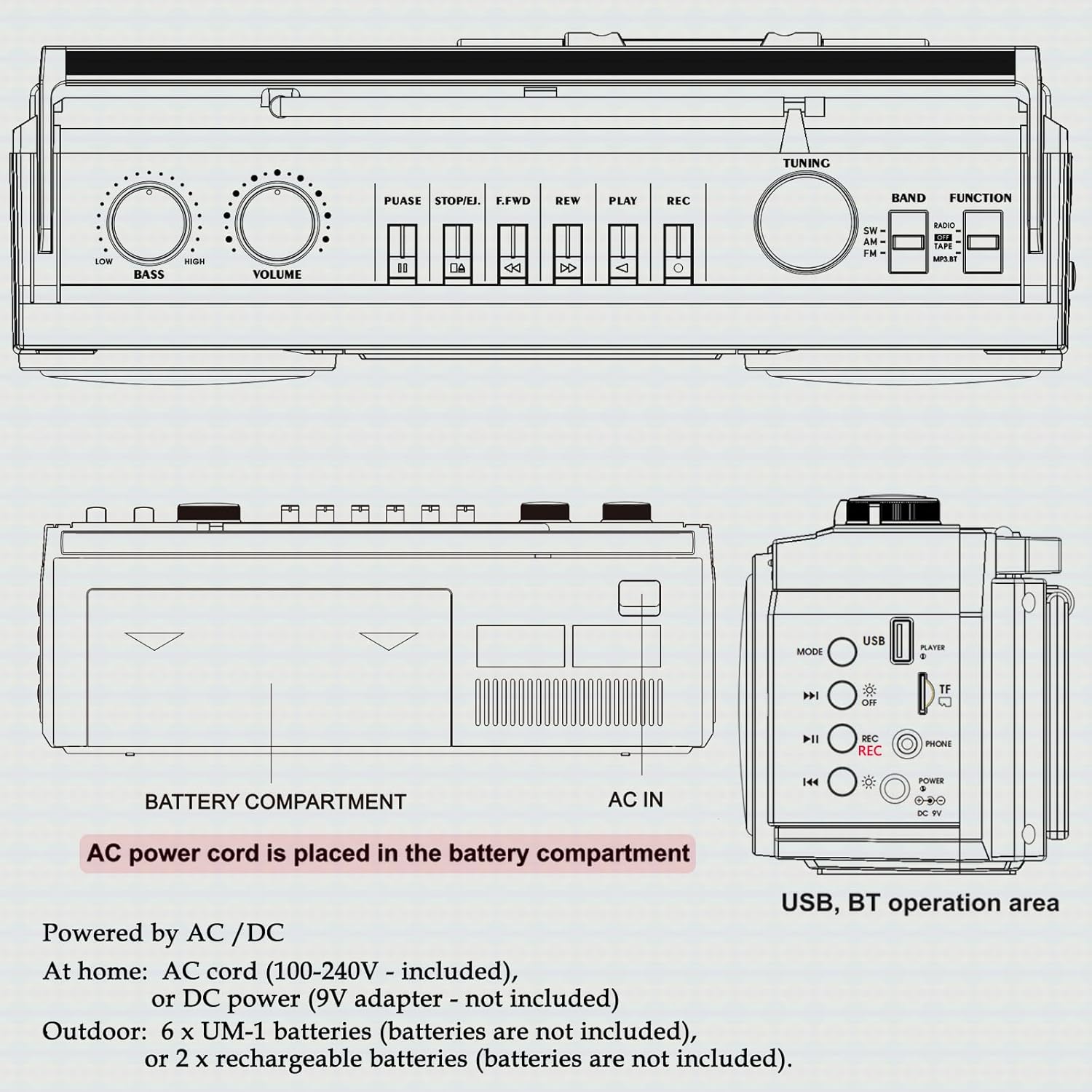
Figure 2: Rear view showing battery compartment and AC IN port.
Antenna Setup
For optimal radio reception, extend the telescopic antenna fully. Adjust its position and angle to improve signal clarity.
Operating Instructions
General Controls

Figure 3: Top panel controls.
- POWER Switch: Turns the unit ON/OFF.
- VOLUME Knob: Adjusts the overall sound level.
- BASS Knob: Adjusts the bass level.
- FUNCTION Selector: Switches between RADIO, TAPE, USB/TF, and BT (Bluetooth) modes.
- BAND Selector: In Radio mode, selects between FM, AM, and SW bands.
- TUNING Knob: Tunes to desired radio stations.
Radio Operation (AM/FM/SW)
- Set the FUNCTION selector to RADIO.
- Select the desired band (FM, AM, or SW) using the BAND selector.
- Extend the telescopic antenna for better reception.
- Rotate the TUNING knob to find your desired station.
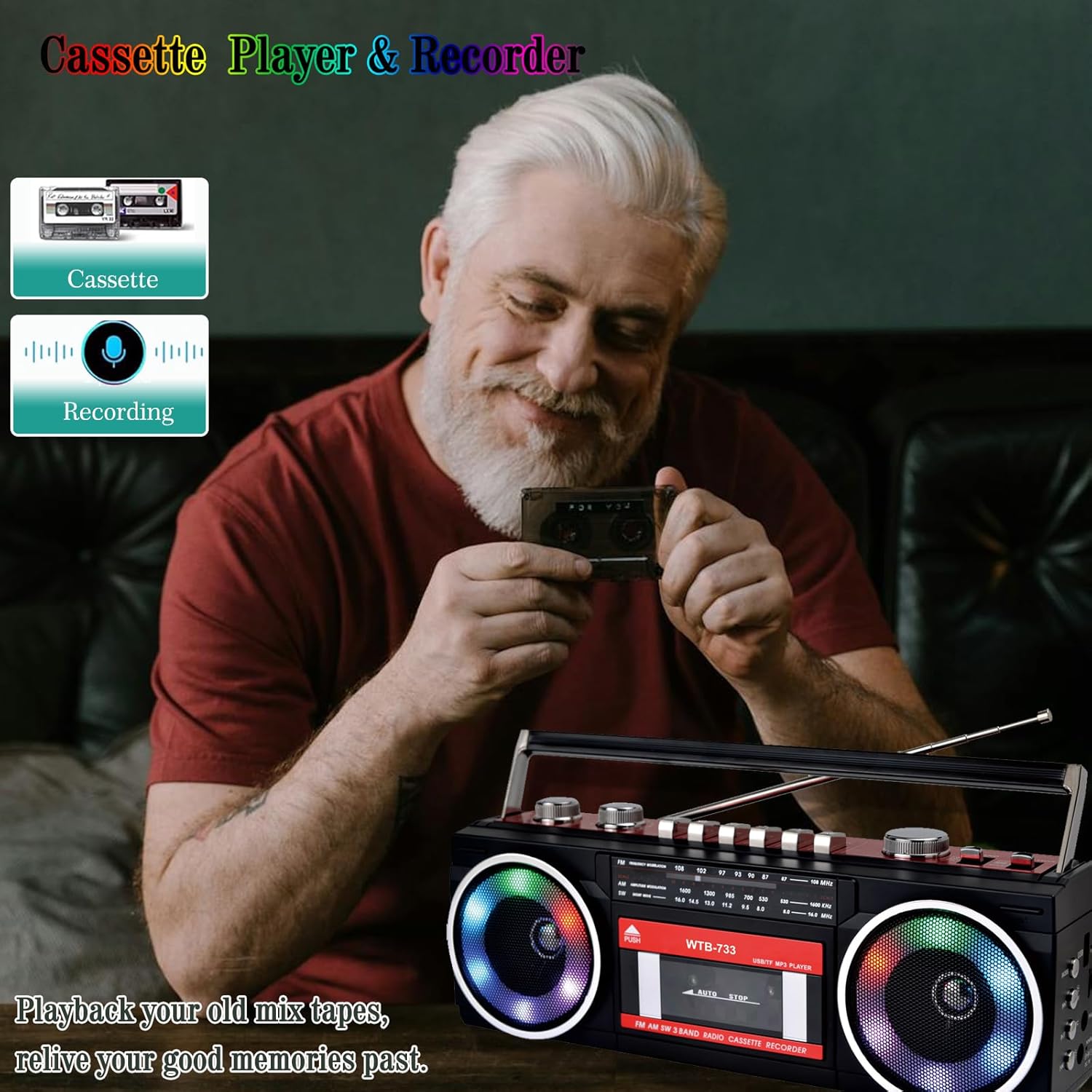
Figure 4: Radio tuning dial.
Cassette Player and Recorder

Figure 5: Cassette player controls.
- Set the FUNCTION selector to TAPE.
- Press the PUSH/EJECT button to open the cassette door.
- Insert a cassette tape with the open edge facing upwards. Close the cassette door.
- Playback: Press the PLAY button to start playback.
- Recording: Press the REC button to begin recording. Ensure a blank tape is inserted. The built-in microphone will record ambient sound.
- Fast Forward/Rewind: Use the F.FWD and REW buttons.
- Pause: Press the PAUSE button to temporarily stop playback/recording. Press again to resume.
- Stop/Eject: Press the STOP/EJECT button to stop playback/recording and eject the tape.
Bluetooth Connectivity
- Set the FUNCTION selector to BT. The unit will enter pairing mode, indicated by a flashing light or audio prompt.
- On your Bluetooth-enabled device (e.g., smartphone, tablet), enable Bluetooth and search for available devices.
- Select "WTB-733" from the list of devices to pair.
- Once paired, you can stream audio from your device to the boombox.
- Note: This unit supports Bluetooth reception only and does not transmit Bluetooth signals to headphones or other speakers.

Figure 6: Bluetooth streaming from a mobile device.
USB/Micro SD (TF) Playback
- Set the FUNCTION selector to USB/TF.
- Insert a USB drive or Micro SD (TF) card into the corresponding slot on the side of the unit.
- The unit will automatically detect and begin playing MP3/WMA files from the storage device.
- Use the playback control buttons (Play/Pause, Next, Previous) to navigate tracks.
RGB Colorful Lights
The speakers are equipped with RGB LED lighting that creates a dynamic visual effect.
- The lights are automatically turned off in Radio mode.
- In other modes (BT, Tape, USB/TF), the lights are on by default.
- To manually control the lights, press the 'OFF' button (often labeled with a lightbulb icon) twice continuously to toggle them on or off.

Figure 7: RGB colorful lights in operation.
Headphone Jack
Connect standard 3.5mm headphones (not included) to the headphone jack on the side of the unit for private listening. Audio will be muted from the main speakers when headphones are connected.
Maintenance
- Cleaning: Use a soft, dry cloth to clean the exterior of the unit. Do not use abrasive cleaners or solvents.
- Cassette Deck Care: Periodically clean the tape heads and pinch rollers with a cotton swab lightly dampened with isopropyl alcohol to ensure optimal sound quality and prevent tape damage.
- Storage: When not in use for extended periods, remove batteries and store the unit in a cool, dry place away from direct sunlight.
Troubleshooting
| Problem | Possible Cause | Solution |
|---|---|---|
| No power | AC cord not connected; Batteries depleted or incorrectly inserted. | Check AC connection; Replace or correctly insert batteries. |
| No sound | Volume too low; Headphones connected; Incorrect function mode. | Increase volume; Disconnect headphones; Select correct function mode. |
| Poor radio reception | Antenna not extended; Weak signal. | Extend and adjust antenna; Try moving the unit to a different location. |
| Cassette not playing/recording | Tape damaged; Incorrect buttons pressed; Tape heads dirty. | Check tape condition; Ensure correct play/record buttons are pressed; Clean tape heads. |
| Bluetooth not connecting | Unit not in BT mode; Device not in pairing mode; "WTB-733" not selected. | Switch to BT mode; Ensure device Bluetooth is on and searching; Select "WTB-733" to pair. |
| RGB lights not working | In Radio mode; Lights turned off manually. | Lights are off in Radio mode by design; Press the 'OFF' button twice to toggle them on in other modes. |
Specifications
- Model Number: WTB-733
- Product Dimensions: 13 x 4.92 x 3.93 inches
- Item Weight: 3.63 pounds
- Radio Bands: AM/FM/SW
- Connectivity: Bluetooth, USB, Micro SD (TF)
- Speaker Type: Stereo
- Power Supply: AC 120V, 60Hz or 6 x UM-1 batteries (not included)
- USB/TF Support: Up to 64GB (FAT32 format)
Warranty and Support
WISCENT products are designed for reliability and performance. For warranty information or technical support, please refer to the documentation included with your purchase or contact WISCENT customer service through their official channels. Keep your purchase receipt as proof of purchase for warranty claims.