
1. Introduction
Thank you for choosing the SIBRILLE HL10 LED Desk Lamp. This advanced desk lamp is designed to provide versatile and comfortable lighting for various tasks, including office work, reading, gaming, and creative activities. Featuring a rotatable dual-head design, multiple color temperatures, dimmable brightness, RGB lighting, and convenient remote control, the HL10 aims to enhance your workspace with optimal illumination and eye protection. Please read this manual thoroughly before use to ensure proper installation, operation, and maintenance.

Image: The SIBRILLE HL10 LED Desk Lamp positioned above a computer setup, demonstrating its wide lighting coverage and RGB ambient light.
2. Safety Information
- Ensure the power adapter is compatible with your local power supply (100-240V AC, 50/60Hz).
- Do not disassemble, repair, or modify the lamp. Contact customer support for assistance.
- Avoid exposing the lamp to water or high humidity. This product is for indoor use only.
- Keep the lamp away from heat sources and direct sunlight to prevent damage.
- Do not look directly into the LED light source for extended periods, as it may cause eye strain.
- Ensure the clamp is securely fastened to a stable surface before attaching the lamp.
3. Package Contents
Please check the package for the following items:
- SIBRILLE HL10 LED Desk Lamp Unit
- Power Adapter
- Wireless Remote Control
- Clamp Base
- User Manual
4. Product Overview and Features
The SIBRILLE HL10 LED Desk Lamp is engineered for optimal lighting performance and user comfort. Key features include:
- Rotatable Lamp Head & Ultra-Wide Coverage: The dual lamp heads can extend up to 31.5 inches and rotate 270 degrees front and back, providing flexible lighting angles. The bendable gooseneck ensures even coverage across a 71-inch wide desk.
- Multi-Mode & Upgraded RGB Color: Offers 5 white/warm color temperatures (3000K-6500K) and 5 brightness levels (10%-100%). Additionally, it features 7 RGB modes (single colors and dynamic effects) for ambient lighting.
- Remote Control & Multifunctional: Equipped with a wireless smart remote control for convenient adjustment of brightness, color, and modes. Includes memory function to recall last settings and a 1-hour timer function.
- Individual RGB Control: RGB colors can be controlled separately via touch or remote, offering 3 single colors (red, green, blue) and 4 dynamic effects (6-color alternating, gradients, breathing flashing, sound rhythm).
- Eye Protection: Provides even illumination with no glare, flicker, or blue light hazard, reducing eye strain during prolonged use.

Image: Illustration of the lamp's rotatable dual head and flexible gooseneck, highlighting its wide lighting coverage and adjustability.
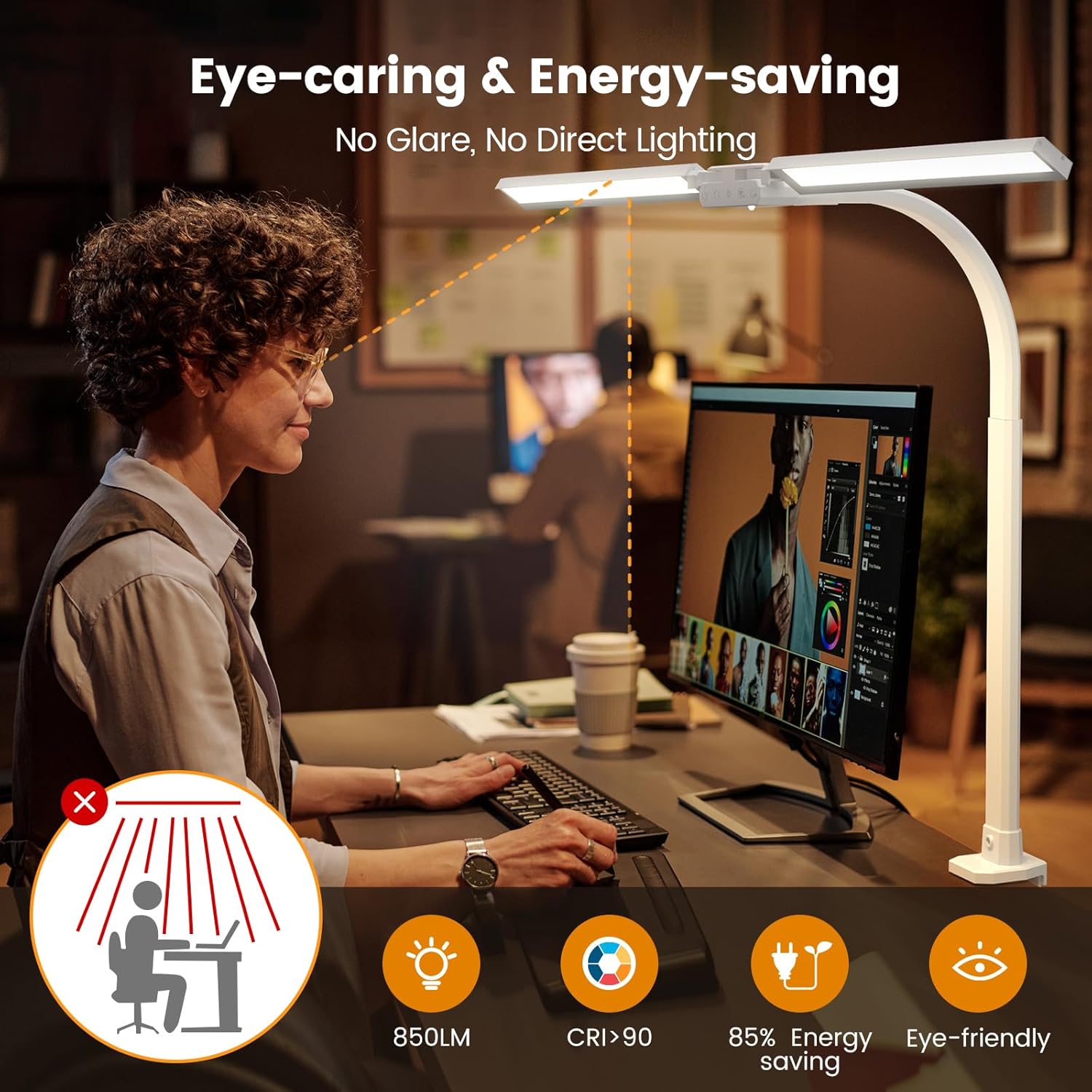
Image: Visual representation of the lamp's eye-caring technology, emphasizing glare reduction, high color rendering index (CRI), and energy efficiency.
5. Setup and Assembly
Follow these steps to assemble and set up your SIBRILLE HL10 LED Desk Lamp:
- Attach the Lamp to the Clamp: Insert the lamp's base into the clamp. Secure it by tightening the short screw (B) and then the long screw (C) as shown in the diagram.
- Mount the Clamp: Place the clamp onto the edge of your desk or workbench. Ensure the desk thickness is suitable for the clamp (typically >1.6 inches for secure fit). Tighten the clamp screw until the lamp is firmly in place.
- Adjust Position: Adjust the flexible gooseneck and rotate the lamp heads to your desired lighting position.
- Connect Power: Plug the power adapter into the lamp's power port and then into a standard electrical outlet.

Image: Step-by-step visual guide for assembling the lamp and attaching it to a desk using the clamp.
Image: Close-up of the lamp's clamp, illustrating proper attachment to a desk edge and highlighting the minimum required desk thickness.
6. Operating Instructions
The SIBRILLE HL10 LED Desk Lamp can be operated using its integrated touch buttons or the included wireless remote control.
6.1 Touch Control
The touch buttons are located on the lamp head. A small blue LED indicates when the lamp is plugged in.
- ON/OFF: Press the power button to turn the lamp on or off.
- Color Temperature (+/-): Adjust the white/warm light color temperature (3000K-6500K).
- Brightness (+/-): Adjust the brightness level (10%-100%).
- RGB Modes: Cycle through various RGB lighting modes.
- RGB ON/OFF: Turn the RGB lighting on or off independently.
6.2 Remote Control
The wireless remote control provides full functionality from a distance.
- Power Button: Turns the lamp on or off.
- Color Temperature Buttons: Adjusts the white/warm light color temperature.
- Brightness Buttons: Adjusts the brightness level.
- 5 Presetted Lighting Modes: Quickly switch between predefined lighting scenarios (e.g., Night, Reading, Working, Gaming, Relaxing).
- RGB Single Color: Select individual red, green, or blue colors.
- RGB Multi-dynamic Modes: Activates dynamic RGB effects like 6-color alternating, gradients, breathing flash, and sound rhythm.
- 1H Timing: Sets a 1-hour automatic shut-off timer.
- Memory Function: The lamp automatically remembers the last used brightness and color settings when turned off and on.

Image: Detailed view of the lamp's touch control panel and the functions available on the wireless remote control.

Image: Visual guide to the lamp's 25 presetted lighting modes, showcasing 5 color temperatures from 2700K to 6500K and 5 brightness levels from 10% to 100%.

Image: Illustration of the lamp's RGB lighting capabilities, displaying individual red, green, blue colors, and dynamic modes like 6-color alternating, gradients, breathing flash, and sound rhythm.
7. Maintenance
- Cleaning: Disconnect the power before cleaning. Use a soft, dry cloth to wipe the lamp. Do not use abrasive cleaners or solvents.
- Storage: If storing the lamp for an extended period, ensure it is clean and dry. Store it in a cool, dry place away from direct sunlight.
- LEDs: The LED light source is integrated and not user-replaceable.
8. Troubleshooting
| Problem | Possible Cause | Solution |
|---|---|---|
| Lamp does not turn on. | No power connection. | Check if the power adapter is securely plugged into the lamp and the wall outlet. Ensure the outlet is functional. |
| Remote control is not working. | Remote battery is low or depleted. Obstruction between remote and lamp. | Replace the remote control battery. Ensure there are no obstacles blocking the signal. Point the remote directly at the lamp's sensor. |
| Brightness or color temperature cannot be adjusted. | Lamp is in a fixed mode. | Ensure the lamp is not in a specific preset mode that restricts adjustments. Try cycling through modes or restarting the lamp. |
| RGB lighting is not functioning. | RGB function is turned off. | Press the RGB ON/OFF button on the lamp or remote to activate RGB lighting. |
9. Specifications
| Feature | Detail |
|---|---|
| Model Name | HL10 |
| Product Dimensions | 16"D x 9"W x 2"H (Lamp Head: 30 inches wide) |
| Item Weight | 3.32 pounds |
| Lamp Type | LED |
| Light Source Type | LED |
| Color Temperature | 3000K-6500K (5 levels) |
| Brightness Levels | 10%-100% (5 levels) |
| RGB Modes | 7 modes (single colors & dynamic effects) |
| Control Method | Remote, Touch Buttons |
| Material | Aluminum, Metal, Plastic |
| Power Source | Corded Electric (Adapter included) |
| Special Features | Dimmable, Rotatable Head, Eye-Caring, RGB, Timer, Memory Function |
| Indoor/Outdoor Usage | Indoor |
10. Warranty and Support
SIBRILLE products are manufactured to high-quality standards. For warranty information, technical support, or any questions regarding your HL10 LED Desk Lamp, please refer to the warranty card included with your purchase or visit the official SIBRILLE website. You may also contact our customer service team directly for assistance.
For additional support and product information, please visit the SIBRILLE Store on Amazon.