
Introduction
This manual provides comprehensive instructions for the assembly, operation, and maintenance of the CADA Shell Gas Station Building Set, Model 402857. This set is an officially licensed 1309-piece clamp block set designed for enthusiasts aged 14 years and older. It allows for the construction of a detailed Shell service station, complete with a shop and car wash, featuring interactive elements and LED lighting.
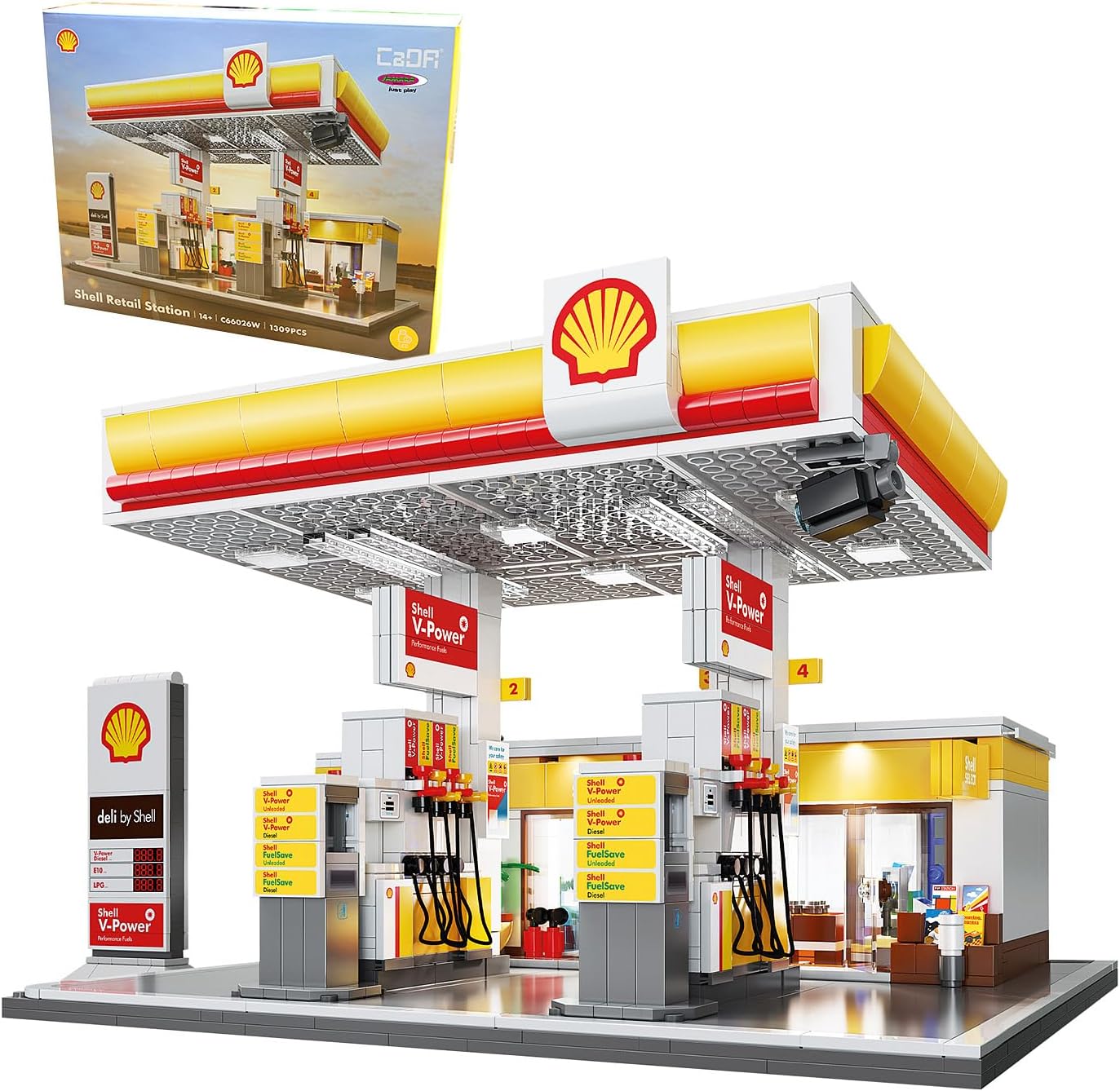
Image: The CADA Shell Gas Station Building Set, Model 402857, shown with its retail packaging. This image provides an overview of the complete set and its components.
Safety Information
Please read and adhere to the following safety guidelines before beginning assembly:
- This product is intended for use under the direct supervision of an adult.
- Not suitable for children under 36 months due to small parts.
- Contains small parts that can be swallowed, posing a choking hazard. Keep out of reach of young children.
- Ensure all components are handled carefully to prevent damage or injury.
What's in the Box
Upon opening the package, verify that all listed items are present:
- Building Blocks (1309 pieces)
- Detailed Instruction Manual
- LED Lighting Components
- Printed Components

Image: A close-up view of the CADA Shell Gas Station Building Set, highlighting the total piece count of 1309. This confirms the extensive nature of the set.
Assembly Instructions
Follow the step-by-step instructions provided in the included manual for proper assembly. The construction process is designed to be intuitive, with components connecting by simply plugging them together.
- Preparation: Unpack all components and organize them by type or color as suggested in the instruction manual.
- Foundation: Begin by constructing the base of the gas station according to the diagrams.
- Structural Elements: Assemble the main walls, pillars, and roof structure. Pay attention to the placement of printed components.
- Interior Details: Construct the interior of the shop and car wash, including any furniture or equipment.
- Interactive Features: Integrate the LED lighting system and ensure all manual doors and wall elements are correctly installed to allow for opening and closing.
- Finishing Touches: Add smaller details, signage, and any accessory vehicles or figures.
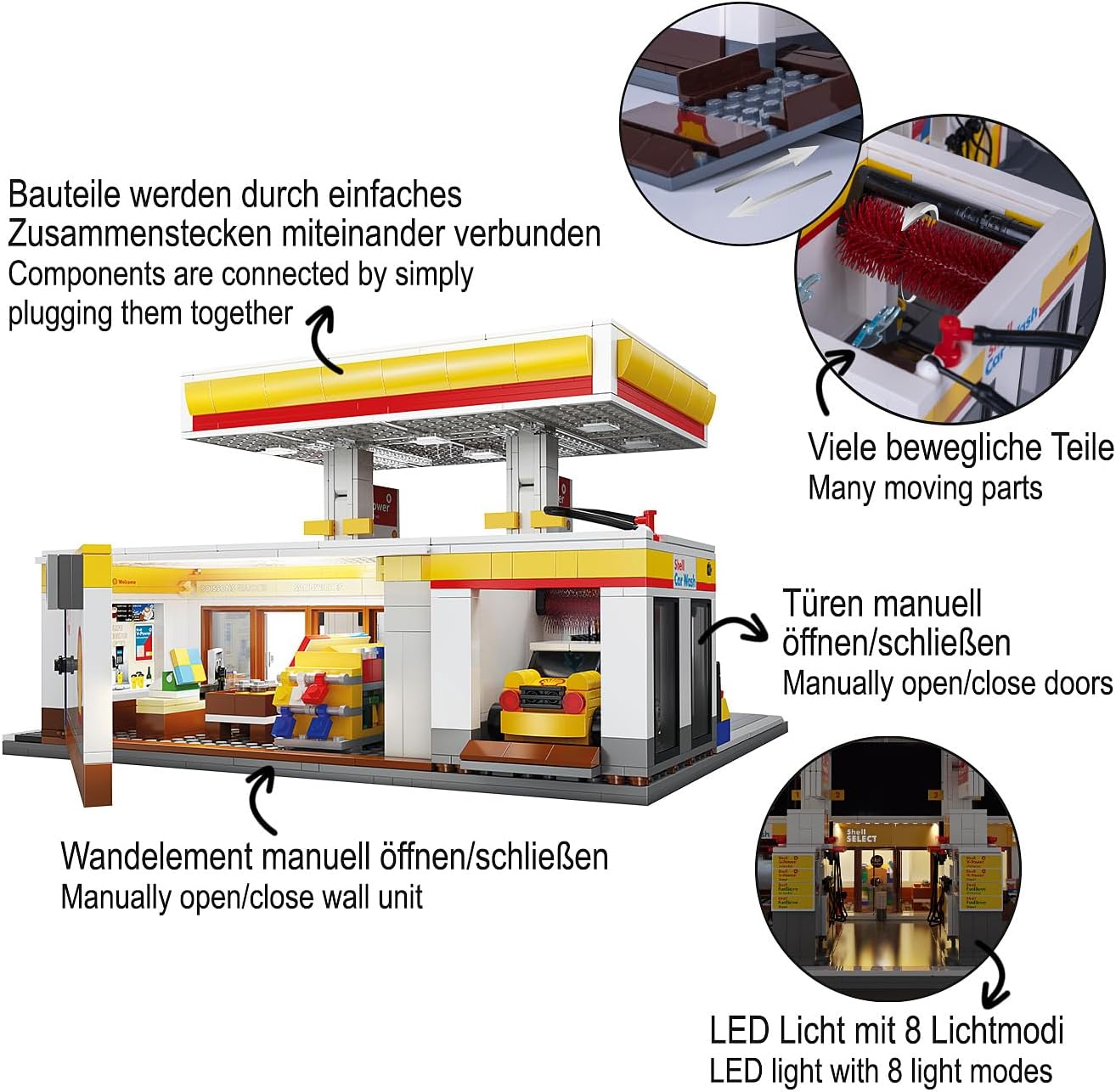
Image: A detailed diagram illustrating key features of the CADA Shell Gas Station. It shows how components are connected by plugging them together, highlights many moving parts, indicates manually opening/closing doors, a manually opening/closing wall unit, and the LED light with 8 modes.
Operating Features
The CADA Shell Gas Station model includes several interactive features:
- LED Lighting: The integrated LED light system offers 8 different modes to create various atmospheric effects. Refer to the assembly manual for instructions on connecting and activating the LED lights.
- Manual Doors: The doors of the gas station shop and car wash can be manually opened and closed, allowing for interactive play or display.
- Manual Wall Elements: Certain wall elements are designed to be manually opened or moved, revealing interior details or providing access.
- Functional Car Wash: The car wash section is designed with movable elements to simulate a working car wash.

Image: The CADA Shell Gas Station Building Set displayed at night, showcasing the integrated LED lighting system. The lights illuminate the station, enhancing its realistic appearance.
Maintenance
To ensure the longevity and appearance of your CADA Shell Gas Station model, follow these maintenance tips:
- Cleaning: Dust the model regularly with a soft, dry cloth or a soft brush. For more stubborn dirt, a slightly damp cloth can be used, but avoid excessive moisture.
- Storage: Store the model in a cool, dry place away from direct sunlight to prevent discoloration or warping of the plastic components.
- Handling: Handle the assembled model with care, especially when moving it, to prevent parts from detaching.
- Component Integrity: Periodically check for any loose or damaged components and reattach or replace them as needed.
Troubleshooting
This section addresses common issues you might encounter during assembly or operation.
| Problem | Possible Cause | Solution |
|---|---|---|
| Missing or damaged parts. | Manufacturing error or shipping damage. | Contact customer support with proof of purchase and details of the missing/damaged parts. |
| Parts do not fit together. | Incorrect orientation or wrong part selected. | Refer to the instruction manual diagrams carefully. Ensure the correct part is used and oriented correctly. Apply gentle, even pressure. |
| LED lights not working. | Incorrect connection or power source issue. | Verify all LED connections are secure and correctly aligned. Ensure the power source (e.g., USB) is functioning. |
| Manual doors/elements are stiff or stuck. | Misalignment during assembly or debris. | Check for any misaligned pieces obstructing movement. Gently clear any dust or debris. Do not force movement. |
Specifications
| Attribute | Detail |
|---|---|
| Product Dimensions | 11.65 x 10.71 x 7.87 inches (29.6 cm L x 27.2 cm W x 20 cm H) |
| Item Weight | 5.75 pounds |
| Model Number | 402857 |
| Manufacturer Recommended Age | 14 years and up |
| Number of Pieces | 1309 |
| Manufacturer | JAMARA |
| Release Date | April 23, 2025 |

Image: The CADA Shell Gas Station Building Set with its approximate dimensions indicated: Length (L) 29.6 cm, Width (W) 27.2 cm, and Height (H) 20 cm.
Warranty and Support
For any inquiries regarding missing parts, assembly assistance, or product defects, please contact the manufacturer, JAMARA, or your retailer. Keep your proof of purchase for any warranty claims.
While specific warranty details are not provided in this manual, most manufacturers offer support for manufacturing defects. Please refer to the contact information provided on the product packaging or the manufacturer's official website for direct support.
