
Introduction
This manual provides comprehensive instructions for the Edillas Kid Digital Watch, designed for children aged 7-16. It covers setup, operation, maintenance, and troubleshooting to ensure optimal use and longevity of your watch. Please read this manual carefully before using the product.

Figure 1: Edillas Kid Digital Watch (Purple)
Product Features
- 1.57-Inch Large Digital Display: Features easy-to-read oversized numerals for effortless time-telling. High-contrast display reduces eye strain.
- Multi-Function Digital Watch: Includes date display, 12/24-hour format, alarm, stopwatch, and countdown timer.
- LED Backlight: Equipped with an LED backlight for visibility in low-light conditions.
- 30M Water Resistance: Suitable for splashes, rain, and handwashing. Note: Not suitable for swimming or diving activities. Do not operate buttons underwater.
- Comfortable Adjustable Strap: Soft silicone material with an easy-to-use buckle and 18 adjustment holes for a perfect fit.
- Durable Construction: Features scratch-resistant reinforced resin glass lens and sturdy build to withstand everyday bumps and minor impacts.
- Long-lasting Battery: Imported movement and battery designed for up to 10 years of life.

Figure 2: Watch Display Functions
Setup Instructions
The Edillas Kid Digital Watch is designed for simple operation. Follow these steps to set the time, date, and other functions.
- Time Setting:
- In Time Display Mode, press the MODE button repeatedly until the seconds begin to flash.
- Press the RESET button to set the seconds to zero.
- Press the START button to advance to the next setting (hours, minutes).
- Use the RESET button to adjust the flashing value.
- Continue pressing START to cycle through hours, minutes, month, date, and day of the week.
- Once all settings are adjusted, press the MODE button to return to Time Display Mode.
- 12/24-Hour Format:
- While setting the hours, press the RESET button to toggle between 12-hour (with AM/PM indicator) and 24-hour formats.
- Alarm Setting:
- From Time Display Mode, press MODE once to enter Alarm Mode.
- Press RESET to select the hour, then press START to confirm.
- Press RESET again to select the minute, then press START to confirm.
- Press MODE to exit Alarm Setting Mode.
- Hourly Chime (CHIME):
- In Time Display Mode, press and hold the RESET button and simultaneously press the MODE button to toggle the hourly chime on or off. The "CHIME" indicator will appear or disappear on the display.
Operating Instructions
Learn how to use the various functions of your Edillas Kid Digital Watch.
- Backlight Function:
- Press the LIGHT button (usually top-left) to illuminate the display for a few seconds.

Figure 3: Backlight in Use
- Stopwatch Function:
- From Time Display Mode, press MODE twice to enter Stopwatch Mode.
- Press START to begin timing. Press START again to pause.
- Press RESET to clear the stopwatch to zero.
- Press MODE to return to Time Display Mode.

Figure 4: Stopwatch in Action
- Countdown Timer Function:
- From Time Display Mode, press MODE three times to enter Countdown Timer Mode.
- Press RESET to set the desired countdown time (hours, minutes, seconds).
- Press START to begin the countdown. Press START again to pause.
- When the countdown reaches zero, an alarm will sound.
- Press MODE to return to Time Display Mode.

Figure 5: Countdown Timer Applications
- Alarm Activation/Deactivation:
- In Alarm Mode (press MODE once from Time Display), press START to toggle the alarm on or off. An alarm icon will appear or disappear.

Figure 6: Alarm Clock Function
Maintenance
- Water Resistance: The watch is 30M water resistant. This means it can withstand splashes, rain, and brief immersion like handwashing. Do not press any buttons while the watch is wet or submerged. Avoid hot water, steam, or prolonged exposure to water.
- Cleaning: Wipe the watch with a soft, dry cloth. For stubborn dirt, a slightly damp cloth can be used, followed by drying. Avoid harsh chemicals or abrasive cleaners.
- Battery: The watch uses an imported battery designed for long life (up to 10 years). Battery replacement should be performed by a qualified technician to maintain water resistance.
- Storage: Store the watch in a cool, dry place away from direct sunlight and extreme temperatures when not in use.

Figure 7: Water Resistance Guidelines
Troubleshooting
| Problem | Possible Cause | Solution |
|---|---|---|
| Display is blank or dim. | Low battery or battery needs replacement. | Replace the battery. Contact customer support if issues persist. |
| Watch is not keeping accurate time. | Incorrect time setting or internal malfunction. | Re-set the time following the "Time Setting" instructions. If the problem continues, the watch may require service. |
| Hourly chime sounds unexpectedly or does not sound. | Hourly chime feature is activated/deactivated. | Toggle the hourly chime on/off by pressing and holding RESET and MODE simultaneously in Time Display Mode. |
| Buttons are unresponsive. | Watch may be wet or in an incorrect mode. | Ensure the watch is dry. Try pressing the MODE button to cycle through modes. If unresponsive, the watch may require service. |
Specifications
| Feature | Detail |
|---|---|
| Model Number | Edi 918 |
| Display Type | Digital |
| Display Size | 1.57 inches |
| Water Resistance | 30M (Not for swimming/diving) |
| Band Material | Soft Silicone |
| Case Material | Reinforced Resin |
| Battery Type | Nonstandard Battery (Included) |
| Applicable Age | 7-16 years (as per product description) |
| Product Weight | 1.41 ounces (approx. 40g) |
| Package Dimensions | 10 x 2.25 x 0.75 inches |
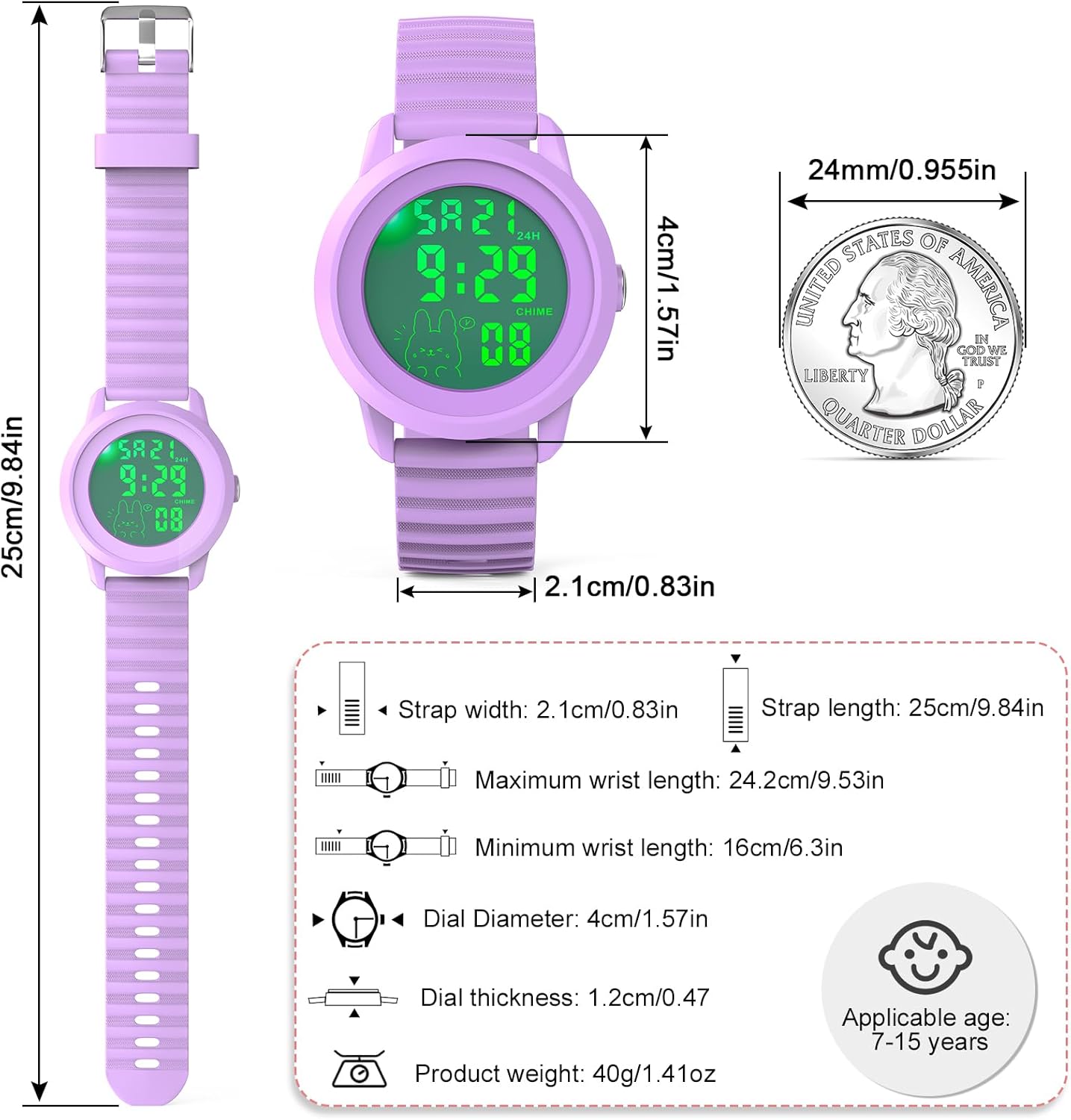
Figure 8: Watch Dimensions
Warranty and Support
Edillas is committed to providing reliable products and satisfactory service. All watches come with a dedicated sales support team.
- Warranty: For specific warranty details, please refer to the product packaging or contact Edillas customer support.
- Customer Support: If you encounter any problems or have questions regarding your Edillas Kid Digital Watch, please feel free to contact our customer service team. We are here to assist you.
- Contact Information: Please refer to the contact details provided on the product packaging or the official Edillas brand store on Amazon for the most up-to-date support information.