
Introduction
This manual provides comprehensive instructions for the operation and maintenance of your Edillas Digital Sports Watch, Model Edi 918. Please read this manual carefully before using the watch to ensure proper function and longevity.
Product Features
- 1.57-inch Large Digital Display for clear readability.
- Multi-functional: Includes date display, 12/24-hour format, alarm, stopwatch, and countdown timer.
- LED Backlight for visibility in low-light conditions.
- 30m Water Resistance (suitable for splashes, rain, hand washing; not for swimming or diving).
- Comfortable and adjustable soft silicone strap.
- Durable design with scratch-resistant reinforced resin glass lens.
Package Contents
- 1 x Edillas Digital Sports Watch (Model Edi 918)
- 1 x User Manual

Image: The Edillas Digital Sports Watch, Model Edi 918, shown in its retail packaging.
Setup
1. Setting Time, Date, and Day of Week
To set the current time, date, and day of the week on your Edillas Digital Sports Watch, follow the steps outlined in the video below. This process involves navigating through different modes and adjusting values using the watch buttons.
Video: Detailed instructions on how to set the time, date, and day of the week on the Edillas Digital Sports Watch.
2. Adjusting the Strap
The watch features a soft silicone strap designed for comfort and adjustability. To ensure a secure and comfortable fit, adjust the buckle to the appropriate hole on the strap. The strap is designed to fit a wide range of wrist sizes.
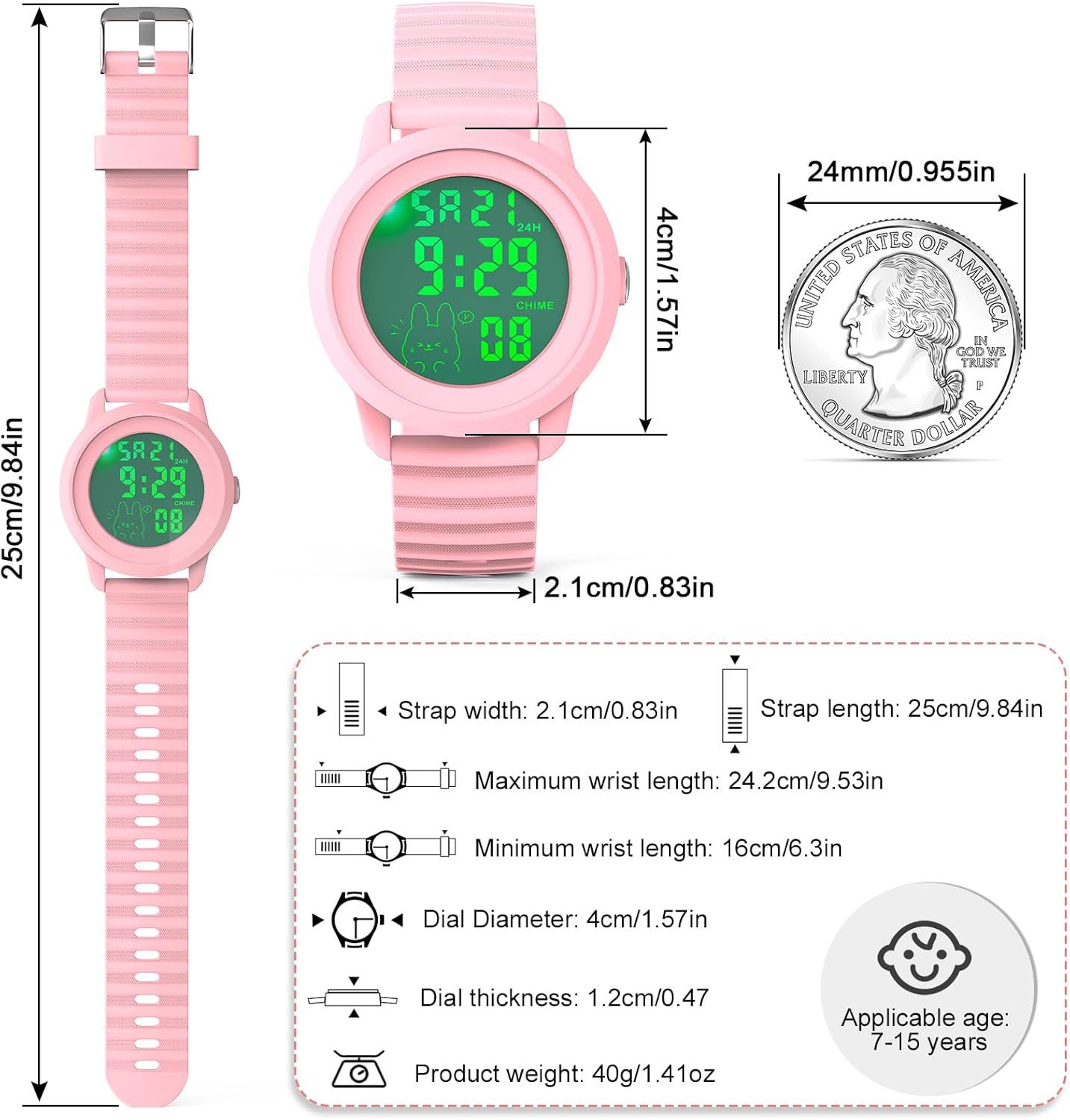
Image: A child wearing the Edillas Digital Sports Watch, demonstrating its comfortable fit.
Operating Instructions
1. Backlight Operation
To activate the LED backlight for viewing the display in dark conditions, press and hold the "MODE" button for 2 seconds. The backlight will illuminate for approximately 3 seconds. This feature is useful for checking the time at night or in dimly lit environments.
Video: Demonstration of how to activate the backlight feature on the Edillas Digital Sports Watch.

Image: Comparison of the watch display in normal mode versus with the backlight activated.
2. Alarm Function
The watch includes an alarm feature to help with daily scheduling. You can set a specific time for the alarm to sound. Refer to the video for detailed steps on setting and managing the alarm.
Video: Instructions on how to set the alarm time on the Edillas Digital Sports Watch.
3. Hourly Chime and Alarm On/Off
You can enable or disable the hourly chime and the alarm function. The hourly chime provides an audible alert at the top of each hour. The video below demonstrates how to toggle these features.
Video: Guide on how to turn the alarm and hourly chime functions on and off.
4. Stopwatch Function
The stopwatch function allows for precise timing of activities. You can start, pause, and reset the stopwatch. Follow the instructions in the video to utilize this feature.
Video: How to use the stopwatch function on the Edillas Digital Sports Watch.

Image: The watch display showing the stopwatch function in action.
5. Countdown Timer
The countdown timer is useful for various timed activities. You can set a specific duration, and the watch will count down to zero. Learn how to set and use the countdown timer from the video provided.
Video: Instructions on how to use and set the countdown function on the Edillas Digital Sports Watch.

Image: The watch display showing the countdown timer function.
6. Water Resistance
Your Edillas Digital Sports Watch is rated for 30 meters (3 ATM) water resistance. This means it is suitable for everyday use and can withstand splashes, rain, and hand washing. It is not suitable for swimming, diving, or prolonged submersion in water. Do not operate buttons underwater.

Image: The watch demonstrating its water resistance against splashes and rain.
Maintenance
Cleaning
To clean your watch, wipe it with a soft, damp cloth. Avoid using harsh chemicals or abrasive materials, as these can damage the watch's finish or internal components.
Battery Replacement
The watch uses a Nonstandard Battery (included). For optimal performance, it is recommended to have the battery replaced by a qualified technician when necessary. The watch is designed for longer battery life with imported components.

Image: Visual representation of the watch's long-lasting battery.
Storage
Store your watch in a cool, dry place away from direct sunlight and extreme temperatures to prevent damage.
Troubleshooting
| Issue | Possible Cause / Solution |
|---|---|
| Display is blank or dim. | Battery may be low or depleted. Replace the battery. |
| Time is incorrect. | Refer to the "Setting Time, Date, and Day of Week" section to re-set the time. |
| Alarm not sounding. | Ensure the alarm function is enabled. Check alarm settings for correct time. |
| Watch is not responding to button presses. | The watch may be in a specific mode or require a reset. Try pressing the MODE button multiple times to cycle through modes. If unresponsive, allow the battery to fully deplete and then replace it. |
Specifications
| Feature | Detail |
|---|---|
| Model Number | Edi 918 |
| Display Type | Digital |
| Case Diameter | 1.57 Inches (4cm) |
| Band Material Type | Silicone |
| Water Resistance Depth | 30 Meters (3 ATM) |
| Power Source | Battery Powered (1 Nonstandard Battery included) |
| Item Weight | 1.28 ounces |
| Movement Type | Japanese Automatic |
Warranty and Support
Edillas offers a Lifetime Warranty for this product. For any issues, missing parts, or discrepancies, please contact customer support. The manufacturer provides a 2-year after-sales service, 30-day no-reason return policy, and 12-hour online customer service.
Contact Email: yadelaiiaftersale@163.com

Image: Customer support details and warranty information.


