
Mova P10 Pro Ultra
Contents
Mova P10 Pro Ultra Robot Vacuum and Mop and Fresh Electric Toothbrush
User Manual
Introduction
Welcome to the Mova P10 Pro Ultra Robot Vacuum and Mop and Fresh Electric Toothbrush user manual. This guide provides comprehensive instructions for the safe and efficient operation, setup, and maintenance of your new Mova devices. Please read this manual thoroughly before using the products to ensure optimal performance and longevity.
Important Safety Information
Always adhere to basic safety precautions when using electrical appliances. Failure to follow these instructions may result in electric shock, fire, or serious injury.
- Read all instructions before use.
- Keep the devices away from water or other liquids.
- Do not operate with a damaged cord or plug.
- Supervise children when devices are in use.
- Use only manufacturer-recommended attachments.
- Unplug devices before cleaning or maintenance.
Product Overview
Your Mova P10 Pro Ultra package includes two primary devices: the Robot Vacuum and Mop, and the Fresh Electric Toothbrush. Each is designed to enhance your daily cleaning and personal hygiene routines.

Figure 1: The Mova P10 Pro Ultra Robot Vacuum and Mop with its advanced docking station, accompanied by the Mova Fresh Electric Toothbrush.
Robot Vacuum and Mop Components:
- Main Robot Unit: Equipped with LiDAR navigation, suction port, side brushes, and mop pads.
- All-in-one Docking Station: Features auto-empty dustbin, hot water mop self-cleaning, hot air mop drying, and water tank refilling.
- Clean Water Tank (4.5L) and Used Water Tank (4L).
- Dust Bag (3.2L capacity).
- Power Cord.
Fresh Electric Toothbrush Components:
- Toothbrush Handle: Contains motor, battery, and control buttons.
- 3-in-1 Brush Head: Features ultra-deep bristles, diamond-shaped bristles, and soft rubber nodes.
- Charging Cable (Type-C).
Setup
Robot Vacuum and Mop Setup:
- Unpack and Position the Docking Station: Place the all-in-one docking station on a hard, flat surface against a wall, ensuring at least 0.5 meters of clear space on either side and 1.5 meters in front. Plug the power cord into the station and a wall outlet.
- Prepare Water Tanks: Fill the 4.5L clean water tank with clean tap water. Ensure the 4L used water tank is empty and properly seated.
- Install Dust Bag: Verify that a 3.2L dust bag is correctly installed in the docking station's auto-empty compartment.
- Place Robot on Dock: Gently place the Mova P10 Pro Ultra robot vacuum onto the docking station. It will automatically begin charging. For first use, ensure it is fully charged.
- Download Mova App: Scan the QR code in the quick start guide or search for "Mova" in your app store to download the official application. Follow in-app instructions to connect your robot vacuum to your home Wi-Fi network and complete the initial mapping process.

Figure 2: The Advanced Docking Station simplifies cleaning with auto-empty, hot water self-washing, hot air self-drying, and self-refilling capabilities.
Fresh Electric Toothbrush Setup:
- Charge the Toothbrush: Connect the Type-C charging cable to the toothbrush handle and a suitable USB power adapter. Charge the toothbrush fully before first use. A single charge provides up to 30 days of use.
- Attach Brush Head: Align the 3-in-1 brush head with the metal shaft on the toothbrush handle and push it down until it clicks into place.

Figure 3: The Fresh Electric Toothbrush offers extended battery life, providing up to 30 days of use on a single charge via its convenient Type-C charging port.
Operating Instructions
Robot Vacuum and Mop Operation:
- Start Cleaning: Press the power button on the robot or use the Mova app to start a cleaning cycle. The robot will automatically map your home and plan an efficient cleaning path.
- Suction Power: The robot features a powerful 13,000Pa suction, effective on both hard floors and carpets for dust, pet hair, and debris.
- Mop Function: The dual spinning extendable mops provide thorough wet cleaning. The robot can lift its mop pads by 10.5mm when transitioning to carpets to prevent wetting.
- Obstacle Avoidance: Equipped with 360° obstacle avoidance technology to navigate around furniture and other objects.
- App Control: Use the Mova app for advanced features such as setting no-go zones, virtual walls, scheduling cleanings, and selecting specific cleaning modes (e.g., vacuum only, mop only, vacuum & mop).

Figure 4: The Mova P10 Pro Ultra boasts a powerful 13,000Pa suction, capable of effectively cleaning various types of debris from floors.
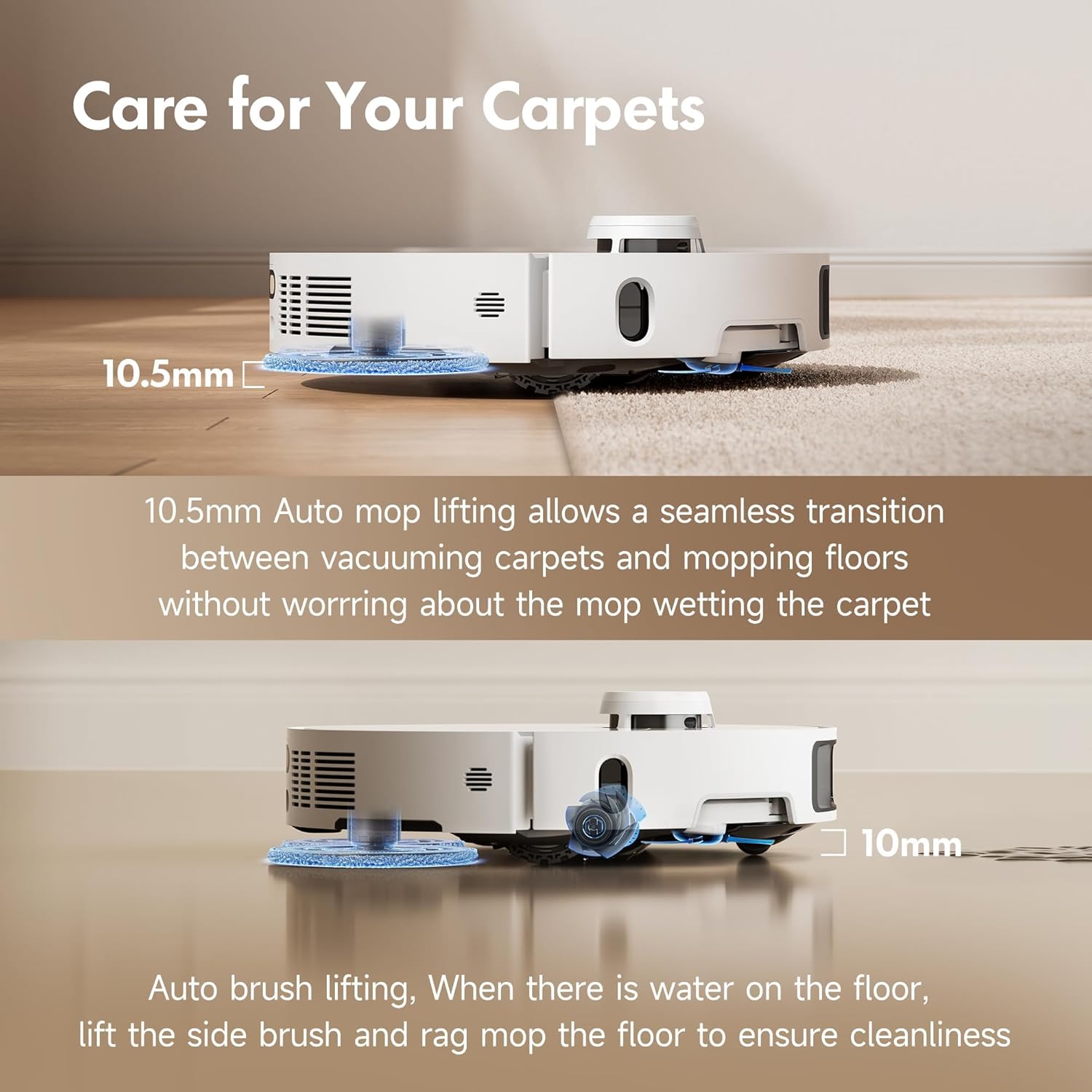
Figure 5: Intelligent mop and brush lifting mechanisms ensure seamless transitions between floor types and prevent cross-contamination.

Figure 6: The Dual Flex Arm design allows the robot to extend its side brush and mop, ensuring thorough cleaning in corners and along edges.
Fresh Electric Toothbrush Operation:
- Power On/Off: Press the power button to turn the toothbrush on or off.
- Brushing Modes: The toothbrush offers various modes for different needs. Refer to the quick start guide for specific mode details and how to switch between them.
- Pressure Sensing: The Smart Light Ring flashes red and automatically reduces vibration if excessive pressure is applied, protecting your gums and teeth.
- SweepDrive Tech: With 66,000 vibrations/min and precise 66-degree side-to-side scrubbing, the toothbrush efficiently removes plaque and food traps.

Figure 7: Regular use of the Fresh Electric Toothbrush contributes to a whiter, brighter smile.
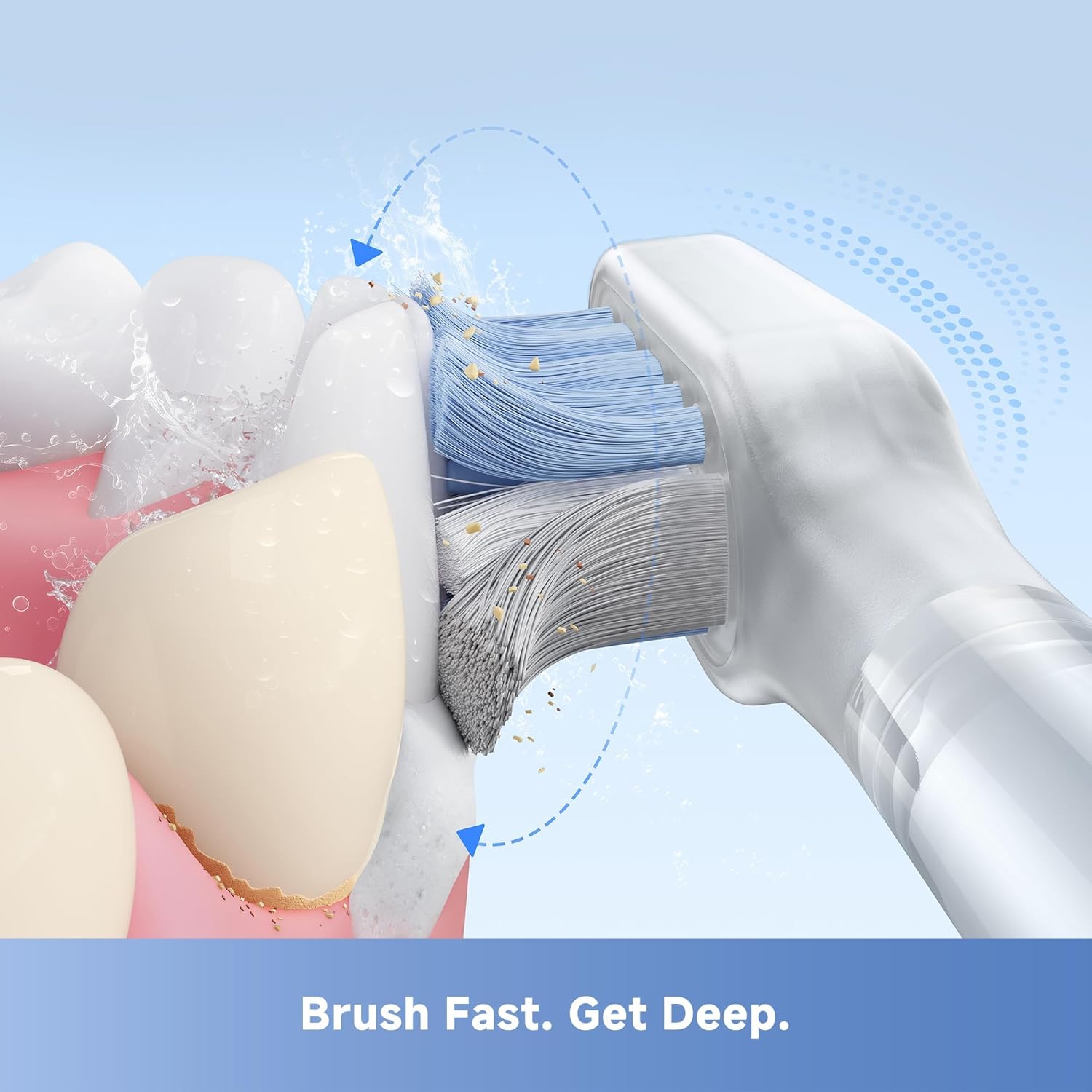
Figure 8: The unique bristle design of the Fresh brush head ensures deep cleaning and effective plaque removal.

Figure 9: The intuitive pressure sensing feature safeguards your gums and teeth by signaling and reducing vibration when too much force is applied.
Maintenance
Robot Vacuum and Mop Maintenance:
- Dust Bag Replacement: The 3.2L dust bag in the docking station can hold debris for up to 75 days. Replace it when the indicator light or app notification prompts you.
- Water Tank Cleaning: Regularly empty and rinse the used water tank. Clean the clean water tank as needed to prevent buildup.
- Mop Pad Cleaning: The docking station performs hot water self-cleaning and hot air drying for the mop pads. Periodically remove and hand-wash the mop pads for thorough cleaning.
- Brush Cleaning: Remove and clean the main brush and side brushes regularly to remove tangled hair and debris.
- Filter Cleaning: Tap out dust from the HEPA filter. Replace the filter every 3-6 months depending on usage.
- Sensor Cleaning: Wipe all sensors (cliff sensors, wall sensors, LiDAR sensor) with a clean, dry cloth to ensure proper navigation.
Fresh Electric Toothbrush Maintenance:
- Brush Head Replacement: Replace the brush head every 3 months, or sooner if the bristles are frayed.
- Cleaning the Handle: Rinse the brush head and bristles thoroughly after each use. Wipe the toothbrush handle with a damp cloth. Do not submerge the handle in water.
Troubleshooting
If you encounter issues with your Mova products, please refer to the following common solutions before contacting support.
Robot Vacuum and Mop Troubleshooting:
| Problem | Possible Cause | Solution |
|---|---|---|
| Robot not charging | Docking station unplugged; charging contacts dirty; robot not properly aligned. | Ensure dock is plugged in. Clean charging contacts on robot and dock. Reposition robot on dock. |
| Poor suction performance | Dust bag full; filter clogged; main brush tangled. | Replace dust bag. Clean or replace filter. Clean main brush. |
| Mop not dispensing water | Clean water tank empty; water nozzle clogged. | Refill clean water tank. Clean water nozzles on the robot. |
| Robot gets stuck frequently | Sensors dirty; too many obstacles; mapping error. | Clean all sensors. Clear clutter from cleaning path. Redo mapping via app if necessary. |
Fresh Electric Toothbrush Troubleshooting:
| Problem | Possible Cause | Solution |
|---|---|---|
| Toothbrush not turning on | Battery low or depleted. | Charge the toothbrush fully. |
| Vibration is weak | Low battery; brush head worn out. | Charge the toothbrush. Replace brush head. |
| Smart Light Ring always red | Applying too much pressure. | Reduce brushing pressure. |
Specifications
Mova P10 Pro Ultra Robot Vacuum and Mop:
- Suction Power: 13,000Pa
- Docking Station Functions: Auto Mop Washing (149°F hot water), Hot Air Mop Drying, Auto-Empty (3.2L dust bag), Auto Water Refill (4.5L clean, 4L used).
- Mop Lifting: 10.5mm for carpet transition.
- Navigation: LiDAR, 360° Obstacle Avoidance.
- Coverage: Up to 4300 sqft mopping area.
- Color: White
Mova Fresh Electric Toothbrush:
- Vibrations: 66,000 vibrations/min (SweepDrive Tech).
- Brush Head: 3-in-1 design with ultra-deep and diamond-shaped bristles, soft rubber nodes.
- Features: Intuitive Pressure Sensing (Smart Light Ring), Type-C Charging.
- Battery Life: Up to 30 days on a single charge.
- Color: White
Warranty and Support
Mova products are designed for durability and performance. For warranty information, please refer to the warranty card included in your product packaging or visit the official Mova website. If you require technical assistance, have questions about operation, or need to report an issue, please contact Mova Customer Support through the following channels:
- Official Website: Visit the Mova official website for FAQs, support articles, and contact forms.
- Email Support: Refer to your product documentation for the customer support email address.
- In-App Support: For the robot vacuum, utilize the support features within the Mova mobile application.
Please have your product model number (P10 Pro Ultra) and purchase date ready when contacting support.
Ask a question about this manual
Ask about setup, troubleshooting, compatibility, parts, safety, or missing instructions. Manuals+ will review the question and use this page’s manual context to help answer it.