
Important Safety Instructions
Please read all instructions carefully before operating your PhiloDeco Portable Air Conditioner. Retain this manual for future reference.
- Electrical Safety: Always plug the unit into a grounded 110V AC outlet. Do not use extension cords or adapter plugs. Ensure the power cord is not damaged or pinched.
- Refrigerant Handling: This unit contains R32 refrigerant. Before initial use, stand the unit upright for at least 5 hours to allow the refrigerant pressure in the compressor to stabilize. Do not attempt to service the refrigerant system yourself.
- Placement: Place the unit on a firm, level surface. Maintain at least 20 inches (50 cm) of clearance from walls or other objects to ensure proper airflow.
- Ventilation: Ensure the exhaust hose is properly installed and vented to the outside to expel hot air. Do not block the air intake or exhaust outlets.
- Children and Pets: Keep children and pets away from the unit during operation.
- Cleaning: Always unplug the unit before cleaning or performing any maintenance.
Product Overview
The PhiloDeco 14000 BTU Portable Air Conditioner is a versatile 5-in-1 unit designed for cooling, dehumidifying, and circulating air in rooms up to 420 square feet.

Front view of the PhiloDeco Portable Air Conditioner, showing the control panel and air outlet.
Package Contents
Before installation, verify that all components are present:

Image showing the portable air conditioner unit, remote control, window kit, hose connector, window adapter, exhaust hose, and water pipe.
- Portable Air Conditioner Unit
- Remote Control
- Window Kit (adjustable panel)
- Hose Connector
- Window Adapter
- Exhaust Hose
- Water Pipe (for continuous drainage)
Setup and Installation
The unit is designed for easy installation and mobility. Follow these steps to set up your portable air conditioner.
Step 1: Positioning the Unit
Place the air conditioner on a flat, stable surface in the room you wish to cool. The unit features omni-directional casters for easy movement.

Image illustrating the dimensions of the portable air conditioner and highlighting features like auto air louver, LED digital display, easy-carry handles, and omni-directional casters.
Step 2: Window Kit Installation
The included window kit is suitable for both single/double-hung and sliding windows. No drilling is required.
- Adjust the window kit panel to fit your window opening.
- Secure the panel in the window frame.
- Attach the exhaust hose to the unit's exhaust outlet and then to the window adapter, ensuring a secure connection to prevent air leakage.
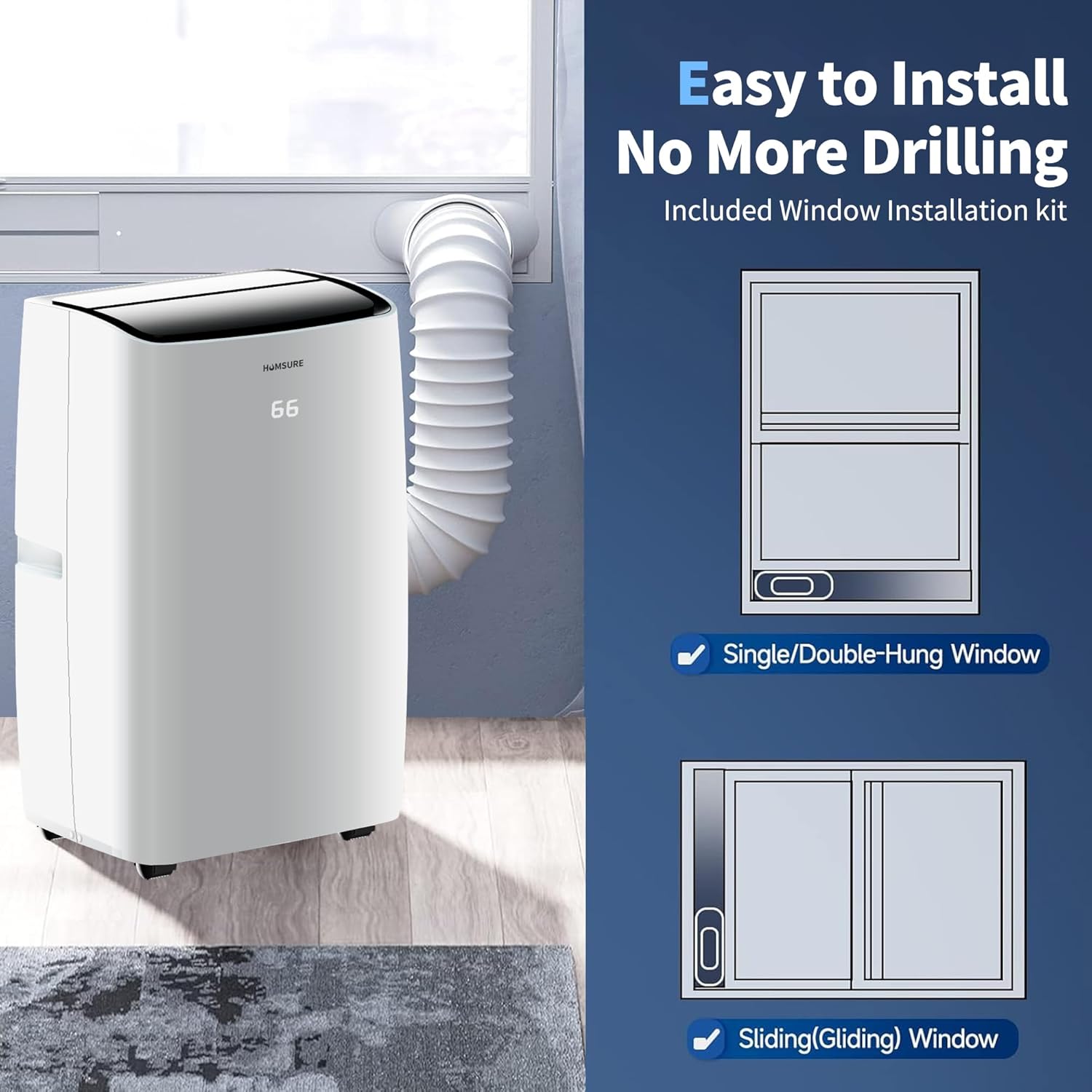
Image demonstrating the installation of the window kit for both single/double-hung and sliding windows, with the exhaust hose connected to the unit.
Step 3: Power Connection
Plug the power cord into a standard 110V AC grounded electrical outlet.
Operating Instructions
Your PhiloDeco Portable Air Conditioner offers multiple operating modes and convenient control options.
Control Panel and Remote Control
The unit can be operated using the integrated control panel on top of the unit or the included remote control.

Image showing the remote control and its buttons: Swing, Automatic, Speed, Timer, and Sleep.
- Power Button: Turns the unit ON or OFF.
- Mode Button: Cycles through operating modes: Cooling, Dehumidification, Fan, Automatic, and Sleep.
- Temperature Adjustment: Use the Up/Down arrows to set the desired temperature.
- Fan Speed Button: Adjusts fan speed (Low, Medium, High) in Cooling and Fan modes.
- Swing Button: Activates or deactivates the automatic air swing function for wider air distribution.
- Timer Button: Sets the 24-hour ON/OFF timer. Press to set the desired operating duration or delay start.
- Sleep Mode: Reduces fan speed and noise for quiet operation during sleep.
Operating Modes
- Cooling Mode: Provides powerful cooling for rooms up to 420 sq ft. Set your desired temperature.
- Dehumidification Mode: Removes excess moisture from the air. The unit will collect condensate, which may require draining.
- Fan Mode: Circulates air without cooling. Adjustable fan speeds are available.
- Automatic Mode: The unit automatically selects the appropriate mode (Cooling or Fan) based on the ambient room temperature.
- Sleep Mode: Optimizes cooling and fan speed for quiet, energy-efficient operation during sleep.
Maintenance
Regular maintenance ensures optimal performance and extends the lifespan of your air conditioner.
Cleaning the Air Filter
The unit features a detachable and washable double-layer air filter. It is recommended to clean the air filter every two weeks for optimal performance and to maintain indoor air quality.

Rear view of the portable air conditioner, indicating the location of the dust filter, continuous drain outlet, air exhaust outlet, and bottom tray drain outlet.
- Unplug the air conditioner from the power outlet.
- Locate the air filter cover on the back of the unit.
- Remove the filter by gently pulling it out.
- Wash the filter under running water (warm water with mild detergent if heavily soiled).
- Allow the filter to air dry completely before reinserting it into the unit.
Draining Water
During cooling and dehumidification, water condensate will collect inside the unit. The unit has two drain outlets:
- Continuous Drain Outlet: For continuous drainage, connect the included water pipe to this outlet and direct it to a floor drain or suitable container.
- Bottom Tray Drain Outlet: For manual drainage, when the internal water tank is full, the unit may stop operating and display an error. Place a shallow pan under this outlet, remove the drain plug, and allow the water to drain completely. Reinsert the plug securely.
Troubleshooting
Refer to this section for common issues and their solutions.
| Problem | Possible Cause | Solution |
|---|---|---|
| Unit does not turn on | No power; Power cord unplugged; Circuit breaker tripped; Internal water tank full. | Check power connection; Reset circuit breaker; Drain water from the unit. |
| Insufficient cooling | Air filter dirty; Exhaust hose blocked or improperly installed; Room size too large; Doors/windows open; Temperature setting too high. | Clean air filter; Ensure exhaust hose is clear and sealed; Close doors/windows; Lower temperature setting. |
| Unit is noisy | Unit not on a level surface; Fan speed too high; Obstruction in fan. | Place on a level surface; Reduce fan speed; Check for obstructions. |
| Water leakage | Drain plug loose; Continuous drain hose improperly connected or blocked. | Ensure drain plug is secure; Check continuous drain hose for proper connection and blockages. |
Specifications
| Feature | Specification |
|---|---|
| Brand | PHILODECO |
| Model Number | YD14000BTU |
| Cooling Capacity | 14000 BTU |
| Recommended Room Size | Up to 420 sq ft |
| Product Dimensions (D x W x H) | 13.11" x 15.07" x 34.64" |
| Item Weight | 49.6 Pounds |
| Voltage | 110 Volts (AC) |
| Noise Level | 45 Decibels |
| Refrigerant Type | R32 |
| Control Method | App, Remote Control |
| Special Feature | Inverter Compressor |
Warranty and Support
PhiloDeco provides quality assurance for its products.
Warranty Information
This product comes with a 1-year limited warranty from the date of purchase. Please retain your proof of purchase for warranty claims.
Customer Support
For any questions, concerns, or assistance with your PhiloDeco Portable Air Conditioner, please contact our after-sales support team. We are committed to resolving any issues promptly.
Contact information for support can typically be found on the product packaging or the official PHILODECO website.