
1. Product Overview
The eLinkSmart Slim Sliding Glass Door Smart Lock (Model YL-D208F-C) is a keyless mortise smart lock designed for sliding glass and patio doors. It offers multiple unlocking methods including fingerprint, IC card/NFC, password, APP control, and traditional keys. This lock is waterproof and features an upgraded double-hook, full-steel structure for enhanced security. It is suitable for door thicknesses ranging from 22mm to 110mm.
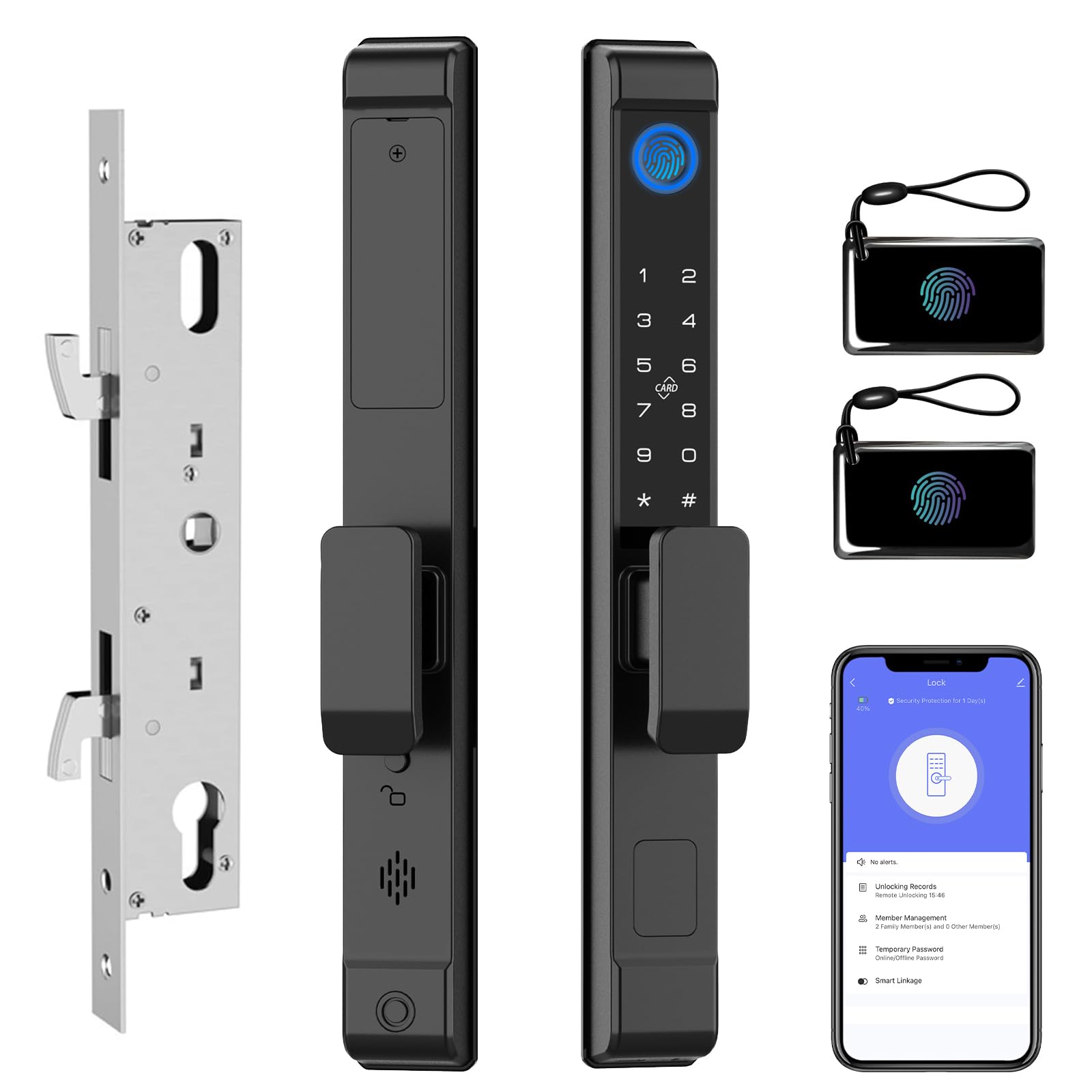
Figure 1: eLinkSmart Slim Sliding Glass Door Smart Lock (Model YL-D208F-C)
2. Key Features
- Multiple Unlocking Methods: Fingerprint, IC card/NFC, Password, APP control, and physical keys.
- Wide Door Thickness Compatibility: Supports door thicknesses from 22mm to 110mm, with various accessory sets included.
- Upgraded Lock Body: Reversible handle for left or right-opening doors, featuring a double-hook and full-steel structure for durability.
- Easy Installation: Designed for seamless fit on most single-cylinder doors (width > 1.57 inches), with installation typically taking 10-15 minutes without drilling.
- Tuya App Integration: Manage users, check lock status, set temporary passwords, and manage fingerprints/IC cards via the Tuya App.
- Weatherproof Design: IPX5 waterproof standard ensures reliable performance in various weather conditions.
- Energy Efficient: Powered by 4 x AAA batteries, offering up to 6 months of battery life with low battery alarm. Includes a Type-C emergency charging port.
- Security Features: Anti-theft lock alarm, one-time code unlock, and anti-peeping passcode function.
- Modes: Auto-lock, Passage Mode, and Privacy Mode.

Figure 2: Overview of multiple unlocking methods and features.
3. Package Contents
Before installation, please verify that all components are present in the package:
- Front Lock Panel
- Rear Lock Panel
- 2885 Mortise Lock Body
- Strike Plate
- Installation Screw Accessories (for 22-110mm door thickness)
- 2 x Backup Keys
- 2 x RFID Cards
- User Manual

Figure 3: All components included in the eLinkSmart Smart Lock package.
4. Specifications
| Feature | Detail |
|---|---|
| Brand | eLinkSmart |
| Model Name | YL-D208F-C |
| Lock Type | Biometric, Mortise Lock with Hook |
| Material | Zinc |
| Color | Black |
| Item Dimensions (L x W x H) | 1.37 x 2.16 x 12.6 inches |
| Item Weight | 5.35 pounds (2.43 Kilograms) |
| Door Thickness Compatibility | 22mm - 110mm |
| Door Frame Width Requirement | At least 40mm (1.57 inches) |
| Control Method | App (Tuya) |
| Power Source | 4 x AAA Batteries (not included) |
| Emergency Power | Type-C USB Cable |
| Waterproof Rating | IPX5 |

Figure 4: Detailed dimensions of the eLinkSmart Smart Lock and mortise for compatibility check.
5. Installation Guide
Follow these steps carefully to install your eLinkSmart Slim Sliding Glass Door Smart Lock. Ensure you have all necessary tools and components before beginning.
5.1 Preparation
- Review the package contents to ensure all parts are present.
- Confirm your door thickness and frame width meet the specifications (22-110mm thickness, >40mm frame width).
- Gather necessary tools: screwdriver, drill, measuring tape, marker.
5.2 Removing Existing Lock (if applicable)
If replacing an existing lock, carefully remove it by unscrewing the mounting screws and detaching the lock body from the door frame.
Video 1: This video demonstrates the initial steps of removing an existing lock and preparing the door for the new smart lock installation. It shows how to unscrew and remove the old lock components.
5.3 Marking and Drilling Holes
- Use the provided template to mark the drilling points on your door frame. Ensure the template is aligned correctly, with the "UP" arrow pointing upwards.
- Carefully drill the marked holes. Ensure the drill bit size matches the template specifications.
Video 2: This video illustrates the process of using the provided template to mark and drill the necessary holes for the smart lock installation. Precision is key for proper fit.
5.4 Assembling the Lock Components
- Lift up the front cover plate of the lock. Locate and tighten the screw caps for the two screws.
- Mount the waterproof silicone pad onto the front panel, ensuring it aligns with the screw holes.
- Remove the battery compartment from the rear cover plate. This allows for easier screw installation later.
- Install the square rod into the mortise lock body. Ensure its size is appropriate for your door thickness.
- Note the triangular mark on the square hole of the front panel. Align this mark in the direction of the handle.
5.5 Installing the Lock Body and Panels
- Insert the mortise lock body into the prepared slot in the door frame. Secure it with screws.
- Carefully feed the wires from the front panel through the door and connect them to the corresponding wires on the rear panel.
- Align the front and rear panels with the square rod and screw holes.
- Partially fasten the screws, but do not fully tighten them yet. This allows for minor adjustments.
- Test the door lock to ensure it can be opened and closed normally.
- Once the position is adjusted and confirmed, fully tighten all screws.
Video 3: This video provides a comprehensive guide to assembling and installing the eLinkSmart smart lock components, including wiring connections and final adjustments.
5.6 Battery Installation
- Insert 4 x AAA batteries into the battery compartment, ensuring correct polarity.
- Place the battery cover back on and secure it with the small screw.

Figure 5: Location of the battery compartment for 4 x AAA batteries.
6. Operating Instructions
The eLinkSmart smart lock offers various methods for unlocking and managing access.
6.1 Initial Setup and App Connection
- Download the Tuya Smart App from your device's app store.
- Create an account or log in.
- Follow the in-app instructions to add your eLinkSmart lock. This typically involves putting the lock into pairing mode (refer to the specific instructions in the physical manual for pairing mode activation).

Figure 6: Example of the Tuya App interface for managing your smart lock.
6.2 Unlocking Methods
- Fingerprint: Place your registered finger on the fingerprint sensor. The lock will unlock if the fingerprint is recognized.
- Passcode: Enter your registered passcode on the keypad, followed by the '#' key. The lock supports anti-peeping passcodes where you can enter random digits before or after your actual code.
- IC Card/NFC: Tap your registered IC card or NFC-enabled device on the designated area of the lock.
- App Control: Use the Tuya App to remotely unlock the door. This may require a Bluetooth gateway for remote access when not in close proximity.
- Physical Key: In case of emergency or battery depletion, use one of the provided physical keys to unlock the door.

Figure 7: Visual representation of the various unlocking methods available.
6.3 Lock Modes
- Auto-Lock: The lock will automatically engage after a set period (configurable via the app) once the door is closed.
- Passage Mode: Keeps the door unlocked for continuous access. Useful for high-traffic periods. Activate/deactivate via the app or specific lock commands.
- Privacy Mode: Engages an internal lock, preventing external access even with valid credentials. Typically activated from the inside.
7. Maintenance
Proper maintenance ensures the longevity and optimal performance of your smart lock.
- Battery Replacement: The lock will issue a low battery alarm when power is critically low. Replace all 4 x AAA batteries promptly.
- Emergency Power: If batteries deplete completely, connect a Type-C USB cable to the emergency charging port to temporarily power the lock and gain access.
- Cleaning: Wipe the lock's exterior with a soft, dry cloth. Avoid abrasive cleaners or solvents that could damage the finish or electronic components.
- Environmental Protection: While the lock is IPX5 waterproof, prolonged exposure to extreme weather conditions should be minimized where possible to extend its lifespan.

Figure 8: The Type-C emergency charging port for temporary power.
8. Troubleshooting
If you encounter issues with your eLinkSmart smart lock, refer to the following common problems and solutions:
| Problem | Possible Solution |
|---|---|
| Lock not responding | Check battery level and replace if necessary. Use the emergency Type-C power port. Ensure the lock is not in privacy mode. |
| Fingerprint not recognized | Ensure your finger is clean and dry. Try re-registering your fingerprint in the app. Ensure the sensor is clean. |
| Passcode not working | Verify the correct passcode is being entered. Ensure the lock is not in an error state (e.g., after multiple incorrect attempts). Reset passcode via the app if needed. |
| App connection issues | Ensure Bluetooth is enabled on your phone. Check if the lock is within Bluetooth range. Restart the app and the lock. If using a gateway, check its connection. |
| Lock mechanism stuck | Check for any obstructions in the door frame or mortise. Ensure the installation screws are not overtightened, causing misalignment. |
For further assistance, please contact eLinkSmart customer support.
9. Warranty and Support
eLinkSmart provides the following after-sales guarantee for your product:
- 30-Day Refund: Eligible for a full refund within 30 days from the date of purchase.
- 180-Day Free Exchange: Eligible for a free product exchange within 180 days from the date of purchase.
If you encounter any product problems or require technical support, please contact eLinkSmart customer service directly. Provide your model number (YL-D208F-C) and a detailed description of the issue for efficient assistance.