
1. Introduction
This manual provides detailed instructions for the safe and efficient operation of your OWON ADS824A 4-Channel 200 MHz Digital Oscilloscope. Please read this manual thoroughly before using the device to ensure proper functionality and to prevent damage. Keep this manual accessible for future reference.
2. Safety Information
Observe the following safety precautions to prevent injury and avoid damage to the instrument or any connected products.
- Power Source: Use only the specified power adapter.
- Grounding: Ensure the instrument is properly grounded to prevent electric shock.
- Ventilation: Do not block ventilation openings. Operate in a well-ventilated area.
- Environment: Avoid operating in wet, damp, or explosive atmospheres. Keep away from strong electromagnetic fields.
- Cleaning: Disconnect power before cleaning. Use a soft, dry cloth. Do not use liquid or aerosol cleaners.
- Servicing: Refer all servicing to qualified service personnel. Do not attempt to repair the instrument yourself.
3. Product Overview
3.1 Key Features
- Ultra-High Precision: 12-bit vertical resolution (4096 levels) with 500 μV sensitivity for detailed signal analysis, ideal for low-noise power supplies and weak signal capture.
- Fast Waveform Refresh Rate: 700,000 wfms/s for capturing rare events and rapid signal disturbances, crucial for CAN/LIN bus diagnostics and fast digital signals.
- 5-in-1 Multifunctionality: Integrates a 12-bit oscilloscope, protocol analyzer (UART/I2C/SPI/CAN/LIN), 6-digit frequency counter, 4-digit voltmeter, and FFT spectrum analyzer. Includes 43 automatic measurements and hardware bus decoding.
- 7-inch Multi-Touch Screen: 1024x600 HD touchscreen for intuitive operation, supporting mouse, keyboard, Wi-Fi, network printers, and external cameras.
- Extensive Connectivity: Equipped with LAN, USB, HDMI, and Type-C ports. Features an integrated web server for remote control via a browser, supporting wireless modules and network equipment.
- Memory Depth: 50 Mpts memory for extended waveform capture.
3.2 Front Panel Components
The front panel of the ADS824A features the multi-touch display, input channels, and various control buttons.
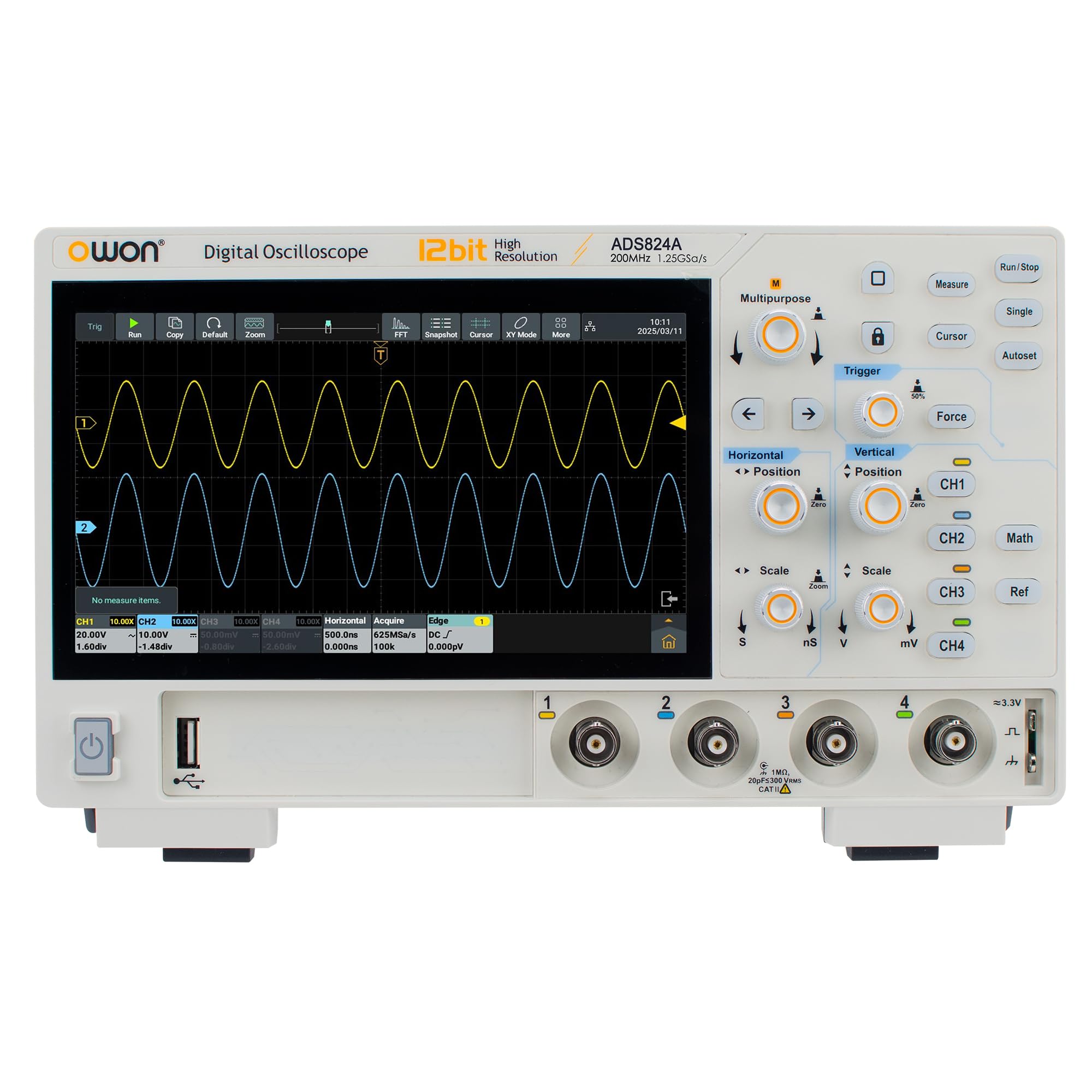
Figure 1: Front view of the OWON ADS824A Digital Oscilloscope. The 7-inch multi-touch screen is central, flanked by input connectors and control buttons.
Detailed descriptions of each component are provided below:
- Display: 7-inch 1024x600 HD multi-touch screen for waveform display and menu navigation.
- Channel Inputs (CH1-CH4): BNC connectors for connecting probes to measure signals.
- Vertical Controls: Buttons and knobs for adjusting vertical scale (Volts/Div) and position for each channel.
- Horizontal Controls: Buttons and knobs for adjusting horizontal scale (Sec/Div) and position.
- Trigger Controls: Buttons for setting trigger mode, level, and source.
- Function Buttons: Dedicated buttons for common functions such as Auto Setup, Run/Stop, Measure, Cursor, Acquire, etc.
- Navigation Controls: Directional buttons and a rotary knob for menu navigation and parameter adjustment.
3.3 Rear Panel Connections
The rear panel provides various connectivity options for power, data transfer, and external display.
- Power Input: Connector for the AC power adapter.
- USB Host Port: For connecting USB storage devices, mouse, or keyboard.
- USB Type-C Port: For data transfer and device communication.
- LAN Port: Ethernet connection for network access and remote control.
- HDMI Output: For connecting to an external monitor or display.
- Ground Terminal: For safety grounding.
4. Setup
4.1 Unpacking and Inspection
Upon receiving your ADS824A oscilloscope, carefully inspect the packaging for any signs of damage. Open the package and verify that all standard accessories are present:
- OWON ADS824A Digital Oscilloscope
- Power Adapter
- USB Cable
- Passive Probes (4 units)
- Quick Guide
- Calibration Certificate
If any items are missing or damaged, contact your dealer immediately.
4.2 Powering On the Device
- Connect the power adapter to the power input port on the rear panel of the oscilloscope.
- Plug the power adapter into a suitable AC power outlet.
- Press the power button located on the front panel to turn on the oscilloscope. The boot screen will appear, followed by the main waveform display.
4.3 Probe Compensation
Before taking measurements, it is recommended to compensate the probes to ensure accurate readings.
- Connect a probe to Channel 1 (CH1) input.
- Connect the probe tip to the probe compensation output (usually a square wave test signal) on the front panel.
- Adjust the compensation trimmer on the probe until a flat-top square wave is displayed on the screen.
- Repeat for all other probes and channels as needed.
5. Operating Instructions
5.1 Basic Waveform Measurement
- Connect the compensated probe to the desired input channel (e.g., CH1).
- Connect the probe tip to the signal source you wish to measure.
- Press the Auto Setup button. The oscilloscope will automatically adjust vertical, horizontal, and trigger settings to display a stable waveform.
- Adjust the Volts/Div knob to change the vertical scale and the Sec/Div knob to change the horizontal time base for optimal waveform viewing.
- Use the Trigger Level knob to stabilize the waveform if needed.
5.2 Using the Multi-Touch Screen
The 7-inch multi-touch screen allows for intuitive control similar to a smartphone.
- Tap: Select menu items, buttons, or parameters.
- Drag: Move waveforms, cursors, or menu windows.
- Pinch-to-Zoom: Adjust vertical or horizontal scale by pinching or spreading two fingers on the waveform display.
- Swipe: Navigate through menus or scroll lists.
5.3 Advanced Functions
The ADS824A offers a range of advanced measurement and analysis capabilities:
- Automatic Measurements: Press the Measure button to access 43 automatic measurements (e.g., Vpp, Vrms, Frequency, Period, Rise Time).
- Protocol Analysis: Utilize the integrated protocol analyzer for UART, I2C, SPI, CAN, and LIN bus decoding. Access this function via the main menu.
- FFT Spectrum Analysis: Perform Fast Fourier Transform (FFT) to analyze the frequency components of a signal. Select FFT from the Math menu.
- Data Storage: Save waveforms, setups, and screenshots to internal memory or a connected USB drive.
- Remote Control: Connect the oscilloscope to a network via LAN or Wi-Fi (with optional module) and access the integrated web server from a browser for remote operation.
6. Maintenance
6.1 Cleaning the Instrument
To maintain the performance and appearance of your oscilloscope:
- Always disconnect the power cord before cleaning.
- Use a soft, dry cloth to clean the exterior surfaces.
- For the display, use a soft, lint-free cloth specifically designed for screens. Avoid abrasive cleaners.
- Do not use liquid or spray cleaners directly on the instrument.
6.2 Firmware Updates
Periodically check the OWON official website for firmware updates. Firmware updates can provide new features, performance improvements, and bug fixes. Follow the instructions provided with the firmware update package carefully.
7. Troubleshooting
| Problem | Possible Cause | Solution |
|---|---|---|
| No power | Power cord not connected; power adapter faulty; power outlet issue. | Check power cord connection; test power adapter; verify power outlet functionality. |
| No waveform displayed | Probe not connected; signal source off; vertical/horizontal scale incorrect; trigger not set. | Connect probe; ensure signal source is active; press Auto Setup; adjust scales; check trigger settings. |
| Unstable waveform | Incorrect trigger level or mode; noisy signal. | Adjust trigger level; change trigger mode (e.g., Edge, Video); use averaging acquisition mode. |
| Touchscreen unresponsive | Temporary software glitch; screen calibration issue. | Restart the oscilloscope; perform screen calibration (refer to advanced settings in the full manual). |
If the problem persists after attempting these solutions, contact OWON technical support or your local dealer.
8. Specifications
| Parameter | Value |
|---|---|
| Model | ADS824A |
| Bandwidth | 200 MHz |
| Channels | 4 |
| Vertical Resolution | 12-bit (4096 levels) |
| Waveform Refresh Rate | 700,000 wfms/s |
| Memory Depth | 50 Mpts |
| Display | 7-inch HD Multi-Touch (1024x600) |
| Multifunctionality | Oscilloscope, Protocol Analyzer, Frequency Counter, Voltmeter, FFT Analyzer |
| Connectivity | LAN, USB Host, USB Type-C, HDMI, Wi-Fi (optional) |
| Product Dimensions (L x W x H) | 31.3 x 21.3 x 13.6 cm |
| Item Weight | 1.5 Kilograms |
| Compliant Specifications | CE, RoHS |
9. Warranty and Support
OWON products are designed and manufactured to the highest quality standards. This product is covered by a standard manufacturer's warranty against defects in materials and workmanship. Please refer to the warranty card included with your product or visit the official OWON website for detailed warranty terms and conditions.
For technical support, service, or inquiries, please contact your local OWON distributor or visit the OWON official support website. When contacting support, please have your product model number (ADS824A) and serial number ready.
OWON Official Website: www.owon.com


