
1. Important Safety Instructions
Please read all instructions carefully before operating the Docreate Handheld Steam Cleaner. Failure to follow these instructions may result in electric shock, fire, or serious injury.
- Always ensure the power supply matches the voltage specified on the appliance.
- Do not direct steam at people, animals, or electrical appliances. Steam is extremely hot and can cause severe burns.
- Keep the appliance out of reach of children and pets.
- Use only distilled or demineralized water to prevent mineral buildup and prolong the life of the unit.
- Never open the water tank cap while the unit is pressurized or hot. Allow the unit to cool down and depressurize completely before refilling.
- Ensure adequate ventilation when using the steam cleaner.
- Unplug the appliance from the power outlet when not in use, before cleaning, or before performing any maintenance.
- Do not immerse the main unit in water or any other liquid.
- Regularly inspect the power cord and hose for any damage. Do not operate if damaged.
- Always check that all attachments are securely fastened before use to prevent leaks.
2. Product Overview
The Docreate Handheld Steam Cleaner is designed for effective and chemical-free cleaning across various surfaces. It features a touch screen for steam intensity control and a range of accessories for diverse cleaning tasks.
Key Features:
- Durable Construction: Made from high-quality ABS material for longevity and high-temperature resistance.
- Efficient Cleaning: Utilizes high-temperature deep penetration steam technology to dissolve stubborn stains and grease.
- User-Friendly Design: Simple operation with a 6-level smart touch screen for adjusting steam intensity.
- Fast Heating: 1500W power ensures quick heating in approximately 15 seconds, reaching up to 105°C (221°F).
- Large Capacity Water Tank: 1100ml tank allows for extended cleaning sessions.
- Leak-Proof Design: Engineered to prevent water leakage during operation.
- Versatile Application: Suitable for home, kitchen, office, car detailing, and various surfaces like tile, grout, upholstery, and windows.
Included Components:
- 1 x Steam Cleaner Main Unit
- 1 x 2M Steam Outlet Hose
- 1 x 1.5M Power Cord
- 1 x Extended Spray Rod
- 1 x Steel Brush
- 1 x Nylon Brush
- 1 x Large Nylon Brush
- 2 x Silicone Seal Rings
- 1 x User Manual
- 1 x Glass Brush (if applicable, based on general accessories)
- 1 x Cleaning Towel Cloth (if applicable, based on general accessories)

Figure 2.1: Docreate Handheld Steam Cleaner with all included accessories.
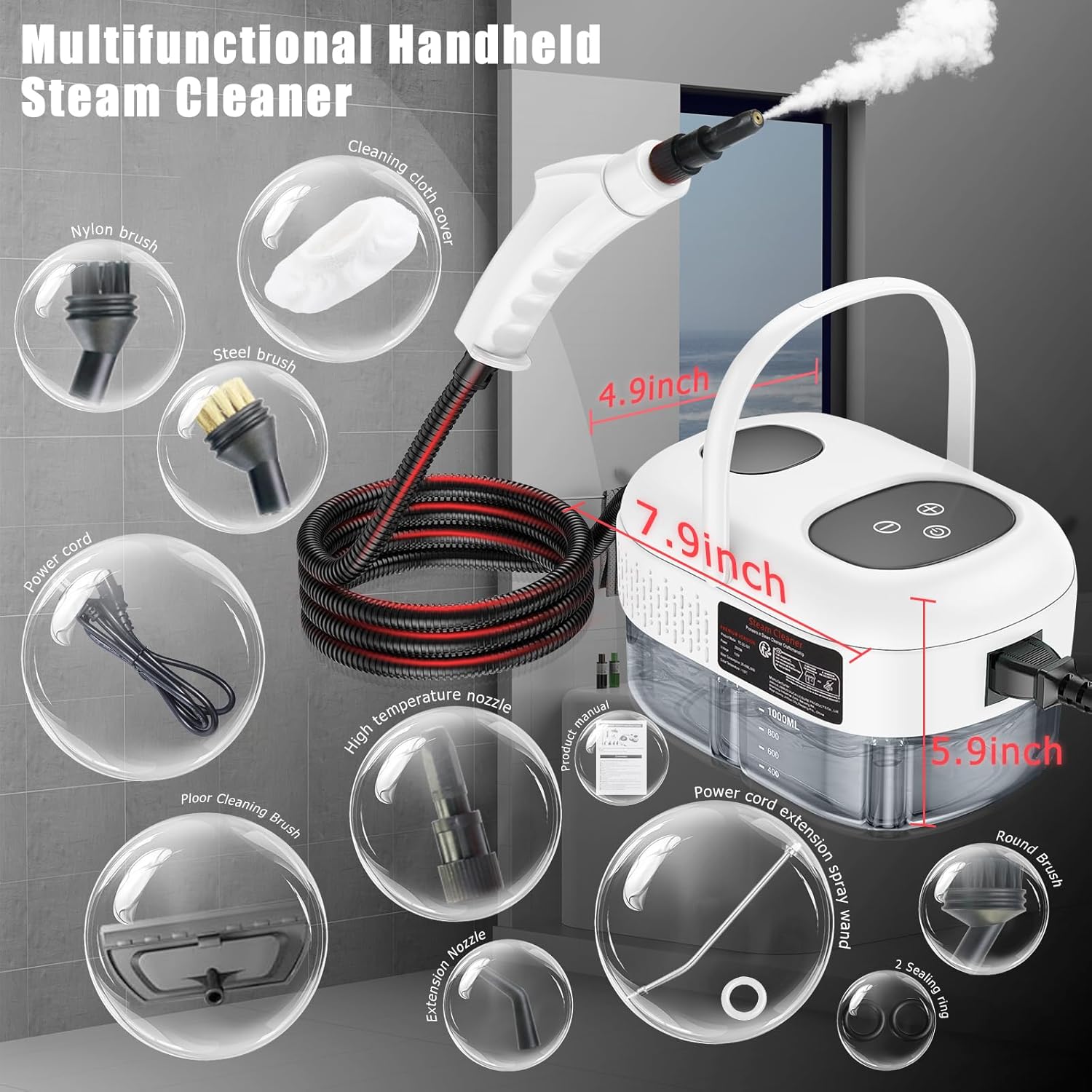
Figure 2.2: Diagram illustrating the main unit, hose, and various attachments with approximate dimensions.
3. Setup
Follow these steps to prepare your steam cleaner for first use:
- Unpack and Inspect: Carefully remove all components from the packaging. Inspect the unit and accessories for any signs of damage.
- Fill Water Tank: Unscrew the top cover of the water tank. Fill the tank with clean distilled or demineralized water up to the 'MAX' line (1100ml capacity). Do not overfill. Securely close the top cover.
- Attach Hose and Nozzle: Connect the steam outlet hose to the main unit. Ensure it clicks securely into place.
- Select and Install Attachment: Choose the appropriate brush head or accessory for your cleaning task. Attach it firmly to the end of the steam nozzle or extended spray rod. Ensure the silicone seal ring is correctly positioned to prevent water leakage.
- Connect Power: Plug the 1.5M power cord into a grounded electrical outlet (110V).

Figure 3.1: Initial setup steps: adding water, installing a brush head, and connecting to power.

Figure 3.2: Guide for installing various brush heads, highlighting the silicone seal ring for leak prevention.
4. Operating Instructions
Once the unit is set up, follow these steps to begin cleaning:
- Power On and Heat Up: Press the power button on the touch screen. The indicator light will illuminate. The unit will begin heating, which takes approximately 9-15 seconds. Wait until steam is consistently produced.
- Adjust Steam Intensity: Use the '+' and '-' buttons on the touch screen to select one of the 6 available steam intensity levels. The current setting will be displayed in real-time. Start with a lower setting and increase as needed.
- Begin Cleaning: Direct the steam nozzle towards the surface to be cleaned. Hold the nozzle a few inches away from the surface for general cleaning, or closer for stubborn stains. Move the nozzle slowly and steadily.
- Using Attachments:
- Steel Brush: Ideal for tough, caked-on grime on durable surfaces like BBQ grills, oven racks, or kitchen sinks.
- Nylon Brush: Suitable for general cleaning on delicate surfaces such as upholstery, tiles, or appliance exteriors.
- Extended Spray Rod: Use for reaching high or low areas, or for cleaning grills and other hard-to-reach spots.
- Glass Brush: For streak-free cleaning of windows, mirrors, and glass surfaces.
- Continuous Operation: The 1100ml water tank provides approximately 40-50 minutes of continuous steam, depending on the selected intensity.
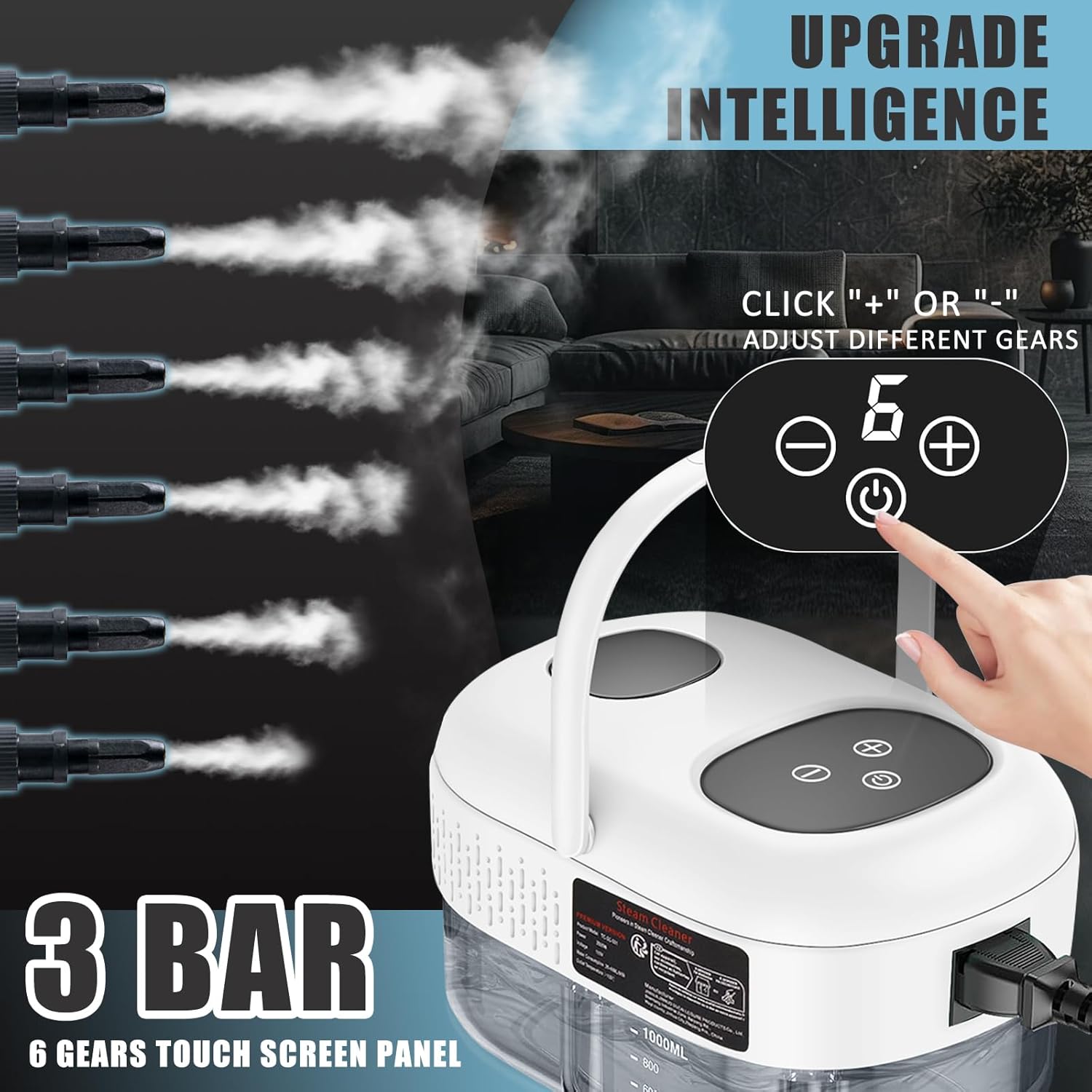
Figure 4.1: Touch screen interface for adjusting steam intensity.

Figure 4.2: Examples of various brushes and their applications for different cleaning scenarios.

Figure 4.3: Steel brush head in use for cleaning kitchen sinks.

Figure 4.4: Nylon brush head in use for cleaning delicate surfaces like oven doors or dishwashers.

Figure 4.5: Extended spray wand in use for reaching hard-to-access areas like grills.
5. Maintenance
Proper maintenance ensures the longevity and optimal performance of your steam cleaner.
- After Each Use:
- Turn off the unit and unplug it from the power outlet.
- Allow the unit to cool down completely.
- Carefully open the water tank cap and drain any remaining water.
- Wipe down the exterior of the unit with a damp cloth.
- Cleaning Attachments: Remove all attachments and rinse them under running water. For brushes, you may use a mild detergent if necessary. Ensure they are dry before storing.
- Descaling (Periodically): If you notice reduced steam output or mineral buildup, descaling may be necessary. Consult the manufacturer's website or customer support for recommended descaling procedures and products. Avoid using harsh chemicals.
- Storage: Store the steam cleaner and its accessories in a cool, dry place, away from direct sunlight and out of reach of children.
Figure 5.1: Step 6 of the 'How To Use' guide, illustrating draining remaining water.
6. Troubleshooting
If you encounter issues with your Docreate Handheld Steam Cleaner, refer to the following common problems and solutions:
| Problem | Possible Cause | Solution |
|---|---|---|
| No steam produced | Water tank is empty or low. Unit has not heated sufficiently. Power cord not properly connected. | Refill water tank. Allow 9-15 seconds for heating. Ensure power cord is securely plugged in. |
| Water leaking from nozzle/attachments | Attachments not securely installed. Silicone seal ring is missing or improperly seated. | Ensure attachments are firmly twisted into place. Check that the silicone seal ring is present and correctly seated. |
| Unit does not turn on | No power supply. Power button not pressed. | Check power outlet and cord connection. Press the power button firmly. |
| Burning smell during operation | Internal component issue. | Immediately unplug the unit and discontinue use. Contact customer support. |
| Reduced steam pressure | Mineral buildup in the system. | Perform descaling procedure as per manufacturer's guidelines. |
If the problem persists after attempting these solutions, please contact Docreate customer support.
7. Specifications
Technical details for the Docreate Handheld Steam Cleaner:
| Feature | Detail |
|---|---|
| Brand | Docreate |
| Model Name | steamer for cleaning |
| Wattage | 1500 watts |
| Voltage | 110 Volts |
| Tank Volume / Capacity | 1100 Milliliters |
| Heat Time | 15 Seconds (approx. 9-15 seconds) |
| Maximum Temperature | 221 Degrees Fahrenheit (105°C) |
| Form Factor | Handheld |
| Color | White |
| Item Weight | 4.24 pounds |
| Package Dimensions | 11.3 x 6.81 x 6.57 inches |
| Power Source | Corded Electric |
| Special Feature | Carry Handle, Compact Design, Lightweight, Portable, Touch Screen |
8. Warranty and Support
Specific warranty information for this product is not provided in the available data. For details regarding warranty coverage, terms, and conditions, please refer to the product packaging or contact the manufacturer directly.
For technical support, troubleshooting assistance beyond this manual, or to inquire about replacement parts, please contact Docreate customer service through their official website or the retailer where the product was purchased.
You may also visit the Docreate brand store on Amazon for additional product information or to contact the seller.