1. Introduction
This manual provides essential information for the safe and efficient operation of your JARXIOKE 2000W Step Up/Down Voltage Transformer, Model ZZ-2000VA. This device is designed to convert voltage between 100V-120V and 220V-240V, allowing you to use electrical appliances from different regions. It supports both stepping up voltage (e.g., 100V to 220V) and stepping down voltage (e.g., 220V to 100V).

Image 1.1: The JARXIOKE ZZ-2000VA transformer illustrating its dual voltage conversion capability.
The transformer is equipped with multiple safety features to ensure reliable performance. Please read this manual thoroughly before use and retain it for future reference.
2. Safety Precautions
- Input Voltage Selection: The unit features manual input voltage selection. Before powering on, always confirm the selected input voltage matches your power source. Incorrect selection can damage the unit and connected appliances.
- Capacity Guideline: For optimal performance and longevity, use the transformer at approximately 80% of its rated capacity. For short-term use, the rated capacity is 2000W. For continuous use, a wattage of 1000W is recommended.
- Inductive Loads: When connecting high-power electrical products or inductive loads such as batteries, motors, or compressors, choose a transformer with sufficient capacity. As a guideline, select a transformer with 2 to 4 times the rated output of the electrical product.
- Continuous Operation: For durability, stop operation for 10 minutes after 1 hour of continuous use to allow the unit to cool down.
- Ventilation: Ensure the transformer is placed in a well-ventilated area. Do not block the ventilation holes.
- Environment: Avoid using the transformer in damp, dusty, or high-temperature environments. Keep it away from direct sunlight and heat sources.
- Grounding: The AC output receptacles of the transformer are internally grounded. The power cord is a Japanese single-phase 100V plug without grounding. When using the transformer overseas, a separate power adapter plug may be required to match the local wall outlet.
- Children and Pets: Keep the transformer out of reach of children and pets.

Image 2.1: The transformer's design featuring heat dissipation holes and icons representing safety protections like circuit breaker, short protection, overload protection, overheat protection, and PSE certification.
3. Product Features
- Dual Voltage Conversion: Converts 100V-120V to 220V-240V (Step-Up) and 220V-240V to 100V-120V (Step-Down).
- Wide Input Voltage Range: Supports input/output voltage from 90V to 260V, with settings for 100V and 220V in Japan.
- Multiple Output Outlets: Equipped with 2 outlets for 100V-120V appliances and 2 outlets for 220V-240V appliances.
- Digital LCD Display: Real-time display of output voltage for easy monitoring.
- Comprehensive Safety Protections: Includes thermostat-controlled temperature protection, input/output overvoltage protection, input undervoltage protection, overcurrent protection, overheat protection, and overload protection.
- Durable Design: Built for reliability and long-term use.

Image 3.1: The JARXIOKE transformer series, highlighting its versatility for international use.
4. Setup
- Unpack the Transformer: Carefully remove the transformer from its packaging. Inspect for any signs of damage.
- Select Input Voltage: On the rear of the unit, locate the input voltage switch. Adjust this switch to match the voltage of your local power supply (e.g., 100V for Japan, 220V for many other countries).
- Connect to Power Source: Plug the transformer's power cord into a wall outlet. For example, if using in Japan, plug it into a 100V AC power source.
- Power On: Turn the power switch on the front of the transformer to the "ON" position. The LED display will illuminate, showing the output voltage.
- Connect Appliance: Plug your electrical appliance into the appropriate output socket on the transformer. Use the 100V-120V outlets for appliances requiring that voltage, and the 220V-240V outlets for appliances requiring that voltage.

Image 4.1: Setup instructions, demonstrating how to select input voltage and connect appliances for 100V to 220V conversion.

Image 4.2: Detailed view of the input voltage selection switch on the rear of the transformer.
5. Operating Instructions
Once the transformer is set up and powered on, operating it is straightforward:
- Voltage Monitoring: The front panel's LED displays show the real-time output voltage for both 100V-120V and 220V-240V outputs. Always verify the voltage displayed matches the requirements of your connected appliance.
- Appliance Connection: Connect your appliance to the corresponding output socket. For example, if your appliance requires 220V, plug it into one of the 220V-240V output sockets.
- Powering Appliances: Turn on your appliance. The transformer will automatically convert the voltage as selected.
- Capacity Management: Be mindful of the transformer's capacity. Do not exceed 80% of the rated capacity for continuous use (1000W recommended for continuous use, 2000W for short-term). Overloading can trigger safety protections or damage the unit.

Image 5.1: Illustration of simple operation, showing the transformer providing both 100V and 220V outputs depending on the input.
Voltage Conversion Calculation
The transformer operates based on the principle: Actual Output Voltage / Actual Input Voltage = Rated Output Voltage / Rated Input Voltage (e.g., 100V/220V = 100V/220V). This means the output voltage is proportional to the input voltage relative to the rated settings.

Image 5.2: Examples of voltage conversion calculations for various input voltages.
6. Maintenance
- Cleaning: Disconnect the transformer from the power source before cleaning. Use a soft, dry cloth to wipe the exterior. Do not use liquid cleaners or solvents.
- Ventilation: Regularly check that the ventilation holes are clear of dust and debris to ensure proper heat dissipation.
- Storage: When not in use for extended periods, store the transformer in a cool, dry place, away from direct sunlight and moisture.
- Inspection: Periodically inspect the power cord and plugs for any signs of damage. Do not use the unit if any part is damaged.
7. Troubleshooting
Common Issues and Solutions:
- No Power/Unit Not Turning On:
- Check if the power cord is securely plugged into the wall outlet and the transformer.
- Ensure the power switch is in the "ON" position.
- Verify the input voltage switch on the rear is correctly set for your local power supply.
- Check if the circuit breaker has tripped (see 'Resetting the Circuit Breaker' below).
- Appliance Not Working:
- Ensure the appliance is correctly plugged into the appropriate voltage output socket (100V-120V or 220V-240V).
- Confirm the appliance's power switch is on.
- Check if the appliance's power consumption exceeds the transformer's capacity.
- Verify the output voltage displayed on the LCD matches the appliance's requirement.
- Overload/Overheat Protection Activated:
- If the transformer automatically shuts off, it may be due to overload or overheating. Disconnect the appliance.
- Reduce the load by using an appliance with lower wattage or a transformer with higher capacity.
- Allow the unit to cool down for at least 10 minutes before restarting.
- Ensure adequate ventilation around the transformer.
Resetting the Circuit Breaker
If the transformer experiences an overload or overheating, the circuit breaker will automatically cut off the power supply. To restore power:
- Turn off the transformer's power switch.
- Disconnect the appliance(s) from the transformer.
- Press the [FUSE] button located on the rear of the unit.
- Reconnect the power and turn on the transformer.
Image 7.1: Location of the [FUSE] button on the rear panel for resetting the circuit breaker.
8. Specifications
| Model | ZZ-2000VA |
| Brand | JARXIOKE |
| Rated Capacity | 2000W (Short-term), 1000W (Continuous Recommended) |
| Input Voltage | 100V AC / 220V AC (Selectable, supports 90V-260V range) |
| Output Voltage | 100V-120V AC / 220V-240V AC (Simultaneous Output) |
| Frequency | 50/60Hz |
| Output Outlets | 2 x 100V-120V, 2 x 220V-240V |
| Color | Black |
| Dimensions (Approx.) | 30.4 x 24.6 x 19.2 cm |
| Weight (Approx.) | 5.67 kg |
| Plug Type | Type A (Japanese standard) |

Image 8.1: Physical dimensions of the transformer.
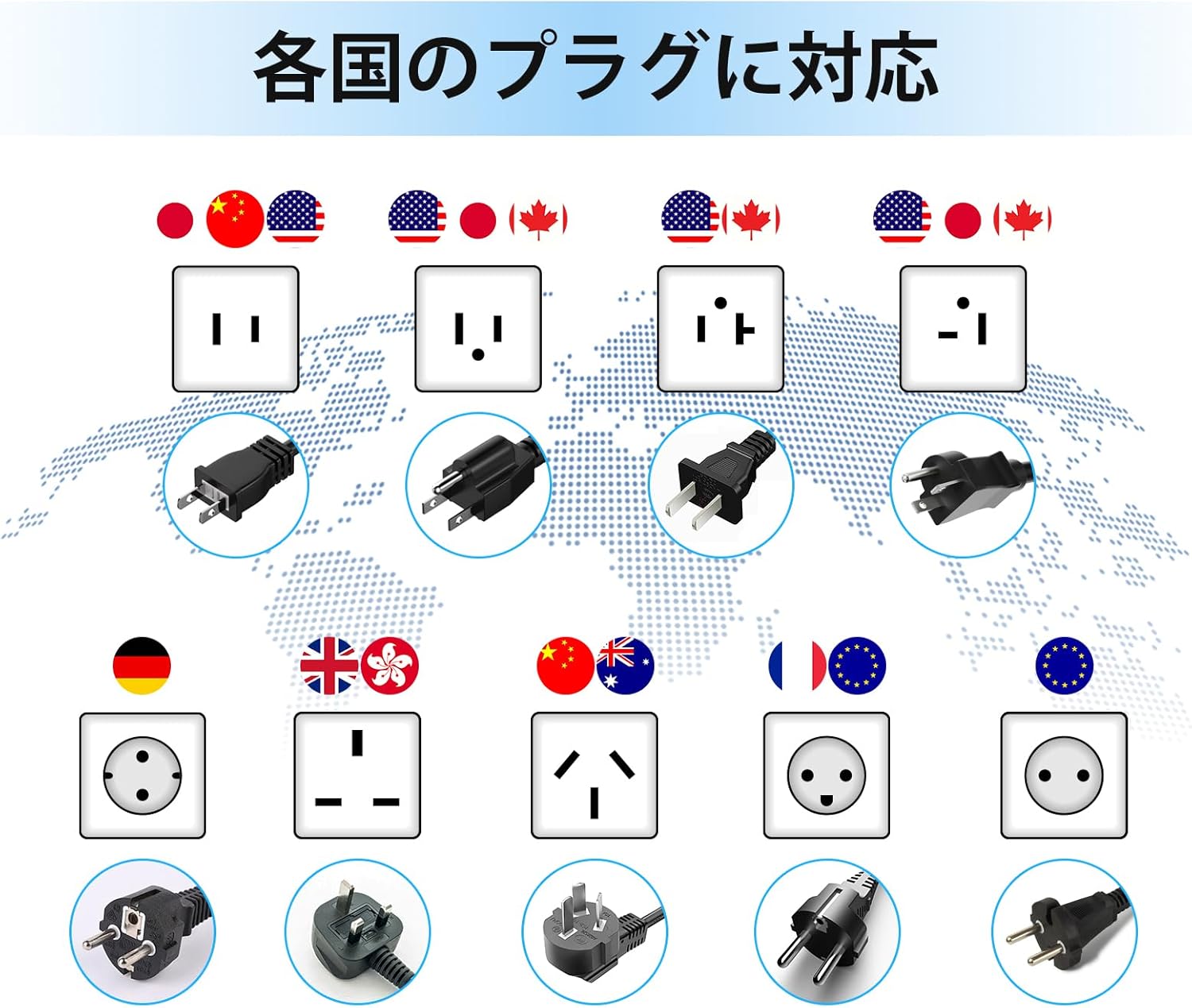
Image 8.2: Examples of international plug types compatible with the transformer's output sockets.
9. Warranty and Support
For warranty information and customer support, please refer to the documentation included with your purchase or contact JARXIOKE customer service through the retailer where the product was purchased. Please have your model number (ZZ-2000VA) and purchase date ready when contacting support.


