
Introduction
This manual provides instructions for the assembly, operation, maintenance, and troubleshooting of your Tangkula 10 FT Solar LED Patio Umbrella. Please read these instructions carefully before use and retain for future reference.
Safety Information
- Always ensure the umbrella is securely anchored in a weighted base (not included) or a patio table with a suitable opening.
- Close the umbrella during strong winds, heavy rain, or other severe weather conditions to prevent damage or injury.
- Do not use the umbrella near open flames or heat sources.
- Keep children and pets away from the umbrella during opening and closing operations.
- Regularly inspect all components for wear and tear. Do not use if any parts are damaged.
Package Contents
Verify that all components are present before beginning assembly:
- 1 x Patio Umbrella
- 1 x User's Manual

Image: The Tangkula 10 FT Solar LED Patio Umbrella in an outdoor setting. Note: Umbrella base is not included.
Assembly Instructions
Follow these steps to assemble your patio umbrella:
- Unpack Components: Carefully remove all parts from the packaging.
- Connect Pole Sections: The umbrella pole comes in two sections. Connect the upper pole section (with the umbrella canopy) to the lower pole section. Ensure they are securely joined.
- Insert into Base: Insert the assembled umbrella pole into a suitable weighted umbrella base (not included) or a patio table with a compatible opening. The pole diameter is 1.4 inches.
- Secure the Umbrella: Tighten any securing knobs on your umbrella base or table to hold the umbrella firmly in place.
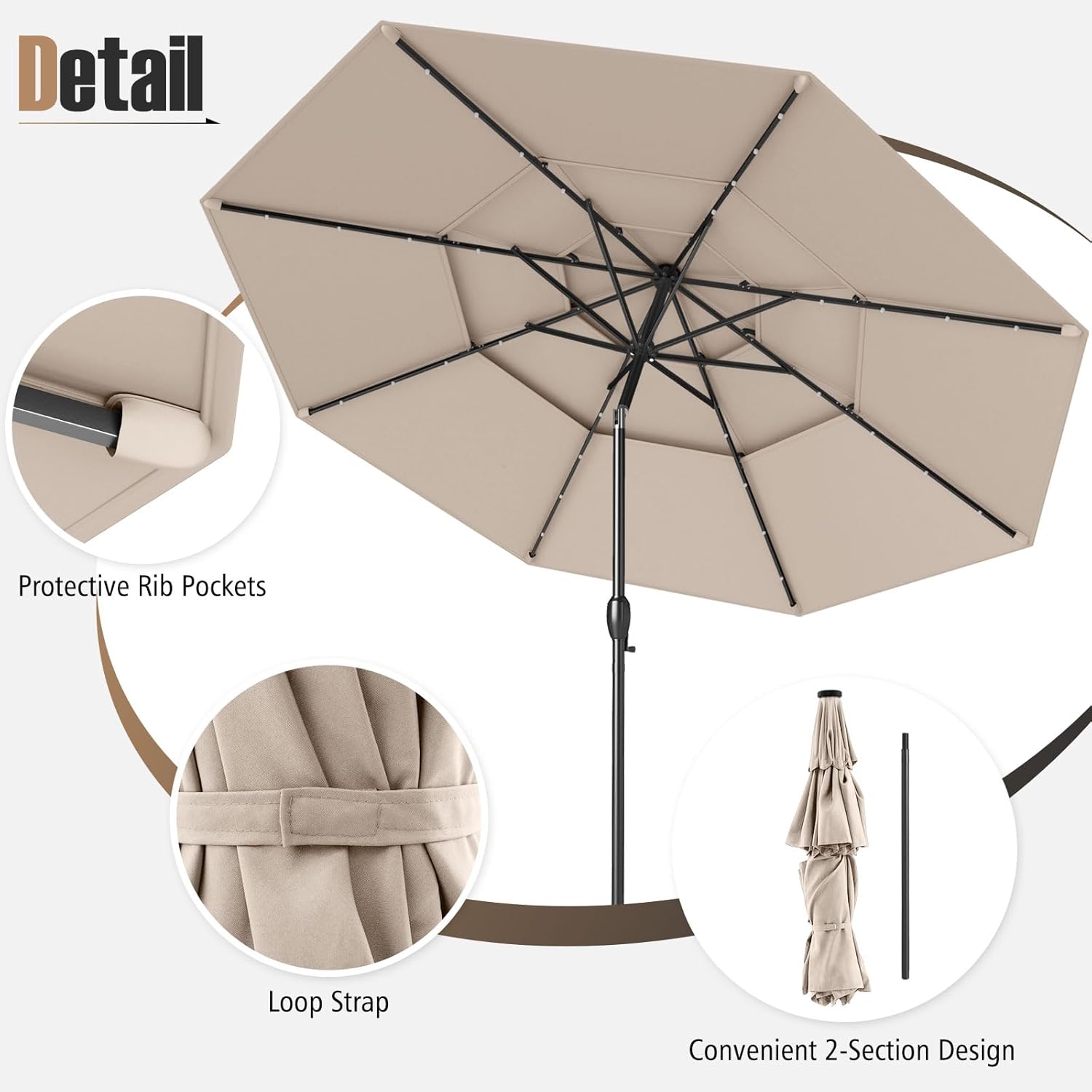
Image: Detail showing the convenient 2-section design for storage and the loop strap for securing the umbrella when closed.
Operating Instructions
Opening and Closing the Umbrella
The umbrella features a crank handle for easy operation:
- To Open: Turn the crank handle clockwise until the canopy is fully extended.
- To Close: Turn the crank handle counter-clockwise until the canopy is fully retracted. Use the integrated loop strap to secure the closed umbrella.

Image: The crank handle for effortless opening and closing, and the push-button tilt mechanism.
Tilt Adjustment
Adjust the canopy angle to block the sun from different directions:
- Locate the push button on the umbrella pole.
- Press the button and gently tilt the canopy to your desired angle (up to 35°).
- Release the button to lock the canopy in position.
Solar LED Lights Operation
The umbrella is equipped with 32 cool-white LED lights powered by a solar panel:
- Charging: Ensure the solar panel on top of the umbrella receives direct sunlight during the day for optimal charging.
- Activation: Locate the handy switch on the umbrella pole. Flip the switch to the "ON" position to activate the LED lights.
- Duration: After a full charge, the LED lights can provide illumination for 6-8 hours.
- Recommendation: Turn off the power switch during the day to allow for better charging of the solar battery.

Image: Details of the solar panel, 32 bright LED lights integrated into the ribs, and the ON/OFF switch for controlling the lights.
Maintenance and Care
- Cleaning: Clean the canopy with a mild soap and water solution. Rinse thoroughly and allow to air dry completely before closing or storing. Do not use harsh chemicals.
- Storage: When not in use for extended periods, or during severe weather, close the umbrella and secure it with the loop strap. For long-term storage, detach the pole into two sections and store in a dry, protected area.
- Weather Protection: Always close the umbrella in severe weather conditions (strong winds, heavy rain, snow) to prevent damage to the canopy and frame.
- Rib Pockets: The umbrella features protective rib pockets to prevent the canopy from tearing. Ensure these are properly aligned during opening and closing.

Image: The premium 180G polyester canopy material, designed for sun protection, water resistance, fade resistance, and tear resistance.
Troubleshooting
| Problem | Possible Cause | Solution |
|---|---|---|
| Umbrella does not open or close smoothly. | Mechanism obstruction or damage. | Check for any debris or fabric caught in the crank mechanism. Ensure the pole sections are fully connected. Do not force the crank. |
| LED lights are not working. | Insufficient solar charge, switch is off, or wiring issue. | Ensure the solar panel has received adequate direct sunlight for charging (6-8 hours). Verify the ON/OFF switch on the pole is in the "ON" position. Check for any visible damage to the wiring. |
| Umbrella is unstable in light wind. | Inadequate base weight or improper securing. | Ensure a sufficiently weighted umbrella base is used (not included) and that the umbrella pole is securely tightened within the base or table. Close the umbrella in stronger winds. |
Specifications
| Feature | Detail |
|---|---|
| Model Number | AM10856HM |
| Brand | Tangkula |
| Product Dimensions | 10 ft (Diameter) x 8.2 ft (Height) |
| Umbrella Rim Height | 6.5 ft |
| Umbrella Pole Diameter | 1.4 inches |
| Net Weight | 16.5 lbs |
| Canopy Material | 180G Polyester Fabric |
| Frame Material | Metal |
| Ribs | 8 Heavy-Duty Metal Ribs |
| Ventilation | 3-Tier Vented Top |
| Lights | 32 Cool-White Solar LED Lights |
| Light Illumination Time | 6-8 hours (after full charge) |
| Opening Mechanism | Crank Lift |
| Tilt Mechanism | Push Button Auto Tilt (up to 35°) |
| Special Features | Solar Powered LED Lights, 3-Tier Vented Top, Tilt Adjustment, Crank Handle, 2-Section Pole Design |

Image: Product dimensions including overall height, canopy diameter, and pole diameter.

Image: The 3-tier vented top design, which promotes air circulation and enhances stability.
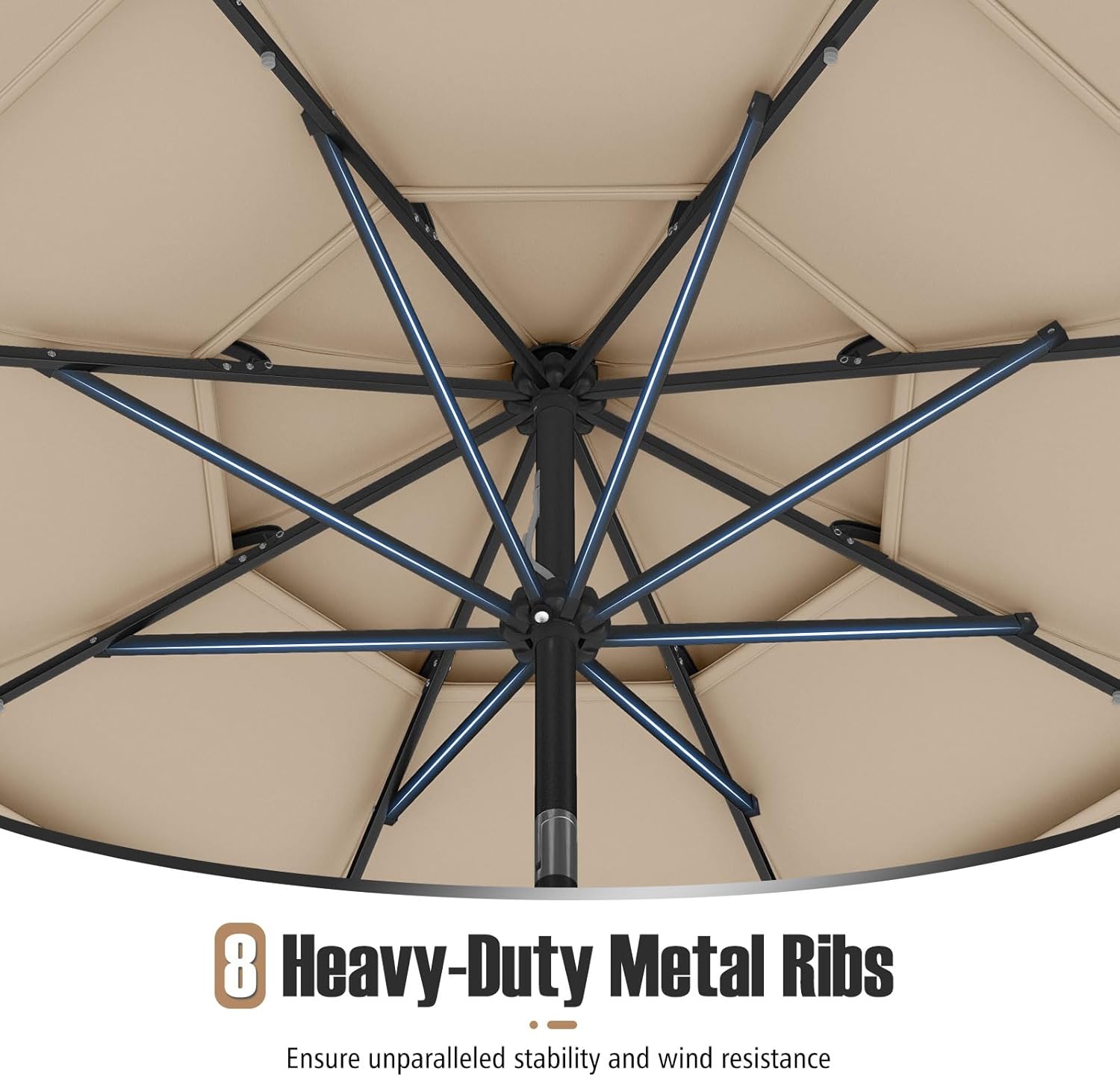
Image: The robust structure of the umbrella, featuring 8 heavy-duty metal ribs for stability and wind resistance.
Warranty and Support
For warranty information or technical support, please contact Tangkula customer service. Refer to your purchase documentation for specific contact details.
Return Policy: This product typically includes a 30-day refund/replacement policy. Please consult your retailer for exact terms.