
1. Product Overview
The DUMBORC DDF-350 is an advanced digital proportional radio system designed for precise control of various RC vehicles, including cars, boats, tanks, and off-road models. This system features a high-resolution LCD screen for real-time telemetry data and customizable settings, ensuring an optimal remote control experience.
The ergonomic design, including a carbon fiber textured grip and comfortable trigger, minimizes fatigue during extended use. The package includes the DDF-350 transmitter and the P10FG receiver, providing a complete solution for your RC control needs.

Image: The DUMBORC DDF-350 Radio Transmitter with the P10FG receiver and battery pack. The transmitter features a pistol-grip design with a steering wheel and an LCD screen.
2. Package Contents
Verify that all items listed below are present in your package:
- DDF-350 Radio Transmitter
- P10FG Receiver
- Battery Pack (for transmitter)
- Lanyard
- Instruction Manual (this document)
3. Setup
3.1 Battery Installation
The DDF-350 transmitter requires 4 'AA' batteries or the included rechargeable battery pack. Ensure correct polarity when inserting batteries.
- Open the battery compartment cover located at the bottom of the transmitter handle.
- Insert 4 'AA' batteries or connect the provided battery pack, ensuring the connector is properly seated.
- Close the battery compartment cover securely.

Image: Detailed view of the DDF-350 transmitter highlighting its ergonomic design, LCD screen, anti-slip wheel, ergonomic trigger, and the 4*AA battery compartment (batteries not included in this view).
3.2 Receiver Connection (P10FG)
Connect the P10FG receiver to your RC vehicle's Electronic Speed Controller (ESC), servo motors, and other components. Refer to your vehicle's manual for specific wiring diagrams.
- Connect the ESC to Channel 2 (throttle).
- Connect the steering servo to Channel 1 (steering).
- Utilize other channels (3-10) for additional functions such as lights, winches, or gear shifts, as required by your RC model.

Image: The DUMBORC P10FG receiver with its various ports for connecting servos, ESC, and other accessories. It supports 4.8-10V DC input.
3.3 Binding the Transmitter and Receiver
To establish communication between the DDF-350 transmitter and the P10FG receiver, a binding process is required. This procedure links the specific transmitter to the receiver.
- Ensure both the transmitter and receiver are powered off.
- Connect a bind plug (not included, typically comes with the receiver or ESC) to the 'BIND' port on the P10FG receiver.
- Power on the receiver. The LED on the receiver should flash, indicating it is in binding mode.
- While holding down the 'BIND' button on the DDF-350 transmitter (refer to the manual for exact button location), power on the transmitter.
- The LED on the receiver should turn solid, indicating successful binding.
- Release the 'BIND' button on the transmitter, then power off both the transmitter and receiver.
- Remove the bind plug from the receiver.
- Power on the transmitter first, then the receiver. The system should now be bound and ready for operation.
4. Operating Instructions
4.1 Basic Controls
- Steering Wheel: Controls the direction of your RC vehicle (left/right).
- Throttle Trigger: Controls the speed and direction of your RC vehicle (forward/reverse). Pull for forward, push for reverse/brake.
4.2 LCD Display and Menu Navigation
The DDF-350 features a high-resolution LCD screen that displays real-time telemetry data and allows access to various settings. Use the navigation buttons and scroll wheel to move through menus and adjust parameters.
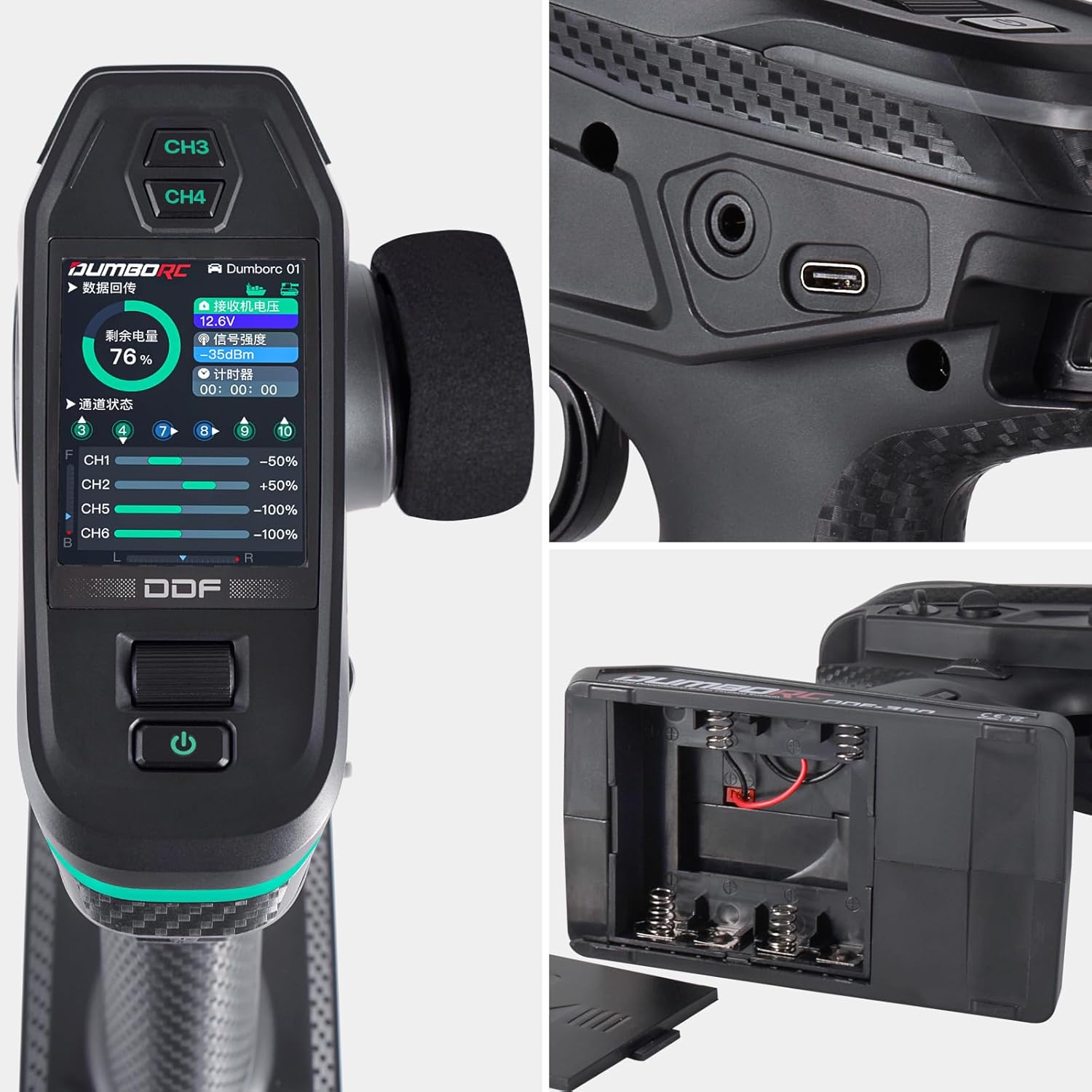
Image: Close-up view of the DDF-350's LCD screen showing battery percentage, receiver voltage, signal strength, channel outputs, and timer. Also visible are the CH3 and CH4 buttons.
4.3 Advanced Features and Programmable Settings
The DDF-350 offers multiple channels and programmable settings for customized operation. These include:
- Channel Assignment: Configure functions for each of the 10 available channels.
- End Point Adjustment (EPA): Set the maximum travel for each servo.
- Dual Rate (D/R): Adjust the sensitivity of steering and throttle.
- Sub-Trim: Make fine adjustments to the neutral position of servos.
- Reverse: Change the direction of servo movement.
- Mix Control: Program custom mixing functions for complex setups.
- Under-Voltage Warning: Alerts you when the battery voltage is low.

Image: Infographic highlighting the DDF-350's 10-channel capability, 2.4GHz frequency, 350-400 meters control distance, modulation (GFSK), spreading mode (FHSS/AFHDS), sensitive control system, wide applicability, and under-voltage warning.
4.4 Firmware Upgrades
The DDF-350 supports upgradable firmware, allowing for future enhancements and bug fixes. Visit the official DUMBORC website for information on available updates and instructions on how to perform them.

Image: A stylized image of the DDF-350 transmitter with a graphic representing its 2.4GHz wireless system and upgradable firmware capability.
5. Maintenance
Proper maintenance ensures the longevity and optimal performance of your DDF-350 system.
- Cleaning: Use a soft, dry cloth to clean the transmitter and receiver. Avoid using harsh chemicals or solvents.
- Storage: Store the system in a cool, dry place away from direct sunlight and extreme temperatures. If storing for extended periods, remove the 'AA' batteries from the transmitter.
- Battery Care: If using the rechargeable battery pack, follow the manufacturer's guidelines for charging and discharging to maximize battery life. Do not overcharge or completely drain the battery.
- Inspection: Periodically inspect all cables and connectors for signs of wear or damage.
6. Troubleshooting
This section addresses common issues you might encounter with your DDF-350 system.
| Problem | Possible Cause | Solution |
|---|---|---|
| Transmitter does not power on. | Low or dead batteries; incorrect battery installation. | Replace batteries or recharge battery pack; ensure correct polarity. |
| No response from RC vehicle. | Transmitter and receiver not bound; receiver not powered; incorrect wiring. | Perform binding process; ensure receiver is powered; check all wiring connections. |
| Erratic or inconsistent control. | Interference; low battery voltage (transmitter or vehicle); loose connections; faulty component. | Operate in an area with less interference; check and charge all batteries; secure all connections; inspect components for damage. |
| Automatic throttling without input. | Throttle trim/sub-trim misadjusted; internal sensor issue. | Adjust throttle trim to neutral; if issue persists, contact DUMBORC support for assistance. |
| Short control range. | Antenna obstruction or damage; interference; low battery. | Ensure receiver antenna is properly positioned and undamaged; avoid operating near large metal objects or strong radio sources; check battery levels. |
7. Specifications
| Feature | Specification |
|---|---|
| Model Number | DDF-350 |
| Product Dimensions | 8 x 3.2 x 8 inches (203.2 x 81.28 x 203.2 mm) |
| Item Weight | 1.2 pounds (0.54 kg) |
| Batteries Required | 1 A batteries (or included rechargeable pack) |
| Compatible Devices | RC Model, RC Car, RC Boat, RC Tank, RC Off-Road Vehicle |
| Color | Black |
| Max Number of Supported Devices | 1 (per transmitter) |
| Manufacturer | Dumborc |

Image: Diagram showing the dimensions of the DDF-350 transmitter: approximately 205mm height, 120mm width, and 65mm depth at the base.
8. Warranty and Support
For warranty information and customer support, please refer to the documentation provided at the time of purchase or visit the official DUMBORC website. Keep your proof of purchase for warranty claims.
If you encounter issues not covered in this manual or require further assistance, please contact DUMBORC customer service directly.


