1. Product Overview
The Drumfit PullUps 4000 Power Tower is a versatile multi-station fitness equipment designed for comprehensive strength training. It allows for a variety of exercises targeting the back, arms, chest, and abdomen, making it an ideal addition to any home gym setup.

Figure 1.1: The Drumfit PullUps 4000 Power Tower, a robust multi-station for various exercises.
Key Features:
- Multi-Station Design: Facilitates exercises such as pull-ups, dips, knee raises, and push-ups.
- Padded Arm Supports: Provides comfort and stability during leg raises and dips.
- Non-Slip Grips: Ensures a secure hold for all exercises, enhancing safety.
- Sturdy Carbon Steel Construction: Guarantees durability and stability during intense workouts.
- Adjustable Height: Accommodates users of various heights for optimal exercise form.
- Maximum Weight Capacity: Supports users up to 120 kg (264 lbs).
2. Package Contents
Please verify that all components are present and undamaged before beginning assembly.
- 1 x Pull Up Tower (main frame components)
- 1 x Mounting Kit (hardware for assembly)
- 1 x Instruction Handle (user manual)
3. Setup and Assembly
Assembly of the Drumfit PullUps 4000 Power Tower requires careful attention to detail. It is recommended to have two people for assembly. Ensure you have adequate space and all tools listed in the mounting kit instructions.
Assembly Steps:
- Unpack Components: Carefully remove all parts from the packaging and lay them out. Check against the package contents list.
- Assemble Base Frame: Connect the horizontal and vertical support beams using the provided bolts and nuts from the mounting kit. Do not fully tighten bolts until the entire frame is assembled.
- Attach Upright Posts: Secure the main upright posts to the assembled base frame.
- Install Pull-Up Bar: Mount the pull-up bar to the top of the upright posts. Ensure it is level and securely fastened.
- Attach Dip Handles and Backrests: Install the padded armrests and dip handles to the designated positions on the upright posts.
- Final Tightening: Once all components are in place, systematically tighten all bolts and nuts. Ensure the tower is stable and does not wobble.
- Stability Check: Before first use, gently shake the assembled tower to confirm its stability.

Figure 3.1: Product dimensions for space planning during assembly.
4. Operating Instructions
The Drumfit PullUps 4000 Power Tower offers multiple exercise stations. Always warm up before exercising and cool down afterwards. Consult a fitness professional for proper form and exercise routines.
Exercise Stations:
- Pull-Up Bar: Use for pull-ups and chin-ups to target back and bicep muscles. Grip the bar with hands shoulder-width apart, palms facing away (pull-up) or towards you (chin-up). Pull your body up until your chin clears the bar.
- Dip Station: Utilize the parallel bars for triceps dips and chest dips. Grip the handles, lift your feet off the ground, and lower your body by bending your elbows.
- Vertical Knee Raise (VKR) / Leg Raise Station: Position your forearms on the padded armrests and grip the handles. Keep your back against the backrest. Raise your knees towards your chest or extend your legs straight out to engage abdominal muscles.
- Push-Up Handles: The lower handles can be used for elevated push-ups, allowing for a deeper range of motion and increased chest activation.
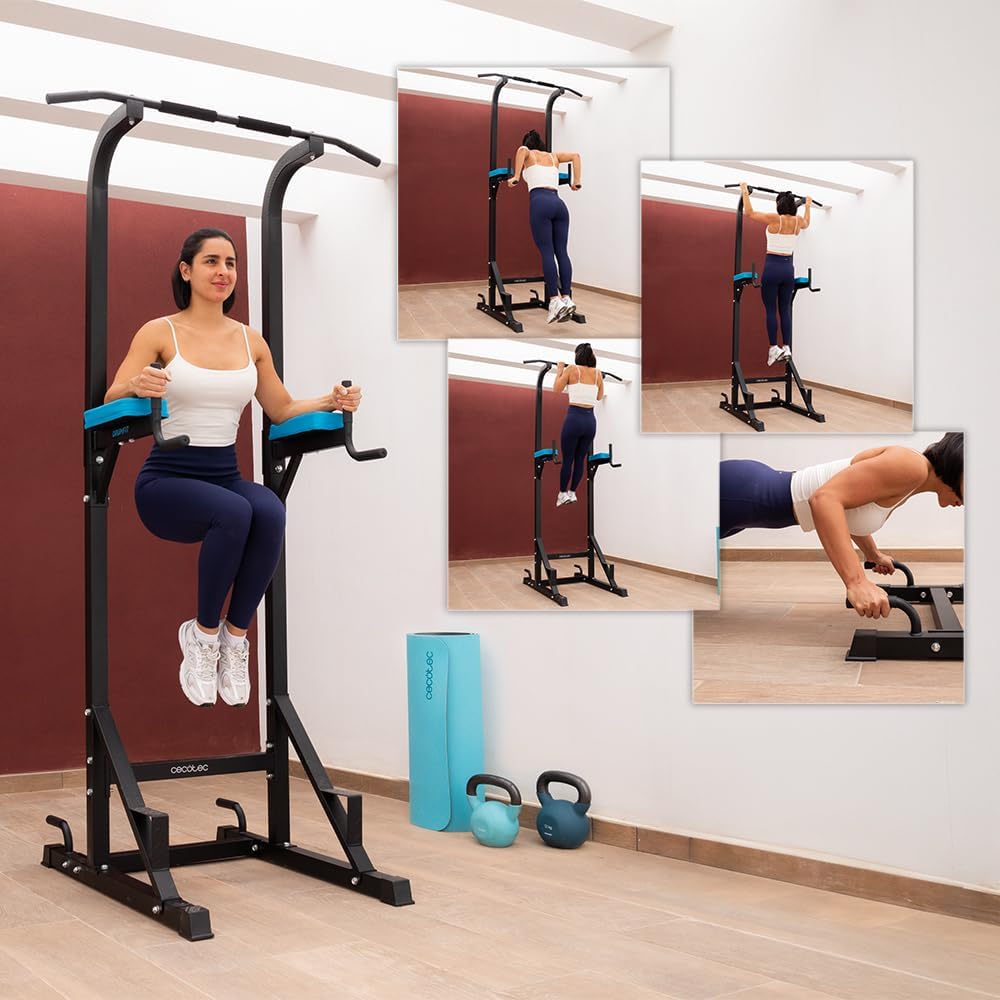
Figure 4.1: Demonstrating the use of the vertical knee raise station for core exercises.
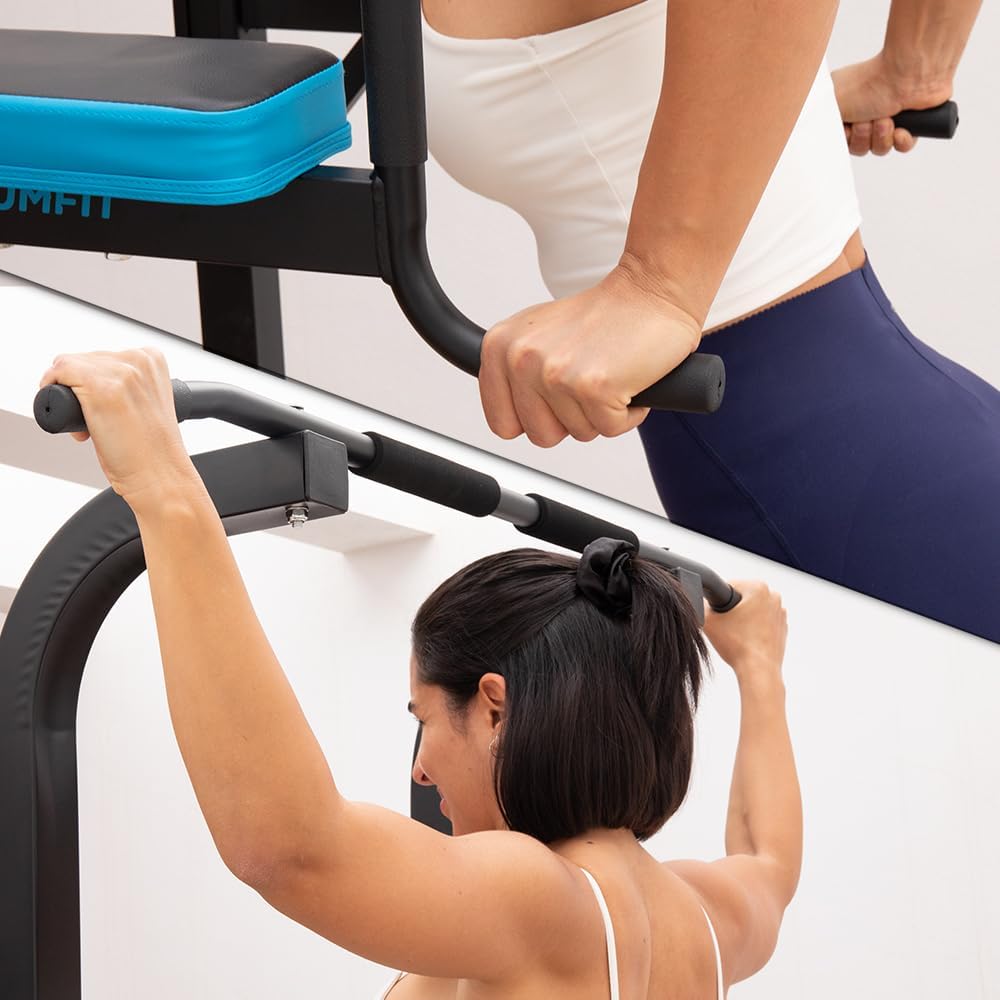
Figure 4.2: Detail of the pull-up bar and dip handles, highlighting the non-slip grips.

Figure 4.3: Padded armrests provide comfort and support during exercises.
5. Maintenance
Regular maintenance ensures the longevity and safe operation of your power tower.
- Cleaning: Wipe down the frame and padded areas with a damp cloth after each use to remove sweat and dirt. Use mild soap if necessary, then wipe dry.
- Bolt Inspection: Periodically check all bolts and nuts for tightness. Re-tighten any loose fasteners to maintain stability.
- Component Check: Inspect padded areas, grips, and frame for any signs of wear, tears, or damage. Replace worn parts immediately.
- Lubrication: If any moving parts (though minimal on this unit) begin to squeak, apply a small amount of silicone-based lubricant.
6. Troubleshooting
If you encounter issues with your Drumfit PullUps 4000 Power Tower, refer to the following common problems and solutions:
- Instability/Wobbling:
Solution: Ensure all assembly bolts are fully tightened. Check that the tower is placed on a flat, level surface. - Squeaking Noises:
Solution: Identify the source of the squeak. It is usually a loose bolt or friction between metal parts. Tighten bolts or apply a small amount of lubricant to contact points. - Damaged/Missing Parts:
Solution: If parts are damaged upon arrival or missing, contact Cecotec customer support immediately for assistance.
7. Specifications
| Attribute | Value |
|---|---|
| Brand | Cecotec |
| Model Number | 07189 |
| Material | Carbon Steel |
| Color | Black/White |
| Product Dimensions (L x W x H) | 87.8" x 42.91" x 87.8" (223 cm x 109 cm x 223 cm) |
| Item Weight | 57.6 pounds (26.2 Kilograms) |
| Maximum Weight Recommendation | 120 Kilograms (264 lbs) |
| Handle Type | Fixed |

Figure 7.1: The sturdy base design ensures stability during use.
8. Warranty and Support
The Drumfit PullUps 4000 Power Tower comes with a Limited Warranty. Please refer to the warranty documentation included with your purchase for specific terms and conditions.
Cecotec offers a 10-year availability for EU spare parts, ensuring long-term support for your product.
Customer Support:
For technical assistance, warranty claims, or to order replacement parts, please contact Cecotec customer support through their official website or the contact information provided in your purchase documentation.


