
Introduction
This manual provides instructions for the installation, operation, and maintenance of your SIXTOP Android 13 Autoradio. This 10.1-inch full touchscreen car radio player is designed for specific VW Golf 7 models manufactured between 2013 and 2018. Please read this manual thoroughly before installation and use to ensure proper functionality and safety.
Product Overview and Compatibility
The SIXTOP Android 13 Autoradio features a 10.1-inch high-definition touchscreen and an automotive-specific user interface. It is compatible with VW Golf 7 models from 2013 to 2018. For compatibility verification, it is recommended to compare your car's center console with the provided images or consult with customer support.

This image illustrates the visual integration of the SIXTOP Android 13 Autoradio into the dashboard of a VW Golf 7 (2013-2018) model, showing the original setup and the new 10.1-inch touchscreen unit installed.
Key Features and Operation
1. Wireless CarPlay and Android Auto
The unit supports both wireless and wired connections for Apple CarPlay and Android Auto. This allows access to your smartphone's address book, mail, notifications, map navigation, music, and videos, with voice control capabilities. The system integrates your smartphone's functions directly into the autoradio display.

This image displays the user interfaces for Wireless CarPlay and Android Auto, showing how smartphone applications are integrated. It also highlights the Mirror Link feature for both iOS (via WiFi) and Android (via WiFi/USB) devices.
2. Steering Wheel Control
The autoradio supports steering wheel control functions, enabling you to manage music tracks, radio channels, and volume without removing your hands from the steering wheel. The system includes a learning interface for custom button mapping.
3. Reversing Camera
The unit is equipped with a waterproof AHD rear camera featuring night vision. It supports both AHD and CVBS formats, providing clear images for parking, especially at night. The display automatically switches to the camera view when reversing, and auxiliary parking lines can be adjusted.

This image demonstrates the steering wheel control learning interface, allowing users to map functions to their vehicle's steering wheel buttons. It also shows the clear image quality and wide-angle view provided by the reversing camera, including parking guidelines.
4. Equalizer (EQ) and Sound Settings
Customize your audio experience with various EQ sound profiles. The system allows for cross-frequency adjustment, DSP (Digital Sound Processor) settings, and surround sound panning to optimize audio output for different music genres and listening preferences.
5. Split Screen Function
The 2 DIN split-screen feature allows you to display two applications simultaneously, such as navigation on one side and music playback on the other. This enhances multitasking capabilities during your journey.
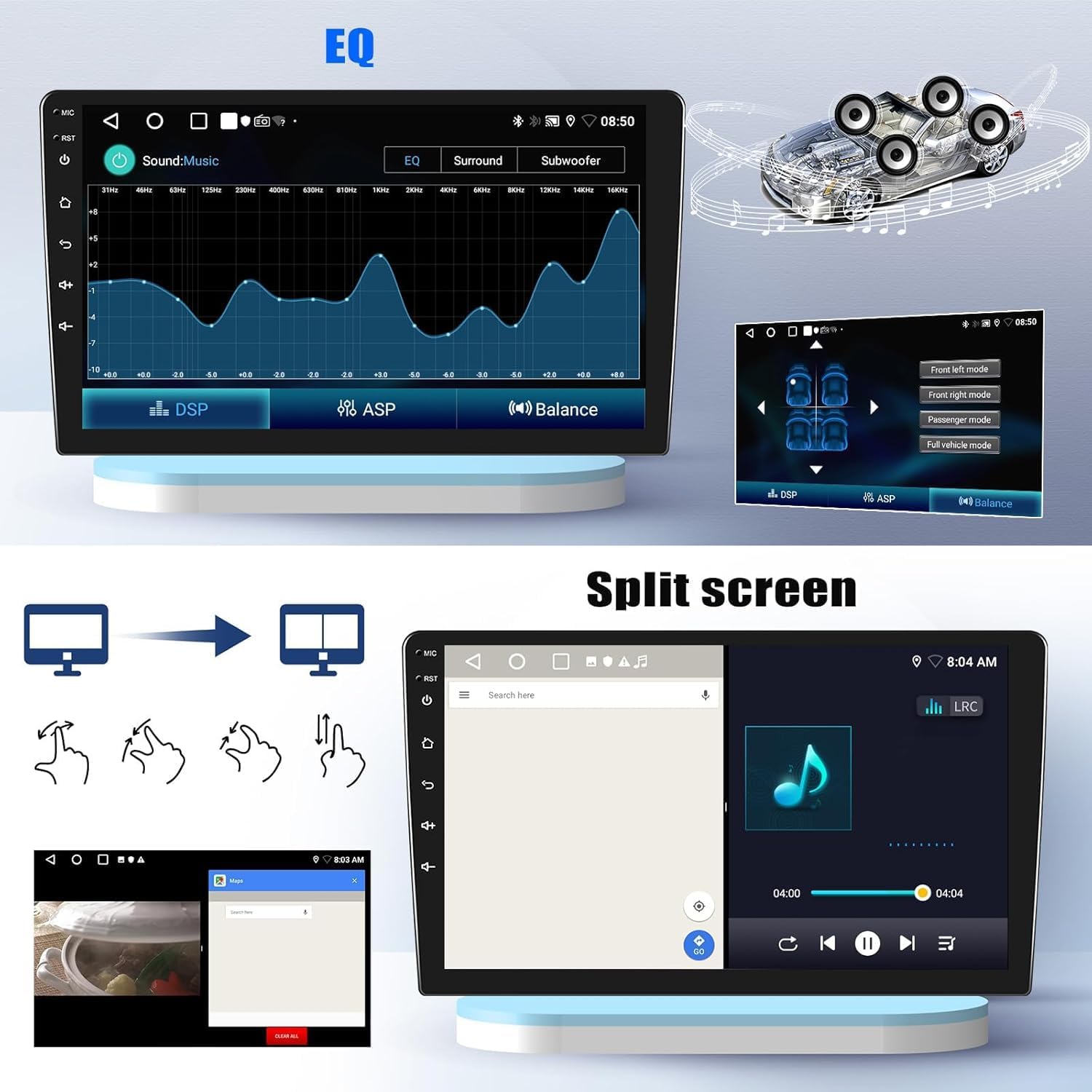
This image illustrates the audio equalizer interface for sound customization, including DSP and balance settings. It also shows the split-screen function, enabling two applications, such as navigation and music, to be displayed simultaneously.
6. Bluetooth Functionality
The integrated Bluetooth hands-free kit supports contact synchronization, hands-free calling, and Bluetooth music playback. This allows for safe communication and audio streaming while driving.
7. FM/RDS Radio
The autoradio supports FM/RDS radio stations with a frequency range of 87.5-108MHz. It includes 18 memory functions for storing preferred stations and provides real-time traffic messages, news, and weather forecasts via RDS.

This image displays the Bluetooth interface for hands-free calling and music streaming. Below it, the FM/RDS radio interface is shown, indicating frequency tuning and RDS information display.
8. GPS Navigation and WiFi Connection
The unit features integrated GPS navigation, compatible with applications like Waze, Navfree, and Google Maps. You can download offline maps directly from the Play Store or use online maps. WiFi connectivity allows for downloading various applications, online music streaming, and video playback.

This image shows the GPS navigation system in action, displaying a route on a map. It also highlights the capabilities of online and offline maps, web browsing, and application downloads via WiFi connectivity.
9. Optional Inputs (Requires separate accessories)
- Car Dashcam Input: Supports connection to an optional car recorder for video recording and evidence backup.
- Digital Audio Broadcast (DAB+) Input: Compatible with an optional DAB+ receiver for enhanced digital radio quality.
- OBD2 (On-Board Diagnostics) Input: Supports connection to an optional OBD2 tool for vehicle diagnostics.

This image presents optional features that can be integrated with the autoradio: a dashcam for recording driving footage, a DAB+ receiver for digital audio broadcasting, and an OBD2 tool for vehicle diagnostics. These accessories require separate purchase.
Specifications
| Feature | Detail |
|---|---|
| System | Android 13 |
| Chipset | MT8163 |
| Operating Speed | 1.3 GHz |
| Screen Size | 10.1 inches |
| Memory | 2 GB RAM + 64 GB ROM |
| Screen Resolution | 1024 x 600 |
| Bluetooth Version | 4.1 |
| Radio Chip | MT6625N |
| Audio Output Power | 4 x 45 W (Total 180W) |
| Operating Temperature | -20 °C to 75 °C |
| Steering Wheel Control | Supported |
| Amplifier Chip | YD7388 |
| Radio Band | FM/RDS (87.5-108MHz, 18 memory functions) |
| Video Output | Not supported |
| Reverse Input | AHD/CVBS |
| External Microphone | Supported |
| Split Screen | Supported |
| Mirror Link | Supported (iOS one-way, Android two-way) |
| Maps | Integrated offline maps (requires internet download), compatible with Waze/Navfree/Google Maps |
| WiFi | Supported |
| USB | Dual USB interface |
| Audio Formats | APE, FLAC, WAV, MP3, WMA |
| Video Formats | MKV, RMVB, AVI, MP4, MDV |
| Image Formats | PNG, JPEG, JPG, GIF, WBMP, BNP |
| Supported Languages | Chinese, English, French, Italian, Korean, Japanese, Arabic, Spanish, Portuguese, Russian, Turkish, Vietnamese, Hebrew, Polish, German |
| Connectivity Technology | Bluetooth, Wi-Fi |
| Controller Type | Touchscreen and mobile application |
| Special Features | Integrated Bluetooth, Touchscreen |
| Compatible Devices | Smartphone |
| Connector Type | RCA |
| Audio Output Mode | Stereo |
| Surround Sound Channel Configuration | 4.0 |
| Item Weight | 1.85 Kilograms |
| Package Dimensions | 43 x 11.6 x 3.8 cm |
Package Contents
The standard package includes the following items:
- User Manual
- Radio Antenna
- Power Cables
- Installation Tool
- Reversing Camera
- USB Cables (x2)
- RCA Cable
- GPS Antenna
- Rear View Input Cable
- External Microphone

This image provides the physical dimensions of the 10.1-inch autoradio unit. Below, it lists the standard package contents, including the user manual, radio antenna, power cables, installation tool, camera, USB cables, RCA cable, GPS antenna, rear view input cable, and microphone.
Maintenance and Troubleshooting
Maintenance
To ensure the longevity and optimal performance of your autoradio, keep the screen clean using a soft, dry cloth. Avoid using abrasive cleaners or solvents. Ensure all connections are secure and free from moisture.
Troubleshooting
If you encounter any issues, please refer to the following general troubleshooting steps:
- No Power: Check all power connections and fuses. Ensure the vehicle's ignition is on.
- No Sound: Verify speaker connections, volume settings, and audio source selection.
- GPS Signal Loss: Ensure the GPS antenna is correctly installed and has a clear view of the sky.
- Bluetooth Connection Issues: Ensure Bluetooth is enabled on both the autoradio and your device. Try unpairing and re-pairing the devices.
- Touchscreen Unresponsive: Try restarting the unit. If the issue persists, a factory reset may be necessary (refer to the on-screen settings).
For persistent issues or specific technical support, please contact customer service.
Warranty and Support
SIXTOP provides comprehensive customer support and warranty services for your product:
- Warranty: 2 Years repair or replacement.
- Returns: 30 Day Replacement policy.
- Online Response: Customer support is available to answer questions within 18 hours.
- Technical Support: Lifetime technical support is provided.
How to Contact Support
If you have questions regarding product compatibility, installation, or technical issues, you can contact SIXTOP customer service through the platform where you purchased the product. Typically, this involves:
- Locating the seller's name (e.g., "xinshunhangdianpu") on the product page.
- Clicking on the seller's name to access their profile.
- Selecting the "Ask a question" option to send a direct message.

This image provides guidance on how to contact the seller through the Amazon platform to verify product compatibility with a specific car model, year, and dashboard configuration.

This image represents the customer support team, emphasizing the availability of assistance for product inquiries and technical support.


