
1. Product Overview
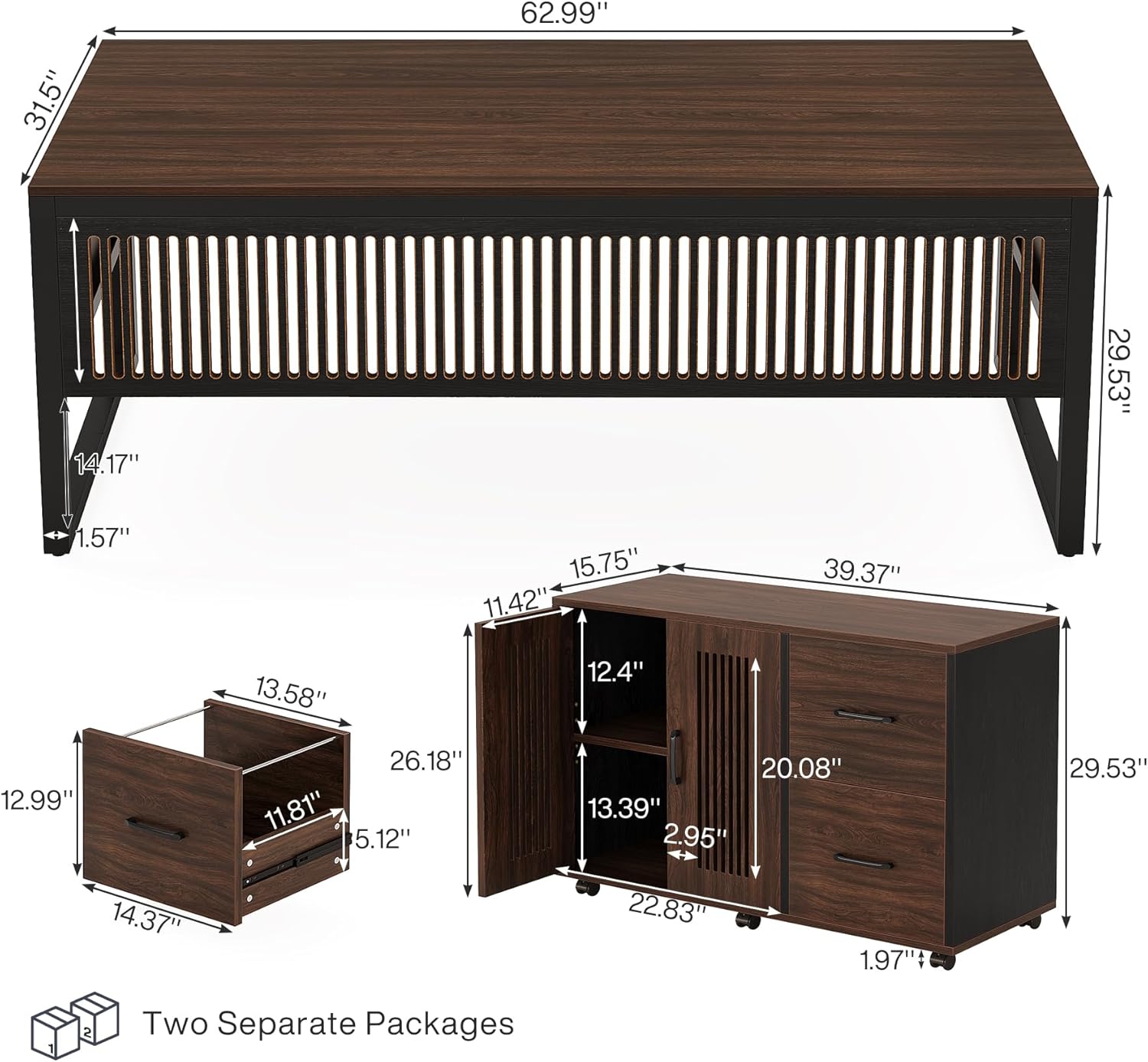
The Tribesigns 63-Inch L-Shaped Executive Desk with Mobile File Cabinet is designed to provide a spacious and organized workspace for home or business offices. This modern desk features a durable metal frame with a dark walnut top and black finish, offering both style and stability. The L-shaped design maximizes corner space, while the included mobile file cabinet provides flexible storage solutions with two drawers and an adjustable door storage compartment.


2. Safety Instructions
Please read and understand all instructions before assembly and use. Keep this manual for future reference.
- Two-Person Assembly: It is highly recommended that two adults assemble this desk to prevent injury and ensure proper construction.
- Check All Parts: Before beginning assembly, verify that all parts and hardware listed in the package contents are present and undamaged. Do not proceed with assembly if any parts are missing or damaged.
- Use Correct Hardware: Only use the provided hardware. Using incorrect hardware may compromise the desk's stability and safety.
- Secure All Connections: Ensure all screws, bolts, and fasteners are tightened securely. Periodically check and re-tighten as needed.
- Weight Limits: Do not exceed the recommended weight limits for the desk surface or cabinet drawers/shelves. Overloading can lead to structural failure.
- Level Surface: Assemble and place the desk on a flat, level surface to prevent wobbling and ensure stability.
- Keep Away from Children: Small parts and plastic bags can be choking hazards. Keep them away from children during assembly.
- Avoid Sharp Objects: Do not use sharp objects or abrasive cleaners on the desk surface, as this may cause damage to the finish.
3. Package Contents
The Tribesigns 63-Inch L-Shaped Executive Desk and Mobile File Cabinet are shipped in two separate, carefully packaged boxes. Please ensure you have received both packages and all components before starting assembly.
Included Components:
- 1 x Executive Desk
- 1 x Mobile File Cabinet
- 1 x Hardware Kits (screws, bolts, tools)
- 1 x Assembly Instructions Manual
4. Assembly Instructions
The assembly process for the Tribesigns L-Shaped Executive Desk and Mobile File Cabinet is designed to be straightforward. Each part is labeled, and detailed instructions are provided in the included manual. Please follow the step-by-step guide carefully.
General Assembly Tips:
- Lay out all parts on a clean, soft surface (e.g., a blanket or carpet) to prevent scratches.
- Identify each part by its label and compare it with the parts list in your physical manual.
- Do not fully tighten all screws until the entire section is assembled, then go back and tighten them completely.
- If you encounter any difficulties, refer to the troubleshooting section or contact customer service.
Assembly Video Guide:
For a visual guide to the assembly process, please refer to the official video below:
Key Features for Assembly:


5. Operating Instructions
The Tribesigns L-Shaped Executive Desk and Mobile File Cabinet are designed for versatile use and easy organization.
L-Shaped Configuration:
The desk's L-shape is ideal for maximizing corner space and providing an expansive work surface. Position the desk to best suit your office layout and workflow. The mobile file cabinet can be placed on either the left or right side of the main desk to create your preferred L-configuration.

Mobile File Cabinet Usage:
The mobile file cabinet is equipped with smooth-rolling casters, allowing it to be easily moved and repositioned as needed. This flexibility helps maintain an organized office layout and adapts to your dynamic workflow.
- File Drawers: The two drawers are designed for letter-size filing, providing ample space to keep your documents organized and accessible. Ensure drawers are closed gently to prevent wear.
- Door Storage: The adjustable storage compartment with doors offers discreet storage for various office supplies, books, or personal items. Adjust the shelf height to accommodate different-sized objects.

Mobile File Cabinet Features Video:
Observe the mobility and features of the file cabinet:
6. Maintenance
Proper care and maintenance will extend the life and appearance of your Tribesigns L-Shaped Executive Desk.
- Cleaning: Wipe surfaces with a soft, damp cloth. For stubborn marks, use a mild, non-abrasive cleaner specifically designed for furniture. Avoid harsh chemicals or abrasive materials that can damage the finish.
- Spills: Immediately wipe up any spills to prevent staining or damage to the wood finish.
- Hardware Check: Periodically check all screws and fasteners to ensure they remain tight. Re-tighten as necessary to maintain stability.
- Avoid Direct Sunlight: Prolonged exposure to direct sunlight can cause fading or discoloration of the desk's finish.
- Heat Protection: Use coasters or protective pads under hot items to prevent heat damage to the desktop.
7. Troubleshooting
If you encounter any issues during assembly or use, please refer to the following common solutions:
- Missing Hardware: If you find that hardware is missing, please contact Tribesigns customer service immediately. Do not attempt to substitute with incorrect parts, as this may compromise the desk's integrity.
- Assembly Difficulties (Incorrect Markings/Instructions): While efforts are made to ensure accuracy, occasional discrepancies may occur. Carefully review the diagrams in the physical manual and compare them with the actual parts. If a part seems incorrectly marked or instructions are unclear, try to logically deduce the correct orientation or step. If still unsure, contact customer service for clarification.
- Scratches on Desktop: Minor scratches can sometimes occur during shipping or handling. For superficial scratches, furniture repair kits or markers designed for wood finishes may help. For significant damage, contact customer service for advice.
- Desk Wobbles: Ensure the desk is placed on a level surface. Check that all assembly screws and bolts are fully tightened. If the issue persists, verify that all parts are correctly installed according to the manual.
- Drawers Not Sliding Smoothly: Check that the drawer slides are correctly installed and aligned. Ensure no debris is obstructing the tracks. Lubricate slides with a silicone-based lubricant if necessary.
For issues not covered here, or if troubleshooting steps do not resolve the problem, please contact Tribesigns customer service.
8. Specifications
| Feature | Detail |
|---|---|
| Brand | Tribesigns |
| Model Number | Executive Desk JW0901 |
| Shape | L-Shape |
| Product Dimensions (D x W x H) | 31.5"D x 62.99"W x 29.53"H |
| Color | Dark Walnut & Black |
| Top Material Type | Engineered Wood |
| Base Material | Metal |
| Finish Type | Powder Coated |
| Number of Drawers | 2 (in mobile file cabinet) |
| Number of Cabinets | 1 (in mobile file cabinet) |
| Special Feature | Wheel (on file cabinet) |
| Assembly Required | Yes |
9. Warranty and Support
Tribesigns products come with a Limited Warranty. For specific details regarding the warranty period and coverage, please refer to the warranty information included with your purchase or contact Tribesigns customer service.
If you have any questions, require assistance with assembly, or need to report missing/damaged parts, our friendly customer service team is available to help. Please have your model number (Executive Desk JW0901) and purchase information ready when contacting support.
Contact Information:
- Website: Visit the official Tribesigns website for support resources and contact options.
- Email: Refer to your purchase documentation for customer service email address.
- Phone: Refer to your purchase documentation for customer service phone number.


