
1. Introduction
The Runleader RL-BI069C is a TFT LCD battery indicator and voltage meter designed to monitor battery power level, percentage, voltage, and total operating hours. This device is compatible with various DC 12V/24V/36V/48V battery types, including Lead acid, GEL, LiFePO4, AGM, and 18650 lithium batteries. It also features a customizable channel for specific battery voltage settings. This manual provides detailed instructions for installation, operation, and maintenance of your RL-BI069C unit.

Figure 1.1: The Runleader RL-BI069C TFT LCD Battery Indicator Voltage Meter.
2. Key Features
- Battery Monitoring: Displays battery power level, percentage, voltage, and total operating hours.
- Wide Battery Compatibility: Supports DC 12V/24V/36V/48V Lead acid, GEL, LiFePO4, AGM, 18650 lithium, and custom battery types.
- Voltage Measurement Range: DC 8V to 65V.
- Low Battery & Voltage Reminders: Alerts for low battery power (10%-60% settable) and over/under voltage (DC 8.5V to 65V settable).
- Working Hours Tracking: Records total operating hours from 0 to 99,999 hours.
- TFT LCD Screen: Provides clear, viewable data from all angles.
- Advanced Features: Voltage output function, parameter editing via Runleader PG600 programmer (sold separately), CAN/485 communication for data transfer, and firmware update capability.
- Water Resistance: Favorable water resistance up to IP65.
3. Product Overview and Accessories
The RL-BI069C unit comes with essential accessories for installation and operation. Familiarize yourself with these components before proceeding with setup.

Figure 3.1: Included accessories for the RL-BI069C. This includes the main product unit, connector wiring, mounting bracket, M4 flange nuts, a rubber ring, and a user manual.
Package Contents:
- RL-BI069C Battery Indicator (x1)
- Connector Wiring (x1)
- Mounting Bracket (x1)
- M4 Flange Nut (x2)
- Rubber Ring (x1)
- User Manual (x1)
4. Specifications
Detailed specifications for the Runleader RL-BI069C.

Figure 4.1: Detailed dimensions of the RL-BI069C unit, showing a diameter of 56.20mm (2.21 inches) and a depth of 37.65mm (1.48 inches).
| Feature | Description |
|---|---|
| Model | RL-BI069C |
| Material | Glass, Plastic |
| Item Dimensions (L x W x H) | 2.52 x 2.52 x 2.13 inches (64 x 64 x 54 mm) |
| Panel Cutout Size | φ51.50mm (φ2.03 inches) |
| Battery Voltage Range | DC 8V to 65V |
| Hour Measurement Range | 0 to 99,999 hours |
| Waterproof Rate | IP65 |
5. Setup and Installation
Follow these steps to properly install your Runleader RL-BI069C battery indicator.
5.1 Panel Mounting
- Prepare Panel Cutout: Drill a hole with a diameter of φ51.50mm (φ2.03 inches) in your desired mounting location.
- Insert Unit: Insert the RL-BI069C unit into the cutout from the front.
- Secure Unit: Use the provided mounting bracket and M4 flange nuts to secure the unit from the rear of the panel. Ensure the rubber ring is in place for a tight seal.
5.2 Power Connection
The RL-BI069C can be connected in several ways:
- Direct Connection: Connect the "+" and "-" poles of the 8-hole connector assembly directly to your battery's positive and negative terminals. This will power the gauge and enable basic functions.
- External Key Switch Connection: For applications requiring power control, connect the "+" pole through an external key switch to the battery's positive terminal.
- Activate Hour Meter Function: To enable the total hours tracking function, connect the "HMR+" or "HMR-" pole on the connector assembly. Refer to the wiring diagram for specific connections.

Figure 5.1: Illustration of panel cutout size, plug-in mounting, direct power connection, external key switch connection, and enabling the timing function.
6. Operating Instructions
Once installed and powered, the RL-BI069C will display various battery and operational data on its TFT LCD screen.
6.1 Display Functions
The full-sight TFT LCD screen simultaneously displays multiple functions:
- Battery Voltage: Shows the current voltage of the connected battery.
- Power Progress Bars: Visual representation of battery charge level. These bars can be configured to display in multiple colors (red, green, blue).
- Power Percentage: Numerical display of the remaining battery charge.
- Total Hours: Records the cumulative operating time of the equipment.

Figure 6.1: The TFT LCD screen displaying battery voltage, power progress bars, power percentage, and total hours. Also shown are selectable colors for progress bars and battery type/voltage range selection options.
6.2 Battery Type and Voltage Selection
The unit supports various battery types and voltage ranges. You can select from preset options or configure a custom channel:
- Battery Types: Lead acid, GEL, LiFePO4, AGM, 18650 lithium, and Custom.
- Voltage Ranges: 12V, 24V, 36V, 48V.
- Custom Setting: For custom battery types, you can set the full and empty voltage values to ensure accurate readings.
6.3 Low Battery and Voltage Reminders
The RL-BI069C provides alerts to notify you of critical battery conditions:
- Low Battery Alert: When the battery power drops below a preset percentage, a low battery icon will illuminate. The reminder percentage can be set between 10% and 60%.
- Over-voltage & Under-voltage Alerts: The unit can alert you if the voltage exceeds or falls below preset values. These alerts are indicated by a red voltage value and an alert icon. The over-voltage and under-voltage alert settings range from DC 8.5V to 65V.

Figure 6.2: The display showing options for setting low voltage, high voltage, and low battery percentage reminders.
6.4 Working Hours Tracking
The gauge automatically tracks total operating hours when the battery-powered equipment is in use. The hour measurement range is from 0 to 99,999 hours.
7. Programming and Communication
The RL-BI069C offers advanced configuration and data transfer capabilities.
7.1 Parameter Editing with PG600 Programmer
Parameters such as low battery reminders, over-voltage and under-voltage reminders, colors of LED bars, and backlight modes can be edited using Runleader's PG600 programmer (sold separately).
7.2 Data Communication
The unit supports CAN/485 communication, allowing for the transfer of working data to compatible equipment.
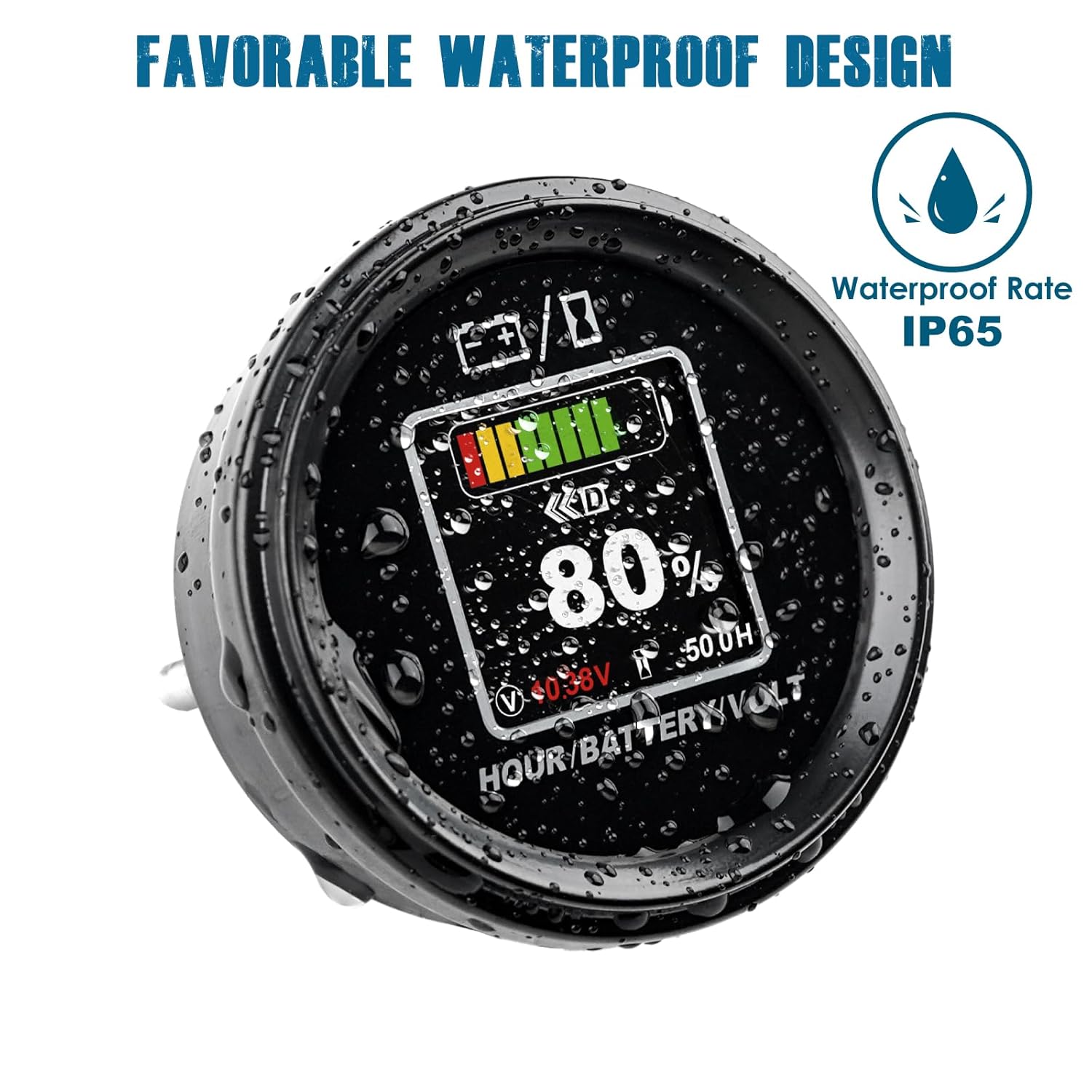
Figure 7.1: Diagrams illustrating parameter editing with the PG600 programmer and data communication via CAN/485.
8. Maintenance
The Runleader RL-BI069C is designed for durability and minimal maintenance.
- Water Resistance: The unit features an IP65 waterproof rating, protecting it from dust and low-pressure water jets. Ensure proper installation with the rubber ring to maintain this rating.
- Cleaning: Clean the display and housing with a soft, damp cloth. Avoid abrasive cleaners or solvents.
- Inspection: Periodically check wiring connections for security and signs of wear or corrosion.

Figure 8.1: The RL-BI069C demonstrating its IP65 waterproof design, suitable for various environments.
9. Troubleshooting
If you encounter issues with your RL-BI069C, refer to the following common troubleshooting steps:
- No Display/Power:
- Check all power connections to ensure they are secure and correctly wired to the battery's positive and negative terminals.
- Verify the battery voltage is within the operating range (DC 8V to 65V).
- Inspect the connector wiring for any damage or breaks.
- Incorrect Readings:
- Ensure the correct battery type and voltage range are selected in the unit's settings.
- For custom battery types, verify that the full and empty voltage settings are accurate.
- Check for stable power supply to the unit. Fluctuations can affect readings.
- Hour Meter Not Tracking:
- Confirm that the "HMR+" or "HMR-" pole is correctly connected to activate the hour meter function as per the installation instructions.
- Ensure the equipment is actively running and drawing power from the battery.
- Alerts Not Functioning:
- Verify that the low battery percentage, over-voltage, and under-voltage alert values are correctly set in the unit's configuration.
- Check if the conditions for the alerts are actually being met (e.g., battery voltage is indeed below the low voltage threshold).
If these steps do not resolve the issue, please contact customer support.
10. Applications
The Runleader RL-BI069C is suitable for a wide range of equipment powered by DC 12V, 24V, 36V, or 48V Lead acid, GEL, LiFePO4, AGM, or 18650 lithium batteries. Common applications include:
- Golf Carts
- Forklifts
- Motorhomes
- Lawn Mowers
- Leaf Trimmers
- Scrubber Machines
- Solar Generators


Figure 10.1: Examples of equipment where the RL-BI069C can be used, including golf carts, forklifts, and motorhomes.
11. Warranty and Support
Runleader products are manufactured to high-quality standards. For warranty information and technical support, please refer to the official Runleader website or contact your authorized dealer. Keep your purchase receipt for warranty claims.