
1. Introduction
The Runleader RL-BI069B is an LED battery indicator designed to monitor the charge level of various battery types. It provides a clear visual representation of remaining battery power and includes a low battery reminder feature. This device is suitable for a wide range of applications, including golf carts, forklifts, lawn mowers, and motorhomes.

Figure 1: Runleader RL-BI069B LED Battery Indicator, front view.
2. Features
- Battery Power Display: Visually indicates remaining battery power using LED bars. When battery power drops below 10%, the relevant bars flash as a low battery reminder.
- Customizable LED Bar Colors: The LED bar colors can be configured to suit user preference, offering options such as (1 red, 2 yellows, 7 greens), (2 reds, 3 yellows, 5 greens), all green, or all red.
- Wide Battery Type Compatibility: Compatible with DC 12V, 24V, 36V, 48V Lead Acid, GEL, LiFePO4, "Trojan", AGM, Graphene, and 18650 Lithium batteries. A customized battery type option is also available.
- Programmable Parameters: Working parameters such as battery types, voltages, low battery reminders, LED bar colors, and backlight modes can be programmed using the Runleader PG600 programmer (sold separately).
- Data Communication: Supports data transfer with equipment that utilizes UART or 485 communication protocols.
- Durable Design: Features a favorable water resistance rating of IP65.
- Firmware Updates: Supports firmware updates for enhanced functionality.
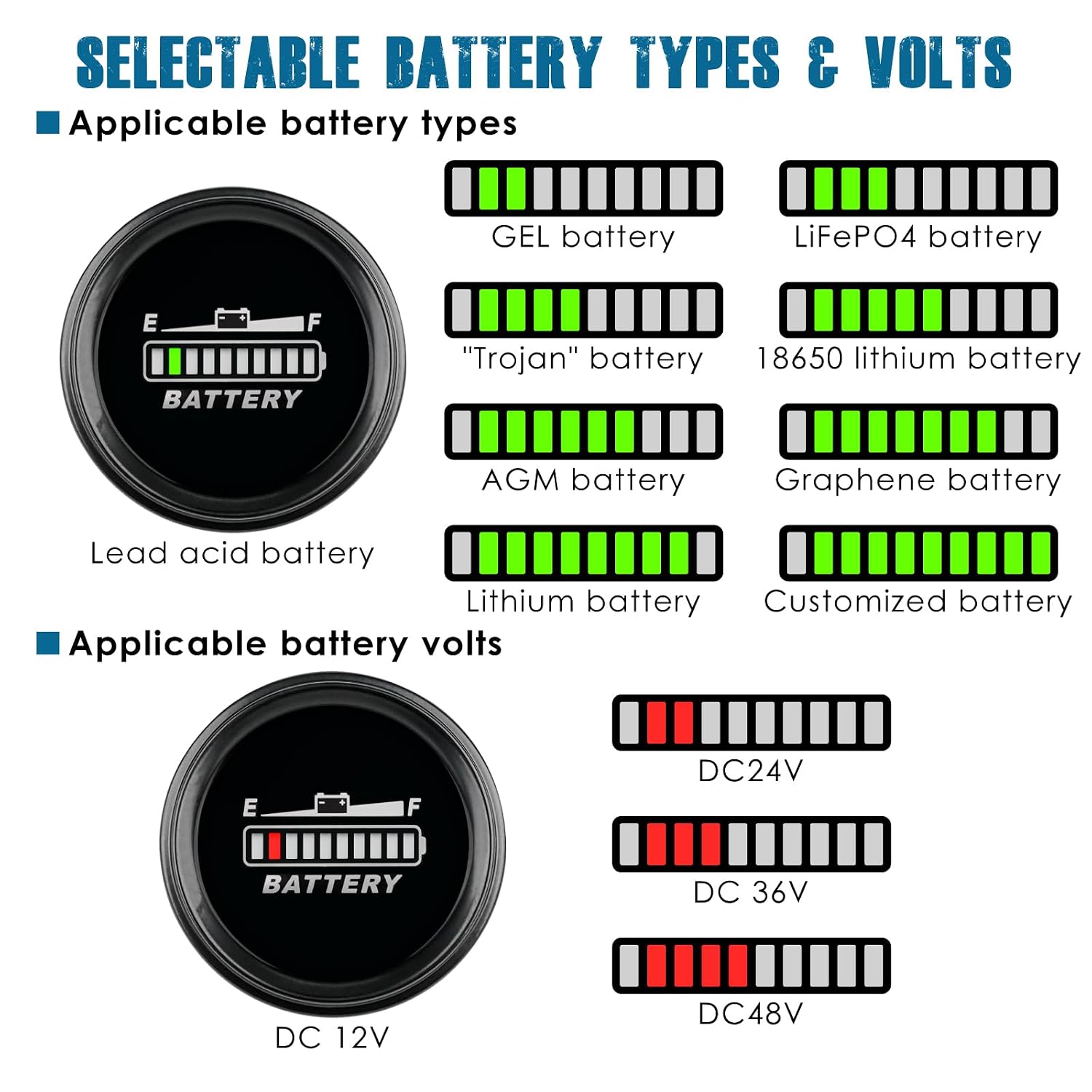
Figure 2: Battery capacity display with low battery reminder and selectable LED bar colors.

Figure 3: Applicable battery types and voltage displays.
3. Setup and Installation
The RL-BI069B battery indicator is designed for easy drill-in and plug-in mounting.
3.1 Package Contents
Before installation, ensure all components are present:
- Runleader RL-BI069B Battery Indicator x 1
- Connector wiring x 1
- M4 Flange nut x 2
- Mounting bracket x 1
- Rubber ring x 1
- Cut-out sticker x 1
- User manual x 1
- White box x 1

Figure 4: Included product accessories.
3.2 Mounting
- Select a suitable location on your panel for mounting.
- Use the provided cut-out sticker as a template to mark the drilling area. The required panel cutout size is φ51.50mm (φ2.03 inches).
- Drill the hole in the panel.
- Insert the battery indicator into the drilled hole.
- Secure the indicator from the rear using the mounting bracket and M4 flange nuts. Ensure the rubber ring is properly seated for a secure fit.
3.3 Power Connection
The indicator can be connected in two ways:
- Direct Connection: Connect the "+" and "-" poles of the battery to the corresponding terminals on the 8-hole connector assembly. This will enable the gauge to run continuously when connected to the battery.
- External Key Switch Connection: For applications where the indicator should only be active when the vehicle or equipment is in use, connect the positive terminal through an external key switch. This prevents unnecessary power draw when the equipment is off.

Figure 5: Mounting dimensions and wiring diagrams for direct and key switch connections.
4. Operating Instructions
Once properly installed and connected, the RL-BI069B will display the battery's state of charge.
4.1 Reading the Display
The LED bars on the indicator represent the remaining battery capacity. A full display indicates a fully charged battery, while fewer illuminated bars indicate a lower charge level.
4.2 Low Battery Reminder
When the battery power drops below 10%, the lowest LED bars will flash to alert the user that the battery requires charging.
4.3 Customization (with PG600 Programmer)
For advanced customization, the Runleader PG600 programmer (purchased separately) allows you to:
- Select specific battery types and voltages.
- Adjust the low battery reminder threshold.
- Change the colors of the LED bars.
- Configure backlight modes.

Figure 6: Programming parameters with the PG600 programmer and data communication setup.
4.4 Data Communication
The indicator supports UART or 485 communication, allowing it to transfer working data to compatible external equipment. Refer to the PG600 programmer manual for detailed communication protocols and setup.
5. Maintenance
The Runleader RL-BI069B is designed for durability and features IP65 water resistance, meaning it is protected against dust ingress and low-pressure water jets from any direction. Regular maintenance is minimal:
- Keep the display clean using a soft, damp cloth. Avoid abrasive cleaners.
- Ensure all electrical connections remain secure and free from corrosion.
- Periodically check the mounting for tightness, especially in high-vibration environments.

Figure 7: The RL-BI069B features an IP65 waterproof design.
6. Troubleshooting
If you encounter issues with your Runleader RL-BI069B, consider the following:
- No Display: Check all power connections to ensure they are secure and correctly wired. Verify that the battery has sufficient voltage to power the indicator.
- Incorrect Reading: Ensure the correct battery type and voltage settings are configured. If using a PG600 programmer, verify the settings. Check the battery itself with a multimeter to confirm its actual voltage.
- Flashing Bars (not low battery): If the bars are flashing erratically and the battery is not low, check for loose connections or potential electrical interference.
- Programming Issues: If you are having trouble programming the device, ensure the PG600 programmer is correctly connected and functioning. Refer to the PG600 manual for specific instructions.
For persistent issues, please contact Runleader customer support.
7. Specifications
| Specification | Value |
|---|---|
| Model Number | RL-BI069B |
| Manufacturer | Ningbo Jiangbei Run Leader Electronics Co., Ltd |
| Item Weight | 80 g |
| Parcel Dimensions | 6.4 x 6.4 x 5.4 cm |
| Measurement Accuracy | 0.1 |
| Panel Cutout Size | φ51.50mm (φ2.03 inches) |
| Water Resistance | IP65 |
| Applicable Voltages | DC 12V, 24V, 36V, 48V |
| Applicable Battery Types | Lead Acid, GEL, LiFePO4, "Trojan", AGM, Graphene, 18650 Lithium, Customized |
| Batteries Included | No |
| Batteries Required | No |

Figure 8: Detailed product dimensions.
8. Warranty and Support
Runleader products are manufactured to high-quality standards. For warranty information, please refer to the documentation included with your purchase or visit the official Runleader website. If you require technical assistance or have questions regarding the RL-BI069B battery indicator, please contact Runleader customer support through their official channels.


