
1. Introduction
This manual provides essential information for the safe and efficient use of your MHPOWOS 220W 20V Portable Solar Panel. This device is designed to convert sunlight into electrical energy, providing a portable power source for various applications, including charging portable power stations and other compatible equipment. It features a high conversion rate and a durable, foldable design suitable for outdoor environments.
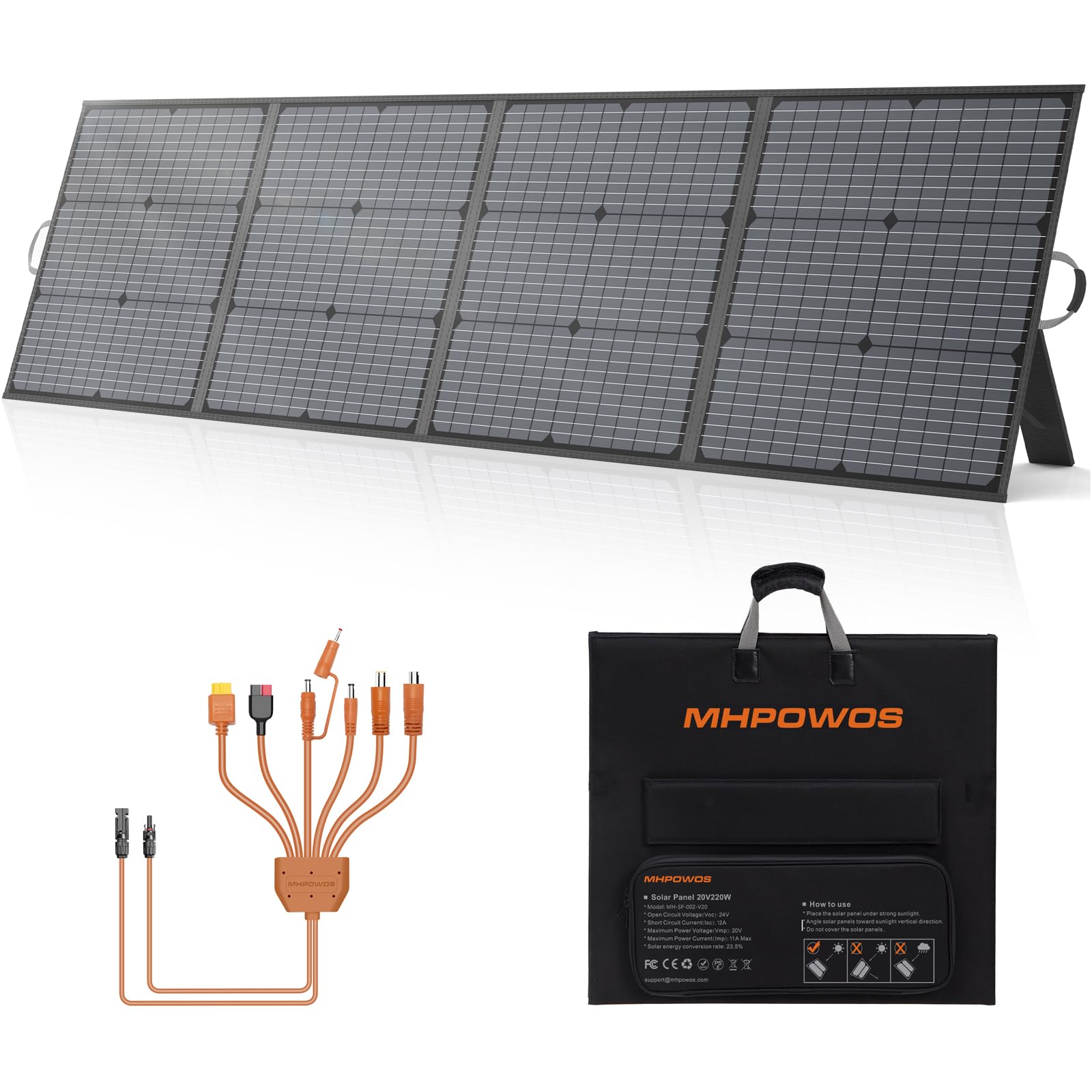
Figure 1.1: MHPOWOS 220W 20V Portable Solar Panel in an outdoor setting.
The solar panel utilizes monocrystalline silicon cells to achieve a 23.5% conversion rate, maximizing energy capture from sunlight. Its IP67 rating ensures protection against dust and water ingress, making it suitable for various weather conditions.
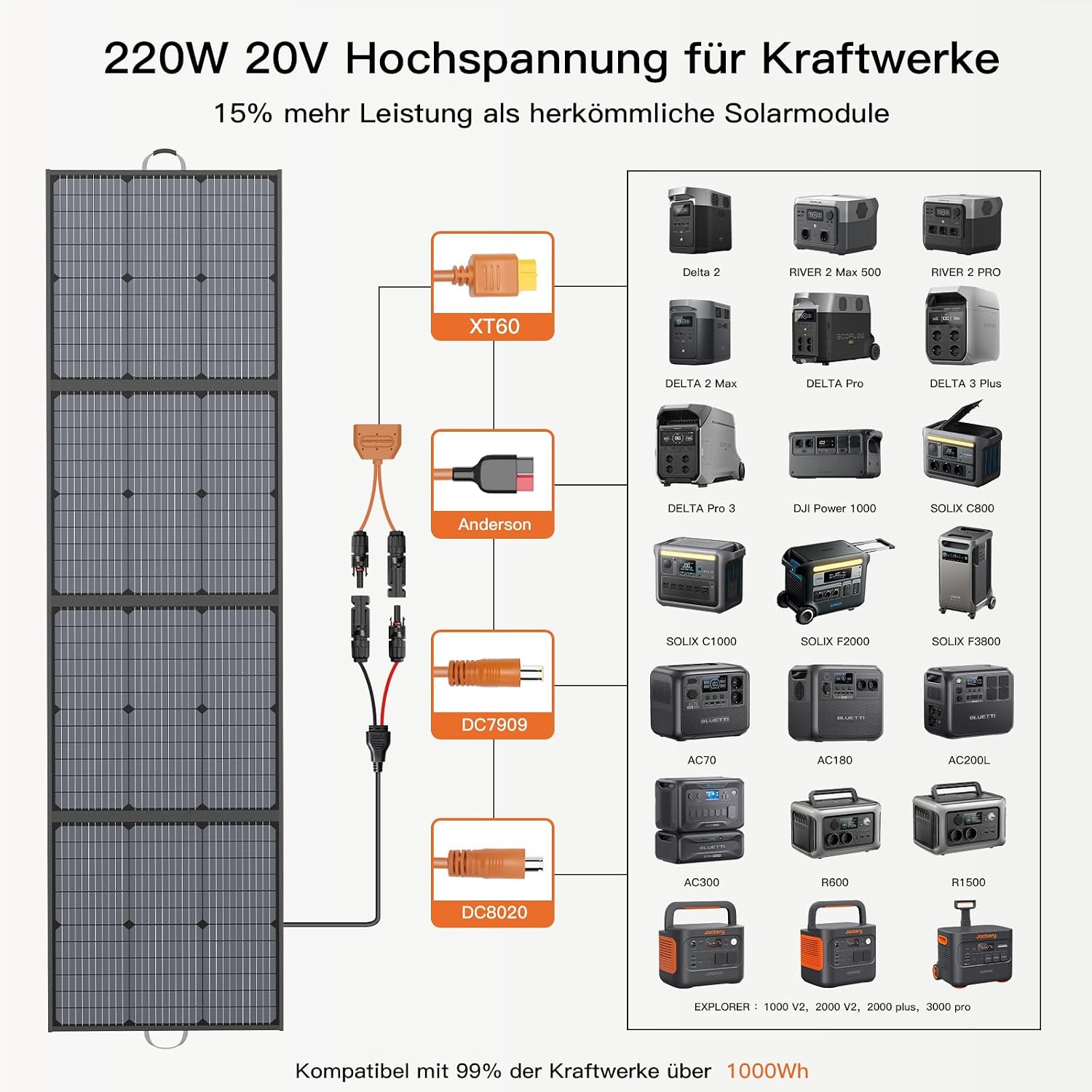
Figure 1.2: Monocrystalline solar cell structure and conversion efficiency.
2. Safety Information
Read all safety instructions before operating the solar panel. Failure to follow these instructions may result in electric shock, fire, or serious injury.
- Do not attempt to disassemble, modify, or repair the solar panel. Refer all servicing to qualified personnel.
- Avoid exposing the solar panel to open flames or extreme heat.
- Do not immerse the solar panel in water, despite its IP67 rating. The connectors should be kept dry.
- Handle the solar panel with care. Avoid dropping it or subjecting it to strong impacts.
- Keep the solar panel away from children and pets.
- Ensure all connections are secure before use to prevent electrical hazards.
- Do not touch the electrical contacts with bare hands or conductive materials when the panel is exposed to sunlight.
3. Package Contents
Verify that all items are present in the package:
- MHPOWOS 220W 20V Portable Solar Panel
- Solar Extension Cable
- 7-in-1 Cable Interface (Anderson/XT60/DC7909/DC5521/DC8020/DC5525/DC35135)
4. Setup
Follow these steps to set up your portable solar panel:
- Unfold the Solar Panel: Carefully unfold the solar panel sections until it is fully extended.
- Position with Kickstands: Utilize the integrated adjustable kickstands to position the panel. Adjust the angle to face the sun directly for optimal energy capture.

Figure 4.1: Unfolding and positioning the solar panel.
- Connect to a Power Station: Connect the solar extension cable to the solar panel's output port. Then, use the appropriate connector from the 7-in-1 cable interface to connect the solar extension cable to your portable power station or compatible device. Ensure all connections are firm and secure.

Figure 4.2: Connection options for various power stations.
5. Operating
Once set up, the solar panel will begin converting sunlight into electricity. Observe the charging indicator on your connected power station to confirm power input.
- Optimal Positioning: For maximum efficiency, periodically adjust the panel's angle to maintain direct exposure to the sun throughout the day. Avoid shaded areas.
- Compatibility: The MHPOWOS 220W 20V solar panel is designed for broad compatibility with most portable power stations and solar generators on the market, thanks to its versatile 7-in-1 cable interface.

Figure 5.1: Solar panel in operation, charging a power station.
The panel is suitable for various outdoor activities and emergency power needs.

Figure 5.2: Versatile applications of the portable solar panel.
6. Maintenance
Proper maintenance ensures the longevity and optimal performance of your solar panel.
- Cleaning: Regularly clean the surface of the solar panel with a soft, damp cloth to remove dust, dirt, or debris that may reduce efficiency. Do not use harsh chemicals or abrasive materials.
- Inspection: Periodically inspect the panel for any physical damage, such as cracks, dents, or frayed cables. Ensure all connectors are clean and free of corrosion.
- Storage: When not in use, fold the solar panel and store it in a dry, cool place, away from direct sunlight and extreme temperatures.
7. Troubleshooting
If you encounter issues with your solar panel, refer to the following troubleshooting guide:
- No Power Output:
- Ensure the solar panel is exposed to direct sunlight and not in shade.
- Check all cable connections between the solar panel, extension cable, and power station. Ensure they are secure and correctly inserted.
- Verify that the power station is turned on and configured to accept solar input.
- Low Power Output:
- Adjust the panel's angle to face the sun directly. The sun's position changes throughout the day.
- Clean the surface of the solar panel. Dust or dirt can significantly reduce efficiency.
- Check for any partial shading from trees, buildings, or other objects. Even small shadows can impact performance.
- Consider environmental factors such as cloud cover or haze, which naturally reduce solar intensity.
- Physical Damage: If the panel or cables are physically damaged, discontinue use immediately and contact customer support.
8. Specifications
Detailed specifications for the MHPOWOS 220W 20V Portable Solar Panel:
| Feature | Specification |
|---|---|
| Brand | MHPOWOS |
| Model Number | EU-SP-002-V20 |
| Item Type Name | 220W20V Portable Solar Panel |
| Item Weight | 8.5 kg |
| Included Components | Solar panel |
| Unit Count | 1 Count |
| Number of Items | 1 |
| Manufacturer | MHPOWOS |
| ASIN | B0F6B9PB31 |

Figure 8.1: Detail of the solar panel's surface.
9. Warranty and Support
For warranty information and customer support, please refer to the documentation provided with your purchase or contact MHPOWOS directly through their official channels. Keep your proof of purchase for warranty claims.