
1. Important Safety Information
Please read and understand all safety instructions before assembling and using this product. Failure to follow these instructions may result in injury or damage to the product.
- Always assemble the desk according to the provided instructions. Ensure the desk is fully assembled and stable before use.
- Do not exceed the maximum weight recommendation of 150 pounds for the working surface.
- Keep the desk away from heat sources and moisture to prevent damage.
- Always unplug the desk from the power source before cleaning or performing any maintenance.
- Ensure all electrical connections are secure and comply with local electrical codes.
2. Package Contents
Verify that all components are present before beginning assembly. If any parts are missing or damaged, please contact customer support.
- Desktop Panels (L-shaped)
- 5-Tier Storage Shelf Panels
- Metal Frame Components
- Built-in Power Outlet Unit (3 AC, 2 USB)
- LED Light Strip with Controller
- Headphone Hook
- Assembly Hardware (screws, bolts, etc.)
- Assembly Tools (Allen wrench, screwdriver)
- Instruction Manual
3. Assembly Instructions
Assembly of the Pamray L-Shaped Computer Desk requires careful attention to the provided instructions. All necessary tools are included in the accessory box.
3.1 General Assembly Guidance
For a smooth assembly experience, we recommend reviewing the comprehensive installation videos available on the product page or by scanning the transparency label on the packaging. These videos provide visual guidance for each step.
- Unpack all components and lay them out on a clean, soft surface to prevent scratches.
- Identify each part using the labels and diagrams in the instruction manual.
- Follow the step-by-step diagrams carefully. Do not overtighten screws until the entire section is assembled, then tighten all connections securely.
- Ensure the 'X'-shaped back braces are correctly installed for enhanced stability.
3.2 Reversible Shelf Installation
The 5-tier side shelf can be installed on either the left or right side of the desk to suit your space and preference. The instruction manual provides specific steps for both configurations.

3.3 Power Outlet and LED Light Installation
Integrate the built-in power outlet and LED light strip during the assembly process as indicated in the manual. Ensure all cables are routed safely and neatly.

4. Setup and Operation
4.1 Initial Placement
Position the desk in your desired location, ensuring it is on a level surface. The adjustable feet can be used to stabilize the desk on uneven floors.
4.2 Using the Built-in Power Outlets
The desk is equipped with 3 AC outlets and 2 USB ports. Connect the desk's power cord to a wall outlet. You can then plug in your devices such as monitors, laptops, and chargers directly into the desk's integrated power strip.
4.3 Operating the LED Lights
The integrated LED light strip offers extensive customization options:
- App Control: Download the dedicated app to remotely control the LED lights. The app provides access to 213 dynamic multicolor lighting modes and over 10,000 color options.
- Brightness Adjustment: Adjust the brightness and hues to match your mood or enhance your workspace ambiance.
- Music Sync: Some modes allow the lights to sync with music or sound.

5. Maintenance
Regular maintenance helps prolong the life and appearance of your desk.
- Cleaning: Wipe the desk surfaces with a soft, damp cloth. Avoid using abrasive cleaners or harsh chemicals that could damage the finish.
- Structural Integrity: Periodically check all screws and bolts to ensure they remain tight. Retighten if necessary.
- Electrical Components: Ensure the power cord and outlet unit are free from damage. Do not attempt to repair electrical components yourself.
- Weight Distribution: Distribute weight evenly across the desktop and shelves. Do not place excessively heavy items on any single point.
6. Troubleshooting
If you encounter issues with your Pamray L-Shaped Computer Desk, refer to the following common solutions:
- Desk Wobbles: Ensure all assembly screws are fully tightened. Check if the floor is uneven and adjust the desk's leveling feet accordingly.
- LED Lights Not Working: Verify that the LED light strip is properly connected to its power source and the desk's power outlet. Check the app connection and ensure the lights are turned on.
- Power Outlets Not Functioning: Confirm the desk's main power cord is securely plugged into a working wall outlet. Test the wall outlet with another device.
- Missing or Damaged Parts: If you discover any missing or damaged parts during assembly, do not proceed. Contact Pamray customer support immediately for assistance.
7. Specifications
| Feature | Detail |
|---|---|
| Brand | Pamray |
| Model Number | S14pink49 |
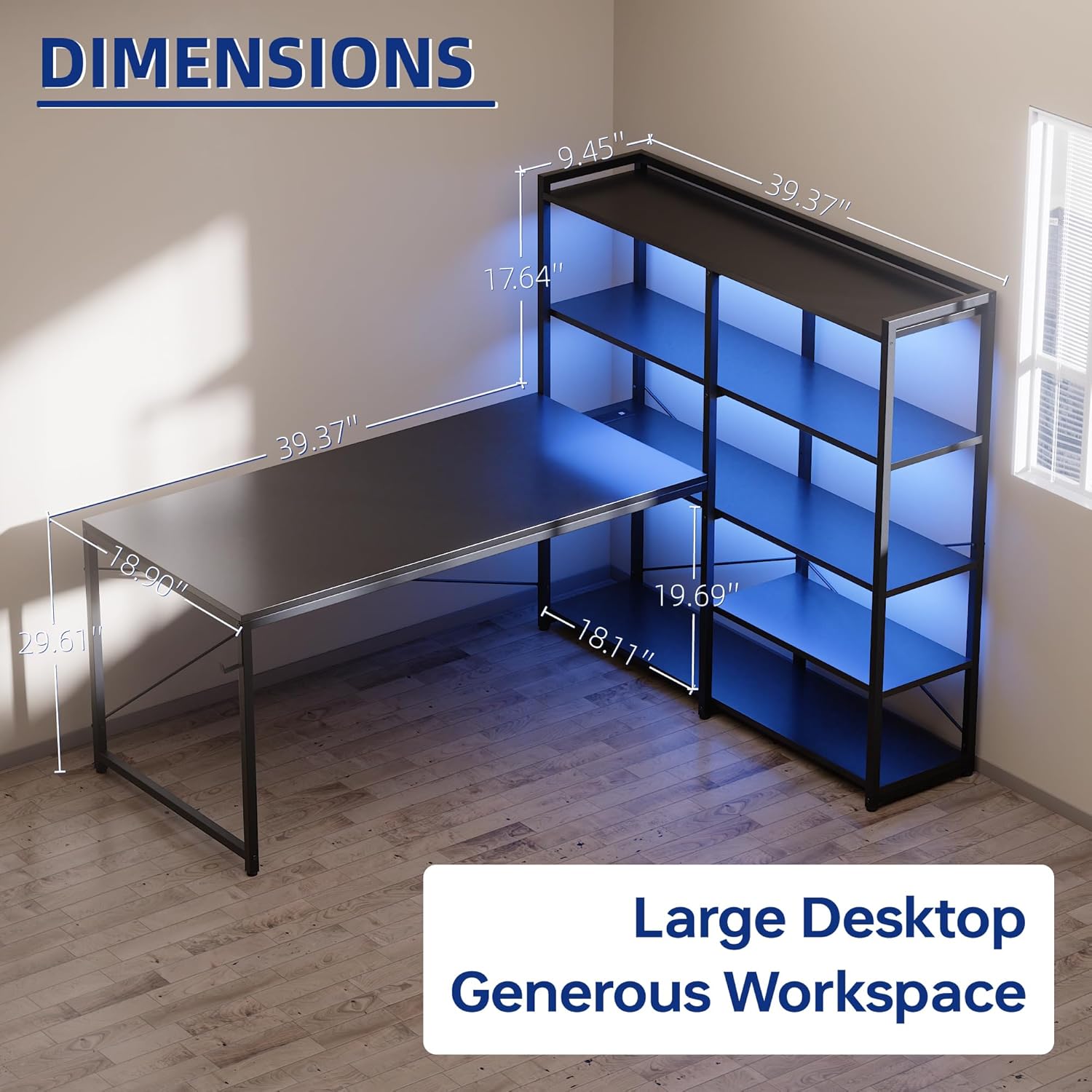
| Product Dimensions | 18.9"D x 48.8"W x 29.61"H |
| Color | Pink |
| Material Type | Metal, Wood (FSC-Certified Tabletop) |
| Weight | 42.35 Pounds |
| Maximum Weight Recommendation | 150 Pounds |
| Number Of Shelves | 5-tier metal shelf (reversible) |
| Included Components | Built-in Outlet, LED Lights, Headphone Hook |
| Power Outlet Specs | 3 AC Outlets (125V/12A), 2 USB Ports (5V/2A), Rated Power 1500W |
| LED Lights | 213 Dynamic Multicolor Modes, 10,000+ Color Options, App Control |
| Assembly Required | Yes (Tools and instructions included) |
8. Official Product Video
Watch the official product video for a visual guide on the features and assembly of the Pamray L-Shaped Computer Desk.
9. Warranty and Support
The Pamray L-Shaped Computer Desk comes with a limited warranty. For warranty details, product support, or to order replacement parts, please contact Pamray customer service.
Please have your model number (S14) and purchase information ready when contacting support.
